Quick Answer: How to Protect Your Privacy Online
Here are the most effective ways to protect your privacy online in 2026:
- Use a temporary email for sign-ups
- Use strong, unique passwords or passkeys (Password Safety Guide)
- Enable two-factor authentication (2FA)
- Use a VPN on public Wi-Fi (Public WiFi Safety)
- Block trackers with a privacy browser
- Limit personal data shared online
- Regularly audit app permissions
These steps help reduce spam, prevent tracking, and protect your personal data across websites and apps. For detailed guidance on each step, check the linked articles throughout this guide.
In today’s hyper-connected world, knowing how to protect your privacy online has become more critical than ever. According to the 2025 Verizon Data Breach Investigations Report, over 80% of data breaches involve personal credentials or sensitive information, putting individuals at constant risk of identity theft and fraud. Meanwhile, Statista reports that the number of global internet users continues to rise, further increasing the exposure of personal data online.
Every day, millions of users register on websites, sign up for newsletters, or download free apps—often using their primary email addresses. This seemingly harmless activity can lead to leaked email addresses, making inboxes a target for spam, phishing attempts, and unsolicited marketing. Even tech-savvy users aren’t immune, as tracking cookies and social media data collection have become increasingly sophisticated.
Protecting your privacy online is no longer optional—it is essential for safeguarding your identity, maintaining control over personal information, and enjoying a safer digital experience. From using strong passwords and secure networks to employing tools like temporary email services, there are practical steps anyone can take to reduce risk and stay anonymous online.
This guide is based on real-world email privacy practices and analysis of spam trends, phishing attacks, and data breach reports from sources like Verizon DBIR and IBM Security. We will walk you through 15 proven strategies that help you reclaim your digital privacy.
Why Is Online Privacy Important in 2026?
Protecting your privacy online is more important than ever. Every click, search, and sign-up can leave a digital trace that companies and cybercriminals can exploit. Understanding how your data is collected and the risks of ignoring privacy is the first step toward taking control of your online presence. By becoming aware of these issues, you can take practical actions to secure your personal information and reduce your exposure to unwanted tracking, spam, and identity theft.
Your Personal Data Is Constantly Collected
Every time you browse the web, use an app, or interact with online services, your personal data is being tracked and collected. Websites and applications use cookies, tracking pixels, and other technologies to monitor your behavior, preferences, and location. Advertisers leverage this information to deliver targeted ads, while some companies may share or sell data to third parties without your explicit consent. Even routine online activities, like signing up for newsletters or filling out forms, contribute to a growing digital footprint.
Most users are unaware of how much data is being collected. From your search history to your shopping habits, nearly every action online can be used to build a profile about you. This information can influence what you see online, and in worst-case scenarios, it can be exploited by cybercriminals to gain access to accounts, personal information, or even financial data.
Risks of Ignoring Privacy
Failing to protect your privacy online can have serious consequences. Identity theft is one of the most common risks, as hackers gain access to email accounts, passwords, and sensitive personal information. Phishing attacks—where cybercriminals trick users into revealing confidential information—have become increasingly sophisticated, targeting both individuals and businesses. Additionally, unprotected email addresses often end up in spam databases, resulting in an overload of unwanted emails. To reduce these risks, you can learn how to stop spam emails, keeping your inbox secure and minimizing exposure to phishing attempts.
Protecting your online privacy is not just a matter of convenience—it is essential for maintaining control over your personal information, preventing financial and reputational damage, and ensuring a safer digital life. Awareness of these risks is the first step toward taking practical actions that safeguard your data and strengthen your privacy online.
What Are the Biggest Online Privacy Risks in 2026?
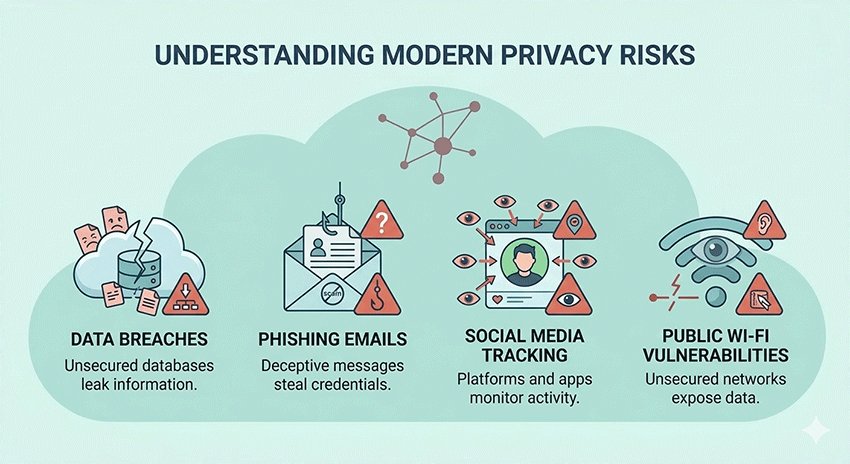
As digital technology evolves, the threats to your online privacy are becoming more sophisticated. Understanding the biggest risks in 2026 is crucial for anyone who wants to stay secure, protect personal information, and avoid costly breaches. From massive data leaks to social media tracking, awareness is the first step toward prevention.
Data Breaches and Leaks
Data breaches continue to rise in frequency and cost. According to the Ponemon Institute’s Cost of a Data Breach Report, the average cost of a data breach has steadily increased over the past few years, with sensitive personal information like email addresses, passwords, and financial data being the primary targets. These breaches can expose millions of users to identity theft, fraud, and unwanted marketing campaigns. Even companies with strong security protocols are not immune, making it essential for individuals to take proactive steps to protect their information.
Phishing & Email Scams
Phishing attacks have become more sophisticated, often mimicking legitimate emails from banks, services, or subscription providers. Cybercriminals exploit unsuspecting users by asking them to click links or download attachments that steal personal information. For example, scams disguised as security alerts or subscription renewals can easily trick users. To learn how to recognize and defend against such attacks, you can check our detailed guide on McAfee Email Scam.
Social Media Tracking
Social media platforms collect vast amounts of data, from location and interests to browsing habits, to personalize ads and recommendations. This tracking can compromise your privacy if data is shared or leaked. One practical approach is to use temporary email addresses when signing up for social media accounts, reducing the risk of your main inbox being exposed to spam and unwanted tracking. Learn more about this in our guide on Temp Mail for Social Media.
Public Wi-Fi Vulnerabilities
Public Wi-Fi networks, while convenient, are often unsecured. Hackers can intercept data transmitted over these networks, including login credentials and personal messages. Using a Virtual Private Network (VPN) is a simple and effective way to secure your connection, encrypt your data, and protect yourself when accessing sensitive information in public spaces.
By understanding these risks—data breaches, phishing attacks, social media tracking, and insecure public networks—you can make informed decisions to safeguard your privacy and reduce exposure to threats in 2026.
The Easiest Way to Protect Your Privacy (Start Here)
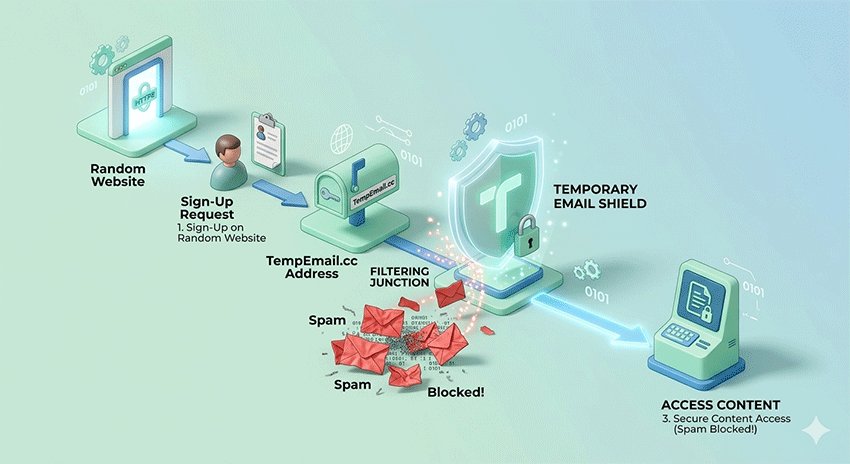
If you want the fastest and simplest way to protect your privacy online, start with one powerful habit: use a temporary email address.
Instead of sharing your real inbox everywhere, a temporary email lets you sign up for websites, free trials, and online services without exposing your personal identity. This single change can dramatically reduce spam, prevent phishing attempts, and keep your primary inbox clean.
Unlike advanced tools like VPNs or password managers, temporary email requires no setup, no technical knowledge, and no long-term commitment. You can generate a disposable email instantly and start using it within seconds.
In fact, using a temporary email for non-essential sign-ups can reduce unwanted emails and data exposure by a significant margin — making it one of the highest-impact, lowest-effort privacy strategies available today.
To get started, check out:
Once you’ve protected your inbox, you can combine this with the additional strategies below for complete online privacy.
15 Ways to Protect Your Privacy Online
Quick List: 15 Ways to Protect Your Privacy Online
- Use a temporary email for sign-ups
- Avoid using your primary email everywhere
- Enable email forwarding carefully
- Know when temporary email is safe
- Use strong, unique passwords
- Enable two-factor authentication (2FA)
- Use a password manager
- Use a VPN on public Wi-Fi
- Block trackers and ads
- Use privacy-focused browsers
- Limit what you share online
- Use temp mail for social accounts
- Regularly delete old accounts
- Review app permissions
- Avoid clicking suspicious links
To make it easier to understand how to protect your privacy online, here is a quick comparison of the most effective strategies based on difficulty and impact.
Privacy Protection Methods Overview
| Category | Method | Difficulty | Impact |
|---|---|---|---|
| Email Privacy | Temporary Email | Easy | High |
| Email Privacy | Avoid Primary Email | Easy | High |
| Email Privacy | Email Forwarding | Medium | Medium |
| Email Privacy | Safe Temp Mail Use | Medium | High |
| Account Security | Strong Passwords | Easy | High |
| Account Security | 2FA | Easy | Very High |
| Account Security | Password Manager | Easy | High |
| Browsing Privacy | VPN | Medium | Very High |
| Browsing Privacy | Ad Blockers | Easy | High |
| Browsing Privacy | Privacy Browsers | Easy | High |
| Social Media | Limit Sharing | Easy | High |
| Social Media | Temp Mail Usage | Easy | High |
| Smart Habits | Delete Old Accounts | Medium | Medium |
| Smart Habits | App Permissions | Easy | High |
| Smart Habits | Avoid Phishing Links | Easy | Very High |
Email Privacy Tips: How to Protect Your Inbox and Prevent Spam
1. Use a Temporary Email for Sign-Ups
One of the most effective ways to safeguard your inbox is by using a temporary email address for website sign-ups, free trials, or online subscriptions. Temporary email services generate anonymous, disposable addresses that expire automatically, preventing spam, phishing attacks, and unwanted marketing from reaching your main inbox. This is especially useful for sites you rarely use or for social media accounts.
Pro Tip: Why standard aliases aren't enough. Unlike Gmail aliases (e.g., [email protected]), which still reveal your primary identity, a true temporary email at TempEmail.cc provides a completely dissociated header, making it impossible for trackers to link the disposable address back to your real identity.
2. Avoid Using Your Primary Email Everywhere
Using the same email for every account increases the risk of spam, phishing, and identity theft. By keeping your primary email separate and only using it for important communications, you reduce exposure to cyber threats. For registrations, newsletters, and online promotions, rely on disposable or secondary email addresses. Our list of the Best Temporary Mail Services can help you manage multiple accounts safely while keeping your primary inbox secure.
3. Enable Email Forwarding Carefully
Forwarding emails from disposable addresses to your main inbox can be convenient, but it must be configured carefully. Mismanaged forwarding can unintentionally expose sensitive information. Ensure the service you use has robust security settings, including auto-expiration and limited forwarding options. This approach allows you to receive essential communications while keeping your primary email protected. For step-by-step guidance, check our Temporary Email Forwarding guide.
4. Know When Temporary Email Is Safe
Not all temporary email services are equally trustworthy. Some may log your messages, sell data, or be vulnerable to breaches. Before using any service, review its privacy policies and reputation carefully. Choose platforms that are transparent, do not store your messages permanently, and offer encryption. Understanding which services are reliable ensures your personal email remains private. For more details, see Is Temp Mail Safe.
Account Security: Protect Your Online Accounts from Hackers
5. Use Strong, Unique Passwords
Strong, unique passwords are the first line of defense for online accounts. Avoid using common words, personal information, or reused passwords across multiple accounts. Each account should have a combination of letters, numbers, and symbols to maximize security. Weak passwords make it easy for hackers to gain access to personal data, email accounts, and even financial information. Regularly updating passwords further reduces risks of unauthorized access.
6. Enable Two-Factor Authentication (2FA)
Two-factor authentication adds an extra layer of security by requiring a second form of verification, such as a code sent to your phone or authentication app. Even if a password is compromised, 2FA helps prevent unauthorized access. Many platforms, including social media, banking, and email services, offer 2FA as a free option. Enabling it across all important accounts significantly reduces the risk of cyberattacks.
7. Use a Password Manager
A password manager securely stores complex passwords and generates strong new ones, reducing the need to remember multiple credentials. Using one helps avoid password reuse, minimizes human error, and keeps your online accounts safer. Some password managers even provide alerts if a website you use experiences a breach, allowing you to update your password immediately. This tool simplifies account management while enhancing security.
Browsing Privacy: Stay Anonymous and Safe Online
8. Use a VPN on Public Wi-Fi
Public Wi-Fi networks are convenient but often unsecured, allowing hackers to intercept sensitive data. A Virtual Private Network (VPN) encrypts your internet connection, securing logins, emails, and personal communications. Using a VPN protects your privacy when accessing banking accounts, shopping online, or checking emails on public networks. Combining a VPN with safe browsing habits significantly reduces exposure to cyber threats and identity theft.
How to check if your VPN is actually working: Use an IP leak test tool to ensure your real DNS and WebRTC addresses aren't leaking behind the encrypted tunnel.
9. Block Trackers and Ads
Online trackers and ads monitor your activity across websites, building profiles of your behavior. Using ad blockers or tracker-blocking extensions prevents companies from collecting this data. Some email-related tools also block trackers in messages, enhancing your overall privacy. To improve both email and browsing protection, see our guide on Temp Mail AdGuard, which helps prevent spam and online tracking simultaneously.
10. Use Privacy-Focused Browsers
Switching to privacy-focused browsers like Brave, Firefox Focus, or Tor reduces tracking, blocks third-party cookies, and limits data collection. These browsers also offer features like ad-blocking, HTTPS upgrades, and anti-fingerprinting technologies. Using a privacy-focused browser alongside other security tools ensures your online footprint is minimized, making it harder for advertisers, hackers, and trackers to gather information about your online behavior.
Social Media Privacy: Safeguard Your Personal Information
11. Limit What You Share Online
Be mindful of personal information shared on social media platforms. Avoid posting sensitive data such as addresses, phone numbers, or travel plans. Adjust privacy settings to control who can see your posts, and periodically review friend or follower lists. Small privacy adjustments significantly reduce the risk of identity theft, targeted advertising, or unwanted contacts accessing your personal information.
12. Use Temp Mail for Social Accounts
Using temporary emails when signing up for social media accounts prevents your main inbox from receiving spam or tracking messages. This is particularly useful for platforms where you may want anonymity or limited exposure. Temp mail services allow you to create disposable accounts quickly, keeping your personal email separate. Learn more about using temp mail for Facebook, TikTok, and Instagram to maintain online privacy.
Smart Online Habits: Daily Practices to Protect Your Privacy
13. Regularly Delete Old Accounts
Inactive accounts are prime targets for hackers. Periodically review your online accounts and delete any that you no longer use. This reduces the number of potential entry points for cybercriminals, limits the personal data stored online, and helps maintain a cleaner digital footprint. Regular account audits improve overall privacy and security.
14. Review App Permissions
Apps often request access to data they don’t need, such as location, contacts, or microphone usage. Regularly reviewing app permissions on your devices and revoking unnecessary access prevents unnecessary data collection. Limiting app permissions ensures that only essential information is shared, reducing potential privacy risks and strengthening control over your digital identity.
15. Avoid Clicking Suspicious Links
Phishing attacks and malware frequently rely on users clicking unverified links in emails, messages, or websites. Always check the source before clicking, and verify links using trusted tools when in doubt. Avoid downloading attachments from unknown senders. Staying vigilant prevents cybercriminals from stealing credentials, installing malware, or gaining unauthorized access to your accounts.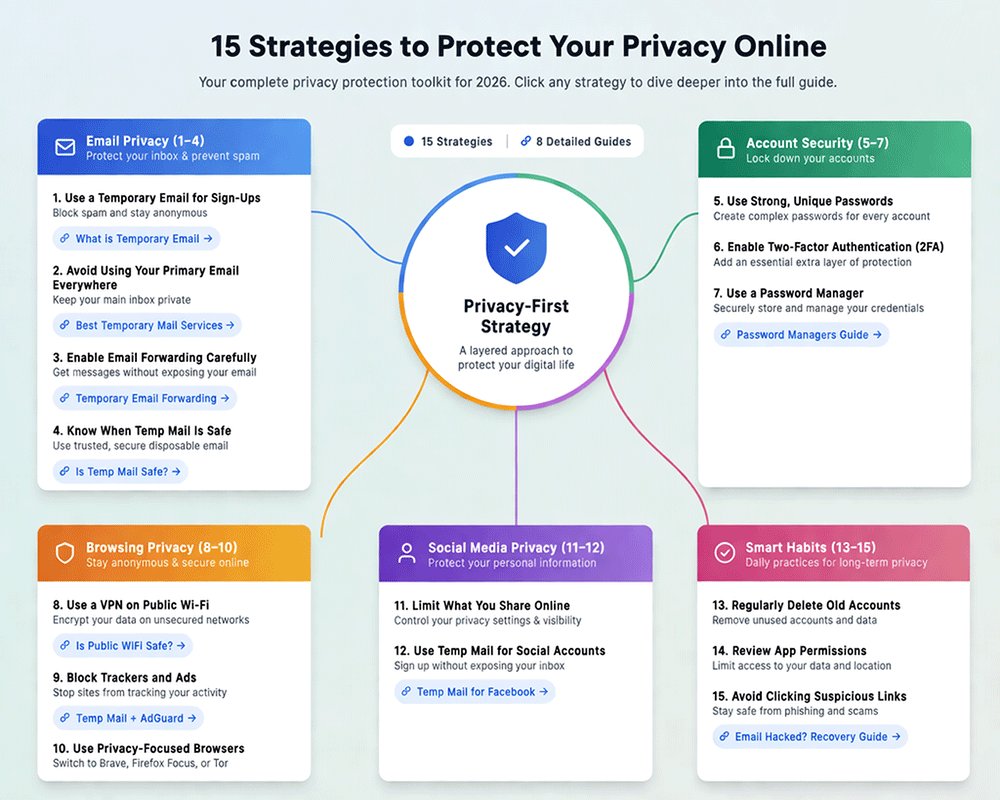
Related Guides to Deepen Your Privacy Protection
- Best Privacy Tools in 2026: My Personal Toolkit
- Is Public WiFi Safe in 2026? Risks & VPN Tips
- Best Way to Keep Passwords Safe: Password Managers & 2FA
- How to Delete Your Digital Footprint
- What to Do If Your Email Is Hacked
- Temp Mail for Facebook & Social Accounts
- McAfee Email Scam Explained
- How to Stop Spam Emails in 2026
- Is Temp Mail Safe? What You Should Know
Tools That Help Protect Your Privacy
Protecting your privacy online is much easier when you use the right tools. From email solutions to browser extensions, these tools help you maintain anonymity, block tracking, and secure your personal data. In this section, we highlight the most effective privacy tools available in 2026 and explain how they can be integrated into your daily online routines.
Temporary Email Services
Temporary email services are essential for anyone who wants to keep their main inbox private. These services provide disposable, anonymous email addresses that can be used for website registrations, free trials, newsletters, or social media sign-ups. The main advantages are clear: your real email remains hidden, you avoid spam, and messages are automatically deleted after a short period. This approach significantly reduces the risk of phishing and unwanted marketing. For the best options and comparisons, see our guide on Best Disposable Email. Temporary emails are especially valuable for online services you rarely use or when signing up for platforms where privacy is a concern.
| Feature | Primary Email | Firefox/Apple Relay | TempEmail.cc |
|---|---|---|---|
| Anonymity | Low (Linked to ID) | Medium (Linked to OS account) | Highest (No account required) |
| Spam Protection | Filter-based only | Good | Absolute (One-click disposal) |
| Best For | Banking, Legal, Family | Long-term subscriptions | Sign-ups, Trials, Public Wi-Fi |
Secure Email Providers
For long-term email security, consider using secure email providers like ProtonMail and Tutanota. These services offer end-to-end encryption, zero-access policies, and robust privacy protections that standard email providers do not. They are ideal for sensitive communications, such as business correspondence or personal financial information. By using secure email providers in combination with temporary email addresses, you can create a layered approach to email privacy that minimizes exposure to cyber threats.
Browser Extensions & Privacy Tools
Browser extensions and privacy-focused tools help block trackers, ads, and malicious scripts while you browse the web. Tools like ad blockers, tracker blockers, and VPN browser extensions prevent companies from collecting your browsing data and reduce the risk of malware infections. Using these tools alongside privacy-focused browsers ensures your digital footprint is minimized and your personal information remains secure.
By combining temporary email services, secure email providers, and privacy tools, you can significantly reduce your exposure to online threats, protect sensitive data, and maintain control over your digital life.
Common Mistakes That Hurt Your Privacy
Many people unknowingly compromise their online privacy by making simple but impactful mistakes. Understanding these pitfalls is crucial for maintaining control over personal information and avoiding potential cyber threats.
One of the most common errors is using the same email address for all website registrations. This increases exposure to spam, phishing, and potential account breaches. Students, for example, often register for multiple educational platforms, social sites, or online tools using a single email. In these cases, using a student temp mail can help keep personal inboxes safe and reduce unwanted messages.
Another frequent mistake is using weak or repeated passwords across multiple accounts. Weak passwords make it easy for hackers to gain access to sensitive data. Coupled with neglecting privacy settings on apps and social media, this significantly increases the risk of identity theft and data exposure.
Over-sharing personal information on social media is also a major privacy risk. Posting sensitive details, including locations, phone numbers, or travel plans, can be exploited by cybercriminals. Regularly reviewing privacy settings, limiting shared information, and using disposable emails for registrations are effective strategies to avoid these common mistakes.
By identifying and correcting these behaviors, users can take meaningful steps toward securing their online presence and protecting their personal data.
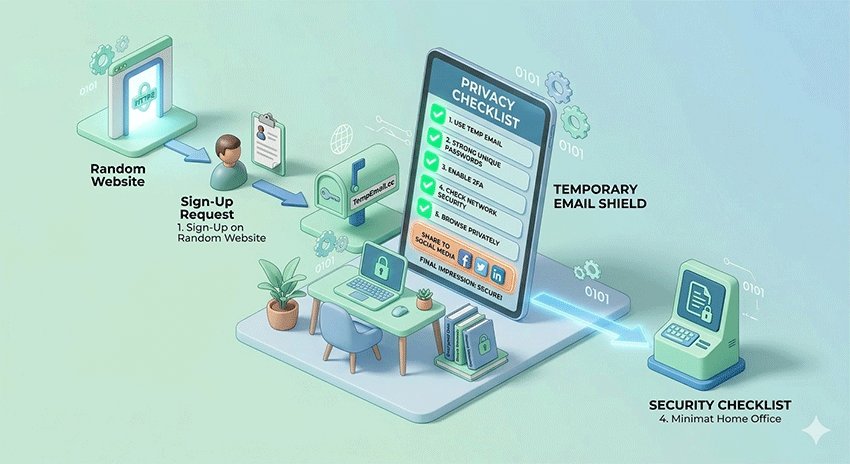
Conclusion: Take Control of Your Online Privacy
Protecting your privacy online is no longer optional—every click, sign-up, and shared detail contributes to your digital footprint. By understanding the risks and implementing practical strategies, you can significantly reduce exposure to spam, phishing, identity theft, and unwanted tracking.
Small, consistent changes—like using temporary email addresses, enabling two-factor authentication, reviewing app permissions, and limiting social media sharing—can make a big difference in securing your personal data. Even minor adjustments can dramatically improve your online safety without disrupting daily routines.
Take action today: start protecting your inbox with a temporary email to prevent spam and keep your personal information private. For step-by-step guidance on creating disposable addresses, visit TempEmail.cc. By adopting these habits and tools, you can regain control over your digital life and enjoy a safer, more secure online experience.
FAQ About How to Protect Your Privacy Online
1. Is it illegal to hide my identity online?
Hiding your identity online is generally legal as long as you don’t use it for illegal activities, such as fraud or hacking. Tools like temporary emails, VPNs, and anonymous browsers are commonly used for privacy and security purposes. Understanding the legal boundaries in your country is important, as regulations vary. Using these tools responsibly allows you to maintain anonymity while staying within the law and protecting your personal data from trackers and marketers.
2. Can I use temporary mail for banking?
Temporary email is not recommended for banking or financial services, because sensitive communications—like account statements, alerts, and security codes—require secure, permanent access. Using a disposable email for banking could result in missed alerts or transaction notifications, putting your accounts at risk.
For non-sensitive sites, social accounts, or temporary sign-ups, temporary emails are safe and effective. You can learn more about using disposable emails for social platforms in our guide: Temp Mail for Facebook & Social Accounts.
3. What is the difference between Incognito mode and a VPN?
Incognito mode only prevents your browser from saving history, cookies, and local data on your device. It does not hide your activity from ISPs, websites, or advertisers. A VPN encrypts your internet connection and masks your IP address, keeping your data private even on public networks. For full online privacy, use a VPN in combination with a privacy-focused browser and consider temporary emails to reduce spam and tracking across websites.
4. How do I know if my email has been leaked in a data breach?
You can check if your email has been exposed using online breach monitoring tools such as Have I Been Pwned or Firefox Monitor. These tools notify you if your credentials appear in known leaks. If your email is compromised, immediately update passwords, enable two-factor authentication, and consider using a temporary email for future sign-ups to reduce exposure to spam and phishing attacks. This proactive approach helps maintain your online privacy.
5. Do temporary emails expire?
Yes, temporary emails are designed to expire automatically after a set period, ranging from minutes to days, depending on the service. Once expired, they can no longer receive emails. This feature prevents spam from reaching your main inbox and maintains anonymity. For continuous privacy, you can generate new temporary addresses as needed.
6. Can I receive attachments via temp mail?
Many temporary email services allow you to receive attachments, but file size limits often apply. Some services only support text-based emails or small files for security reasons. Always check the provider’s policies to ensure compatibility with your needs. For more advanced use cases, you may combine temporary email with secure file-sharing tools or email forwarding to protect sensitive attachments while maintaining privacy.
7. How do search engines track me if I’m not logged in?
Even if you’re not logged in, search engines track your IP address, browser fingerprint, cookies, and device information. This data is used to personalize search results, ads, and recommendations. Using privacy-focused browsers, VPNs, and clearing cookies regularly can reduce tracking. Temporary emails also help prevent search engines and advertisers from linking online accounts to your personal email address.
8. What is the best browser for privacy in 2026?
Privacy-focused browsers like Brave, Firefox Focus, and Tor remain top choices in 2026. They block trackers, limit third-party cookies, and prevent fingerprinting. Combined with a VPN, ad blockers, and temporary emails, these browsers provide a robust privacy setup. Choose a browser that aligns with your needs: Tor for maximum anonymity, Brave for speed with tracker blocking, and Firefox Focus for mobile privacy.
9. How can I protect my privacy online for free?
Protect your privacy online for free by following these steps:
- Use a temporary email for sign-ups
- Enable two-factor authentication (2FA)
- Use strong, unique passwords
- Switch to a privacy-focused browser
- Limit personal information shared online
These free methods significantly reduce spam, tracking, and data exposure.
10. What is the safest way to browse anonymously?
The safest way to browse anonymously is to use a VPN with a privacy-focused browser.
Avoid logging into personal accounts, block trackers and cookies, and use temporary emails for sign-ups.
Combining these tools helps hide your identity, encrypt your data, and minimize online tracking.