AdGuard Temp Mail is pretty straightforward on the surface: get a disposable address, wait for the verification email, use the code, and forget about the address. The confusion starts when you put it next to AdGuard's email aliases. They both hide your real email, but they're built for very different situations.
Think of AdGuard Temp Mail as an address you use and throw away. An AdGuard email alias is an address you keep using. Temp Mail gives you a temporary inbox for things like one-off signups and verification codes. An alias forwards mail to your normal inbox and is meant to stick around.
That's also why we didn't want to write another article that simply walks through AdGuard's feature list. We used AdGuard Temp Mail ourselves and paid attention to the things that actually matter when you're trying to use it: getting an address, receiving verification mail, keeping the inbox, dealing with its limits, and figuring out what happens when a site doesn't accept the address. Then we checked those observations against AdGuard's current documentation.
If you're searching for AdGuard Temp Mail because you want to use it, that's what this guide is for. We'll look at how it works in practice, where it works well, where it doesn't, and how it compares with an AdGuard email alias when the temporary option isn't the right fit.
AdGuard Temp Mail vs Email Alias
AdGuard Temp Mail and an email alias solve the same basic problem — keeping your real email address out of other people's hands — but they work very differently. Temp Mail gives you a temporary inbox for short-term tasks. An email alias forwards messages to your real inbox and is designed to stay in use.
The easiest way to choose is to ask how long you need the address. If you only need an email to receive a verification code or complete a signup, Temp Mail is usually the simpler option. If you expect to keep receiving messages from the service, an alias makes more sense.
| AdGuard Temp Mail | AdGuard Email Alias | |
|---|---|---|
| Hide your real email | Yes | Yes |
| Temporary inbox | Yes | No |
| One-time verification | Best fit | Works |
| Forward mail to your real inbox | No | Yes |
| Keep the same address long term | No | Yes |
| Receive attachments | No | Yes |
| Send or reply | No | Yes, paid tier |
| Account required | No | Yes |
| Newsletters & recurring mail | Not ideal | Better fit |
| Long-term accounts | Not recommended | Better fit |
The biggest difference isn't really about features. It's about what happens after you've received the email. With Temp Mail, the inbox is temporary and eventually disappears. With an alias, the address stays connected to your real inbox, so you can keep receiving mail from the same service.
In simple terms: Temp Mail is for an email address you don't plan to keep; an alias is for one you do.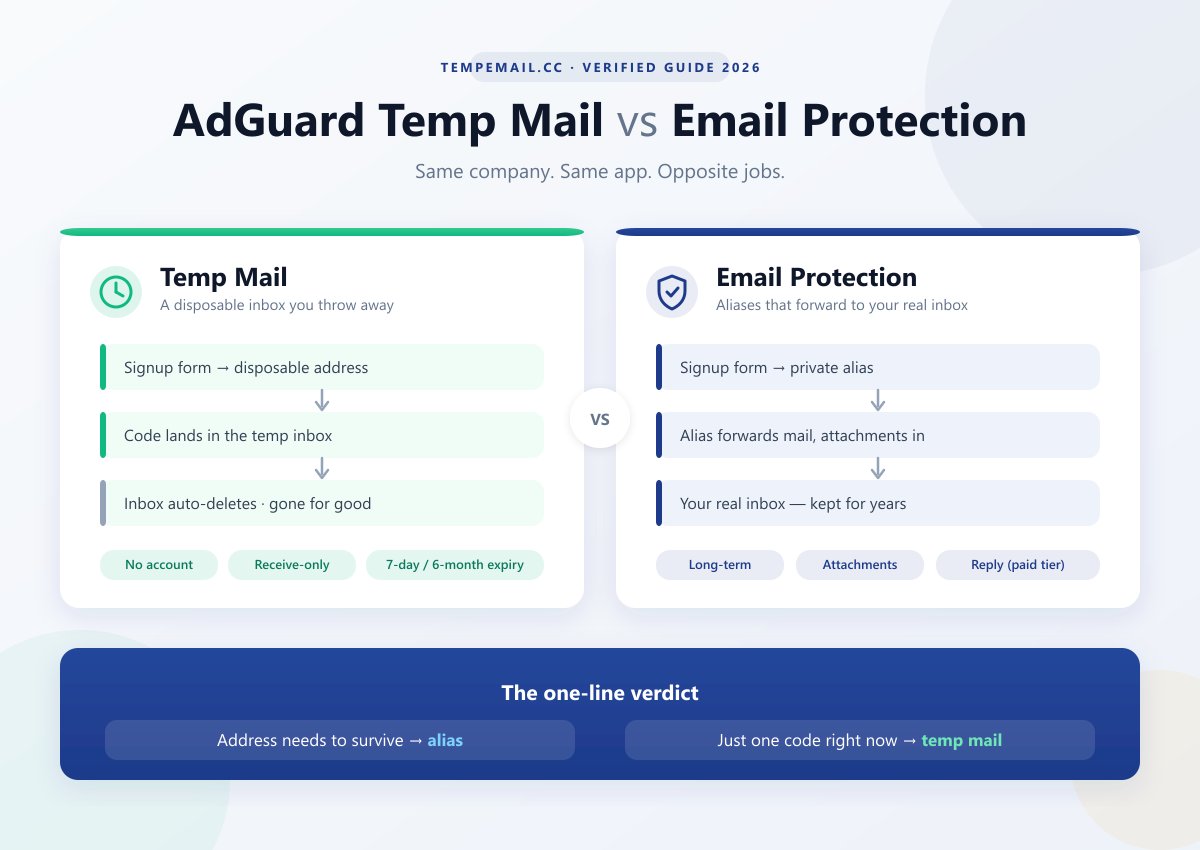
How We Tested AdGuard Temp Mail
We didn't want this to be another AdGuard Temp Mail article built entirely from the FAQ. We used the service ourselves, went through the normal Temp Mail workflow, and then checked what we saw against AdGuard's current documentation.
The goal was simple: test the things a normal user actually cares about — getting an address, receiving mail, keeping the inbox, and finding out what happens when the service hits one of its limits.
What We Checked
- Getting an address: How quickly an address is generated, whether an account is required, and how the address is remembered between visits.
- Receiving mail: Whether verification emails arrive, how the inbox behaves, and what happens when a message doesn't show up.
- Inbox limits: Address changes, inbox retention, message size, attachments, and whether deleted mail can be recovered.
- Domain acceptance: We checked AdGuard's disposable domains against the public
disposable-email-domainsblocklist to see whether they were already being flagged there. - How the service works: We also inspected the live web app and its network requests to understand how the temporary inbox is actually connected to AdGuard's backend.
We treated our observations and AdGuard's published claims separately. If we could verify something ourselves, we say so. If a claim depends on a long-term condition or a third-party website, we don't present it as a test result.
Testing note: Our checks were performed in August 2026. Delivery and domain acceptance can vary by website, network, and time, so a successful test does not mean every signup will work.
What We Found
After actually using AdGuard Temp Mail, the difference between it and an email alias is pretty obvious. Temp Mail is deliberately simple — and most of its limitations come from that simplicity. You get a temporary address, receive what you need, and eventually the inbox disappears. An alias is built around the opposite idea: keep the address around and forward its mail to your normal inbox.
A few things stood out during our checks:
- Temp Mail does exactly what it is supposed to do — but only within a fairly narrow range. It's receive-only, doesn't accept attachments, and the inbox isn't something you should treat as permanent storage. The address can also disappear when you change it, so anything important needs to be saved before you move on.
- The bigger question is whether the website you're signing up for will accept the address. AdGuard itself warns that disposable domains can be blocked. We couldn't turn our own checks into a universal delivery score because acceptance depends on the website you're using, but we did check the public
disposable-email-domainslist and found no AdGuard-related domains in its August 2026 snapshot. - The lack of an account is a real advantage. There is almost nothing to set up before you can start receiving mail. For a one-off verification, that's much less friction than creating and maintaining an email alias.
So the choice isn't really about which service has more features. It's about whether you want the email address to disappear or stick around.
Which One Should You Use?
| If you need to... | Better choice |
|---|---|
| Get one verification code | AdGuard Temp Mail |
| Complete a signup you'll probably never use again | AdGuard Temp Mail |
| Test a registration flow | AdGuard Temp Mail |
| Receive newsletters or recurring emails | Email Alias |
| Keep the same address for months | Email Alias |
| Reply without exposing your real address | Email Alias |
| Keep receiving account or recovery emails | Email Alias |
The simple rule: if you need the address for the task, use AdGuard Temp Mail. If you need the address after the task, use an email alias.
How AdGuard Temp Mail Works
Using AdGuard Temp Mail is about as simple as you'd expect: get an address, wait for the email, use it, and move on.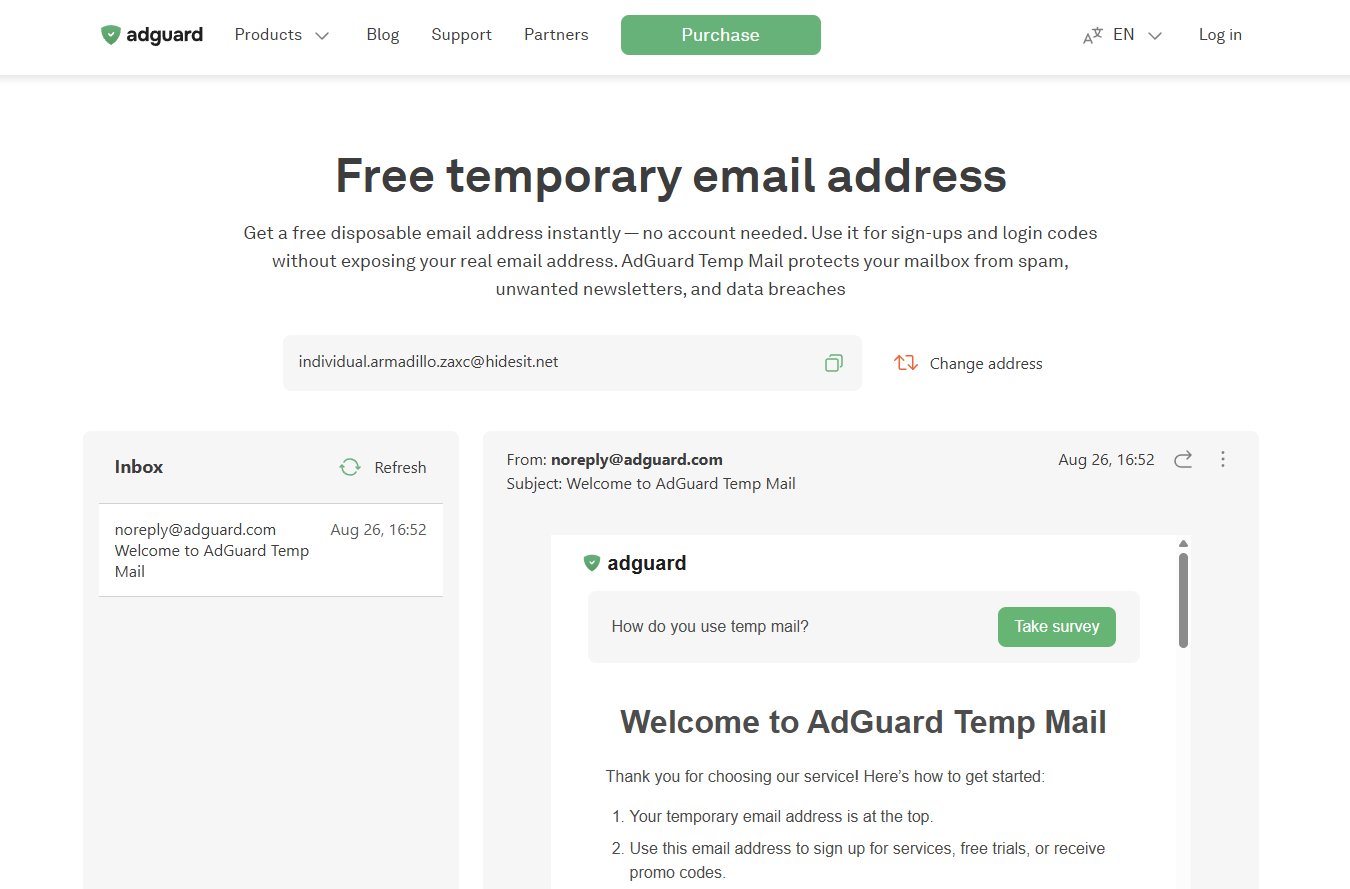
The basic flow is:
Website → Disposable Address → Temporary Inbox → Done
There is no account to create and no real inbox to connect. AdGuard generates a disposable address, and messages sent to it appear in the temporary inbox. For a one-off signup or verification code, that's really all you need.
What matters more is what happens after you use it:
- Nothing is forwarded. Emails stay inside the temporary inbox instead of reaching your real mailbox.
- The inbox doesn't stay forever. AdGuard says it is deleted after 7 days without opening or refreshing, with a maximum lifetime of 6 months even with regular use.
- Changing the address wipes the old inbox. If you click Change address, the previous address and its messages are deleted immediately and cannot be recovered.
- It's receive-only. You can't send or reply from an AdGuard Temp Mail address, and AdGuard says the service doesn't accept attachments.
That's the trade-off. You get almost no setup, but you also don't get a permanent mailbox. Temp Mail is useful precisely because you can walk away from it when the job is done.
And that's where it differs from an AdGuard email alias: Temp Mail is designed to disappear; the alias is designed to stick around.
Sources: AdGuard Temp Mail overview, FAQ, and AdGuard Mail knowledge base, checked August 2026.
How AdGuard Email Protection Works
If AdGuard Temp Mail is the "use it and forget it" option, an email alias takes the opposite approach. It gives you a separate address, but the mail sent to that address ends up in your normal inbox.
The basic flow is:
Website → Email Alias → Your Real Inbox
You create an alias and use it instead of your real email address. When the website sends you a message, AdGuard forwards it to the inbox you've connected to the alias. You can keep using that same address for the service, a newsletter, or anything else that may need to contact you later.
That's the main difference you'll notice in practice. Nothing is sitting in a separate temporary inbox waiting to disappear. The alias is simply another address in front of the inbox you already use. If it starts attracting spam, you can disable or delete it without affecting your other aliases.
AdGuard also supports replying through an alias on its paid tier, which makes aliases more useful for ongoing conversations. Temp Mail doesn't have that option — it's receive-only.
So if Temp Mail is the address you use for something you want to forget, an alias is the address you use when you expect to hear from that service again.

Can You Use Temp Mail With AdGuard?
Yes — AdGuard Temp Mail is designed to work as an AdGuard service, but your own filtering settings can still get in the way.
This is mainly relevant if you're using AdGuard DNS, the browser extension, or aggressive content-blocking filters. We inspected the live Temp Mail page and found that the inbox isn't just a static webpage: it loads a separate web app, uses an iframe, and communicates with a backend API. AdGuard also uses CAPTCHA in some situations.
That gives filtering tools a few places where things can go wrong.
What Can Break?
- DNS filtering: A required AdGuard hostname could be blocked by a filter rule or a custom DNS setup.
- Script or iframe blocking: The inbox may load partially if a required resource is filtered.
- CAPTCHA: If the verification step doesn't appear or keeps failing, content filtering can be one possible cause.
We didn't find an AdGuard document saying that its DNS or browser products are incompatible with Temp Mail. So if Temp Mail isn't loading properly, don't assume AdGuard is blocking its own service — test it first.
A Quick Way to Check
If the inbox works with filtering turned off but breaks when you turn it back on, you've got a strong clue:
- Turn off AdGuard filtering temporarily and reload Temp Mail.
- If the inbox works, turn filtering back on and reload.
- Check whether AdGuard reports any blocked requests.
- If necessary, add the affected Temp Mail domain to your allowlist.
- If the inbox works but verification emails still don't arrive, that's a different problem — check the receiving site's disposable-email policy instead.
The important distinction: a page failing to load and a website rejecting your Temp Mail address are two completely different problems. The first may be caused by filtering; the second usually happens on the website you're trying to sign up for.
AdGuard Temp Mail Not Working? What to Check
When AdGuard Temp Mail isn't working, the first thing to figure out is what isn't working. A blank inbox, a missing verification email, and a website rejecting the address are three different problems — and they don't have the same fix.
The Inbox Won't Load
If the Temp Mail page opens but the inbox doesn't, start with the simple stuff.
Refresh the page, try a private window, and temporarily disable AdGuard filtering or other aggressive content blockers. If the inbox suddenly works, you've probably found the culprit. Clearing your cookies can also make an existing address disappear from your side, so don't mistake a forgotten address for a broken mailbox.
The Verification Email Never Arrives
This is probably the problem you'll care about most.
Give it a few minutes first. If nothing shows up, don't immediately assume the mailbox is broken. The website you're signing up for may simply be rejecting the disposable domain. AdGuard itself acknowledges that some sites block Temp Mail domains.
The easiest thing to try is generating a new address and submitting it again. If the new address uses a different domain, it may get through where the first one didn't.
There are also a couple of less obvious limits: AdGuard says messages larger than 2 MB are rejected, and a mailbox stops accepting mail once it reaches 100 MB.
CAPTCHA or Page Elements Are Broken
If the address generates but buttons, the inbox, or a CAPTCHA don't behave normally, check your content-blocking settings.
AdGuard Temp Mail relies on scripts and embedded web resources, so an aggressive filter can occasionally remove something the page needs. Temporarily pause filtering and reload the page. If everything suddenly appears, add the affected domain to your allowlist rather than changing anything else.
The Address Can't Be Generated
If you can't get an address at all, try a refresh first. Then rule out the obvious things: network problems, browser extensions, or a temporary service/API issue.
If it still fails in a clean browser or private window, there's not much value in repeatedly clicking the button — try again later.
Still Not Working?
Here's the shortcut I'd use:
Can't open the inbox → check your browser and filters.
Inbox works but no email arrives → check whether the target site accepts disposable email.
Email arrives but the page doesn't behave → check scripts, CAPTCHA, and content blocking.
And if AdGuard shows a "Report a problem" option for a blocked domain, use it. Domain rotation is part of how Temp Mail deals with disposable-address blocking.
Why Sites Block AdGuard Temp Mail Domains
Sometimes AdGuard Temp Mail is working fine — the website simply doesn't accept the address.
Many signup forms check the domain after the @ before sending a verification email. If that domain is recognized as disposable, the site can reject it immediately. This is common with temp mail services in general, not unique to AdGuard.
AdGuard itself acknowledges this problem. Because a known disposable domain can be blocked, Temp Mail uses multiple domains and rotates them over time rather than relying on one permanent domain.
What We Found
We checked the public disposable-email-domains blocklist in August 2026:
Blocklist check — August 2026
Domains checked: 8,354
AdGuard-related matches: 0
That's a positive sign, but it doesn't mean every site will accept an AdGuard address. Websites can use private or commercial blocklists, or maintain their own rules. AdGuard also doesn't publish a complete list of its active Temp Mail domains, so our check is only a snapshot.
If your address is rejected, generate a new one first. If the site keeps rejecting every address, it's probably blocking disposable email altogether — in that case, changing addresses won't help.
A rejected address doesn't necessarily mean Temp Mail is broken. Sometimes the website is simply saying no to disposable email.
Is AdGuard Temp Mail Safe to Use?
For low-risk, short-term tasks, yes. But don't treat AdGuard Temp Mail like a normal email account.
AdGuard says its Temp Mail service doesn't associate temporary mailboxes with users' IP addresses or personal information, and mailboxes are automatically deleted after a period of inactivity. That's useful from a privacy standpoint, but privacy doesn't mean the inbox is suitable for sensitive information.
Good uses:
- One-time verification codes
- Quick, low-risk signups
- Testing registration flows
- Keeping marketing email away from your real inbox
Don't use it for:
- Banking or payment accounts
- Password recovery for important accounts
- Government, medical, or work-related accounts
- Sensitive documents or information
There's one simple reason: the address is temporary. Once the mailbox expires — or you change to a new address — the old inbox and its messages are gone. If you need that email again six months from now, a disposable address is the wrong tool.
So, is AdGuard Temp Mail safe? Safe enough for what it's built to do, as long as you treat it as disposable. Use it to get through a low-stakes signup, not as a private replacement for your everyday email account.
FAQ: AdGuard Temp Mail
A few practical questions that are easy to miss when you're actually using AdGuard Temp Mail.
1. Does AdGuard Temp Mail require an account?
No. You can generate a temporary address without creating an AdGuard account or linking a real email address.
2. Can I choose my AdGuard Temp Mail address?
No. AdGuard generates the disposable address for you. You don't get to pick a custom username or domain.
3. Can I send an email from AdGuard Temp Mail?
No. Temp Mail is receive-only. You can receive verification messages, but you can't send or reply from the temporary address.
4. Does AdGuard Temp Mail support attachments?
No. AdGuard says Temp Mail doesn't accept attachments, so it's intended for simple incoming messages such as verification emails rather than document exchange.
5. Can I have multiple AdGuard Temp Mail addresses?
You can generate a new address, but switching addresses discards the previous mailbox and its messages. So it's not designed to work like a collection of permanent inboxes.
6. Does AdGuard Temp Mail hide my real email address?
Yes. The website you give the temporary address to doesn't receive your normal email address. However, hiding your email address doesn't make the signup itself anonymous — the website may still collect other information such as your IP address or browser details.
7. Why does AdGuard Temp Mail sometimes ask for a CAPTCHA?
AdGuard may use CAPTCHA as an anti-abuse measure. If it doesn't load properly, check your browser or content-blocking settings before assuming the Temp Mail service is down.
8. What happens if a website blocks my Temp Mail address?
There's no guaranteed workaround. You can try generating another address in case the new one uses a different domain; if the site blocks disposable email as a category, you'll need a different type of email address.
9. Can I use AdGuard Temp Mail for account recovery?
It's a bad idea. Recovery emails may arrive after the temporary mailbox has disappeared, leaving you with no way to access the account through that address.
Looking for an AdGuard Temp Mail Alternative?
AdGuard Temp Mail works well when you just need a disposable inbox and don't want to create an account. But you may want something different if you need more control over the address, multiple domains, or a longer-lived inbox.
That's where alternatives start to make sense. If your main problem is that a particular site rejects an AdGuard domain, for example, having another domain to try can be more useful than simply generating the same kind of address again.
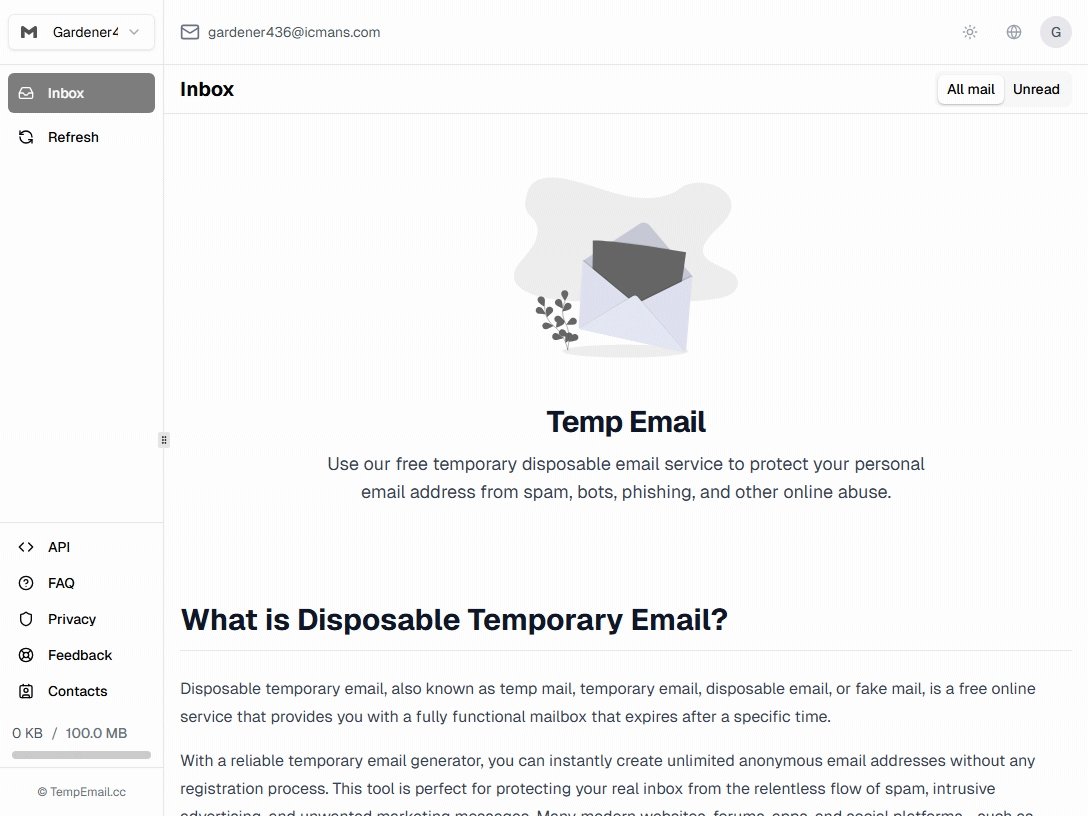
For a straightforward alternative, Tempemail.cc gives you a disposable inbox without registration, with custom addresses and multiple domains. If you're comparing several services rather than looking for a one-to-one replacement, our 10 Minute Mail Alternatives guide compares retention, domains, sending, and other practical differences across the main options.
Final Verdict
If you only need an email address for a few minutes, use AdGuard Temp Mail. If you need the address to stick around, use an AdGuard alias. That's really the whole distinction.
AdGuard Temp Mail makes more sense for one-off verification codes, quick signups, and situations where you don't want the address tied to your regular inbox. An alias makes more sense for accounts, newsletters, and anything you'll need to come back to later.
The important thing is not to treat them as interchangeable. Temp Mail is meant to be forgotten; an alias is meant to be kept.
If all you need right now is a disposable inbox, you can generate one and get on with the task — no signup required.