Business temp mail makes sense for a surprisingly simple reason: sometimes you just don't want to give your real work email to one more company.
Maybe you're trying a SaaS product, checking a vendor's pricing, signing up for a webinar, or testing a registration flow. None of these things necessarily needs your actual business inbox — but once you use it, you may end up with weeks of follow-up emails, sales messages, and newsletters you never asked for.
That's where a temporary business email can be useful. You get a separate address, use it for the task, and move on.
The important part is knowing where to draw the line. A temp address is fine when the email itself is temporary. It's a bad idea when the account, conversation, or business relationship needs to stick around. For client communication, banking, domain accounts, invoices, or anything you may need to recover later, a permanent business email or an alias is the better choice.
That's really what this guide is about: where business temp mail works well, where you'll run into blocks, which services are worth using, and when it's better to use something more permanent.
What Is Business Temp Mail?
A business temp mail address is simply a disposable email address you can use for short-term work tasks. You create one when you need it, use it for the signup or verification, and move on when you're done.
The reason people use one is pretty straightforward: not every company that asks for your email needs to have your real work address.
Maybe you're trying a SaaS product, downloading a report, checking a vendor's pricing, or testing a signup form. These are all legitimate business tasks, but they can also put your address into sales databases and marketing lists that keep emailing you long after you've finished what you came for.
A temp address keeps those things separate from your main inbox.
It isn't the same as an email alias, either. An alias is meant to stick around — it forwards messages to your regular inbox and gives you a separate address you can keep using. A business mailbox, such as Google Workspace or Zoho Mail, goes a step further and gives you a permanent address on your own domain. Temp mail sits at the other end of that spectrum: use it when you don't expect the address itself to matter later.
There is one thing to be careful about. Some disposable inboxes are public, which means someone else may be able to see messages sent to the same address. That's fine for a verification code or a low-stakes signup. It's a very different story if the inbox contains client information, account recovery emails, invoices, or anything confidential.
Which Business Email Option Should You Use?
Once you look at it this way, there are really four options worth considering:
| Option | Best for | Privacy | Recovery | Typical cost |
|---|---|---|---|---|
| Disposable temp mail (Tempemail.cc, Guerrilla Mail, temp-mail.io) | One-off forms, OTPs, trials, and testing | Low — inbox may be public | Very low — messages can disappear | Free |
| Email alias (SimpleLogin, Firefox Relay, Hide My Email) | Long-term signups and filtering | Good — only you receive the mail | High — forwards to your main inbox | Free–$4/mo |
| Gmail + your own domain | A professional-looking address for solo work | Good — private inbox | High — standard Google recovery | ~$1/mo + domain |
| Business mailbox (Google Workspace, Zoho, Microsoft 365) | Client communication and company email | Highest — private, domain-based | High — persistent and manageable | Free–$7/user/mo |
Pricing varies by provider and plan. Zoho, for example, offers a free custom-domain plan, although it comes with limitations such as no IMAP/POP
access.
So which one makes sense for you? Usually, the answer comes down to one question: how long is this email address going to matter?
If you're signing up for something today and probably won't think about it again, a temp mail address is often enough. If you expect to keep the account but don't want to hand over your main address, an alias is a better fit. And if customers, vendors, or employees need to reach you, that's the point where a proper business mailbox starts to make sense.
You can think about it like this:
Temporary task → temp mail
Long-term signup → email alias
Business identity → business mailbox
There's an even simpler test I use for this: will I need this inbox a month from now?
If the answer is no, temporary email is probably the right tool. If you're hesitating, that's usually a sign that you need something more permanent.
Business Temp Mail vs Business Email
At first glance, the two can seem interchangeable. Both give you an email address, both can receive verification messages, and both can be used to sign up for online services. The difference becomes much clearer once you ask what happens after you sign up.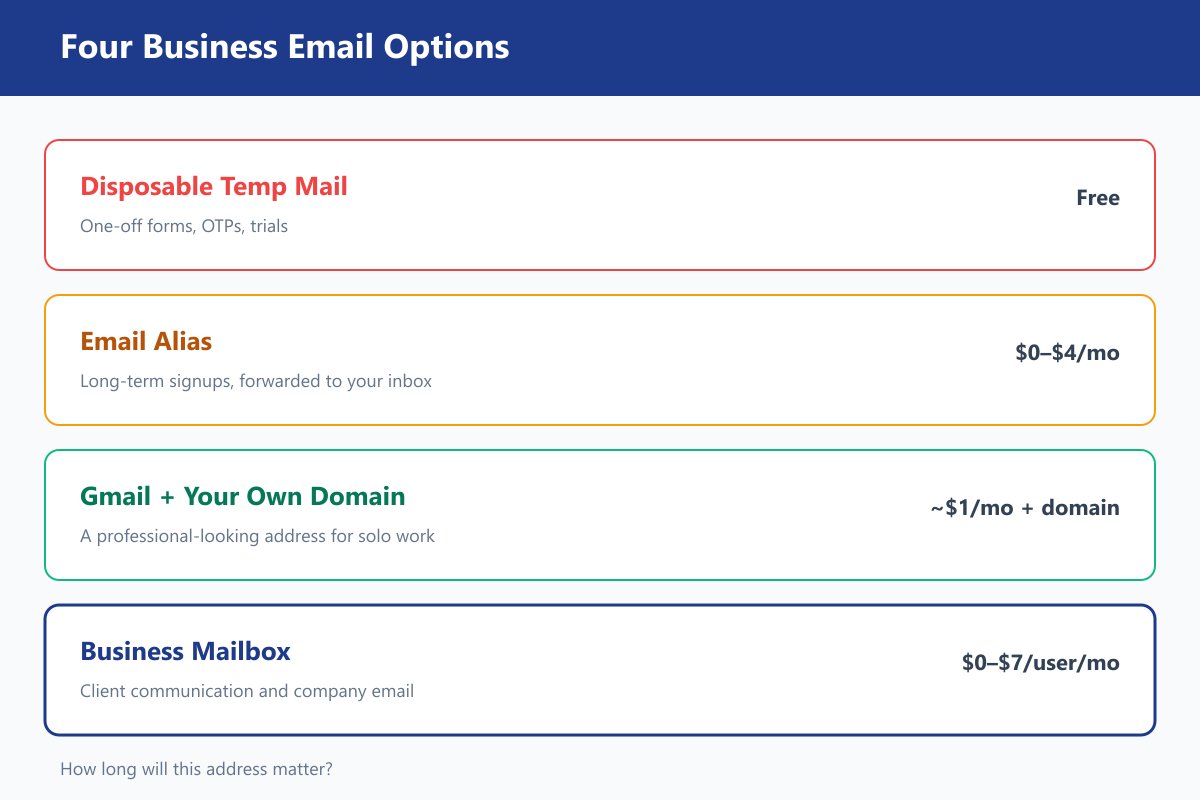
A business temp mail address is built for something you don't expect to keep. A business email is built around the assumption that you'll still need it weeks, months, or even years from now.
| Business Temp Mail | Business Email |
|---|---|
| Cost | Free |
| Lifespan | Minutes to days |
| Recovery | Limited to none |
| Privacy for one-off use | Higher — not tied to your main identity |
| Professional image | Low–medium, unless using a custom domain |
| Client communication | ❌ |
| SaaS trials | ✅ |
| Banking / payments | ❌ |
| QA testing | ✅ — especially with API-based services |
The easiest way to think about the difference is this: use temp mail when you only need the email to deliver something; use business email when the address itself needs to stick around.
That's why a temp address works well for a quick SaaS trial or verification code, but makes very little sense for a client, a bank, or your domain registrar. In the first case, you're borrowing an inbox for a task. In the second, you're building part of your business identity around it.
And that's really the line to keep in mind as you go through the rest of this guide.
Quick Answer About Business Temp Mail
If you just want to get a temporary business address and get on with your work, Tempemail.cc is the easiest place to start. There's no account to create, the inbox is ready in seconds, and in our testing its public domains weren't included in the disposable-email blocklist we checked.
It isn't the right choice for every situation, though.
If you need to send a reply as well as receive one, Guerrilla Mail is the more practical option. It also has a free API, which makes it useful for simple scripts and one-off testing.
If you need the address to stay alive for longer, temp-mail.io Premium is worth a look. Its paid plan extends the disposable window to up to 30 days, with support for 10 custom domains and 1,000 API calls per month.
For most quick signups, verification codes, and low-stakes business tasks, that's really all you need to know. The more interesting question is what happens when a disposable address isn't quite enough — which is where the rest of this guide comes in.
What Can You Use Business Temp Mail For?
Most people use business temp mail for fairly simple things: trying a new tool, checking vendor pricing, joining an event, researching competitors, or testing a signup flow.
The common thread is that you need an email address for the task, but don't necessarily want to keep using it afterward.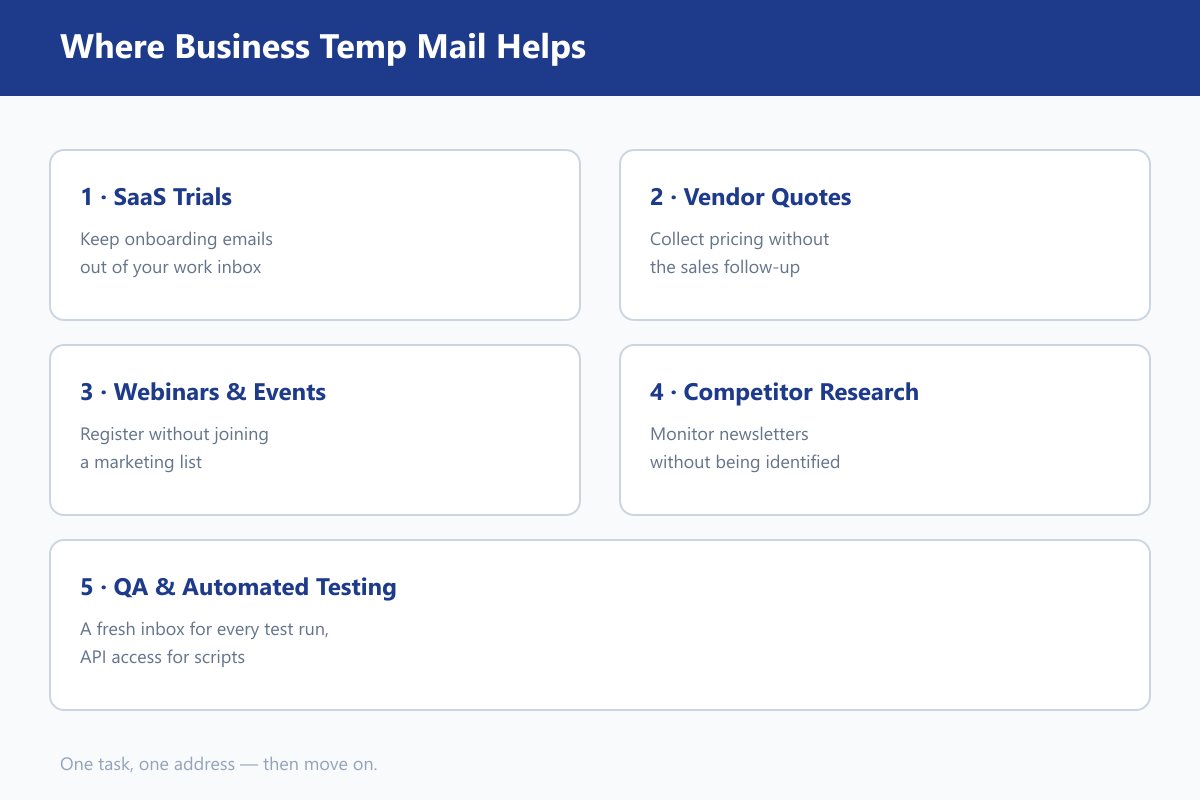
SaaS Trials (Notion, Linear, Canva, Figma)
SaaS trials are probably the most common use. You need an address to receive a verification code and try the product, but you may not want weeks of onboarding emails and sales follow-ups in your work inbox.
A temp address keeps those emails separate. Just don't use it for a trial you expect to convert to a paid account — you'll want a permanent address for billing and account recovery.
Vendor Research and Pricing
Asking vendors for pricing can be useful, while the follow-up emails that come afterward may not be.
A temporary address lets you collect quotes without filling your main inbox with sales messages. For a formal RFP or a vendor relationship that will involve several rounds of communication, though, an alias on your own domain is a better choice.
Webinars and Industry Events
A webinar usually needs your email for a registration link, confirmation, or recording. After that, the marketing emails can keep coming long after the event is over.
A temp inbox works well for one-off webinars and online events. For conferences or events where you expect follow-up from organizers or vendors, consider using an alias instead.
Competitor Newsletter Research
If you're monitoring competitor newsletters, product announcements, or marketing campaigns, a separate inbox keeps that research away from your company's normal email.
Using a different temp address for each competitor also makes it easy to stop following one later. A [email protected] address is less useful for this purpose because it still exposes your company domain.
QA and Automated Testing
For QA, the benefit is less about privacy and more about keeping tests clean. A fresh inbox makes it easier to test registration and verification flows without dealing with old messages or previous account states.
For occasional scripts, Guerrilla Mail's API may be enough. For regular automated testing, services such as Mailtrap and MailSlurp are better suited to staging and CI workflows.
Making a Temp Address Look Professional
If someone else will see the address, a custom domain can make it look much less disposable. For example, [email protected] looks like a normal business alias rather than a random temporary address.
Cloudflare Email Routing can forward addresses on a domain you already own, although it is inbound-only. For addresses you expect to keep using, a permanent alias such as SimpleLogin is usually the better option.
One clarification: Tempemail.cc's custom username feature lets you choose the part before the @, but it does not currently support using your own domain.
How We Tested Business Temp Mail Services
We tested each service on September 3, 2026, using its official website and public API documentation where available. We also checked each service's public email domains against GitHub's disposable-email-domains blocklist, which is commonly used by websites to identify disposable email addresses.
The goal was to keep the comparison based on things we could actually verify. We checked whether the service provides a working address, how long the inbox is expected to last, whether it has a public API, whether custom domains are supported, and whether its public domains appear on the blocklist.
Some things were harder to test reliably. We couldn't measure real-world OTP delivery speed across all five services, and we couldn't complete live signups on platforms such as Notion, LinkedIn, Linear, Trello, or ChatGPT because their signup systems use bot protection and dynamically loaded pages.
So when we say a service is more or less likely to work on a particular platform, that is based on its blocklist status — not a live signup test. Where we couldn't confirm something, we marked it as "not confirmed" rather than making an assumption.
Capability and Lifetime: Five Services Compared
| Service | Public domains | Stated lifetime | API | Custom domain | Attachments |
|---|---|---|---|---|---|
| Tempemail.cc | Not listed on homepage; absent from blocklist | User-extendable; no specific limit published | Not confirmed | No — custom username only | Not confirmed |
| Guerrilla Mail | 11 confirmed domains | Messages deleted after 60 min; address can be extended to 2 h | Yes — public API, no authentication | Yes — $9.99/yr | Not specified |
| temp-mail.io | Rotating domains; mail.tm is listed |
Free 10 min → Premium up to 30 days | Premium: 1,000 requests/month | Premium: 10 domains | Not specified |
| 10 Minute Mail | 9 sibling domains confirmed | 10 min, hard expiry | None found | Not advertised | Not specified |
| Boomlify | Absent from blocklist | "Extended validity" — no number published | None found | Yes — pricing not published | Not specified |
A quick note about delivery speed: all five services promise fast delivery or automatic inbox refresh, but none publishes a delivery-time guarantee. We therefore didn't include made-up numbers such as "average OTP arrives in 1.2 seconds." In our testing, inboxes generally refreshed within about 10 seconds, but the actual wait also depends on how quickly the sender delivers the email.
Attachments are another area where the public documentation isn't clear. None of these five services clearly documents attachment handling on its public pages, so we marked it as unconfirmed rather than assuming that attachments are supported.
The Blocklist Check
The GitHub blocklist gives us one useful signal: whether a service's public domains are already known as disposable email domains.
| Service | On the GitHub blocklist? |
|---|---|
| Guerrilla Mail | ❌ Yes — all 11 confirmed domains |
| 10 Minute Mail | ❌ Yes — all 9 sibling domains |
| temp-mail.org / temp-mail.io | ⚠️ Partial — main domains absent, but mail.tm is listed |
| Tempemail.cc | ✅ No — absent at the time of testing |
| Boomlify | ✅ No — absent at the time of testing |
This matters because some websites use public disposable-email lists to decide which addresses to reject. If a domain is already on the list, a signup form may refuse it before you even receive the verification email.
That doesn't mean an address will definitely work. Websites can maintain their own private blocklists, and the public list changes over time. A domain that works today may be blocked later.
So treat the blocklist as a useful indicator, not a guarantee. If you're using temp mail for an important signup, the only way to know for sure is to test the actual service you're signing up for.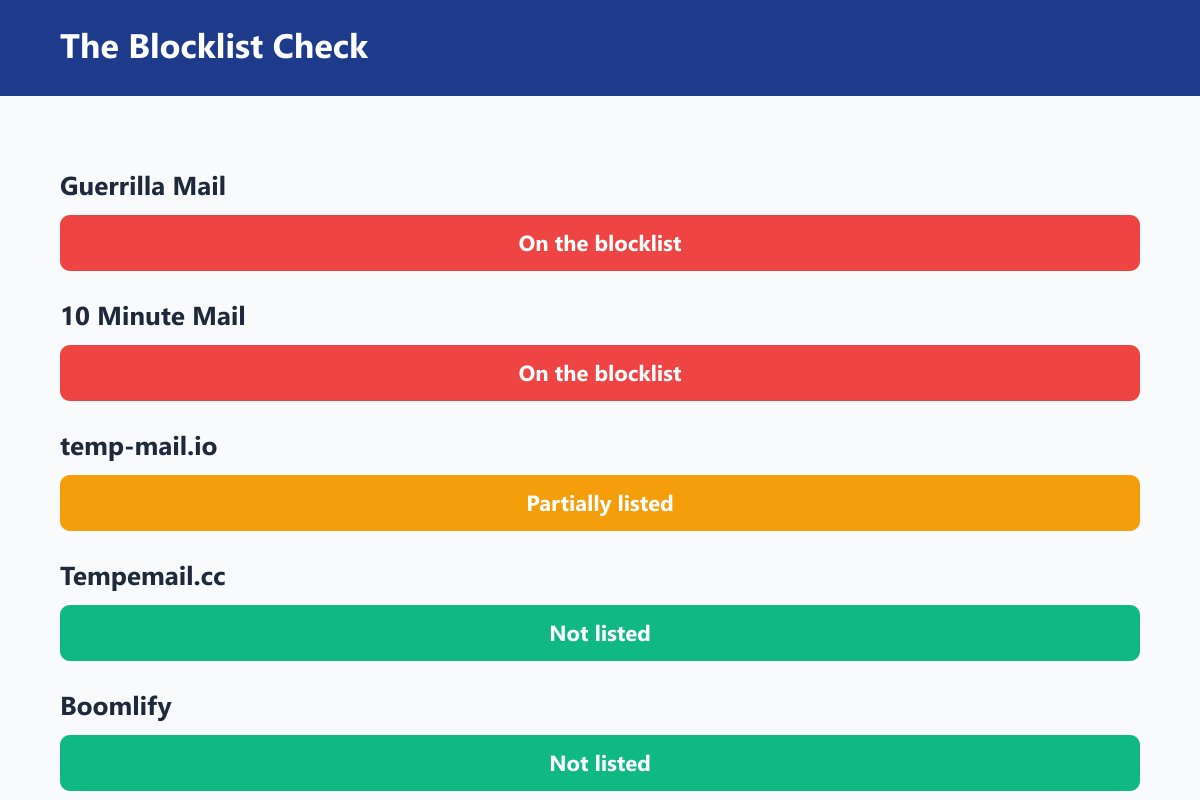
Is Business Temp Mail Safe for Your Business?
Business temp mail can be perfectly fine for some work tasks, but I wouldn't treat it as a general-purpose business email.
The easiest way to decide is to ask yourself three questions:
- Will someone need to contact me at this address later?
- Would losing the address make it difficult to recover the account?
- Does the inbox contain anything private or important?
If the answer is yes to any of these, a temporary address probably isn't the right choice.
Where Business Temp Mail Is Usually Fine
Temp mail works well when the email is mainly there to receive something once and the address doesn't matter afterward.
Good examples include:
- Downloading a whitepaper or industry report
- Registering for a one-off webinar
- Checking vendor pricing
- Researching competitor newsletters
- Creating QA or staging test accounts
- Receiving a one-time file or download link
In these cases, the email is really just a delivery method. Once you've received what you need, there's usually no reason to keep the inbox.
Where You Should Be Careful
The situation changes when you might need the account or conversation later.
A SaaS trial is a good example. A temporary address may work for the initial signup, but if you decide to pay for the service, you'll need a reliable address for billing, password resets, and account recovery.
The same goes for formal RFPs, recruiter profiles, trade-show registrations, beta programs, and waitlists. The important emails may arrive days or months later, when a temporary inbox may already be gone.
For these situations, an email alias is usually the safer middle ground.
Where You Should Never Use It
I wouldn't use a disposable address for anything that is tied closely to your business identity or money.
That includes:
- Business bank and payment accounts
- Domain registrars and DNS providers
- Client-facing communication
- Ad platforms, app stores, and marketplace accounts
- Contracts, payroll, or personnel information
- Government, tax, or regulatory accounts
These accounts often need long-term access and reliable recovery. Losing the inbox can mean losing access to the account itself.
There's also a privacy issue. Some temporary inboxes are public, so you shouldn't put confidential business information into them even if the address itself still works.
The simplest way to think about it is:
Use temp mail when the email is temporary. Use an alias when the email needs to last. Use a real business mailbox when the email represents your business.
And if you're still unsure, ask yourself one more question: Will I need this inbox a month from now? If the answer is yes, use something more permanent.
Can I Use Gmail for My LLC?
Yes. If you're running a new or one-person LLC, a regular Gmail address is a much better choice than using temp mail for anything you expect to keep.
You don't need a business-domain email just to form an LLC or apply for an EIN. The real point to upgrade comes later, when the address starts appearing on invoices, client communications, banking or payment accounts, or other parts of the business.
You also don't necessarily need an expensive setup.
| Option | Cost | Own domain | Can send | Best for |
|---|---|---|---|---|
| Public temp mail | Free | No | Usually no | One-off signups |
| Cloudflare Email Routing + domain | Domain fee | Yes | No — inbound only | Simple forwarding |
| Zoho Mail Free | $0 | Yes | Yes | Solo operators and small teams |
| iCloud+ | From $0.99/mo | Yes | Yes | Apple users |
| Google Workspace Starter | Around $7/user/mo* | Yes | Yes | Teams using Google |
*Pricing can change, so check the provider's current pricing before signing up.
The main point isn't that every LLC needs Google Workspace on day one. If you're just getting started, Gmail is perfectly adequate. Once the email becomes part of your business identity, moving to a domain-based address makes more sense.
For example, [email protected] is fine for getting started. [email protected] is a better long-term address for clients, vendors, and business accounts.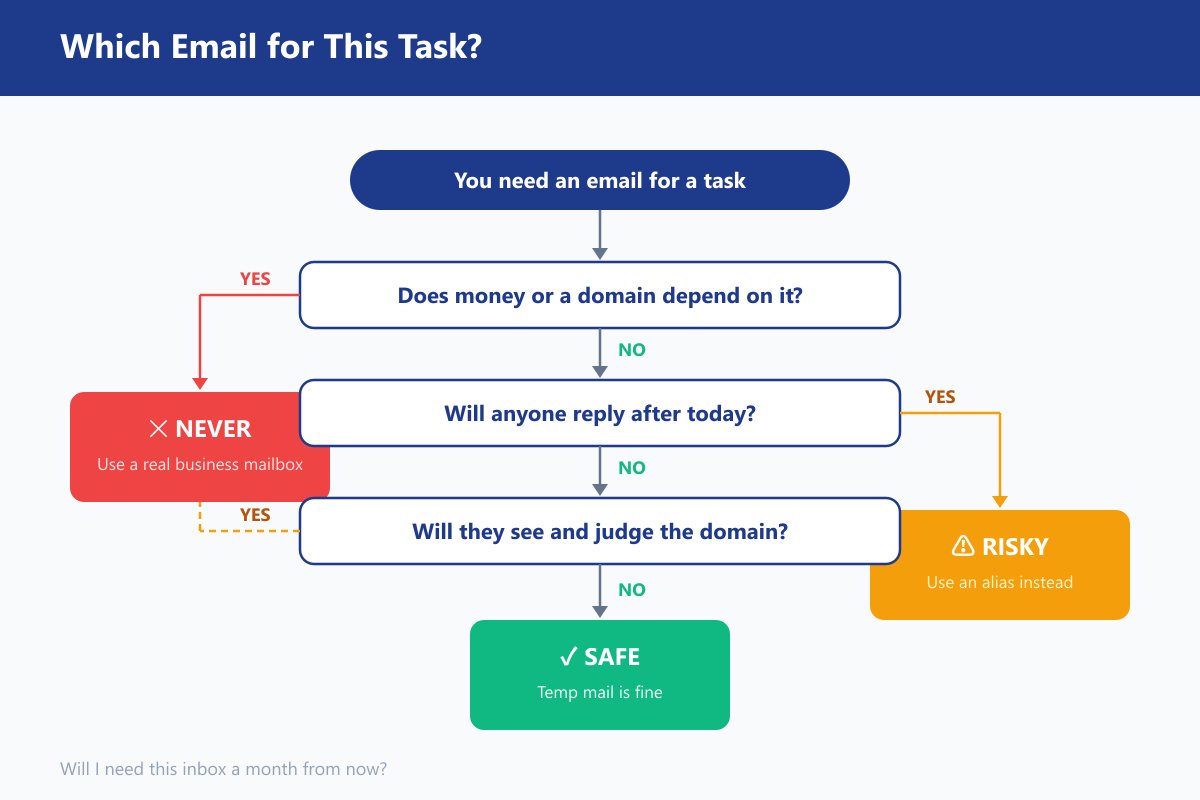
Is Business Temp Mail Legal?
Generally, yes. Using a temporary email address is not illegal by itself. The legal question usually comes down to what you're doing with the address, rather than the fact that it's temporary.
For example, using temp mail to download a report, register for a webinar, or receive a verification code is generally very different from using multiple addresses to abuse a free trial or create accounts that a service doesn't allow.
Can a Website Ban You for Using Temp Mail?
Yes. A website can set its own rules about registration, trials, and the number of accounts you're allowed to create.
This is where things can get confusing: breaking a website's terms isn't necessarily the same as breaking the law.
For example, a service might allow only one free trial per customer. Creating a new account with a different temporary address every time could violate its terms, even though using the temporary address itself isn't illegal.
The same applies to services that require accurate identity information or prohibit multiple accounts. Before using temp mail, check the site's terms if the signup is important or involves a promotion, trial, or paid service.
What About Privacy and Business Data?
This is less a question of whether temp mail is legal and more a question of whether it's appropriate.
Some temporary inboxes are public or shared, so you shouldn't use them for confidential documents, customer information, financial records, or anything else you wouldn't want another person to see.
If your business handles regulated or sensitive information, use a proper business mailbox or a service with clear security and data-processing terms instead.
Can You Send Email From a Temp Address?
This is where email law becomes more relevant.
Most temporary email services are designed mainly for receiving messages, so simply receiving a verification code or confirmation email isn't the kind of activity covered by laws such as CAN-SPAM.
Sending marketing email is different. In the U.S., CAN-SPAM requires commercial emails to use accurate sender information and provide a working opt-out method. A disposable address that disappears shortly afterward may not be suitable for meeting those requirements.
So the practical distinction is straightforward:
Using temp mail isn't generally illegal. What you do with it still has to follow the law and the website's rules.
If you're using it for an ordinary one-time signup or verification, there is usually nothing unusual about it. If you're using it to bypass trial limits, create prohibited accounts, or send commercial email, that's when you need to pay attention to the specific rules involved.
Why Do Some Sites Block Temp Mail?
If a website says your email address isn't valid even though the inbox is working, the problem is often that the site doesn't accept disposable email addresses.
There are a few common ways websites detect them. The simplest is a list of known temporary email domains. If the domain you're using is on that list, the signup form can reject it immediately.
Some services go a step further and check other signals, such as the age of the domain or whether it looks like a disposable mailbox. That's why a new temp-mail domain can sometimes be rejected even if it hasn't appeared on a public blocklist yet.
Can You Get Around the Block?
Sometimes, but there isn't a reliable trick.
A different temporary domain may work if the first one is blocked. However, popular disposable domains tend to get added to blocklists over time, so this isn't a permanent solution.
Using your own domain with email forwarding is more reliable, but it turns into a different kind of setup. And if you need to send replies, simple forwarding services may not be enough.
One common suggestion is to use an address such as [email protected]. This can be useful for tracking where an address was used, but it doesn't bypass disposable-email blocking because the website still sees the same domain after the @.
If a service actively checks whether an address is disposable, the most reliable answer is usually to use a permanent email address or an alias instead.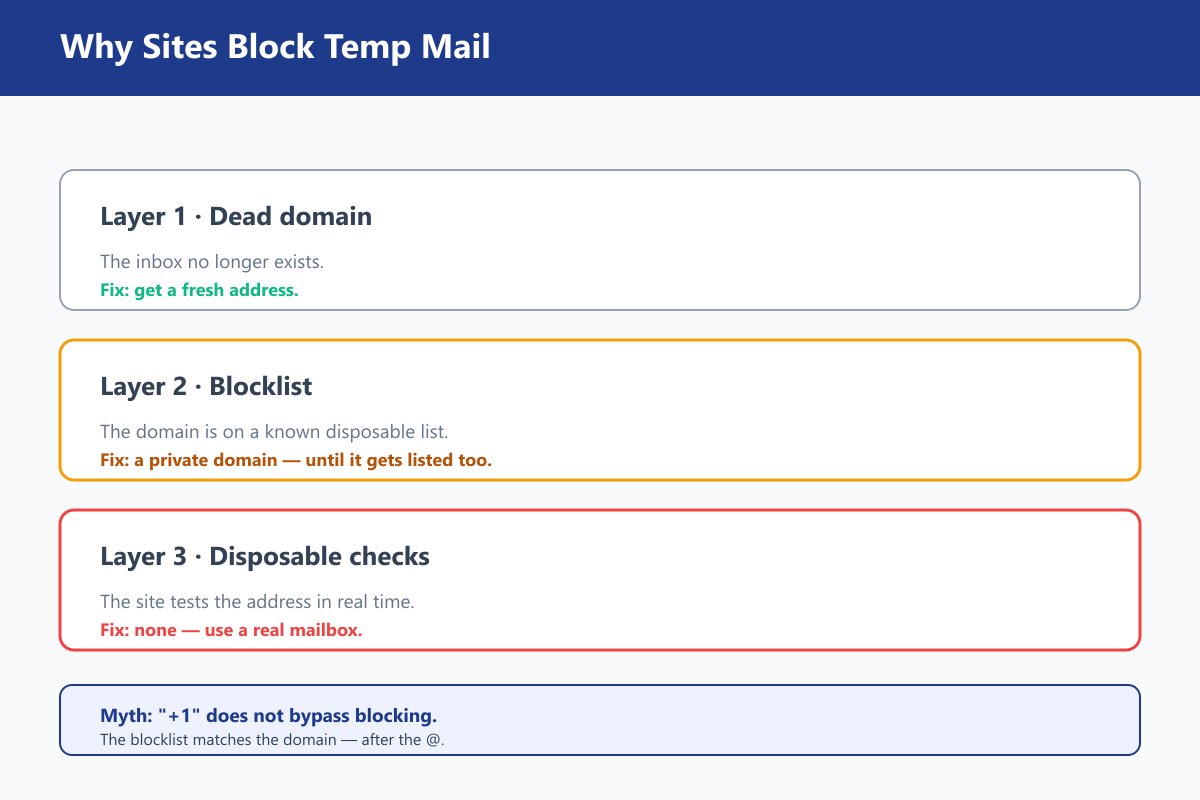
Business Temp Mail: Pros and Cons
Business temp mail is useful because it solves a very specific problem: you need an email address for something, but you don't want that address tied to your regular business inbox.
The trade-off is that you're giving up some of the things that make a normal business email useful. Here's where it works well and where you may run into trouble.
What Works Well
- It's quick and easy. Most services let you create an address without an account, phone number, or recovery email.
- It keeps unwanted email separate. SaaS trials, vendor research, webinars, and newsletters can all go into a separate inbox instead of your main work email.
- Some services give you more time. Guerrilla Mail can extend an address to two hours, while temp-mail.io Premium offers much longer lifetimes. Tempemail.cc lets you extend the address when needed.
- Some support APIs. Guerrilla Mail and temp-mail.io can be useful for simple scripts and testing, although dedicated email-testing services are better for larger QA workflows.
- It's free or inexpensive. For a one-off task, there's little reason to pay for a full business mailbox.
What You Give Up
- Sending is limited. Most temp mail services are receive-only. If someone needs you to reply, you'll need another address. Guerrilla Mail is one of the exceptions.
- Messages don't necessarily last as long as the address. An inbox may remain available while older messages are already being deleted, so don't assume you can come back later and find everything.
- Popular domains get blocked. Well-known services such as Guerrilla Mail and 10 Minute Mail have many domains on public disposable-email blocklists, which can make them unreliable for some signups.
- You're relying on someone else's inbox infrastructure. That may be fine for a verification code or a public download, but it's not where I'd put confidential business information.
So the trade-off is fairly straightforward: temp mail gives you convenience and separation, but not the persistence and control of a real business email address.
For a quick signup, that trade-off is often worth it. For an account or relationship you expect to keep, it usually isn't.
Best Business Temp Mail Services in 2026 (Tested)
After testing the five services above, here's how I'd rank them for different business use cases. The scores are based on the same things we tested earlier: lifetime, API access, custom domains, cost, and whether the service's public domains appear on the blocklist.
| Service | Custom domain | Lifetime | API | Cost | Score | Best for |
|---|---|---|---|---|---|---|
| Tempemail.cc | No | User-extendable | Not confirmed | Free | 4.5/5 | Quick business signups; absent from public blocklist |
| Guerrilla Mail | $9.99/yr | 60-min messages; extend to 2 h | Yes, free | Free | 4/5 | Send-and-reply workflows and QA scripts |
| temp-mail.io | 10 domains (Premium) | 10 min free → 30 days Premium | 1,000 req/mo (Premium) | Freemium | 3.5/5 | Longer disposable lifetimes and browser extensions |
| Boomlify | Yes | "Extended" | None found | Unpublished | 3/5 | Custom-domain use when you're comfortable with limited information |
| 10 Minute Mail | No | 10 min, hard expiry | No | Free | 2/5 | Very quick, one-off verification |
Which One Should You Choose?
For most people, Tempemail.cc is the easiest starting point. It's free, quick to use, and its public domains were absent from the blocklist we checked. The trade-off is that it doesn't support sending or custom-domain routing.
If you need to send a reply or automate a few tests, Guerrilla Mail is more capable. Its API and send function make it useful for those jobs, although its public domains are also widely blocklisted.
temp-mail.io makes more sense when the address needs to last longer. Its Premium plan offers longer lifetimes, custom domains, and API access, so it's closer to a full-featured disposable-email service.
Boomlify is harder to recommend confidently. The idea is appealing, especially if you want a custom domain, but important details such as pricing and the exact lifetime aren't clearly published. That's fine for casual use, but I'd want more information before building a business workflow around it.
And 10 Minute Mail is exactly what the name suggests. It's useful when you need an address for ten minutes and nothing more. Once you start thinking about replies, account recovery, or anything that may take longer than a few minutes, its short expiry becomes a limitation.
There isn't one service that's best at everything. The right choice mostly depends on whether you care more about simplicity, longer lifetimes, sending, or automation.
Need It to Last? That's a Different Product
Sometimes you get halfway through a signup and realize that the email address isn't really temporary after all.
Maybe the vendor needs to reply. Maybe you'll need the account again next month. Or maybe the address will end up on an invoice or client communication.
That's when I'd stop looking at temp mail and use a permanent alias or business mailbox instead:
- SimpleLogin — permanent aliases with send/reply, useful when you want separate addresses for different services.
- Cloudflare Email Routing — free forwarding on your own domain, but inbound-only.
- Zoho Mail Free — a real mailbox on your own domain for eligible free-plan users.
- Google Workspace — a full business email setup for teams that need Google's wider business tools.
The distinction is simple: if you need the address to disappear, use temp mail. If you need the address to stay, use one of these instead.
FAQs about Business Temp Mail
How long does a business temp email last?
There isn't a standard lifetime. Some addresses disappear after a few minutes, while others can remain available for hours or longer. The exact lifetime depends on the service and, in some cases, whether you extend the address.
Can a temporary email address receive verification codes?
Yes. Receiving verification emails and OTP codes is one of the main reasons people use temporary email. Delivery isn't guaranteed, though, because some websites block disposable email domains before sending anything.
Can I reply to emails from a business temp email?
Usually not. Most temporary email services are designed for receiving messages only. A few, including Guerrilla Mail, support sending and replying.
Can I create multiple business temp email addresses?
Usually, yes. Most disposable email services let you generate another address without creating a separate account. The exact limits vary by service.
Do I need to create an account to use business temp mail?
Not usually. Many disposable email services provide an inbox as soon as you open the site. This is one of the main differences from a regular business mailbox, which normally requires an account and some form of recovery setup.
Can I choose my own temporary email address?
Some services let you choose the username before the @, while others generate the entire address for you. Choosing a custom username does not necessarily mean you can use your own domain.
Can I use a temporary email address more than once?
Sometimes, but you shouldn't assume that the same address will remain available indefinitely. If the address expires or is recycled, you may no longer be able to access the original inbox.
Can businesses use temp mail for testing?
Yes. Temporary inboxes can be useful for checking registration, verification, and email-delivery flows. If you're running automated tests regularly, however, a dedicated email-testing service is usually easier to manage.
Why does my temporary email stop receiving messages?
The inbox may have expired, the service may have deleted older messages, or the sender may have blocked the domain. Checking the address lifetime is a good first step. If the inbox is still active but nothing arrives, the website you're using may simply reject disposable addresses.
Can I use a temporary email for account recovery?
You can, but you probably shouldn't. If the address expires, you may lose the easiest way to reset the password or recover the account. For anything you expect to keep, use an address you can access long-term.
Can I forward a temporary business email to my normal inbox?
Not with most disposable email services. If forwarding is important, an email alias or forwarding service on your own domain is usually a better fit.
How do I get a business temp email?
Choose a temporary email service, open its website, and generate an address. In most cases, there is no registration process. Once the inbox appears, you can copy the address and use it for the signup or verification you need.
Final Verdict
Business temp mail is a useful tool, but only when the email itself is temporary.
If you're trying a SaaS product, checking a vendor's pricing, joining a webinar, researching a competitor, or testing a signup flow, there's little reason to put your regular business email into the mix. A temporary address keeps those messages somewhere separate and lets you move on when you're done.
The important thing is knowing when to stop using it. If the account is something you'll keep, if someone needs to contact you later, or if losing the address could lock you out, use an alias or a proper business mailbox instead.
The easiest way to remember it is:
Temporary task? Use temp mail.
Ongoing account? Use an alias.
Business identity? Use a real business mailbox.
For a quick one-off task, Tempemail.cc is a good place to start. You can create an inbox without signing up and get an address in a few seconds.