Quick Answer: Best Way to Keep Passwords Safe in 2026
- ✅ Use a password manager to generate and store unique passwords for every account
- ✅ Enable 2FA on all important accounts (prefer authenticator apps or hardware keys over SMS)
- ✅ Never reuse the same password across multiple sites
- ✅ Check regularly to see if your credentials have been exposed in data breaches
- ✅ Use temporary emails only for untrusted sign-ups, not for password recovery
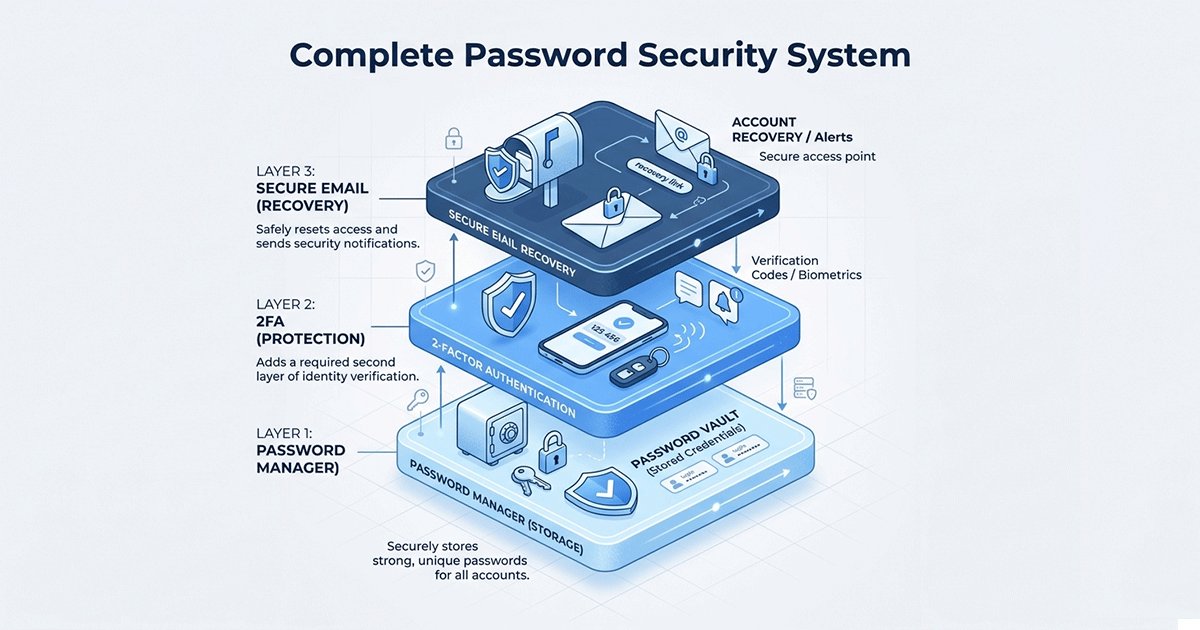
The best way to keep passwords safe is to build a layered security system: use a password manager for storage, enable 2FA as a second defense layer, and keep your primary email secured for account recovery. With AI-powered password cracking tools getting faster and data breaches happening every day, strong password security is more important than ever.
According to the 2025 Identity Theft Resource Center Data Breach Report, over 15 billion credentials were exposed in breaches last year alone. That's more than enough for attackers to gain access to millions of email accounts, bank profiles, and personal information.
Passwords remain the first line of defense for your online privacy — but outdated password habits leave you vulnerable. Even if you're careful about where you use your email, a weak or reused password can quickly lead to unauthorized access, identity theft, and fraud.
The good news is that with the right tools and system setup, you can drastically reduce your risk. Whether you use temporary emails for sign-ups to protect your primary inbox or rely on one main email for everything, proper password management makes all the difference. In this guide, we'll break down the most effective password security practices, compare top password managers and 2FA methods, and help you build a complete system that keeps your accounts safe.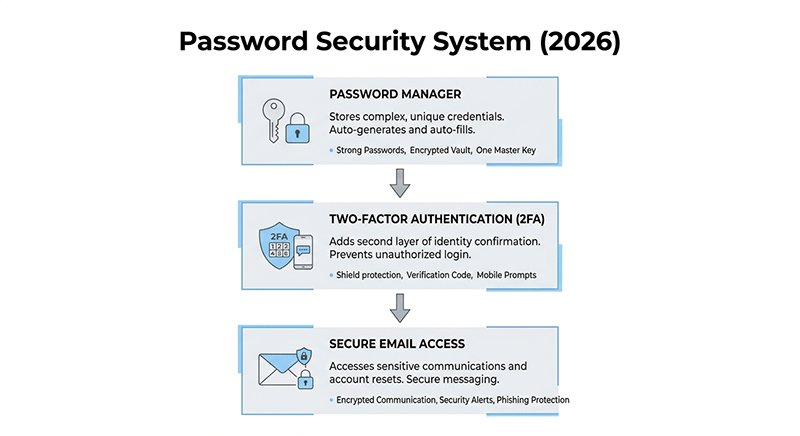
Why Is Password Security Important in 2026?
Password security matters because weak or reused passwords are still the number one cause of account takeovers. With AI tools that can guess billions of password combinations per second, even passwords that seemed secure 10 years ago can now be cracked in minutes.
When your password leaks in a breach, attackers don't just get access to that one account — they try that same email and password combination on every popular service, from banking to social media. A single weak password can lead to your entire digital identity being compromised.
Investing a little time into setting up a solid password security system protects you from this risk and gives you peace of mind that your personal information stays private.
What Is the Best Password Manager for 2026?
A password manager is the single best tool for keeping your passwords safe. It creates unique, strong passwords for every account and stores them encrypted, so you only need to remember one master password. This eliminates the biggest risk — password reuse — automatically.
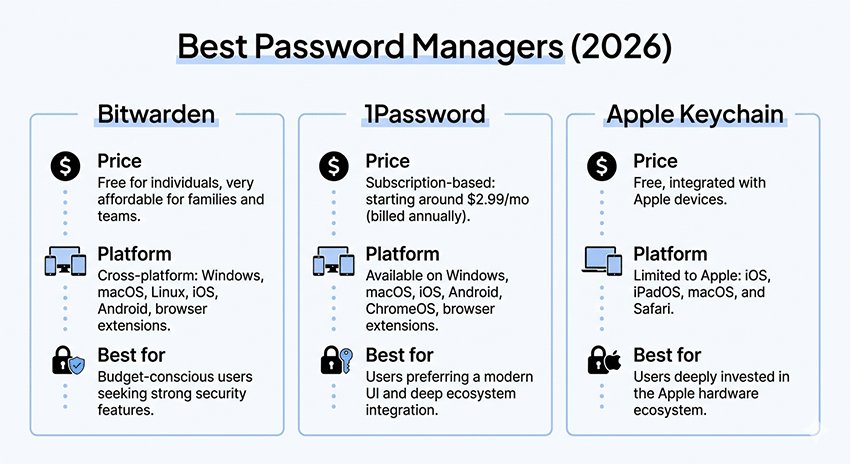
Best Password Managers Compared: Bitwarden vs 1Password vs Apple Keychain
| Password Manager | Price | Open Source | Platform Support | Best For |
|---|---|---|---|---|
| Bitwarden | Free tier available, $10/year premium | Yes | Windows, Mac, iOS, Android, all browsers | Budget-focused users, privacy enthusiasts |
| 1Password | $36/year | No | All platforms | Users who want polished UI and extra features |
| Apple Keychain | Free | No | Apple ecosystem only | iPhone/Mac users who want no extra cost |
| KeePassXC | Free | Yes | All platforms | Tech-savvy users who want full control |
Which Password Manager Should You Choose?
If you're on a budget, Bitwarden offers almost all the features you need for free and is open source, meaning anyone can audit the code for backdoors. This makes it our top pick for most users.
If you use only Apple devices, Apple Keychain is completely free, well-integrated with iCloud, and secure enough for most users. You don't need to install anything extra, and it works seamlessly across your iPhone, iPad, and Mac.
If you want the best user experience and don't mind paying, 1Password has the most polished interface and extra features like travel mode and advanced vault organization that make it worth the cost for many users.
Are Password Managers Safe to Use?
Yes — when you use a reputable one. All top password managers use zero-knowledge architecture, which means even the company can't see your passwords. The only way someone can access your vault is if they know your master password.
Two-Factor Authentication (2FA): Which Method Is Most Secure?
Even the strongest password can be compromised. Two-factor authentication adds a second layer of security by requiring a second code besides your password to log in. This means that even if your password leaks, attackers still can't get into your account without the second code.
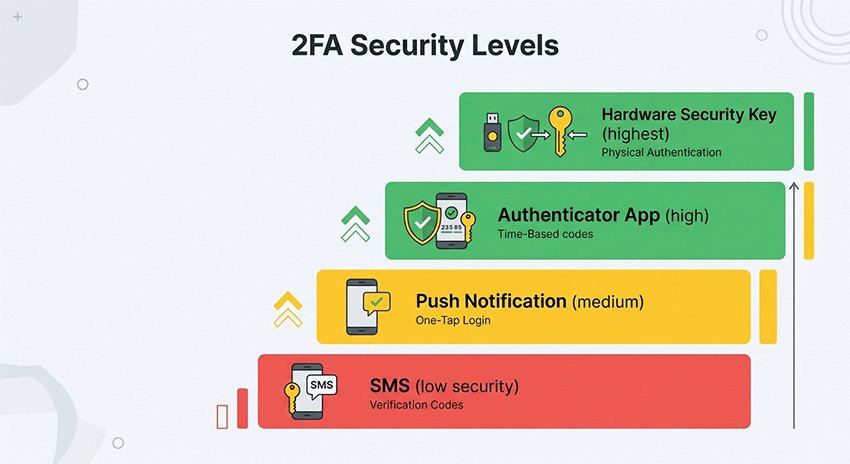
2FA Security Comparison: SMS vs Authenticator App vs Hardware Key
Not all 2FA methods are equally secure. Here's how they stack up for password safety:
| 2FA Method | Security Level | Convenience | Notes |
|---|---|---|---|
| Hardware Security Key (YubiKey) | ⭐⭐⭐⭐⭐ (Highest) | Medium | Most resistant to phishing and man-in-the-middle attacks |
| Authenticator App (Google Authenticator, Authy) | ⭐⭐⭐⭐⭐ | High | Better than SMS, no internet connection needed |
| Push Notifications (from password managers) | ⭐⭐⭐⭐ | Highest | Convenient, but slightly less secure than TOTP apps |
| SMS/Text Message | ⭐⭐ (Lowest) | Medium | Vulnerable to SIM swapping attacks. Avoid if possible. |
2FA Best Practices for Password Safety
Use a hardware security key for your most important accounts like email, banking, and your password manager itself if you want maximum security. While it's an extra cost, it provides unmatched protection against phishing and remote attacks.
For everything else, use an authenticator app. It's free, easy to set up, and much more secure than SMS. We recommend Google Authenticator for simplicity or Authy if you want cloud backup.
Finally, disable SMS 2FA wherever possible, especially on your critical accounts. SIM swapping attacks are becoming more common, and SMS provides very little protection against determined attackers.
How to Check if Your Password Has Been Compromised
Even if you do everything right, your password can still end up in a breach from a service you used. Regular checking helps you catch leaks early before attackers can use them to access your accounts.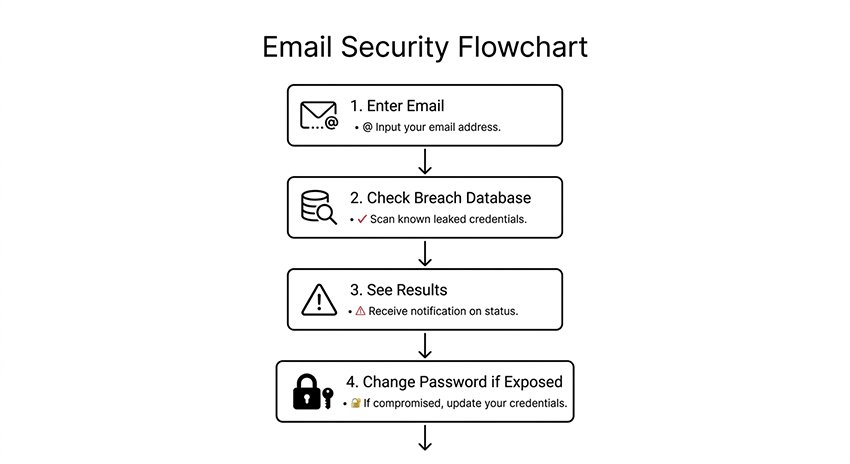
Best Tools to Check for Password Leaks Online
The most popular free tool is Have I Been Pwned?, which lets you check if your email has been exposed in any known data breach. The service is trusted by security professionals worldwide and doesn't store your email in any identifiable format.
Most modern password managers like Bitwarden and 1Password also include automatic leak monitoring that alerts you when your credentials are found in a new breach. This is the most convenient option because it happens automatically in the background.
Other good options include Google Password Checkup for Chrome users and Firefox Monitor from Mozilla.
How Often Should You Check for Compromised Passwords?
Set a reminder to check manually at least every six months. If you use a password manager with automatic monitoring, you'll get alerts automatically when new breaches are found, so you don't need to check manually very often.
Essential Password Safety Rules You Can Actually Follow in 2026
These simple rules are easy to follow and will drastically improve your password security. You've probably heard most of them before, but they're worth repeating because so many people still ignore them.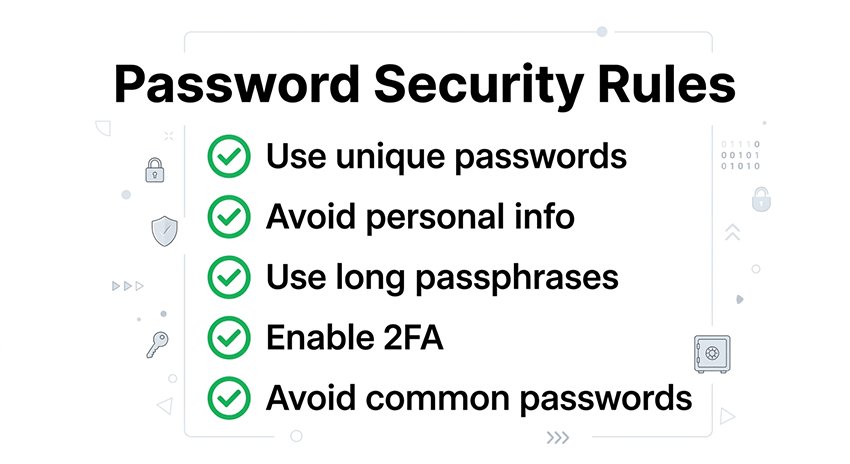
Why You Should Never Reuse Passwords Across Multiple Accounts
Password reuse is the number one mistake people make with password security. If one site gets breached and your password is exposed, attackers will try that same email and password on every other popular service. One weak reused password can compromise all your accounts.
A password manager solves this problem automatically by generating a unique password for every site, so you don't even have to think about it.
What Information Should You Never Use in Your Password?
Never use obvious personal information like names of your family members, pets, birthdays, or anniversaries. All of this information is often publicly available on social media, making it easy for attackers to guess.
What Are the Worst Passwords to Use in 2026?
Common passwords like "123456" and "password" will be cracked in less than a second, even with basic cracking tools. Any short password made entirely of common words is also unsafe today when AI can guess billions of combinations per minute.
Why Length Beats Complexity for Password Security
A long passphrase of four or five random words is much stronger than a short password with mixed characters and symbols. For example, "correct horse battery staple" is stronger than "P@ssw0rd1" and easier to remember.
Build a Complete Password Security System (Instead of Isolated Tools)
Many people think password security is just about picking strong passwords, but the most effective approach is to build a layered system where each component protects the next. Here's how the three core layers work together:
Login Security System:

Password → Stored in Password Manager
  ↓
Second Factor → Handled by 2FA
  ↓
Recovery → Sent to your Secure Primary Email- Password Manager (Storage Layer): This is where all your unique passwords are stored encrypted. It takes care of generating strong passwords and filling them in automatically.
- 2FA (Defense Layer): Even if your password leaks, attackers still can't get in without the second verification code. This stops most automated attacks.
- Secure Email (Recovery Layer): Your primary email is the key to resetting any password. It needs to be secured with your strongest password and 2FA because if you lose access to your email, you lose access to everything.
Temporary emails have a role in this system too — they just belong at the front line, for signing up to untrusted services where you don't want to share your real email. They don't belong in the recovery layer because they expire.
How Do Disposable Emails Fit Into Your Password Security Strategy
Many people ask: "Should I use a temporary email for password resets?"
The short answer is no. Save your temporary email for sign-ups on untrusted sites, but always use your primary, secure email for password recovery.
Password reset links are critical — if you lose access to your temporary email because it expires, you lose access to your account forever. Temporary emails are designed for privacy protection when signing up for services you don't trust, not for recovering your most important accounts.
Your primary email should always be secured with a strong unique password and 2FA, and it's the right place to receive password reset links. This way, you always control access to your accounts.
Best Practice for Using Temporary Emails with Passwords
When you sign up for an unknown or untrusted site, generate a temp mail plus a unique generated password from your password manager. If the service gets hacked or sells your data, your main email and important accounts stay safe.
For services you actually use and plan to keep, use your primary email plus a unique generated password. Enable 2FA, and password resets will go to an email you control permanently.
Frequently Asked Questions About Password Safety
Q: How many unique passwords do I need?
A: You need one unique password per account. That sounds like a lot, but a password manager handles this automatically. You only need to remember your master password, and the tool generates and stores unique passwords for every site.
Q: Is it safe to write down your master password?
A: For your master password, some people prefer to write it down and store it somewhere secure like a locked drawer or safe. This is actually safer than storing it digitally if your computer gets hacked. Just don't leave it out in the open where others can see it.
Q: How often should you change your passwords?
A: You only need to change your passwords if you know there's been a breach or someone else has seen it. For most accounts, changing every 12-18 months is fine. According to NIST guidelines, forcing password changes every 90 days actually leads to weaker passwords overall.
Q: Can I use a password manager on public Wi-Fi?
A: Yes, because your vault is encrypted end-to-end, so even if someone is monitoring the network, they can't read your data. That said, you should still use a VPN when you're on untrusted public Wi-Fi for any sensitive activities, including accessing your password manager.
Q: What is the most secure way to store passwords?
A: The most secure way to store passwords is using a reputable password manager with zero-knowledge encryption and two-factor authentication enabled on your password manager account. This combination keeps all your passwords encrypted and protected even if one of your devices is compromised.
Q: What is the safest password length in 2026?
A: Aim for at least 12 characters for most passwords, and 16 characters or more for your most important accounts like email and banking. Longer passwords are exponentially harder to crack with modern AI tools, and password managers make remembering long passwords easy.
Conclusion: What Is the Best Way to Keep Passwords Safe in 2026
Putting it all together, the best password security system isn't complicated:
- Get a password manager and use it to create unique passwords for every account
- Enable 2FA on all important accounts, preferably with an authenticator app or hardware key
- Check for breaches regularly — let your password manager do this automatically if possible
- Use temporary emails strategically — for sign-ups, not for password recovery
- Never reuse passwords — this is non-negotiable for good security
By following these steps, you'll drastically reduce your risk of being hacked and keep your online accounts and personal information safe. Password security is the foundation of online privacy, and investing a little time to set this up correctly will save you from a lot of headaches later.
Related Articles: