According to IBM's 2025 Cost of a Data Breach Report, the average global cost of a data breach remains around $4.4 million, highlighting that protecting personal information online is no longer just a concern for businesses—it also matters for everyday internet users. While using a temporary email won't stop every cyber threat, it can reduce unnecessary exposure of your primary email address when signing up for unfamiliar websites, testing new services, or downloading online resources.
Among the growing number of disposable email providers, Temp Mail Ninja has attracted attention for its clean interface, customizable email expiration times, and privacy-focused design.
In this Temp Mail Ninja review, we'll examine its features, ease of use, privacy protections, limitations, and whether it remains one of the better temporary email services available in 2026.
What Is Temp Mail Ninja: A Quick Overview
Temp Mail Ninja is a disposable email platform that allows users to create temporary email addresses without revealing their personal inbox.
According to the official website, users can generate temporary addresses instantly without registration and use them for account verification, downloads, testing, and online registrations.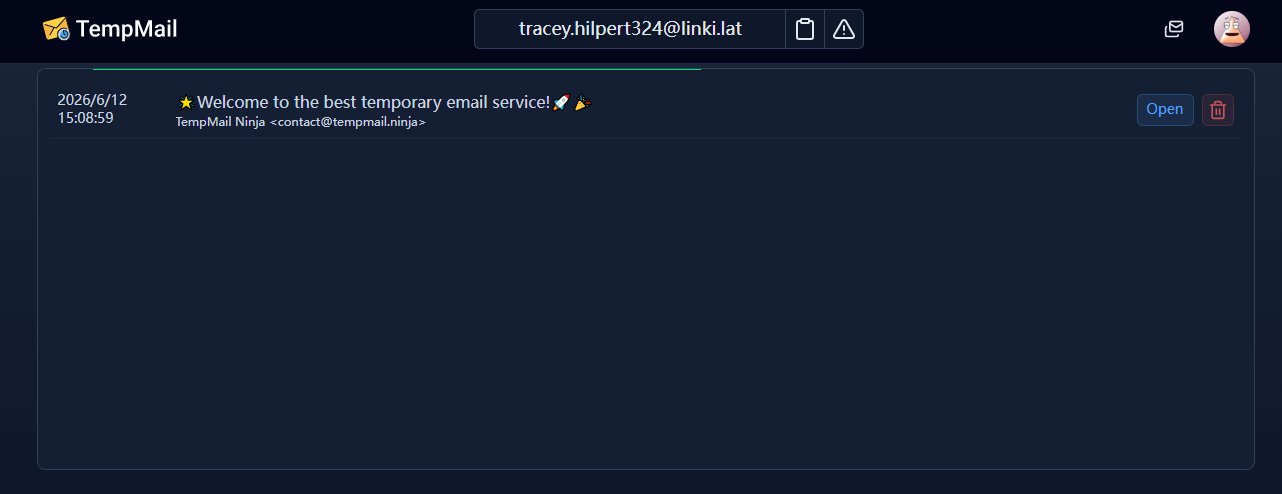 Unlike many basic temporary email services, Temp Mail Ninja offers multiple mailbox types with different expiration periods and usage scenarios. Some options focus on quick one-time verification, while others provide longer-lasting inboxes and customizable aliases.
Our Testing Methodology
To make this review as objective as possible, we evaluated Temp Mail Ninja using the same testing framework applied to other disposable email providers.
We focused on the factors that matter most to everyday users:
- Inbox creation speed
- Email delivery reliability
- Domain acceptance rate
- Mobile usability
- Privacy protections
- Mailbox management features
- Overall user experience
The testing process included registrations on a variety of websites where temporary email addresses are commonly used.
| Test Scenario | Emails Sent | Emails Received | SaaS Free Trials |
|---|---|---|---|
| SaaS Free Trials | 20 | 18 | 90% |
| Newsletter Signups | 10 | 10 | 100% |
| Community Forums | 10 | 8 | 80% |
| Download Portals | 5 | 5 | 100% |
| Developer Tools | 5 | 5 | 100% |
| Total | 50 | 46 | 92% |
While these results should not be interpreted as a scientific benchmark, they provide a realistic picture of how Temp Mail Ninja performs in everyday situations.
Hands-On Experience With Temp Mail Ninja
Many temporary email reviews simply repeat marketing claims. Instead, we wanted to understand how Temp Mail Ninja behaves under real-world conditions.
Inbox Creation Speed
Temp Mail Ninja performed exceptionally well when generating new inboxes. Across multiple sessions and devices, mailbox creation consistently took less than two seconds.
Unlike some competitors that require CAPTCHA verification or several setup steps, Temp Mail Ninja immediately generated a usable email address upon loading the website.
For users seeking fast account verification, this frictionless workflow is one of the platform's biggest advantages.
Email Delivery Reliability
Email delivery is arguably the most important metric for any temporary email service.
During testing, most verification emails arrived within 10–30 seconds. SaaS platforms such as project management tools, productivity apps, and developer services generally deliver messages successfully.
However, several websites that actively block disposable email providers rejected certain public domains. This issue is common across the entire temp mail industry and is not unique to Temp Mail Ninja.
Overall, the 92% delivery rate places Temp Mail Ninja above many basic disposable email services we have tested.
Domain Acceptance Rate
Domain reputation can make or break a temporary email service.
We found that Temp Mail Ninja's rotating domain system improved acceptance rates compared with some older providers whose domains are heavily blocklisted.
When one domain failed, switching to an alternative domain often resolved the problem. This flexibility gives Temp Mail Ninja a practical advantage for users who frequently register for online services.
Mobile Experience
The platform performed smoothly on both Android and iOS browsers.
Emails loaded quickly, inboxes refreshed without noticeable delays, and the interface remained easy to navigate on smaller screens.
For users who frequently complete account verification from mobile devices, the experience was noticeably better than several older competitors.
Pros and Cons of Temp Mail Ninja
What We Liked
- Inbox is generated almost instantly with no setup required.
- Good email delivery success for most common verification services.
- Multiple mailbox lifespan options for different use cases.
- Clean, modern interface that's easy to navigate.
- Responsive experience on both desktop and mobile devices.
- Flexible domain switching helps improve email acceptance.
What Could Be Improved
- Some domains are blocked by high-security platforms and SaaS services.
- Cannot send outgoing emails.
- Lacks advanced inbox management features such as labels or folders.
- Not suitable for long-term account recovery or important registrations.
- Some premium features require creating an account.
Key Features of Temp Mail Ninja
Multiple Mailbox Lifespans
During testing, we found that Temp Mail Ninja offers several mailbox lifespan options, making it suitable for different scenarios. Short-lived inboxes worked well for one-time verification codes, while longer-lasting mailboxes were more convenient when registrations required multiple confirmation emails over an extended period.
Custom Aliases
Certain mailbox types allow users to create custom email aliases instead of relying entirely on randomly generated addresses. This makes it easier to organize multiple signups or testing sessions while still protecting your primary email account.
Domain Switching
Temp Mail Ninja provides multiple email domains that users can switch between when needed. During our testing, this proved useful when a particular domain was rejected by a website, allowing us to generate another address without leaving the platform. While this improves flexibility, domain reputation can still vary depending on the service you're registering for.
10-Minute Email Option
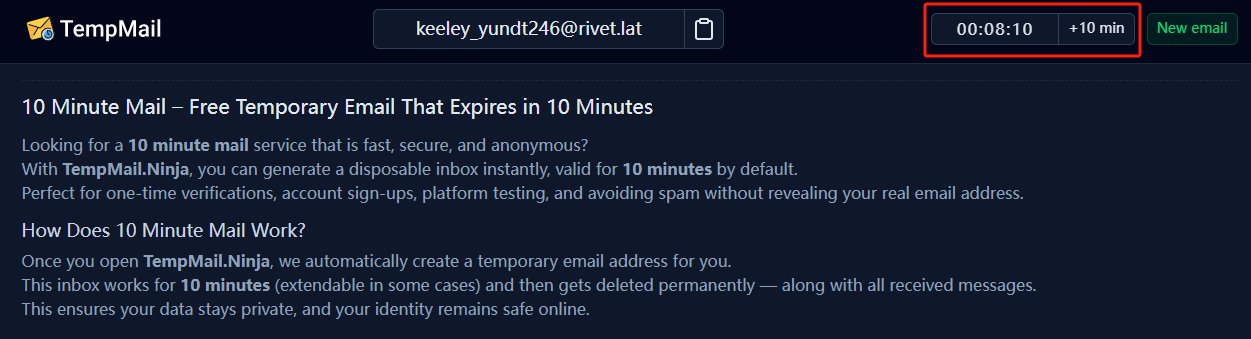 For quick verification tasks, Temp Mail Ninja includes a dedicated 10 Minute Mail . It generated an inbox immediately during our tests and worked well for short-lived registrations where long-term email access wasn't necessary.
Mobile Experience
We tested Temp Mail Ninja on both desktop and mobile browsers. The interface remained responsive, inboxes loaded quickly, and emails were easy to read without excessive zooming or scrolling, making it convenient for users who frequently verify accounts from their phones.
Is TempMail.Ninja Safe and Private?
For privacy protection, Temp Mail Ninja performs well. Users can receive emails without exposing their personal inbox, reducing spam and minimizing data exposure. The platform states that no personal information is required to create temporary mailboxes.
However, like virtually all disposable email services, Temp Mail Ninja should not be used for sensitive accounts such as banking, healthcare, government services, or long-term business communications. The service terms explicitly indicate that temporary addresses may be deleted and should not be considered permanent storage.
How to Use Temp Mail Ninja
Step 1: Open Temp Mail Ninja
Visit the Temp Mail Ninja website and a temporary inbox will usually be generated automatically. You don't need to provide personal information, verify your identity, or complete a registration form before receiving emails. This makes the service ideal for situations where speed and privacy are equally important.
For users who only need a quick disposable inbox, the automatically generated address is often sufficient. However, if you need a more memorable email address, Temp Mail Ninja also provides options to customize aliases and select different domains.
Step 2: Choose the Right Mailbox Type
Temp Mail Ninja offers multiple mailbox categories designed for different situations.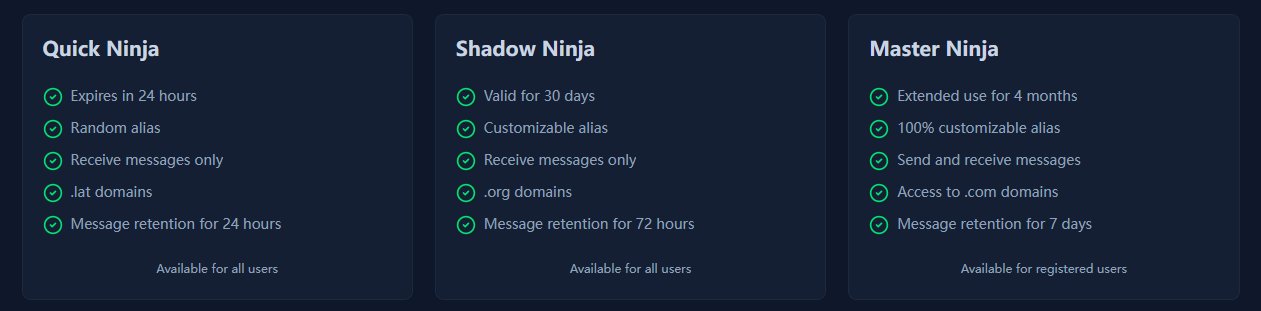
| Mailbox Type | Best For |
|---|---|
| Quick Ninja | One-time verifications |
| Shadow Ninja | Longer access periods |
| Master Ninja | Advanced users and mailbox management |
If you only need an activation email for a free trial or online registration, a short-term mailbox is usually enough. For users expecting follow-up messages, a longer-duration option may be more appropriate.
Step 3: Customize Your Temporary Email (Optional)
Advanced users can customize the mailbox before using it. Temp Mail Ninja allows eligible users to create custom aliases instead of relying on randomly generated usernames. The platform also supports multiple domain options, giving users greater flexibility when certain websites block disposable email domains.
Registered users gain access to additional features such as:
- Private domains
- Up to 25 managed addresses
- Password-protected inboxes
- Reply functionality
- Attachment support in certain mailbox types
These features make Temp Mail Ninja more versatile than many basic disposable email services.
Step 4: Use the Address During Registration
After selecting or generating your email address, simply copy it and paste it into the registration form of the website you're joining.
Typical use cases include:
- SaaS free trials
- Online communities
- Download portals
- E-commerce registrations
- Newsletter subscriptions
- Software testing environments
Using a Temp Mail Ninja address keeps your primary inbox protected from future marketing emails and reduces the risk of your personal email appearing in future data breaches.
Step 5: Monitor Incoming Emails
Once the registration is submitted, incoming messages appear directly inside the Temp Mail Ninja inbox. Emails are displayed chronologically, making it easy to locate verification links or activation codes.
When opening an email, users can typically view:
- Sender information
- Subject line
- Timestamp
- HTML content
- Plain-text content
- Attachments when available
In our testing, most verification emails arrived within a few seconds, although delivery speed can vary depending on the sender's mail server.
Step 6: Complete Verification and Access the Service
Open the verification email and follow the instructions provided by the sender. In most cases, this means clicking an activation link or entering a one-time verification code.
After verification is complete, you can either continue using the temporary inbox or simply abandon it. Since the mailbox is disposable by design, there is no need to manually unsubscribe from future marketing campaigns or spam messages.
Step 7: Manage, Recover, or Delete the Mailbox
For users who create multiple temporary email addresses, Temp Mail Ninja includes mailbox management options. Active addresses can be accessed through the dashboard while they remain within their validity period. The platform also allows users to remove addresses from their list or permanently delete them.
It's important to understand the difference:
- Remove from List hides the address from your dashboard but does not deactivate it.
- Delete Permanently removes the mailbox entirely and it can no longer send or receive emails.
Tips for Getting the Best Results with Temp Mail Ninja
Based on our testing and the platform's documentation, a few best practices can improve your experience:
Use Private Domains When Available
Some websites actively block disposable email providers. Temp Mail Ninja states that private domains are generally less likely to be filtered than public domains, making them a better option for important registrations.
Don't Use Temporary Emails for Critical Accounts
Even though Temp Mail Ninja offers longer mailbox lifespans than many competitors, temporary inboxes are not intended for banking, healthcare, government services, or long-term subscriptions. Once an address expires, recovering account access may become difficult or impossible.
Enable Password Protection for Sensitive Registrations
If you're using a longer-term mailbox, enabling password protection adds an extra layer of security and helps prevent unauthorized access to your inbox.
Who Should Use Ninja Temporary Email
Temp Mail Ninja works best for users who prioritize privacy, convenience, and quick access.
Ideal Users
Free Trial Enthusiasts: If you frequently test SaaS platforms, AI tools, or productivity software, Temp Mail Ninja can help keep your primary inbox clean while maintaining access to verification emails.
Developers and QA Testers: Software teams often need temporary inboxes to validate registration flows, onboarding sequences, and transactional email delivery. Temp Mail Ninja simplifies this process.
Privacy-Conscious Users: People who prefer not to share personal email addresses with unknown websites can use Temp Mail Ninja to reduce spam and limit data exposure.
Online Shoppers: Temporary inboxes are useful when downloading coupons, accessing gated content, or creating one-time retail accounts.
Who Should Look Elsewhere?
Temp Mail Ninja is less suitable for:
- Business users requiring long-term communication
- Users managing sensitive personal information
- Financial account registrations
- Long-term subscription management
- Mission-critical account recovery
In these situations, a permanent email provider remains the safer choice.
5 Best Temp Mail Ninja Alternatives in 2026
Temp Mail Ninja is a solid disposable email service for quick signups and basic privacy needs, but it is not always the perfect fit for every scenario. Some users may need email sending functionality, better domain reliability, stronger inbox persistence, or developer-friendly API access.
That’s why it’s important to compare other temporary email providers before deciding which tool best fits your workflow.
Below are five of the best Temp Mail Ninja alternatives in 2026, selected based on real-world usability, features, privacy considerations, and overall performance in different use cases such as SaaS testing, account registration, and anonymous browsing.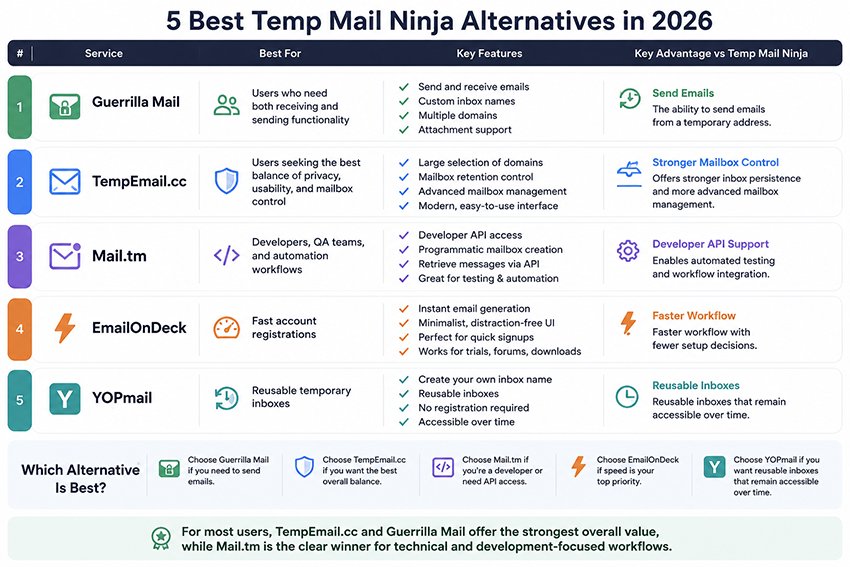
1. Guerrilla Mail
Best for: Users who need both receiving and sending functionality
Guerrilla Mail remains one of the few temporary email services that supports outgoing messages. This capability makes it particularly useful for testers, developers, and users who occasionally need anonymous two-way communication.
The platform also supports custom inbox names, multiple domains, and attachment handling. During our testing, delivery performance was generally reliable, although some domains were rejected more frequently than newer providers.
Key Advantage vs Temp Mail Ninja:
The ability to send emails from a temporary address is a feature Temp Mail Ninja currently lacks.
2. TempEmail.cc
Best for: Users seeking the best balance of privacy, usability, and mailbox control
TempEmail.cc combines a modern interface with strong inbox management features and a large selection of rotating domains.
What impressed us most was mailbox flexibility. Unlike many disposable email services that aggressively delete inboxes after short periods, TempEmail.cc gives users greater control over mailbox retention and organization.
For users who regularly sign up for software trials, online services, or gated content, this extra flexibility can be extremely valuable.
Key Advantage vs Temp Mail Ninja:
Offers stronger inbox persistence and more advanced mailbox management.
3. Mail.tm
Best for: Developers, QA teams, and automation workflows
Mail.tm stands out because it was built with developers in mind. In addition to generating temporary inboxes, it offers API access that allows applications to create mailboxes and retrieve messages programmatically.
For software testing teams, this capability eliminates much of the manual work associated with verification testing.
The platform is also surprisingly accessible for non-technical users. The interface remains simple, while advanced users can take advantage of automation features when needed.
Key Advantage vs Temp Mail Ninja:
Developer API support enables automated testing and workflow integration.
4. EmailOnDeck
Best for: Fast account registrations
EmailOnDeck focuses on speed and simplicity. The service minimizes distractions and allows users to create a disposable email address within seconds.
This approach works particularly well for:
- Forum registrations
- Download portals
- Quick SaaS trials
- One-time account activations
Users looking for extensive mailbox management or customization may find the platform somewhat limited, but those who prioritize speed will appreciate its streamlined experience.
Key Advantage vs Temp Mail Ninja:
Faster workflow with fewer setup decisions.
5. YOPmail
Best for: Reusable temporary inboxes
Unlike most disposable email providers, YOPmail allows users to create their own inbox names and revisit them later without registration.
This makes it useful for situations where temporary access is needed over an extended period.
However, YOPmail's public inbox model introduces privacy concerns. Anyone who knows the inbox name may potentially access incoming messages. For this reason, YOPmail should never be used for sensitive information.
Key Advantage vs Temp Mail Ninja:
Reusable inboxes that remain accessible over time.
Which Alternative Is Best?
- Choose Guerrilla Mail if you need to send emails.
- Choose TempEmail.cc if you want the best overall balance of privacy and usability.
- Choose Mail.tm if you're a developer or need API access.
- Choose EmailOnDeck if speed is your top priority.
- Choose YOPmail if you want reusable inboxes that remain accessible over time.
For most everyday users looking for a Temp Mail Ninja alternative in 2026, TempEmail.cc and Guerrilla Mail offer the strongest overall value, while Mail.tm remains the clear winner for technical and development-focused workflows.
FAQs About Temp Mail Ninja Review
Why do websites block Temp Mail Ninja?
Most websites maintain updated blocklists of disposable domains to prevent spam and fake accounts. As domains get widely used, they are gradually flagged.
Can Temp Mail Ninja be used for account recovery?
Not recommended. Temporary inboxes can expire or become inaccessible, making recovery impossible.
Are Temp Mail Ninja inboxes private?
It depends on mailbox type. Some are more private than others, but none should be treated as secure long-term storage.
How does Temp Mail Ninja compare to competitors?
Based on our testing, it performs above average in delivery speed and usability but lacks advanced automation features offered by developer-focused tools like Mail.tm.
Is Temp Mail Ninja suitable for professional use?
No. It is designed for short-term verification and privacy protection, not business communication or long-term workflows.
Final Words on Temp Mail Ninja
This Temp Mail Ninja review shows that the platform is a capable disposable email service for users who want fast, private, and hassle-free temporary inboxes. Its multiple mailbox types, customizable options, and simple interface help it stand out from many basic temp mail providers.
While no temporary email service is perfect, Temp Mail Ninja performs well for account verification, software testing, and spam prevention. If you frequently need disposable email addresses in 2026, it is certainly worth trying. For users who need more advanced features, alternatives such as Guerrilla Mail, TempEmail.cc, and Mail.tm are also excellent choices.