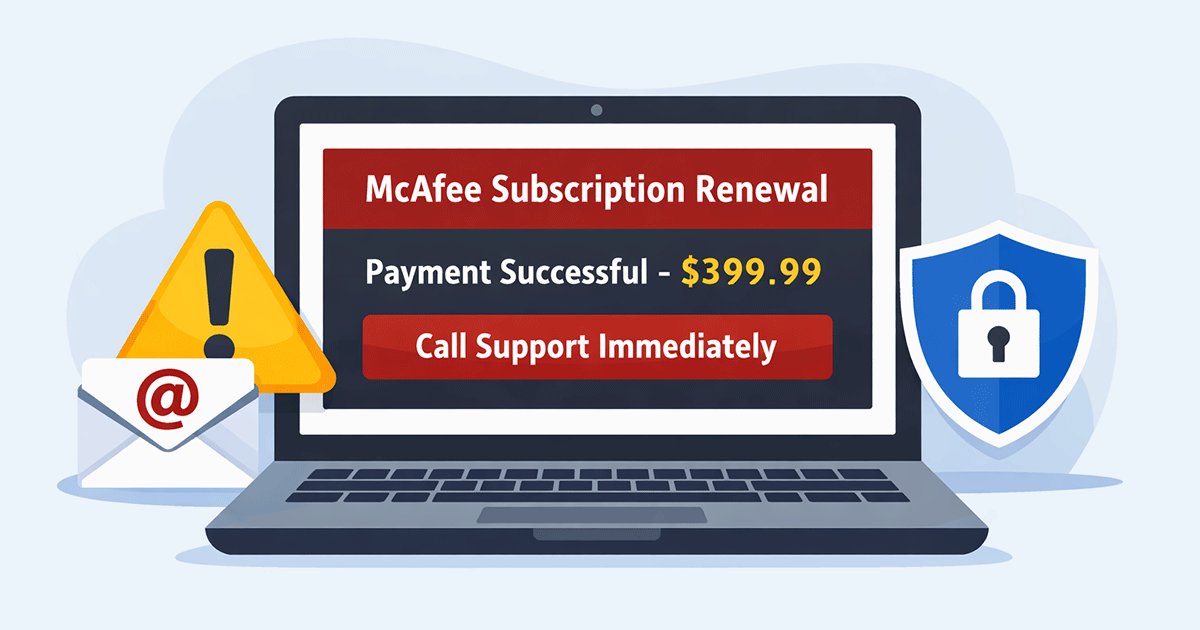
In recent years, many internet users have reported receiving suspicious emails claiming that their McAfee antivirus subscription has been renewed automatically. These messages often appear professional and may include subject lines such as “McAfee Subscription Renewed,” “Payment Successful,” or “Invoice Attached.” At first glance, the email may look like a legitimate notification from McAfee, which makes it easy for recipients to panic—especially if they do not remember purchasing the service.
These emails typically contain alarming details designed to pressure the recipient into acting quickly. For example, the message may claim that $299, $349, or even $399 has already been charged to your account for a subscription renewal. It often provides a customer support phone number and instructs you to call immediately if you want to cancel the charge. In some cases, the email also includes a link to cancel the subscription or download an attached invoice. The goal is to create urgency so that victims respond without carefully checking the legitimacy of the message.
In reality, these messages are part of a widespread McAfee email scam. Cybercriminals send fake billing notifications to trick people into calling fraudulent support numbers, sharing personal information, or granting remote access to their computers. This type of phishing attack—commonly known as the McAfee renewal scam or fake McAfee email—has become increasingly common in recent years.
In this guide, we’ll explain how the McAfee email scam works, how to recognize fake renewal emails, and what steps you should take if you receive one. Understanding these warning signs can help you protect your inbox, your personal information, and your money.
What Is the McAfee Email Scam?
Quick Warning Signs of a McAfee Email Scam
If you receive an email claiming your McAfee subscription was renewed, watch for these red flags:
- Unexpected charge of $299–$499
- Email sent from non-mcafee.com domains
- Urgent instructions to call support immediately
- Attachments labeled invoice or receipt
- Requests to install remote access software
If you notice any of these signs, the email is likely a McAfee phishing scam.
According to cybersecurity reports and consumer protection agencies, fake antivirus renewal scams have become one of the most common phishing techniques used by cybercriminals in recent years.
The McAfee email scam is a type of phishing attack where cybercriminals impersonate the well-known cybersecurity company McAfee in order to trick people into revealing personal information or sending money. These scam emails are designed to look like legitimate billing notifications, making many recipients believe that their antivirus subscription has been renewed or that a payment has already been processed.
Typically, the message claims that your McAfee subscription has been automatically renewed and that a large charge has been applied to your account. The email may include details such as a subscription renewal notice, an invoice confirmation, or a payment receipt to make the message appear authentic. In many cases, the email also displays a fake invoice number, renewal date, and billing amount to increase credibility.
One of the most suspicious aspects of these emails is the unexpected charge. Victims often see amounts such as $299, $349, or $399, even though they never purchased or renewed any McAfee products. To create urgency, the email usually instructs the recipient to call a customer support number immediately if they want to cancel the transaction or request a refund.
This tactic is known as a panic-based scam strategy. Scammers intentionally create fear by suggesting that a large payment has already been processed. When people panic about losing money, they are more likely to act quickly without verifying the email’s authenticity. Once the victim calls the provided phone number or follows the instructions in the message, the scammers attempt to obtain sensitive information, install remote software, or trick the victim into making a payment.
Understanding how the McAfee renewal email scam works is the first step toward recognizing and avoiding these deceptive phishing attempts.
How the McAfee Email Scam Works (Step-by-Step)
The McAfee email scam follows a predictable pattern designed to trick victims into acting quickly. By understanding the typical steps used in this phishing scheme, it becomes much easier to recognize the warning signs before any damage is done. In most cases, scammers rely on urgency, confusion, and trust in the brand name of McAfee to manipulate victims.
Step 1 – You Receive a Fake Invoice Email
The scam usually begins with an email that appears to be an official billing notification. At first glance, the message may look convincing because it often includes elements that resemble legitimate corporate emails. For example, the email may display the McAfee logo, an invoice number, a subscription ID, and a message confirming that your antivirus subscription has been renewed.
Many fake emails also include a payment confirmation section that lists a charge supposedly applied to your account. The amounts are often intentionally high to create alarm, such as $299, $349, or even $499. Even users who have never purchased McAfee products may still receive these emails, since scammers send them in large batches hoping that some recipients will panic.
Step 2 – The Email Creates Panic
Once the recipient sees the unexpected charge, the email attempts to escalate the situation by creating urgency. Common messages include statements like:
- “Your subscription has been renewed.”
- “Payment processed successfully.”
- “Contact us immediately if this charge was unauthorized.”
These phrases are designed to trigger fear that money has already been withdrawn. The email often includes a support phone number and encourages the recipient to call immediately to cancel the charge. This panic tactic is one of the most common strategies used in phishing scams.
Step 3 – Victims Call the Fake Support Number
If the recipient calls the number listed in the email, the call is answered by a scammer posing as a McAfee customer support agent. The scammer may sound professional and claim they can help cancel the subscription or issue a refund.
During the conversation, the attacker will try to gain the victim’s trust and guide them through a series of steps that supposedly “resolve the billing problem.”
Step 4 – Scammers Try to Access Your Computer
In many cases, the fake support agent asks the victim to install remote access software so they can “assist” with the refund process. Programs such as remote desktop tools allow scammers to control the victim’s computer.
Once connected, they may attempt to:
- Access files on the computer
- Request login credentials
- Guide the victim to log into online banking accounts
The scammer may also claim that a refund requires verification of payment details.
Step 5 – Money or Personal Data Is Stolen
The final goal of the scam is to steal valuable information or money. Victims may be asked to provide credit card numbers, banking details, or other sensitive personal data. In some cases, scammers manipulate victims into making payments directly through bank transfers or gift cards.
By the time the victim realizes the situation, the scammers may already have obtained financial information or installed malicious software on the device. Understanding this step-by-step process is essential for identifying the McAfee renewal email scam and avoiding its traps.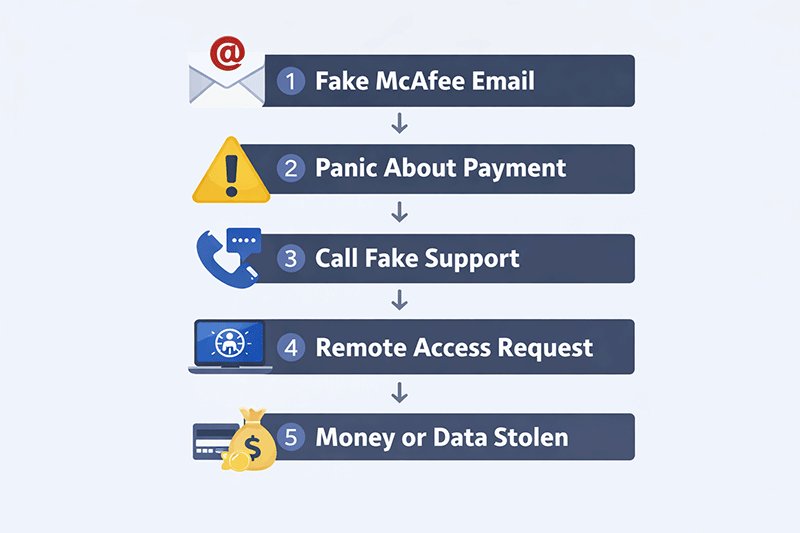
Common Types of McAfee Scam Emails
Not all McAfee phishing emails look exactly the same. In fact, scammers use several variations of the same tactic to increase their chances of tricking victims. While the wording and design may differ slightly, these messages usually impersonate official notifications from McAfee and claim that a payment or subscription action has occurred. Understanding the most common types of McAfee scam emails can help you recognize them more quickly.
McAfee Renewal Email Scam
The McAfee renewal email scam is the most frequently reported version. In this scam, the email claims that your antivirus subscription has been automatically renewed and that a payment has already been processed.
The message may include statements such as:
“Your McAfee protection has been renewed successfully.”
“Your subscription has been extended for another year.”
To make the email appear legitimate, scammers often include details such as a subscription ID, renewal date, and a large charge amount. Even if the recipient has never used McAfee products, the email may still appear convincing enough to cause concern. The message usually encourages the user to call a support number immediately if they wish to cancel the renewal.
McAfee Invoice Scam
Another common variation is the McAfee invoice scam. Instead of focusing on a subscription renewal, the email claims that a payment invoice has already been generated or processed.
These messages often include elements such as:
- An attached invoice document
- A payment receipt
- An order or transaction number
The attachment is meant to make the email appear official. In some cases, the file may simply contain fake billing details, while in more dangerous situations it could include malicious links or downloads. The email typically urges the recipient to review the invoice and contact support if the charge is incorrect.
McAfee Refund Scam
The McAfee refund scam is another variation that targets victims who believe they were charged incorrectly. In this scenario, scammers claim they can help process a refund for the supposed subscription payment.
However, the “refund process” usually involves asking the victim to install remote access software so the scammer can “assist” with the transaction. Once remote access is granted, the attacker may attempt to control the computer, access financial information, or manipulate the victim into transferring money. This technique is commonly used in refund scams, which rely on trust and technical manipulation to steal funds.
Real Examples of Fake McAfee Emails
One reason the McAfee email scam is so effective is that the messages often look surprisingly realistic. Scammers carefully design these emails to imitate official notifications from McAfee, using similar formatting, logos, and billing language. For many recipients, the email may appear legitimate at first glance—especially if they are not familiar with how phishing scams work.
Most fake emails begin with alarming subject lines that suggest a recent purchase or subscription renewal. Common examples include:
- “McAfee Subscription Renewal Confirmation”
- “Payment Successful – McAfee Antivirus”
- “McAfee Security Invoice”
These subject lines are intentionally designed to make the recipient believe that a payment has already been processed. Once the email is opened, the message typically claims that a subscription has been renewed automatically and that a specific amount has been charged to the user’s account.
Another common element in these scams is the large payment amount listed in the invoice. Fake McAfee emails frequently display charges such as $299.99, $349.99, or $499.99. The high price is not accidental—it is meant to shock the recipient and push them to react quickly without verifying the email.
Inside the message, scammers often include several details to make the email look authentic. For example, the email may display a fake invoice ID, an order number, or a transaction date. It may also provide a customer support phone number, encouraging the recipient to call immediately if they want to cancel the charge.
However, there are usually clear warning signs. Many scam emails come from suspicious sender addresses or random domains that have nothing to do with the official McAfee website. Recognizing these patterns can help you quickly identify a fake McAfee email before responding to it.
How to Identify a Fake McAfee Email
Because the McAfee email scam is designed to look convincing, many people find it difficult to tell whether a message is legitimate. However, most phishing emails share several common warning signs. By paying attention to these details, you can quickly determine whether an email claiming to be from McAfee is real or part of a scam.
Suspicious Sender Email Address
One of the easiest ways to detect a fake email is to check the sender’s address. Scam emails often come from domains that look similar to legitimate companies but are not actually associated with the official brand.
For example, phishing emails may come from addresses such as:
At first glance, these addresses may appear convincing because they include the word “mcafee.” However, legitimate emails from the company typically come from official domains such as:
- @mcafee.com
If the sender’s domain looks unusual, contains extra words, or does not match the official website, the message is likely part of a phishing attempt.
Unexpected Charges
Another major red flag is receiving a billing notification for a product you never purchased. Many scam emails claim that your antivirus subscription has been automatically renewed and that a large amount has been charged.
If you:
- Never bought a McAfee subscription
- Did not enable automatic renewal
then the email is almost certainly fraudulent. Scammers rely on confusion and hope that some recipients will assume the charge is real and attempt to cancel it quickly.
Urgent or Threatening Language
Phishing emails often use urgent language to pressure victims into acting immediately. The message may include phrases such as:
- “Immediate action required”
- “Final warning”
- “Account suspension notice”
These statements are meant to create fear and prevent recipients from carefully checking whether the email is legitimate.
Suspicious Attachments
Many scam emails also include attachments that supposedly contain invoices or payment details. These files are often presented as proof that a transaction occurred.
Common examples include:
- ZIP files
- HTML files
- PDF invoices
Opening these attachments can be risky because they may contain malicious links or instructions that lead to phishing websites. If you receive an unexpected attachment related to a payment you did not authorize, it is safest to avoid opening it and delete the email instead
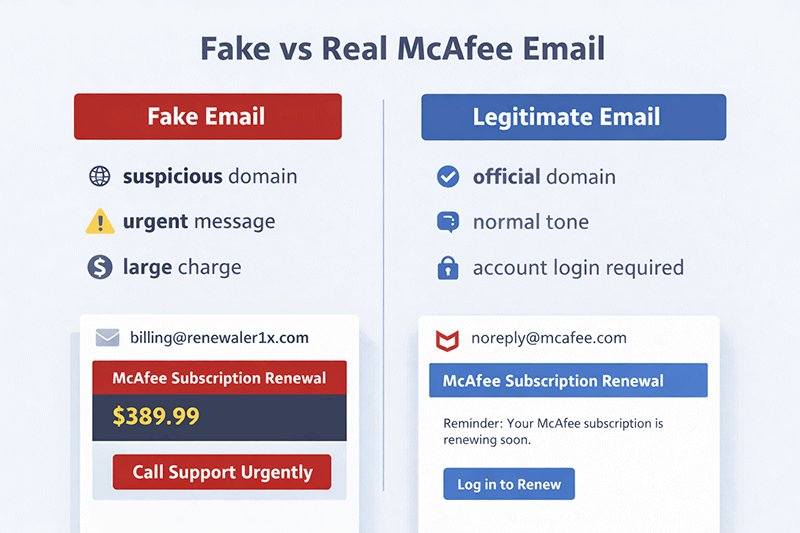
Table:Fake vs Real McAfee Email
| Feature | Fake McAfee Email | Legitimate McAfee Email |
|---|---|---|
| Sender Domain | random domains like mcafee-renewal.com | official domain @mcafee.com |
| Tone | urgent and alarming | neutral and informative |
| Payment Claims | large unexpected charges ($299-$499) | only appears if you actually have a subscription |
| Phone Numbers | asks you to call immediately | rarely asks you to call support |
| Attachments | suspicious invoice files | usually directs you to official account login |
| Refund Process | asks for remote access | handled through official website |
What To Do If You Receive a McAfee Scam Email
If you receive a suspicious message related to the McAfee email scam, it’s important to stay calm and avoid reacting immediately. These phishing emails are designed to create panic so that victims act quickly without verifying the information. By following a few simple steps, you can protect yourself from falling victim to scammers impersonating McAfee.
1. Do Not Click Any Links
The first and most important rule is never click on links inside a suspicious email. Scam messages often contain links that lead to fake websites designed to collect personal information such as login credentials, credit card numbers, or banking details. Even if the link claims to cancel a subscription or verify a payment, it may redirect you to a phishing page that looks legitimate but is actually controlled by scammers.
2. Do Not Call the Phone Number
Many fake McAfee emails include a customer support phone number and instruct recipients to call immediately to cancel a supposed charge. This number is usually operated by scammers posing as technical support agents. Once you call, they may attempt to gain your trust and convince you to install remote access software or share sensitive financial information. For this reason, you should never contact the phone number listed in a suspicious email.
3. Report the Email
Reporting phishing emails helps email providers identify scams and protect other users. Most email services have built-in tools for reporting suspicious messages.
For example, you can report the email through:
- Gmail using the “Report phishing” option
- Microsoft Outlook by marking the message as phishing or junk
Once reported, the provider may block similar messages from reaching other users.
4. Delete the Email
After reporting the message, the safest step is to delete the email from your inbox. Removing the message reduces the chance of accidentally clicking a link or opening an attachment later. If you continue receiving similar scam emails, make sure your spam filters are enabled to automatically block them in the future.
What If You Already Clicked the Scam Email?
If you have already clicked a link or interacted with a McAfee scam email, it’s crucial to act quickly to minimize potential damage. Scammers often rely on immediate access to your personal information, financial accounts, or even your computer. The faster you respond, the better your chances of protecting your data and funds.
1. Disconnect from the Internet
The first step is to disconnect your device from the internet. This prevents any ongoing data transmission or remote access that scammers may have initiated. If you were asked to install remote access software, disconnecting immediately can stop the attacker from controlling your computer.
2. Run a Full Antivirus Scan
Next, run a comprehensive antivirus and anti-malware scan on your device. Make sure your security software is up to date. This step helps detect and remove any malicious files or software that may have been installed after interacting with the scam email.
3. Change Your Passwords
If you entered any login credentials after clicking the scam link, change your passwords immediately. Start with critical accounts such as email, online banking, and other financial services. Enable two-factor authentication (2FA) wherever possible to add an extra layer of security.
4. Contact Your Bank
If you provided any financial information, contact your bank or credit card provider immediately. Inform them about the potential fraud and monitor your accounts for unauthorized transactions. They may advise temporarily freezing your card or issuing a new one.
Additional Step – Remove Remote Software
If you installed any remote access program as instructed by the scammers, uninstall it immediately. Follow up with another antivirus scan to ensure no residual malware remains. Acting promptly can prevent further unauthorized access and protect your sensitive information.
Why You Are Receiving So Many Scam Emails
Receiving frequent scam emails, including McAfee phishing attempts, is often a result of how your email address circulates online. Cybercriminals rely on a variety of methods to gather email addresses, a practice known as email harvesting, to target potential victims with spam and scams.
One common reason is email leakage. Your email may have been exposed through a security breach or by sharing it on websites, forums, or social media. Once leaked, scammers can add your address to large mailing lists used for phishing campaigns.
Another factor is data breaches. Many websites store user data, including email addresses, and if these sites are compromised, your email can end up in the hands of cybercriminals. Signing up for numerous services without verifying their security can increase this risk.
Registering on multiple websites can also lead to your email being sold to marketing companies or malicious actors. Even seemingly harmless websites may sell their user data, intentionally or unintentionally, which can result in a surge of spam emails.
Email harvesting is the technical process behind this: automated bots crawl the internet looking for valid email addresses to collect. Once gathered, these addresses are often used in large-scale phishing campaigns like the McAfee email scam.
Understanding these causes highlights the importance of protecting your inbox and considering alternatives such as temporary email services, which help keep your real email address private and reduce exposure to scams.
How Temp Mails Can Protect Your Inbox
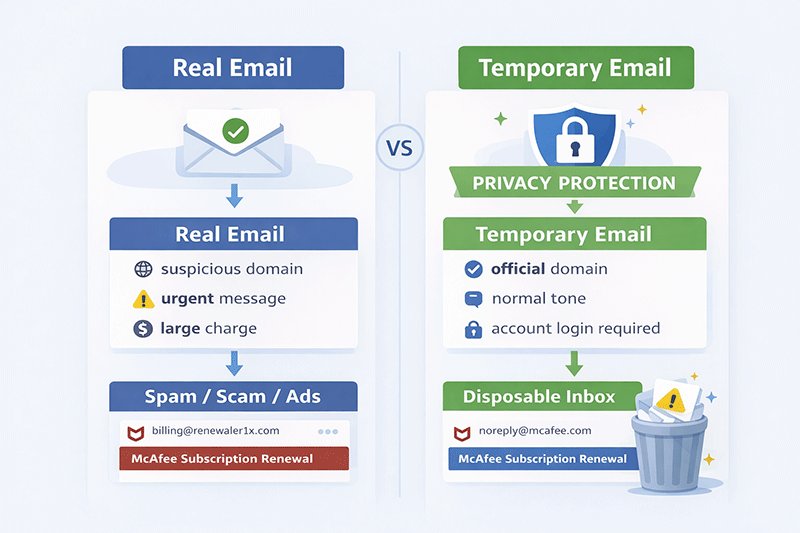
One of the most effective ways to reduce the risk of falling victim to scams like the McAfee email scam is to use a temp mail. Temporary email services provide disposable addresses that you can use for online signups, downloads, or free trials, without revealing your real inbox. This helps protect your personal information from cybercriminals and marketers alike.
The advantages of temporary emails are clear:
- Do not expose your real email address: By using a disposable address, your primary inbox remains private and inaccessible to scammers who harvest email addresses online.
- Prevent spam: Since temporary emails are only used for a short period, spam messages, phishing attempts, and unsolicited marketing emails never reach your main inbox.
- Automatic deletion: Most temporary email services automatically delete messages after a short time, ensuring that any scam attempts are discarded before you even see them.
For example, using a service like TempEmail.cc allows you to receive verification codes or confirm website registrations without giving away your real email address. Even if a scammer tries to target the temporary address, it will expire quickly, keeping your personal inbox safe from phishing attacks and spam campaigns.
By incorporating temporary emails into your online habits, you significantly reduce your exposure to scams and maintain control over your digital privacy. This simple step is a proactive defense against email-based threats and ensures your main inbox stays secure.
How to Stop Scam Emails Permanently
Preventing scam emails from reaching your inbox requires a combination of technical tools and careful online habits. While no method is 100% foolproof, implementing these strategies can drastically reduce the number of phishing attempts and spam messages you receive.
1. Use Spam Filters: Most email providers, including Gmail and Microsoft Outlook, offer advanced spam filtering options. Make sure these filters are enabled and regularly updated to automatically detect and move suspicious messages out of your inbox.
2. Use Email Aliases: Many services allow you to create email aliases for different online accounts. This keeps your main email address private and allows you to disable an alias if it starts receiving spam.
3. Use Temporary Emails: For one-time registrations, downloads, or free trials, consider using a best temporary email service like TempEmail.cc. This prevents your real inbox from being exposed to data harvesting and phishing campaigns.
4. Avoid Public Email Exposure: Be cautious about sharing your primary email address publicly on forums, social media, or untrusted websites. Every exposure increases the likelihood of your address being harvested by scammers.
By combining these methods—filtering spam, using aliases and temporary emails, and limiting public exposure—you can significantly reduce the volume of scam emails you receive and protect your inbox from threats like the McAfee email scam. Consistently applying these practices builds a stronger line of defense against phishing and spam.
FAQs About the McAfee Email Scam
Is the McAfee email scam real?
Yes. Scammers frequently impersonate McAfee to send fake renewal or invoice emails. These phishing emails are designed to look like official notifications and often include urgent language or fake charges to trick recipients into calling a fraudulent support number or sharing sensitive information.
Does McAfee send renewal emails?
Yes, McAfee does send renewal notifications for its products. However, legitimate emails always come from official domains such as @mcafee.com. Real emails will never pressure you to call random phone numbers or install remote access software. If an email seems suspicious, it is safest to verify it directly through your McAfee account or the official website.
What happens if I call the phone number in a scam email?
If you call the number listed in a fake McAfee email, scammers may pretend to be technical support agents. They often try to convince victims to install remote access software, share login credentials, or provide payment information. This can result in stolen money or compromised personal data.
Why did I receive a McAfee email if I never purchased it?
Scammers typically send phishing emails to thousands of random addresses at the same time. They do not know whether you actually use McAfee products. Their strategy is to rely on panic—hoping that some recipients will assume the charge is real and contact the fake support number.
How can I stop receiving scam emails?
You can reduce the risk of phishing emails and spam by taking several precautions:
- Enable spam filters on your email account to automatically detect and block suspicious messages.
- Avoid sharing your email address publicly on websites, forums, or social media platforms.
- Use temporary email services like TempEmail.cc for one-time signups, free trials, or downloads, keeping your primary inbox private and secure.
By following these steps, you can protect yourself from the McAfee email scam and other phishing attempts while keeping your personal information safe.
Can opening a scam email infect my computer?
Simply opening an email usually does not infect your device. However, clicking links, downloading attachments, or installing software from the message can expose your computer to malware or phishing websites.
How do scammers get my email address?
Cybercriminals often collect email addresses through data breaches, email harvesting bots, and marketing databases. If your email has been exposed on multiple websites or publicly shared online, it becomes more likely to appear in spam and phishing campaigns.
Are McAfee renewal emails legitimate?
Yes, legitimate renewal emails can be sent by McAfee if you have an active subscription. However, these emails will always come from official domains such as @mcafee.com and will never pressure you to call random phone numbers or install remote software.
Conclusion
The McAfee email scam has become increasingly common, targeting unsuspecting users with fake invoices and alarming messages. At its core, this scam relies on creating panic—tricking recipients into believing that a large payment has been processed and prompting them to act hastily. The typical tactics include fraudulent invoice attachments, urgent language, and fake support numbers, all designed to extract money or sensitive information from victims.
To stay safe, it is crucial never to click links, download attachments, or call phone numbers included in suspicious emails. Always verify any unexpected charges directly through official channels, and remain vigilant when handling emails that request personal or financial information.
Ultimately, protecting your email privacy is one of the most effective ways to reduce the risk of phishing attacks and spam. Using strong security practices, spam filters, and temporary email services can help safeguard your inbox, keeping your personal information secure and minimizing exposure to scams like the McAfee email scam.