Kotak Jawapan Pantas
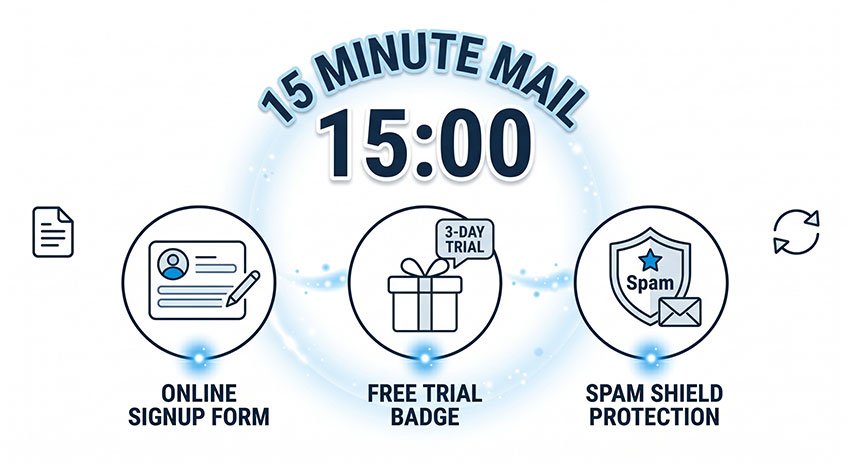
15 Minute Mail ialah perkhidmatan e-mel sementara yang menjana peti masuk pakai buang yang akan tamat tempoh secara automatik selepas 15 minit.
Sistem jenis ini biasanya dikelaskan dalam rangka kerja keselamatan e-mel sebagai mekanisme e-mel pakai buang / peti mel sementara, satu kategori yang dirujuk secara meluas dalam sistem penapisan anti-spam yang digunakan oleh penyedia utama seperti Gmail dan Outlook, serta didokumenkan dalam pangkalan data pencegahan penyalahgunaan industri seperti Spamhaus.
Ia digunakan untuk menerima e-mel pengesahan tanpa mendedahkan alamat e-mel sebenar anda.
Terbaik untuk:
- Pendaftaran dan pengesahan sekali guna
- Percubaan percuma dan muat turun
- Mengelakkan e-mel spam
Tidak sesuai untuk:
- Akaun perbankan atau kewangan
- E-mel pemulihan kata laluan
- Akaun jangka panjang
15 Minute Mail ialah perkhidmatan e-mel pakai buang yang membolehkan pengguna mencipta peti masuk sementara untuk pengesahan jangka pendek tanpa menggunakan alamat e-mel peribadi.
Ia tergolong dalam kategori perkhidmatan e-mel sementara yang lebih luas, yang diiktiraf secara meluas dalam sistem keselamatan e-mel dan klasifikasi anti-spam sebagai saluran identiti yang jangka hayatnya singkat atau tahap kepercayaannya rendah. Klasifikasi serupa dirujuk dalam rangka kerja pencegahan spam peringkat industri dan sistem penapisan yang digunakan merentas penyedia e-mel utama, termasuk pangkalan data anti-spam awam seperti Spamhaus.
Tidak seperti sistem e-mel tradisional, alat e-mel pakai buang direka untuk penggunaan identiti jangka pendek dan bukannya komunikasi atau penyimpanan jangka panjang.
Panduan ini menjelaskan cara 15 Minute Mail berfungsi, bila untuk menggunakannya, batasannya, dan cara ia dibandingkan dengan perkhidmatan e-mel sementara lain seperti 5 minute mail dan 10 minute mail.
Apakah Itu 15 Minute Mail (Penjelasan Perkhidmatan E-mel Sementara)
15 Minute Mail ialah perkhidmatan e-mel sementara yang menjana peti masuk rawak yang tamat tempoh secara automatik selepas 15 minit.
Ia membolehkan pengguna menerima e-mel pengesahan, pautan pengaktifan, dan kod sekali guna tanpa menggunakan atau mendedahkan alamat e-mel peribadi mereka.
Tidak seperti perkhidmatan e-mel tradisional, tiada proses pendaftaran, tiada kata laluan, dan tiada penyimpanan mesej jangka panjang.
Sistem e-mel tradisional ditakrifkan oleh piawaian internet seperti RFC 5321 dan RFC 5322, yang menetapkan identiti peti mel yang kekal dan format mesej berstruktur.
Ia berfungsi dengan menjana sesi peti masuk sementara serta-merta tanpa pendaftaran, dan memadamkan semua e-mel secara automatik selepas 15 minit.
Perkhidmatan e-mel sementara biasanya dirujuk dalam sistem penapisan e-mel dan anti-spam sebagai saluran identiti jangka pendek yang digunakan untuk tujuan pengesahan sahaja.
Dari segi penggunaan praktikal dalam sistem keselamatan e-mel, ini dianggap sebagai peti mel pengesahan sahaja tanpa lapisan identiti yang kekal.
Apakah Kegunaan 15 Minute Mail
15 Minute Mail direka untuk menjadi ringan, pantas, dan pakai buang. Ciri-ciri utamanya termasuk:
- Tiada pendaftaran atau daftar masuk diperlukan
- Tiada data peribadi atau penyimpanan jangka panjang
- Tiada kata laluan atau pengurusan akaun
- Tamat tempoh automatik selepas 15 minit
Setiap peti masuk hanya wujud untuk sesi yang singkat dan dipadamkan secara kekal selepas itu.
Ini menjadikannya sistem e-mel pakai buang sepenuhnya yang digunakan untuk interaksi dalam talian sekali guna.
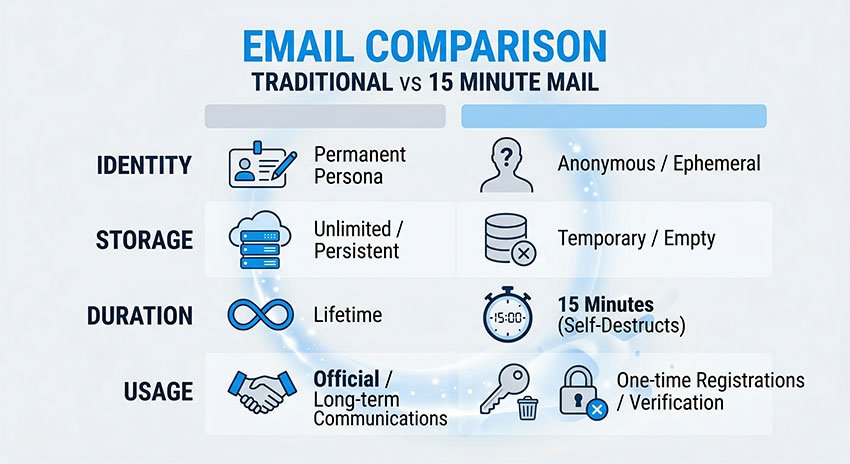
Perbezaan 15 Minute Mail dengan Akaun E-mel Biasa
Perbezaan antara e-mel tradisional dan 15 Minute Temp Email menjadi lebih jelas apabila anda membandingkan cara ia direka dan digunakan.
| Ciri | E-mel Tradisional | 15 Minute Mail |
|---|---|---|
| Persediaan | Memerlukan pendaftaran | Penjanaan segera |
| Penyimpanan | Kekal | Sementara (15 min) |
| Identiti | Dipautkan kepada pengguna | Sesi tanpa nama |
| Penggunaan | Komunikasi jangka panjang | Pengesahan sekali guna |
E-mel tradisional dibina untuk identiti, komunikasi, dan penggunaan jangka panjang.
15 Minute Mail dibina untuk kelajuan, privasi, dan akses sementara.
Ringkasnya, satu adalah sistem identiti kekal, manakala satu lagi adalah alat akses pakai buang.
Mengapa 15 Minute Mail Berfungsi Serta-merta (Perspektif Reka Bentuk Sistem)
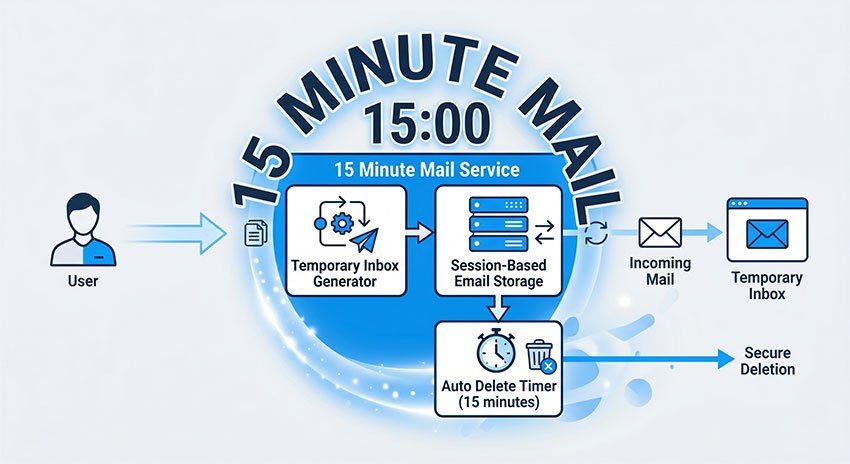
Dari perspektif reka bentuk sistem, 15 Minute Mail beroperasi sebagai lapisan penyediaan e-mel tanpa status (stateless), serupa dengan sistem peti masuk pakai buang seperti 30 Minute Email dan 60 Minute Email Address, kedua-duanya direka untuk pengesahan jangka pendek dan aliran kerja pendaftaran sementara.
Daripada mencipta akaun pengguna yang kekal, ia bergantung pada penjanaan peti mel berasaskan sesi sementara, yang menghapuskan pengikatan identiti dan keperluan penyimpanan jangka panjang.
Seni bina ini biasanya merangkumi:
- Penyediaan peti masuk atas permintaan tanpa pengesahan pengguna
- Pengendalian sesi tanpa status (tiada profil pengguna yang kekal)
- Tiada kebergantungan pangkalan data hubungan untuk kesinambungan peti masuk
- Penamatan kitaran hayat automatik selepas TTL (masa untuk hidup) yang ditetapkan
Hasilnya, penciptaan peti masuk adalah hampir serta-merta kerana sistem memintas proses penyediaan akaun, pengesahan identiti, dan permulaan penyimpanan yang tradisional.
Mengapa Orang Menggunakan 15 Minute Mail
Selain fungsi teknikalnya, 15 Minute Mail mencerminkan perubahan yang lebih luas dalam cara orang mengurus identiti dalam talian dan penggunaan e-mel pada tahun 2026.
Daripada menggunakan satu e-mel kekal untuk setiap aktiviti dalam talian, corak ini biasanya diperhatikan dalam tingkah laku pelayaran yang mementingkan privasi dan strategi penggunaan anti-spam yang didokumenkan merentas perbincangan keselamatan siber dan penyelidikan pencegahan penyalahgunaan e-mel.
Mengapa Pengguna Menggunakan E-mel Sementara untuk Pendaftaran
15 Minute Mail adalah sebahagian daripada peralihan yang lebih besar ke arah "identiti digital yang diasingkan."
Dalam praktiknya, ini bermakna pengguna tidak lagi bergantung pada satu alamat e-mel untuk segala-galanya.
Sebaliknya, mereka membahagikan penggunaan kepada:
- Akaun penting (perbankan, kerja, identiti peribadi)
- Interaksi sementara (pendaftaran, percubaan, muat turun)
Pengasingan ini membantu mengurangkan hubungan data jangka panjang antara platform yang berbeza.
Lama-kelamaan, ia mengehadkan jumlah maklumat yang boleh dipautkan kembali kepada satu identiti digital.
Bagaimana 15 Minute Mail Membantu Mengelakkan E-mel Spam
Satu lagi kesan penting ialah pengurangan pendedahan data peribadi yang tidak perlu semasa interaksi yang tahap kepercayaannya rendah.
Apabila pengguna mendaftar untuk perkhidmatan baharu menggunakan e-mel sebenar mereka, alamat tersebut boleh:
- Ditambah ke pangkalan data pemasaran
- Dijejaki merentas berbilang platform
- Digunakan untuk pemprofilan tingkah laku
Dengan menggunakan e-mel sementara, pendedahan ini dikurangkan dengan ketara.
Ini membawa kepada:
- Lebih sedikit profil pemasaran jangka panjang
- Kurang penjejakan pengguna merentas platform
- Pengurangan pengagregatan identiti berasaskan e-mel
Secara ringkasnya, ia membantu pengguna berinteraksi dalam talian tanpa melampirkan identiti sebenar mereka secara kekal.
Faedah Privasi Perkhidmatan E-mel Pakai Buang
Selain faedah privasi, 15 Minute Mail juga meningkatkan kecekapan digital harian.
Ramai pengguna menggunakannya semata-mata untuk mengelakkan bebanan peti masuk dan mengurangkan pengurusan e-mel yang tidak perlu.
Faedah kecekapan biasa termasuk:
- Pendaftaran akaun yang lebih pantas tanpa geseran persediaan
- Lebih sedikit e-mel promosi atau spam dalam peti masuk utama
- Organisasi e-mel jangka panjang yang lebih bersih
Ini menjadikannya berguna bukan sahaja untuk pengguna yang mementingkan privasi, tetapi juga bagi sesiapa sahaja yang mahukan aliran kerja dalam talian yang lebih diperkemas.
Dalam erti kata ini, ia berfungsi sebagai alat privasi dan alat produktiviti.
Cara Menggunakan 15 Minute Mail (Panduan Langkah demi Langkah)
Menggunakan 15 Minute Mail adalah sangat mudah dan mengambil masa kurang daripada satu minit dari awal hingga akhir.
Ia tidak memerlukan pendaftaran, persediaan, atau sebarang maklumat peribadi.
Langkah 1 – Jana E-mel Anda
Buka perkhidmatan 15 Minute Mail, dan peti masuk sementara akan dicipta serta-merta.
Anda akan terus melihat alamat e-mel sementara yang dijana secara rawak yang sedia untuk digunakan.
Langkah 2 – Gunakannya untuk Pendaftaran
Salin alamat e-mel sementara tersebut dan tampalkannya ke dalam mana-mana borang pendaftaran atau daftar masuk.
Ini biasanya digunakan untuk:
- Pendaftaran aplikasi
- Percubaan percuma
- Halaman akses muat turun
Perkhidmatan tersebut akan menghantar e-mel pengesahan ke peti masuk sementara ini.
Langkah 3 – Terima E-mel Pengesahan
E-mel muncul secara automatik dalam masa nyata di dalam peti masuk.
Kebanyakan mesej merangkumi:
- Kod pengesahan
- Pautan pengaktifan
- E-mel pengesahan akaun
Tiada muat semula atau daftar masuk diperlukan dalam kebanyakan kes.
Langkah 4 – Biarkan Ia Tamat Tempoh Secara Automatik
Sebaik sahaja anda menyelesaikan tugas anda, anda tidak perlu melakukan apa-apa lagi.
Sistem akan memadamkan secara automatik:
- Peti masuk
- Semua e-mel yang diterima
- Semua data sesi
Segala-galanya dialih keluar secara kekal selepas 15 minit.
Daripada menjana e-mel hingga melengkapkan pengesahan, keseluruhan proses biasanya mengambil masa kurang daripada 60 saat.
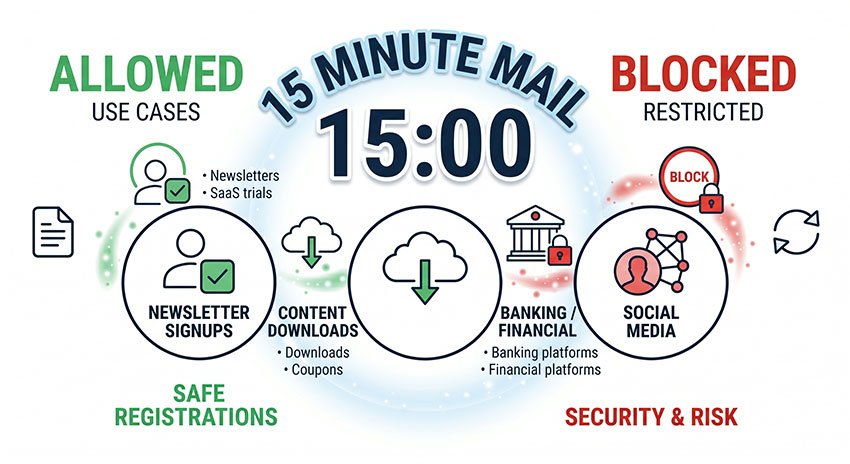
Di Mana 15 Minute Mail Berfungsi dan Di Mana Ia Disekat
Tidak semua laman web melayan e-mel sementara dengan cara yang sama.
Walaupun 15 Minute Mail berfungsi dengan lancar dalam banyak senario berisiko rendah, sesetengah platform secara aktifmenyekat atau mengehadkan perkhidmatan e-mel pakai buang atas sebab keselamatan dan pencegahan penyalahgunaan.
Memahami di mana ia berfungsi—dan di mana ia tidak berfungsi—adalah kunci untuk menggunakannya dengan berkesan.
Laman Web Yang Menerima E-mel Sementara
15 Minute Mail biasanya diterima di platform yang tidak memerlukan identiti jangka panjang.
Kes penggunaan biasa yang berjaya termasuk:
- Pendaftaran surat berita (newsletter)
- Alat SaaS asas dan percubaan percuma
- Muat turun fail dan sumber terkawal
- Pendaftaran akaun keselamatan rendah
Dalam kes ini, e-mel hanya diperlukan untuk pengesahan sekali sahaja, jadi e-mel pakai buang berfungsi dengan boleh dipercayai.
Kadar kejayaan keseluruhan: tinggi
Laman Web Yang Menyekat Perkhidmatan E-mel Pakai Buang
Sesetengah platform secara aktif menyekat domain e-mel pakai buang sebagai sebahagian daripada sistem keselamatan mereka.
Ini lebih biasa berlaku pada:
- Aliran pendaftaran Facebook / Meta
- Platform perbankan atau kewangan
- Produk SaaS berkeselamatan tinggi
Perkhidmatan ini sering memerlukan pengesahan identiti yang lebih kukuh dan kebolehpercayaan e-mel jangka panjang.
Akibatnya, e-mel sementara mungkin ditolak atau ditandakan semasa pendaftaran.
Mengapa Sesetengah Platform Mengesan E-mel Sementara
Laman web tidak menyekat e-mel sementara secara rawak. Sebaliknya, mereka menggunakan sistem pengesanan kepercayaan dan risiko automatik.
Kaedah pengesanan biasa termasuk:
- Pemarkahan reputasi domain
- Analisis rekod MX dan infrastruktur e-mel
- Penapisan pangkalan data e-mel pakai buang
Sistem ini membantu platform mengurangkan akaun spam, pendaftaran palsu, dan penyalahgunaan percubaan.
Dalam kebanyakan kes, penyekatan adalah berdasarkan isyarat kepercayaan automatik, bukan semakan manual.
Adakah 15 Minute Mail Selamat Digunakan pada 2026?
15 Minute Mail secara amnya selamat apabila digunakan untuk aktiviti sementara yang berisiko rendah seperti pengesahan e-mel atau pendaftaran sekali sahaja.
Walau bagaimanapun, ia tidak direka untuk akaun sensitif atau jangka panjang yang memerlukan pemulihan e-mel atau perlindungan identiti.
Keselamatan 15 Minute Mail bergantung sepenuhnya pada cara ia digunakan.
Bilakah E-mel Sementara Selamat Digunakan
15 Minute Mail selamat digunakan dalam senario yang tidak memerlukan data jangka panjang atau pemulihan akaun.
Kegunaan selamat yang biasa termasuk:
- Kod pengesahan e-mel
- Pendaftaran percubaan percuma
- Pendaftaran sementara atau sekali sahaja
Dalam kes ini, peti masuk hanya digunakan untuk akses jangka pendek dan tidak menyimpan data penting.
Bilakah Anda TIDAK Perlu Menggunakan 15 Minute Mail
Ia TIDAK sepatutnya digunakan untuk akaun yang memerlukan akses jangka panjang atau pemulihan identiti.
Ini termasuk:
- Akaun perbankan atau kewangan
- E-mel pemulihan kata laluan
- Langganan atau keahlian jangka panjang
Risiko utama ialah peti masuk tamat tempoh secara kekal, menjadikan pemulihan mustahil.
Penjelasan Risiko Keselamatan dan Had
Walaupun perkhidmatan ini selamat untuk kegunaan asas, ia mempunyai had yang wujud disebabkan reka bentuk sementaranya.
Ini termasuk:
- Tiada pemulihan peti masuk setelah tamat tempoh
- Tiada penyulitan terjamin untuk data sesi yang disimpan (berbeza mengikut pembekal)
- Infrastruktur dikongsi yang mungkin mengurangkan pengasingan dalam sesetengah pelaksanaan
Had ini adalah pertukaran reka bentuk yang disengajakan untuk kelajuan dan kerahsiaan, bukan kelemahan sistem.
Mengapa 15 Minute Mail Tidak Berfungsi (Masalah Biasa)
15 Minute Mail berfungsi dengan boleh dipercayai dalam kebanyakan kes, tetapi seperti mana-mana sistem e-mel pakai buang, ia mempunyai had tertentu bergantung pada polisi laman web dan keadaan penghantaran e-mel.
Isu-isu ini bukanlah ralat sistem, tetapi tingkah laku yang dijangkakan yang disebabkan oleh platform luaran atau sifat sementara perkhidmatan tersebut.
Mengapa E-mel Tidak Sampai
Dalam sesetengah kes, e-mel pengesahan mungkin tidak muncul serta-merta dalam peti masuk.
Ini biasanya berlaku disebabkan oleh:
- Kelewatan dalam penghantaran e-mel daripada platform penghantar
- Sistem penapisan spam atau keselamatan yang menyekat atau melambatkan mesej
- Sesetengah laman web menyekat atau menghalang domain e-mel pakai buang
Dalam kebanyakan situasi, e-mel sama ada sampai selepas kelewatan singkat atau ditapis sebelum sampai ke peti masuk.
Mengapa Peti Masuk Tamat Tempoh Terlalu Cepat
Oleh kerana peti masuk hanya wujud selama 15 minit, masa boleh menjadi had dalam proses pendaftaran berbilang langkah.
Ini biasanya berlaku apabila:
- Proses pendaftaran mengambil masa lebih lama daripada yang dijangkakan
- Penghantaran e-mel dilambatkan oleh sistem luaran
- Pengguna menukar tab atau berhenti seketika semasa pengesahan
Setelah pemasa tamat, semua mesej dipadamkan secara kekal dan tidak boleh dipulihkan.
Mengapa Laman Web Menolak E-mel Sementara
Sesetengah laman web mungkin menolak alamat e-mel sementara sepenuhnya semasa pendaftaran.
Ini biasanya disebabkan oleh:
- Domain e-mel pakai buang ditandakan oleh sistem keselamatan
- Pencegahan penipuan peringkat platform atau penapis penyalahgunaan
- Klasifikasi berisiko tinggi dalam pangkalan data reputasi domain
Ini bukan kegagalan teknikal, tetapi sekatan berasaskan kepercayaan yang disengajakan yang dikuatkuasakan oleh laman web.
Kebanyakan had tidak disebabkan oleh perkhidmatan itu sendiri, tetapi oleh cara platform luaran menilai domain e-mel sementara.
15 Minute Mail vs 5 Minute Mail vs 10 Minute Mail
Perkhidmatan e-mel sementara yang berbeza berbeza terutamanya dari segi tempoh, kebolehpercayaan, dan kadar kejayaan bergantung pada berapa lama peti masuk kekal aktif.
Memilih yang betul bergantung pada berapa banyak masa yang anda perlukan untuk pengesahan dan betapa ketatnya laman web sasaran.
| Ciri | 5 Minute Mail | 10 Minute Mail | 15 Minute Mail |
|---|---|---|---|
| Tempoh | Sangat singkat | Sederhana | Lebih lama |
| Kadar kejayaan | Rendah | Sederhana | Tinggi |
| Kes penggunaan terbaik | Pendaftaran pakai buang pantas | Kegunaan umum | Laman web yang banyak pengesahan |
| Risiko terlepas e-mel | Tinggi | Sederhana | Rendah |
Cara Memilih Yang Betul
5 Minute Mail adalah yang terbaik apabila anda hanya memerlukan akses pantas sekali sahaja dan menjangkakan pengesahan segera.
10 Minute Mail menawarkan keseimbangan antara kelajuan dan kebolehpercayaan untuk kes kegunaan umum.
15 Minute Mail adalah pilihan yang paling boleh dipercayai apabila berurusan dengan e-mel pengesahan yang tertangguh atau platform yang lebih ketat.
Secara keseluruhannya, semakin lama tempohnya, semakin tinggi kadar kejayaan dan kebolehpercayaannya.
Cara Mendapatkan Kadar Kejayaan Terbaik dengan 15 Minute Mail
Untuk memaksimumkan kejayaan apabila menggunakan 15 Minute Mail, adalah penting untuk menyelaraskan tingkah laku penggunaan dengan cara sistem e-mel sementara dan proses pengesahan laman web sebenarnya berfungsi.
Dalam kebanyakan kes, kejayaan lebih bergantung pada masa dan senario penggunaan berbanding alat itu sendiri.
Selesaikan Pengesahan Serta-merta
Faktor yang paling penting ialah masa.
Sebaik sahaja anda menjana e-mel sementara, anda harus menggunakannya serta-merta untuk pendaftaran atau pengesahan.
Ini mengurangkan risiko tamat tempoh sebelum e-mel sampai.
Amalan terbaik:
- Jana e-mel dahulu
- Gunakannya serta-merta pada borang pendaftaran
- Pantau peti masuk dalam masa nyata
Gunakannya Hanya untuk Senario yang Sesuai
E-mel sementara berfungsi paling baik dalam situasi berisiko rendah dan jangka pendek.
Kes penggunaan ideal termasuk:
- Pengesahan akaun sekali sahaja
- Pengaktifan percubaan percuma
- Memuat turun sumber terkawal
- Menguji laman web atau aplikasi
Elakkan menggunakannya untuk akaun yang memerlukan akses atau pemulihan jangka panjang.
Elakkan Platform Sekatan Tinggi
Sesetengah laman web secara aktif menyekat perkhidmatan e-mel pakai buang menggunakan sistem pengesanan automatik.
Ini termasuk:
- Platform kewangan atau perbankan
- Produk SaaS berkeselamatan tinggi
- Media sosial besar dengan peraturan pengesahan yang ketat
Kadar kejayaan jauh lebih tinggi di laman web berkeselamatan rendah atau kegunaan umum.
Anggap Ia sebagai Alat Sesi Tunggal
Minda yang paling berkesan ialah menganggap 15 Minute Mail sebagai alat sesi sekali guna, bukan peti mel.
Ini bermakna:
- Jangan jangkakan akses masa depan
- Jangan simpan maklumat penting di sana
- Gunakannya hanya untuk tugas pengesahan segera
Berfikir dalam "mod sesi" mengurangkan ralat pengguna dengan ketara.
Kejayaan dengan 15 Minute Mail kurang bergantung pada alat itu sendiri dan lebih kepada cara dan tempat ia digunakan.
Apabila digunakan dengan betul, ia pantas, boleh dipercayai, dan cekap untuk interaksi dalam talian sementara.
Soalan Lazim 15 Minute Mail (Soalan & Jawapan Biasa)
Soalan Lazim ini juga merangkumi variasi carian berkaitan dan niat pengguna yang lebih mendalam tentang cara perkhidmatan e-mel sementara berfungsi.
Apakah kegunaan 15 Minute Mail?
15 Minute Mail digunakan untuk pengesahan e-mel sementara tanpa mendedahkan peti masuk peribadi.
Ia biasanya digunakan untuk pendaftaran, percubaan percuma, dan memuat turun kandungan terkawal.
Ramai pengguna mencari ini apabila mereka ingin mengelakkan spam atau menguji perkhidmatan tanpa komitmen.
Bolehkah laman web mengesan 15 Minute Mail?
Ya. Banyak platform mengesan perkhidmatan e-mel pakai buang menggunakan reputasi domain dan sistem pencegahan penyalahgunaan yang serupa dengan yang diterangkan dalam dokumentasi keselamatan e-mel daripada pembekal seperti Cloudflare dan pangkalan data anti-spam seperti Spamhaus.
Mengapa laman web menyekat e-mel sementara?
Laman web menyekat domain e-mel pakai buang untuk mengurangkan penyalahgunaan automatik, penciptaan akaun palsu, dan eksploitasi percubaan percuma, amalan yang biasanya didokumenkan dalam sistem pencegahan penipuan SaaS dan rangka kerja risikan ancaman e-mel.
Apakah yang berlaku jika saya terlepas e-mel sebelum ia tamat tempoh?
Jika peti masuk tamat tempoh sebelum anda melengkapkan pengesahan, e-mel tersebut hilang secara kekal.
Dalam kes itu, anda perlu menjana e-mel sementara yang baharu dan memulakan semula proses tersebut.
Ini adalah salah satu isu paling biasa yang dihadapi pengguna apabila masa terlalu perlahan.
Bolehkah saya menggunakan 15 Minute Mail untuk berbilang pendaftaran?
Ya, tetapi setiap sesi menjana alamat e-mel sementara yang baharu.
Ini bermakna:
• Anda tidak boleh menggunakan semula peti masuk yang sama
• Setiap pendaftaran memerlukan sesi e-mel baharu
Inilah sebabnya ia paling sesuai untuk kes penggunaan sekali sahaja.
Mengapa 15 Minute Mail tidak berfungsi pada sesetengah laman web?
Sesetengah laman web menyekat domain e-mel sementara menggunakan sistem pengesanan automatik.
Ini biasanya berlaku pada platform dengan:
- Pengesahan identiti yang ketat
- Keperluan keselamatan yang tinggi
- Sistem pencegahan penipuantems
Dalam kes sedemikian, penggunaan e-mel tradisional adalah diperlukan.
Kesimpulan Akhir 15 Minute Mail
15 Minute Mail harus difahami sebagai lapisan pengesahan sementara dan bukannya sistem komunikasi e-mel.
Dari perspektif infrastruktur e-mel, ia berfungsi sebagai penimbal identiti pakai buang yang tidak mempunyai status (stateless), direka untuk menyokong aliran kerja pengesahan jangka pendek tanpa perkaitan akaun yang kekal.
Dalam penggunaan dunia sebenar, keberkesanannya bergantung pada konteks: ia berfungsi dengan boleh dipercayai dalam senario pengesahan sekali sahaja yang berkepercayaan rendah, tetapi tidak sesuai untuk mana-mana sistem yang memerlukan kesinambungan identiti, keupayaan pemulihan, atau komunikasi jangka panjang.
Secara ringkasnya, ia bukanlah alternatif kepada sistem e-mel tradisional, tetapi mekanisme akses sementara yang digunakan untuk pengesahan dalam talian buat sementara waktu.