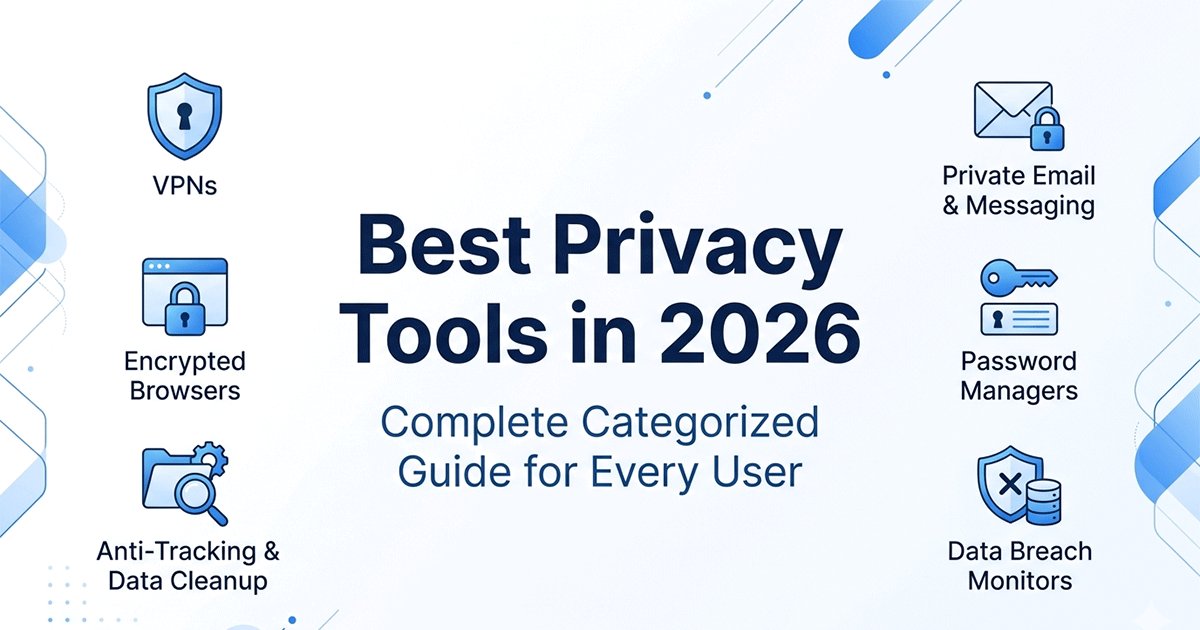
Quick Answer: Best Privacy Tools in 2026
The best privacy tools in 2026 depend on your needs, but a strong setup includes:
• Email: ProtonMail + temporary email for sign-ups• Browser: Firefox + uBlock Origin• VPN: ProtonVPN (or Mullvad for advanced users)• Passwords: Bitwarden• Search: DuckDuckGo• Messaging: Signal
This combination provides 80–90% of privacy benefits with minimal cost and effort.
Why trust my recommendations? I've been deep in the privacy rabbit hole since 2023. I've tried the obscure tools, contributed to open-source privacy projects, and made all the mistakes so you don't have to. This guide isn't just a list — it's my actual setup, with the honest pros and cons I've discovered through daily use.
Why I Became Obsessed With Privacy Tools (And Why You Might Want To)
Three years ago, I didn't care about privacy. I used Chrome, Gmail, and didn't think twice about clicking "accept all cookies." Then two things happened:
First: I saw how much data was being collected about me. I requested my Google data dump — it was 15GB. They knew everywhere I'd been, every search, every video I'd watched. It felt invasive in a way I couldn't articulate before seeing it.
Second: I had an account compromised in a data breach. It was a service I'd forgotten about, using a password I'd reused. The attacker got into my email, then my Amazon, then tried to social engineer my phone carrier. It took me 40 hours to clean up the mess.
Those two events started my journey into privacy tools. At first, it was overwhelming — there are thousands of tools, conflicting advice, and a lot of paranoia. I went through phases:
- Phase 1: Switched everything at once, broke my workflows, was miserable
- Phase 2: Went too deep into obscure tools, made my life unnecessarily complicated
- Phase 3: Found the balance — good enough privacy without sacrificing usability
That's where I am now. I have strong privacy protections, but I can still get work done, communicate with people, and use the internet without constant friction.
Should you care about privacy tools? That depends. If you're happy with your current setup and don't feel like you're being harmed by data collection, maybe you don't need to change everything. But if you've ever felt creeped out by targeted ads, worried about data breaches, or just want more control over your digital life, privacy tools are worth exploring.
You don't have to go full "privacy maximalist." Even switching your browser and search engine makes a meaningful difference. Start small, see how it feels, and build from there if you want more.
Why Use Dedicated Privacy Tools?
Every day, your personal data is collected, shared, and sold by advertisers, data brokers, and large tech platforms. Research from Privacy Rights Clearinghouse shows that hundreds of data brokers operate in the U.S., often collecting and trading personal data without a direct relationship with consumers.
Using privacy-focused tools helps you:
- Keep your personal information private from advertisers and data brokers
- Prevent cross-site tracking across different websites and services
- Protect your sensitive data from hackers and data breaches
- Cut down on spam and unwanted marketing emails
- Take control of who can see and store your online activity
Many people think you have to be a privacy activist to need privacy tools — but that's not true. Even if you "have nothing to hide," your personal information is valuable, and you deserve to control who gets access to it.
You don't need to use every privacy tool available — but picking the right tools for the things you do every day makes a huge difference in how much privacy you have online, without requiring you to be a security expert.
My Complete Privacy Tool Setup (What I Actually Use Daily)
Before diving into categories, here's my complete personal setup after 3 years of experimentation:
| Category | What I Use | Why I Chose It | Monthly Cost |
|---|---|---|---|
| ProtonMail + Temp Mail | Swiss privacy + disposable for junk | $0 (free tiers) | |
| Browser | Firefox + uBlock Origin | Trust Mozilla more than for-profits | $0 |
| VPN | Mullvad (ProtonVPN backup) | No email required, Bitcoin accepted | €5 (~$5.50) |
| Passwords | Bitwarden | Open source, free tier is enough | $0 |
| Search | DuckDuckGo | 99% of the time, !g when needed | $0 |
| Messaging | Signal | Everyone I care about migrated | $0 |
| TOTAL | ~$6/month |
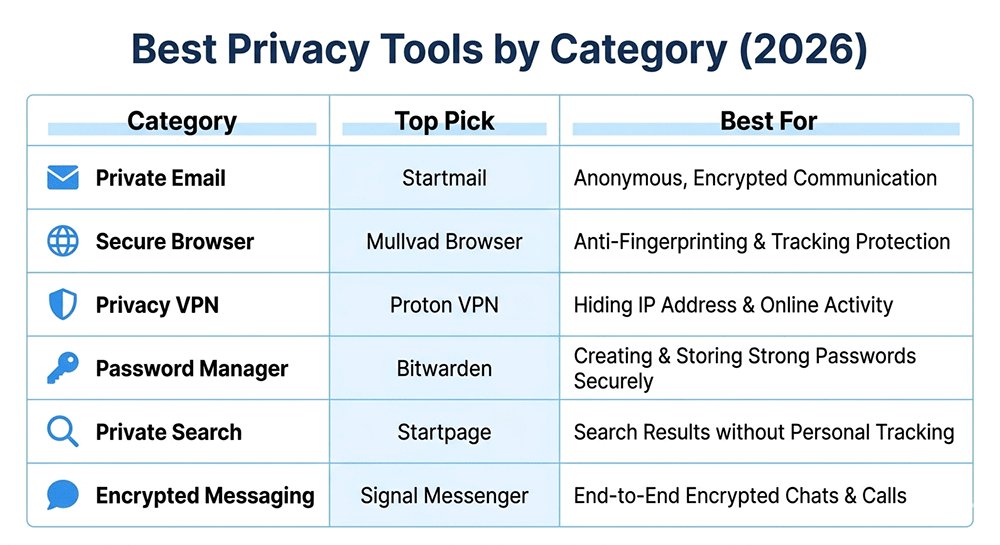
My honest take: This setup gives me 90% of the privacy benefit for about the cost of a latte. I could spend more (I used to), but this is the sweet spot of privacy vs. usability vs. cost.
Email Privacy: My Most Important Privacy Decision
Your email is the master key to your digital life. Every password reset, every account recovery, every sensitive communication — it all goes through email. This was the first privacy tool I switched, and it had the biggest impact.
My Personal Setup: ProtonMail + Temp Mail
After 2 years of daily use, here's my honest assessment:
ProtonMail handles my important accounts — banking, government, medical, and personal contacts. I pay for the Plus plan ($4/month) mainly for custom domain support. The interface is clean, mobile apps work great, and I've never had a reliability issue.
Temp Mail is my secret weapon that I use 5-10 times per day. Any time I need to:
- Download a "free" resource that requires email
- Sign up for a newsletter I'm not sure about
- Create a trial account for software
- Register for a one-time webinar
- Book a service I'll only use once
I use Temp Mail instead of my real email. My ProtonMail inbox stays clean — I get maybe 3-5 unwanted emails per month instead of the 50+ I used to get.
ProtonMail: What I Love and What Annoys Me
The good (why I stay):
- Zero-access encryption means they literally can't read my emails
- Swiss privacy laws give me legal protections
- Clean, modern interface that keeps getting better
- Mobile apps are reliable and well-designed
- Free tier is genuinely usable (I used it for 6 months before upgrading)
The annoying (what you should know):
- Search is noticeably slower than Gmail (they have to decrypt on the fly)
- Some automated emails get flagged as suspicious (bank notifications, government updates)
- Calendar and Drive exist but aren't as polished as Google's
- Custom domains require paid plans
My honest take: ProtonMail isn't perfect, but it's the best balance of privacy, usability, and trust I've found. I recommend it to everyone who asks about private email.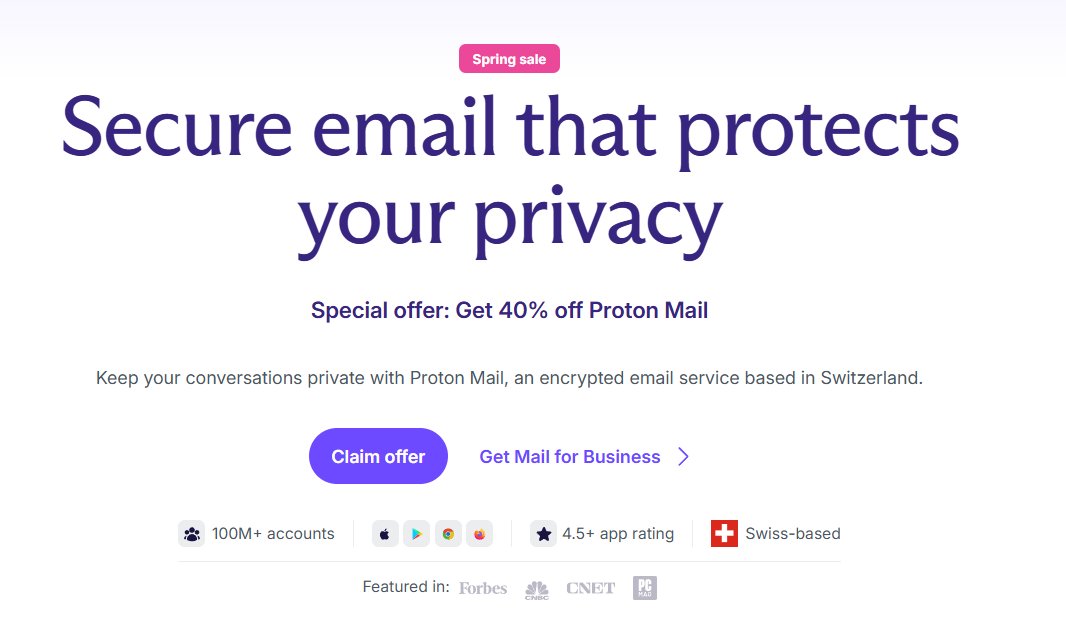
Temp Mail: The Privacy Tool I Use Most Often
This deserves special attention because it's genuinely one of my most-used privacy tools, yet most people have never heard of it.
Temp Mail creates a temporary, disposable email address that exists for a short time (usually 10 minutes to a few hours), then self-destructs. No signup, no account, no personal information required.
Here's how I use it in practice:
Yesterday alone:
- Downloaded a PDF guide that required email → used Temp Mail
- Signed up for a SaaS free trial to test it → used Temp Mail
- Registered for a webinar I might not attend → used Temp Mail
- Created an account on a forum to ask one question → used Temp Mail
Real impact on my life:
Before Temp Mail: 50+ unwanted emails per week, constantly unsubscribing from lists
After Temp Mail: 3-5 unwanted emails per month
Why this matters for privacy:
- Your real email isn't in databases that get breached
- Companies can't track you across services via email
- You avoid the "give us your email for this free thing" trap
- No more endless unsubscribe battles
Is this for you? Try this: For one week, use Temp Mail for every sign-up that isn't from someone you personally know. Count how many times you use it. If it's more than 5, you'll immediately see the value. It's one of the easiest privacy wins you can make.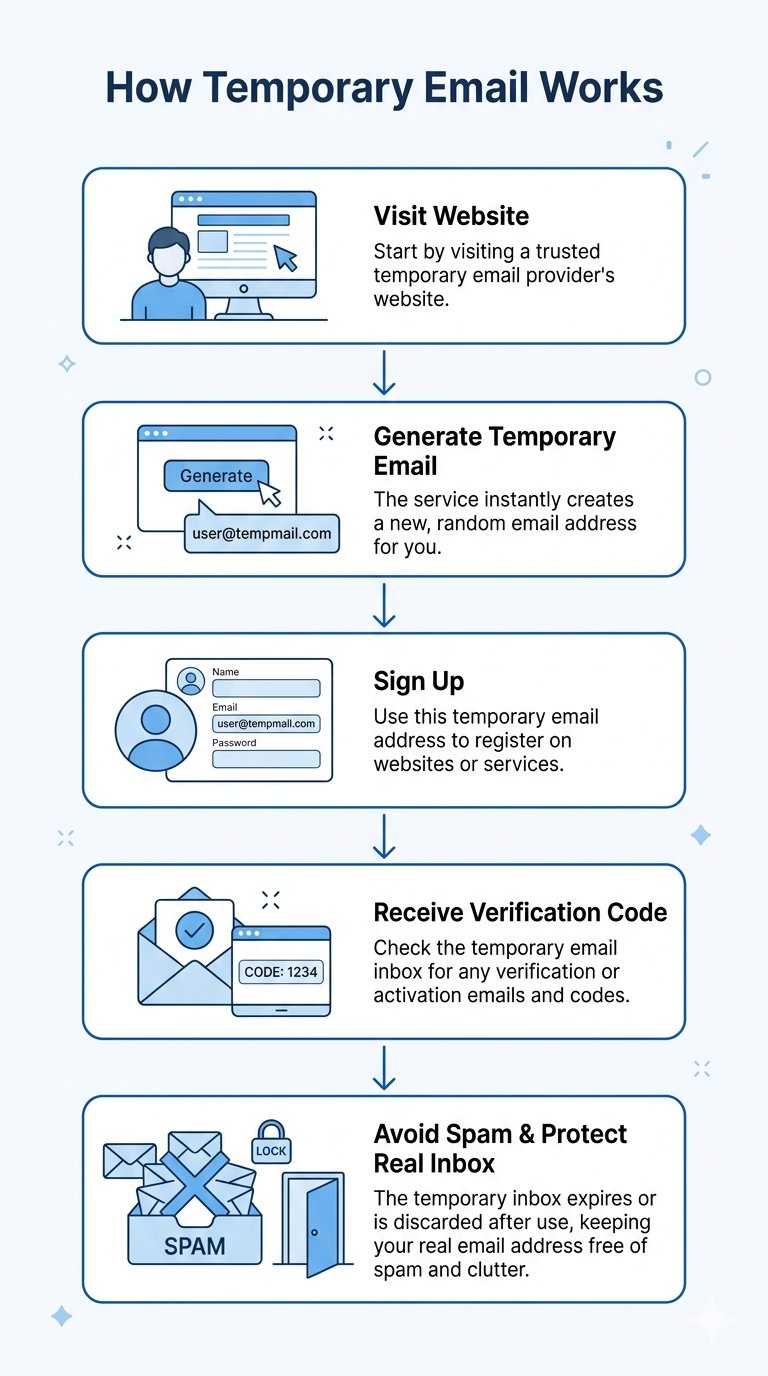
Private Browsers: Firefox vs Brave (My Real Experience)
Your browser is where you spend most of your time online — and if you're using Chrome with default settings, you're being tracked constantly. Switching browsers was the second privacy change I made (after email), and it's one of the highest-impact moves you can make.
What I Use: Firefox + uBlock Origin
I've tried Brave, I used it for about 8 months, and it's genuinely good. But I came back to Firefox because:
- It's developed by a non-profit (Mozilla) rather than a for-profit company
- The privacy protections are more transparent and trustworthy
- I can configure exactly what I want with about:config
- It feels less "heavy" than Brave
I pair it with uBlock Origin, which is the gold standard for ad and tracker blocking. The combination gives me better privacy protection than Chrome or Safari with minimal effort.
Firefox: Why It's My Daily Driver
Firefox has been around forever, and there's a reason it's still popular among privacy-conscious users. It's developed by the non-profit Mozilla Foundation, which doesn't have a business model based on selling your data.
What makes Firefox good for privacy:
- Blocks third-party trackers by default
- Doesn't collect your browsing data
- Highly customizable privacy settings
- Open source — anyone can audit the code
- Available on all platforms
How to make Firefox even more private:
Install these extensions:
- uBlock Origin — blocks ads and trackers (essential)
- Privacy Badger — blocks invisible trackers (optional but helpful)
- HTTPS Everywhere — forces secure connections (now built into Firefox but good to have)
My personal Firefox setup:
- uBlock Origin with default lists
- Privacy Badger
- Container tabs for different activities (work, personal, shopping)
- about:config tweaks for extra privacy (disable telemetry, enable strict tracking protection)
Should you switch to Firefox? If you're currently using Chrome, yes — it's one of the best privacy upgrades you can make. The transition is easy, all your bookmarks and passwords transfer, and you'll immediately start being tracked less.
Brave: The Alternative I Used (And Why I Switched Back)
Brave is built on Chromium (the same base as Chrome) so it's fast and compatible with all Chrome extensions. It blocks ads and trackers by default, has a built-in Tor window for private browsing, and doesn't sell your data.
What I liked about Brave:
- Super fast page loading (blocks ads by default)
- Built-in HTTPS upgrading
- Tor private windows (useful occasionally)
- Rewards system if you're into that (I turned it off)
Why I switched back to Firefox:
- I trust Mozilla (non-profit) more than Brave (for-profit)
- Firefox feels less "heavy" on my system
- I prefer Firefox's container tabs for separating activities
- Brave's crypto stuff feels unnecessary to me
Is Brave bad? No — it's genuinely good, and I recommend it to people who want something that "just works" with minimal setup. I just personally prefer Firefox. You can't go wrong with either.
Browser Choice: My Recommendation Hierarchy
If you're switching from Chrome/Safari, here's my suggested order:
- Firefox + uBlock Origin — Best balance of privacy, trustworthiness, and usability. My daily driver.
- Brave — If you want something that works great out of the box with minimal configuration.
- Safari with Privacy Settings — If you're on macOS/iOS and don't want to switch browsers, at least harden Safari's settings.
Avoid: Chrome (tracks everything), Edge (Microsoft tracks you), Opera (owned by Chinese consortium, privacy concerns).
VPN: When I Actually Use One (And When I Don't)
VPNs are the most misunderstood privacy tool. They're not a magic privacy bullet, but they are genuinely useful in specific situations. After using VPNs daily for 2+ years, here's my honest take on when they help and when they're overkill.
What I Use: Mullvad (But ProtonVPN is Fine for Most People)
I use Mullvad because I'm probably more privacy-obsessed than average. I paid with Bitcoin, didn't give them an email address, and got an anonymous account number. Their no-logging policy has been independently audited, and they're based in Sweden (decent privacy laws).
But honestly? For most people, ProtonVPN is perfectly fine. The free tier works for occasional use, the paid tier is reasonably priced, and it's much easier to set up than Mullvad.
What a VPN Actually Does (And What It Doesn't)
A VPN does:
- Encrypt your internet traffic so your ISP can't see what websites you visit
- Hide your IP address from websites you visit (though they can still track you via cookies, fingerprinting, etc.)
- Protect you on public WiFi from local network attacks
- Bypass geographic content restrictions (if you care about that)
A VPN does NOT:
- Make you anonymous online (websites can still track you)
- Protect you from malware or phishing attacks
- Hide your activity from the VPN provider themselves
- Replace other privacy tools (you still need a good browser, password manager, etc.)
The biggest misconception: A VPN is not a magic privacy shield. It's one tool in a larger toolkit.
When I Actually Use a VPN (My Real Usage)
I don't use a VPN 24/7. Here's when I actually turn it on:
Always (Non-Negotiable):
- Public WiFi (coffee shops, airports, hotels) — I never connect to public WiFi without a VPN
- Traveling in countries with heavy internet censorship or surveillance
Sometimes:
- When I want to hide my IP address from a specific website (rare, but occasionally useful)
- When my ISP is throttling specific types of traffic
- Researching sensitive topics I don't want associated with my IP address
Never:
- At home on my trusted network for regular browsing (unnecessary, adds latency, slows connection)
- For "anonymity" — I know I'm not anonymous with just a VPN
My honest VPN usage: Maybe 10-15% of my total internet time. Public WiFi is the main use case.
VPN Recommendations (From Someone Who's Actually Used Them)
I've personally used or tested: ProtonVPN, Mullvad, IVPN, Windscribe, ExpressVPN, NordVPN, Surfshark.
My actual recommendations:
For most people: ProtonVPN
- Free tier is genuinely usable (unlike most "free" VPNs)
- Based in Switzerland (strong privacy laws)
- Easy to use, good apps on all platforms
- Same company as ProtonMail (trusted name in privacy)
- Paid plans reasonably priced ($4-8/month)
- My take: This is what I recommend to friends and family. It's the sweet spot of privacy, usability, and price.
For the privacy-obsessed: Mullvad
- No email required (anonymous account number)
- Accepts cash and Bitcoin (maximum anonymity)
- Strict no-logging policy, independently audited
- Based in Sweden (decent privacy laws)
- €5/month flat rate (no pricing tricks)
- My take: This is what I personally use, but I'm more privacy-obsessed than most. It's less user-friendly than ProtonVPN, but offers maximum privacy.
For beginners who want it simple: Windscribe
- Generous free tier (10GB/month)
- Built-in ad/tracker blocking (R.O.B.E.R.T. feature)
- Simple, friendly interface
- Good for casual users who want basic protection
- My take: Good "gateway" VPN for people who aren't sure if they need one. The free tier is actually usable.
VPNs I actively don't recommend:
- ExpressVPN/NordVPN/Surfshark: Owned by shady parent companies (Kape, Tesonet), heavy affiliate marketing, questionable practices, not as "no-logs" as they claim
- Any "lifetime deal" VPN: If it sounds too good to be true, it is. Running VPN servers costs money. "Lifetime" deals are unsustainable.
- Free VPNs with no clear business model: If you're not paying, you're the product. Many free VPNs sell your data or inject ads.
The Bottom Line on VPNs
VPNs are useful but misunderstood. They're essential for public WiFi and useful for specific privacy needs, but they're not a magic privacy shield.
My honest advice:
- If you use public WiFi regularly, get a VPN (ProtonVPN's free tier is fine)
- If you're privacy-conscious but not paranoid, ProtonVPN paid is the sweet spot
- If you're doing things that require maximum anonymity, look into Mullvad or Tor
- Don't expect a VPN to make you "anonymous" or replace other privacy tools
What I actually do: I use Mullvad because I'm privacy-obsessed, but I only turn it on for public WiFi, sensitive research, or when traveling. Maybe 10-15% of my internet usage. That's the honest reality.
Password Management Tools
Good password management is foundational for online privacy and security. If you reuse passwords across multiple sites, one data breach can compromise all your accounts. We covered this in depth in our guide to the best way to keep passwords safe in 2026, but here's the quick recommendation for your privacy tool stack.
Bitwarden — Best Free Password Manager
Bitwarden is open source, meaning anyone can audit the code for security issues. It has a full-featured free tier that's enough for most users, and it works seamlessly on every platform. It also includes built-in data breach monitoring to alert you if your credentials are exposed.
1Password — Best Premium Option
1Password has a polished, intuitive user interface and extra features like travel mode (which removes your secrets from your device when you cross borders) and advanced vault organization. It's reasonably priced and worth the cost if you want the best possible user experience.
Best for: Every online user — regardless of your other privacy tools, everyone should be using a password manager.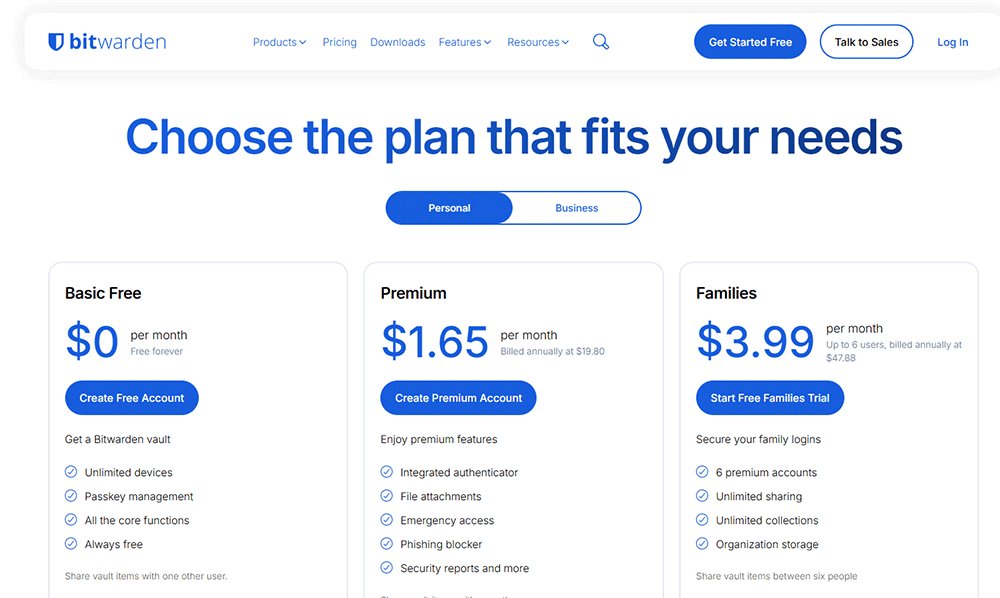
Private Search Engines
Google tracks every search you do, builds a detailed profile on you based on your searches, and uses that profile for targeted advertising. Private search engines don't track your searches, don't store your IP address, and don't build personal profiles.
DuckDuckGo — Best Overall Private Search
DuckDuckGo is the most popular private search engine, it doesn't track you, and it gives good search results that have improved a lot over the years. It's the easiest drop-in replacement for Google that just works.
Startpage — Best Privacy with Google-Quality Results
Startpage uses Google search results but strips out all tracking, so you get Google's quality results without Google tracking you. If you miss Google's search accuracy but want privacy, Startpage is an excellent option.
Best for: Anyone who doesn't want their search history collected and used for advertising.
Encrypted Messaging Apps
When you send messages with regular SMS or most big-tech messaging apps, your messages can be read by the company and are often stored on their servers. End-to-end encrypted messaging ensures that only you and the person you're talking to can read your messages.
Signal — Best Easy Encrypted Messaging
Signal is completely free and open source, it's easy to set up and use, and it has all the features you expect from a modern messaging app including group chats, voice calls, and video calls. Everything is end-to-end encrypted by default, and the company doesn't collect any metadata about your conversations.
It's the most popular encrypted messaging app for good reason — it's secure and easy enough for everyone to use.
Session — Best for Maximum Anonymity
Session doesn't require a phone number to create an account, which means you don't have to give them your phone number to use the service. This gives you more anonymity than Signal, which requires a phone number for registration. It's slightly less user-friendly than Signal but offers more privacy.
Best for: Anyone who wants to keep their personal conversations private from big tech companies.
Privacy Tool Combination Recommendations
Not everyone needs the same privacy setup. The best privacy tool stack is one you'll actually use consistently. Here are ready-to-go combinations depending on how much privacy you want and how much effort you want to put in: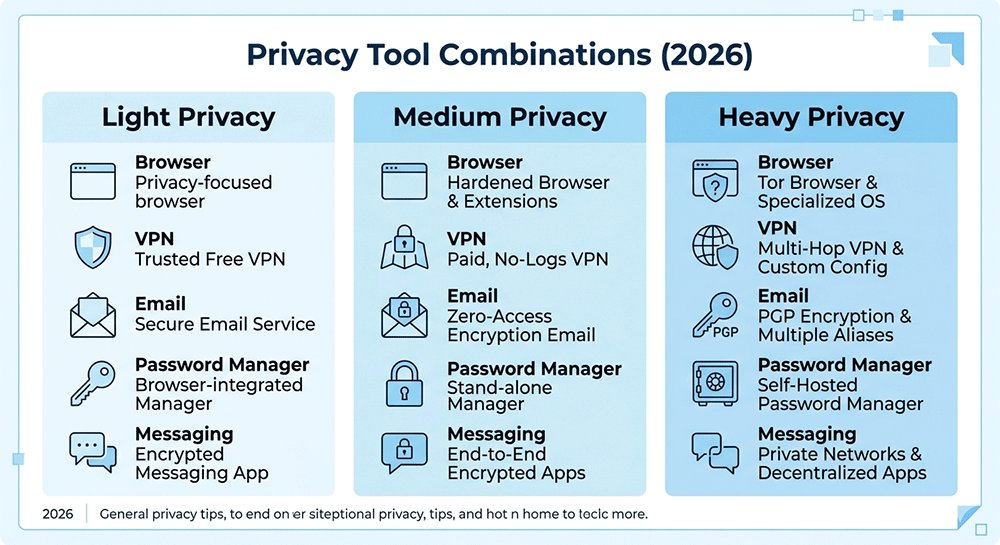
Light Privacy Setup (Casual User, Minimal Effort)
- Browser: Brave (built-in ad and tracker blocking, no configuration needed)
- Password Manager: Bitwarden free tier
- Default Search: DuckDuckGo
- Messaging: Signal
- Email: Use your current email + temporary email for untrusted sign-ups
This setup gives you significant privacy improvements over the default big tech tools (Chrome, Google Search, WhatsApp) without much effort or cost. Most days you won't even notice a difference, but you'll be tracked a lot less.
Medium Privacy Setup (Privacy Conscious User)
- Browser: Firefox with uBlock Origin extension
- VPN: ProtonVPN (free tier for occasional use, paid for regular use)
- Password Manager: Bitwarden free tier
- Email: ProtonMail free + temporary email for all untrusted sign-ups
- Default Search: DuckDuckGo
- Messaging: Signal
This is a great balanced setup that gives you solid privacy protection for daily use without requiring you to change all your habits. It's what most privacy-conscious users should start with.
Heavy Privacy Setup (Advanced User, Maximum Privacy)
- Browser: Firefox with privacy hardening (disabling telemetry, disabling JavaScript by default where possible)
- VPN: Mullvad (no email required, maximum anonymity)
- Password Manager: Bitwarden
- Email: ProtonMail paid + temporary email for all untrusted sign-ups
- Search: DuckDuckGo or Startpage
- Messaging: Session (no phone number required)
- Operating System: Linux on desktop, GrapheneOS on mobile
This is for users who prioritize privacy above convenience and want maximum protection against tracking and surveillance. It requires more setup and some changes to your workflow, but it gives you the strongest possible privacy.
Most users will be very happy with the medium setup — it gives you 80% of the possible privacy benefit with only 20% of the effort.
Frequently Asked Questions About Privacy Tools
Q: Do I need to use privacy tools for everything?
A: No, you don't need to replace every tool you use. Focus on the big three first: a good password manager, a privacy-focused browser, and using a VPN when you're on public WiFi. That gives you most of the benefit with minimal effort.
Q: Are all privacy tools free?
A: Many good privacy tools have free tiers that are enough for most users. Some advanced tools require a paid subscription, but you don't need to pay anything to get good privacy protection starting out.
Q: Is using privacy tools illegal?
A: No, using privacy tools is completely legal in almost every country. Privacy tools are just about protecting your personal data from being collected and shared without your consent.
Q: Why use a temporary email instead of my regular email?
A: Using a temporary email for untrusted sign-ups keeps spam out of your main inbox and protects your real email address from being sold or exposed in data breaches. It's a simple privacy tool that makes a big difference.
Q: What's the first privacy tool I should get?
A: The first privacy tool everyone should use is a good password manager. Password reuse is the biggest security risk most people have, and a password manager fixes that immediately. It's easy to set up and starts protecting you right away.
Conclusion: Choosing the Best Privacy Tools for You in 2026
The best privacy tools are the ones you'll actually use consistently. You don't need to be an expert to improve your online privacy — start with the basics:
- Get a password manager to protect your accounts
- Switch to a privacy-focused browser from Chrome or Safari
- Use a VPN when you connect to public WiFi
- Use a temporary email for untrusted sign-ups to protect your main inbox
- Use an encrypted messaging app instead of regular SMS
By picking the right tools for your needs and combining them properly, you can drastically improve your online privacy without having to sacrifice too much convenience. Whether you're a casual user or an advanced privacy enthusiast, there's a combination that will work for you.
Quick Privacy Stack (TL;DR)
- Browser: Brave
- Email: ProtonMail + temporary email
- VPN: ProtonVPN
- Passwords: Bitwarden
- Messaging: Signal
Simple privacy setup covering core online privacy areas.
For more tips on online privacy, check out our guide to protecting your privacy online in 2026and our article on staying safe on public WiFi.