10 Minute Mail ยังคงถูกใช้งานอย่างแพร่หลายในปี 2026 ในฐานะเครื่องมืออีเมลชั่วคราวสำหรับการสมัครใช้งานด่วนและการรับรหัสยืนยันตัวตน
อย่างไรก็ตาม ความน่าเชื่อถือของบริการนี้ได้เปลี่ยนแปลงไปอย่างมาก เนื่องจากแพลตฟอร์มสมัยใหม่ต่างอัปเกรดระบบตรวจจับอีเมลแบบใช้แล้วทิ้งให้มีประสิทธิภาพมากขึ้น
จากรายงานด้านความปลอดภัยทางไซเบอร์หลายฉบับ รวมถึงการวิเคราะห์จากบริษัทติดตามข้อมูลในอุตสาหกรรมอย่าง Spamhaus และ Cloudflare’s Email Threat Report พบว่าในช่วงไม่กี่ปีที่ผ่านมา กว่า 40–50% ของปริมาณอีเมลทั่วโลกถูกจัดว่าเป็นสแปมหรือการใช้งานในทางที่ผิดโดยระบบอัตโนมัติ
ด้วยเหตุนี้ อัตราความสำเร็จในการใช้งาน 10 Minute Mail ในปัจจุบันจึงแตกต่างกันไปอย่างมาก ขึ้นอยู่กับประเภทของแพลตฟอร์มที่ใช้งาน
คู่มือนี้จะเจาะลึกถึงประสิทธิภาพของ 10 Minute Mail ในปี 2026 รวมถึงผลการทดสอบจริง บริการที่ยังใช้งานได้ บริการที่ใช้งานไม่ได้ และสถานการณ์ที่คุณควรหลีกเลี่ยงการใช้งานโดยสิ้นเชิง
10 Minute Mail คืออะไร? (คำจำกัดความและข้อมูลจำเพาะฉบับย่อปี 2026)
โดยพื้นฐานแล้ว 10 Minute Mail คือเครื่องมือรักษาความเป็นส่วนตัวเชิงกลยุทธ์ที่ออกแบบมาเพื่อเว็บยุคใหม่ ในสภาพแวดล้อมที่ข้อมูลส่วนบุคคลมักถูกเก็บเกี่ยวและนำไปขาย บริการนี้เปรียบเสมือน "เกราะป้องกัน" ดิจิทัลชั่วคราวสำหรับตัวตนของคุณ
ทำงานอย่างไรในฐานะระบบอีเมลชั่วคราว
10 Minute Mail เป็น บริการอีเมลชั่วคราว ฟรีที่สร้างกล่องจดหมายแบบทำลายตัวเองเพื่อรับรหัสยืนยันโดยไม่ต้องเปิดเผยตัวตนหลักหรือเสี่ยงต่อการได้รับสแปม ซึ่งต่างจากผู้ให้บริการอีเมลทั่วไปอย่าง Gmail หรือ Outlook ตรงที่ไม่มีการลงทะเบียน ไม่มีรหัสผ่าน และไม่ต้องใช้ข้อมูลส่วนบุคคลใดๆ
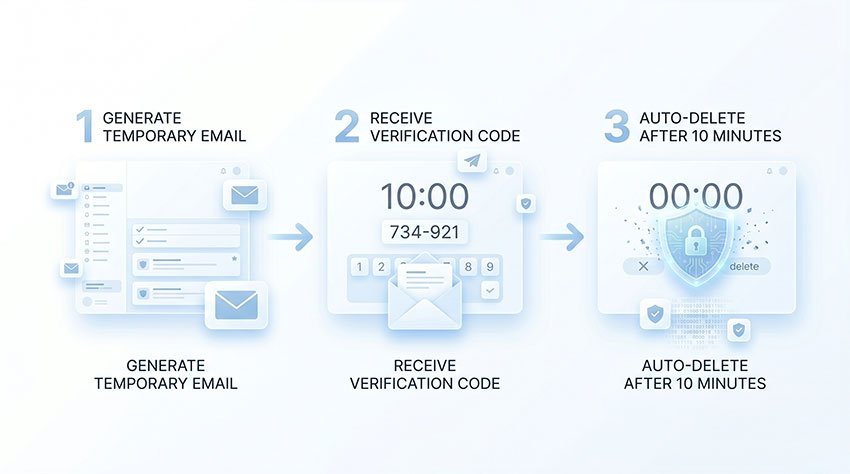
ทันทีที่คุณเข้าสู่เว็บไซต์ ระบบจะกำหนดที่อยู่อีเมลแบบสุ่มให้คุณ กล่องจดหมายนี้จะใช้งานได้นาน 600 วินาที ซึ่งคุณสามารถรับและอ่านข้อความที่เข้ามาได้ เมื่อหมดเวลา กล่องจดหมายและเนื้อหาทั้งหมดจะถูกลบออกจากเซิร์ฟเวอร์อย่างถาวร
ทำไมจึงยังคงมีอยู่บนระบบนิเวศดิจิทัลปี 2026
ความจำเป็นของเครื่องมือเหล่านี้ชัดเจนยิ่งกว่าที่เคย จากรายงานอุตสาหกรรมความปลอดภัยทางไซเบอร์และการวิเคราะห์ภัยคุกคามหลายฉบับ (รวมถึง Cloudflare Radar และชุดข้อมูลการละเมิดอีเมลของ Spamhaus) พบว่าสแปมและอีเมลที่ส่งจากระบบอัตโนมัติมีสัดส่วนที่สำคัญของปริมาณอีเมลทั่วโลก
สิ่งนี้นำไปสู่การนำระบบตรวจจับอีเมลแบบใช้แล้วทิ้งมาใช้กันอย่างแพร่หลายในแพลตฟอร์มที่เน้นผู้บริโภค
การใช้อีเมลชั่วคราวช่วยให้ผู้ใช้สามารถตัดความเชื่อมโยงระหว่างตัวตนจริงกับระบบติดตามข้ามแพลตฟอร์มที่ผู้ลงโฆษณาและนายหน้าข้อมูลใช้ได้อย่างมีประสิทธิภาพ
ข้อจำกัดทางเทคนิคที่คุณควรรู้
แม้ว่า 10 Minute Mail จะมีประสิทธิภาพสำหรับการยืนยันตัวตนแบบทันที แต่ก็มีข้อจำกัดที่เข้มงวด:
- ไม่สามารถส่งอีเมลออกได้
- ไม่สามารถกู้คืนกล่องจดหมายหลังจากหมดเวลาได้
- ไม่รองรับการใช้งานบัญชีในระยะยาว
บริการนี้ถูกออกแบบมาเพื่อเป็นเครื่องมือ "อ่านแล้วทำลาย" สำหรับการยืนยันตัวตนระยะสั้นเท่านั้น ไม่ใช่สำหรับการสื่อสารที่ต่อเนื่อง
ทำไมผู้คนยังคงใช้ 10 Minute Mail ในปี 2026
การทำความเข้าใจว่าเหตุใดผู้ใช้จึงพึ่งพาบริการอีเมลแบบใช้แล้วทิ้งเป็นสิ่งจำเป็นสำหรับการตีความพฤติกรรมในโลกแห่งความเป็นจริง ในปี 2026 ภูมิทัศน์ดิจิทัลมีความกระจัดกระจายมากขึ้น และพฤติกรรมของผู้ใช้ได้เปลี่ยนไปสู่การตระหนักถึงความเป็นส่วนตัวที่มากขึ้นและความอดทนต่อสแปมที่ลดลง
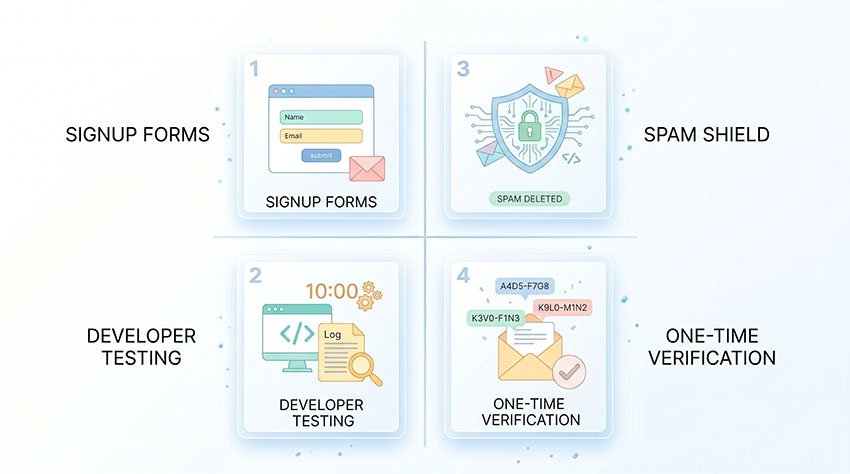
ความตั้งใจหลักของผู้ใช้ 10 Minute Mail ในปี 2026 คือ “การเข้าถึงที่ไร้รอยต่อ” ซึ่งช่วยให้ผู้ใช้สามารถข้ามแบบฟอร์มการสมัครสมาชิกได้อย่างรวดเร็วโดยใช้กล่องจดหมายชั่วคราวที่ใช้งานได้นานสูงสุด 10 นาที โดยไม่ต้องสร้างความเชื่อมโยงกับตัวตนถาวร
1. การข้าม “เนื้อหาที่ถูกจำกัด” และการบังคับลงทะเบียน
เว็บไซต์จำนวนมากยังคงต้องการการลงทะเบียนอีเมลเพื่อเข้าถึงเนื้อหา เช่น บทความ การดาวน์โหลด หรือเทมเพลต ในกรณีเหล่านี้ บริการอีเมลชั่วคราวมักถูกใช้เพื่อข้ามข้อกำหนดในการลงทะเบียนและเข้าถึงเนื้อหาโดยไม่ต้องผูกมัดกับการสมัครสมาชิกในระยะยาว
โดยทั่วไปจะใช้สำหรับการโต้ตอบเพียงครั้งเดียวที่ไม่จำเป็นต้องมีการรักษาบัญชีไว้
2. การหลีกเลี่ยงสแปมการตลาดและการติดตามข้อมูล
เนื่องจากเทคโนโลยีการติดตามมีการพัฒนาขึ้น ที่อยู่อีเมลของผู้ใช้จึงถูกนำไปใช้สร้างโปรไฟล์โฆษณาข้ามแพลตฟอร์มมากขึ้น บริการอีเมลชั่วคราวช่วยลดการสัมผัสกับแคมเปญการตลาดระยะยาวโดยป้องกันไม่ให้อีเมลหลักของผู้ใช้ถูกจัดเก็บในฐานข้อมูลการตลาด
สิ่งนี้ช่วยลดความเชื่อมโยงระหว่างตัวตนและพฤติกรรมการท่องเว็บข้ามแพลตฟอร์มต่างๆ
3. การทดสอบเวิร์กโฟลว์ SaaS และแอปแบบทันที
สำหรับนักพัฒนาและวิศวกร QA บริการอีเมลชั่วคราวมักถูกใช้ระหว่างการทดสอบผลิตภัณฑ์ เมื่อสร้างหรือตรวจสอบขั้นตอนการเริ่มต้นใช้งาน ทีมงานมักจำเป็นต้องจำลองการลงทะเบียนผู้ใช้หลายครั้งโดยไม่ต้องสร้างบัญชีถาวร
กรณีการใช้งานทั่วไป ได้แก่:
- การทดสอบขั้นตอนการยืนยันอีเมล
- การตรวจสอบประสบการณ์การเริ่มต้นใช้งาน
- การตรวจสอบระบบการส่งอีเมลอัตโนมัติ
สิ่งนี้ช่วยให้สามารถทดสอบในสภาพแวดล้อมที่สมจริงโดยไม่ทำให้ข้อมูลผู้ใช้จริงปนเปื้อน
4. การยืนยันตัวตนที่ปลอดภัยสำหรับการเข้าถึงครั้งเดียว
บริการอีเมลชั่วคราวยังถูกใช้สำหรับสถานการณ์การยืนยันตัวตนระยะสั้น เช่น การเข้าถึง Wi-Fi, การตรวจสอบคูปอง หรือการลงทะเบียนครั้งเดียว กรณีการใช้งานเหล่านี้โดยทั่วไปไม่จำเป็นต้องมีการกู้คืนบัญชีในระยะยาว
อย่างไรก็ตาม ประสิทธิภาพขึ้นอยู่กับระดับความปลอดภัยและระบบกรองอีเมลที่แต่ละแพลตฟอร์มใช้
ข้อมูลเชิงลึกที่สำคัญ
ในทุกกรณีการใช้งาน จะเห็นรูปแบบที่สอดคล้องกัน:
บริการอีเมลชั่วคราวอย่าง 10 Minute Mail จะถูกใช้เป็นหลักเมื่อให้ความสำคัญกับการเข้าถึงระยะสั้นมากกว่าการกู้คืนบัญชีระยะยาวหรือการคงอยู่ของตัวตน
แพลตฟอร์มอิสระมักให้ความสำคัญกับการเริ่มต้นใช้งานที่ราบรื่น ในขณะที่แพลตฟอร์มขนาดใหญ่มักให้ความสำคัญกับการยืนยันตัวตนและการป้องกันการฉ้อโกง
รายการตรวจสอบทีละขั้นตอน: วิธีใช้ 10 Minute Mail อย่างมีประสิทธิภาพ
การใช้อีเมลแบบใช้แล้วทิ้งอาจดูเหมือนเข้าใจได้ง่าย แต่ในปี 2026 เว็บไซต์จำนวนมากใช้กลยุทธ์ "การส่งล่าช้า" เพื่อให้เกินเวลาของตัวจับเวลาชั่วคราว การทำตามรายการตรวจสอบนี้จะช่วยให้มั่นใจได้ว่าคุณจะไม่สูญเสียการเข้าถึงก่อนที่รหัสจะมาถึง
ขั้นตอนที่ 1: สร้างที่อยู่อีเมลชั่วคราวของคุณ
กระบวนการนี้เกิดขึ้นทันที เพียงไปที่หน้าแรกของ 10 Minute Mail แล้วที่อยู่อีเมลแบบสุ่มจะรอคุณอยู่ ไม่มีปุ่ม "ลงทะเบียน" การที่คุณอยู่ในหน้านี้จะกระตุ้นการสร้างกล่องจดหมายโดยอัตโนมัติ
ขั้นตอนที่ 2: เปิดแท็บเบราว์เซอร์ทิ้งไว้ (สำคัญมาก!)
นี่คือข้อผิดพลาดที่พบบ่อยที่สุดที่ผู้ใช้ทำ เซสชันของ 10 Minute Mail มักจะผูกติดอยู่กับเซสชันในเครื่องของเบราว์เซอร์ของคุณ หากคุณปิดแท็บ คุณอาจสูญเสียการเข้าถึงที่อยู่นั้นไปตลอดกาล ให้เปิดแท็บนี้ไว้ จนกว่าคุณจะยืนยันการตรวจสอบสำเร็จ
ขั้นตอนที่ 3: กระตุ้นอีเมลยืนยัน
คัดลอกที่อยู่ชั่วคราวของคุณและวางลงในช่องลงทะเบียนของบริการที่คุณกำลังทดสอบ เมื่อคุณคลิก "ส่ง" บนเว็บไซต์ของพวกเขา ให้กลับไปที่แท็บ 10 Minute Mail ของคุณและดูที่ส่วน "กล่องจดหมาย" รหัสส่วนใหญ่จะมาถึงภายใน 10–30 วินาที แต่แพลตฟอร์มสมัยใหม่บางแห่งจงใจหน่วงเวลาอีเมลเหล่านี้ไว้หลายนาทีเพื่อขัดขวางบอทอัตโนมัติ
💡 เคล็ดลับระดับโปร: เคล็ดลับ "โดเมนใหม่"
หากเว็บไซต์ปฏิเสธที่อยู่ของคุณด้วยข้อผิดพลาด "โดเมนไม่ถูกต้อง" อย่าเพิ่งยอมแพ้ ตัวกรองอัตโนมัติจำนวนมากให้ความสำคัญกับการขึ้นบัญชีดำนามสกุล.comและ.netลองรีเฟรชตัวสร้างจนกว่าคุณจะได้ TLD ที่ไม่ค่อยพบบ่อยนัก (เช่น.pw,.icuหรือ.top) โดเมนใหม่เหล่านี้มักจะผ่านตัวกรองมาตรฐานได้นานหลายสัปดาห์ก่อนที่จะถูกตรวจพบ
ขั้นตอนที่ 4: ขยายเวลาหากบริการล่าช้า
คอยดูตัวจับเวลานับถอยหลัง คลิก “เพิ่มเวลาอีก 10 นาที” ก่อนที่เวลาจะถึงศูนย์หากอีเมลยังมาไม่ถึง เมื่อตัวจับเวลาหมดลง กล่องจดหมายจะถูกลบอย่างถาวรและไม่สามารถกู้คืนได้ หากอีเมลล่าช้า มักเกิดจากการกรองของเซิร์ฟเวอร์หรือการป้องกันบอทบนเว็บไซต์เป้าหมาย การใช้บริการนั้นง่าย แต่เวลาเป็นสิ่งสำคัญ การพลาดช่วงเวลาการขยายเวลาหมายถึงการสูญเสียอีเมลยืนยัน
อย่างไรก็ตาม ขั้นตอนเหล่านี้จะได้ผลจริงหรือไม่นั้น ขึ้นอยู่กับว่าแพลตฟอร์มต่างๆ จัดการกับการตรวจจับอีเมลชั่วคราวอย่างไร
[ผลการทดสอบจริง] 10 Minute Mail ใช้สำหรับการยืนยันตัวตนในปี 2026 ได้หรือไม่?
สิ่งสำคัญที่ควรทราบคือ ไม่มีอัตราความสำเร็จที่เป็นมาตรฐานสาธารณะสำหรับบริการอีเมลแบบใช้แล้วทิ้ง เนื่องจากระบบกรองอีเมลระดับแพลตฟอร์มเป็นกรรมสิทธิ์และมีการพัฒนาอย่างต่อเนื่อง อย่างไรก็ตาม การสังเกตการณ์ในอุตสาหกรรมจากผู้ให้บริการตรวจสอบอีเมลและเอกสารสำหรับนักพัฒนาชี้ให้เห็นว่าอัตราการยอมรับแตกต่างกันอย่างมาก ขึ้นอยู่กับชื่อเสียงของโดเมนและระดับความปลอดภัยของแพลตฟอร์ม
เพื่อประเมินความน่าเชื่อถือในโลกแห่งความเป็นจริง เราได้ทำการทดสอบแบบควบคุมในช่วงต้นปี 2026 โดยใช้ความพยายามในการสมัครสมาชิก 100 ครั้งในบริการเว็บที่ใช้กันทั่วไป แพลตฟอร์มต่างๆ ถูกเลือกตามระดับการเข้าชมและการกระจายหมวดหมู่ (บล็อก, เครื่องมือ SaaS, ฟอรัม, แพลตฟอร์มโซเชียล และบริการทางการเงิน) การทดสอบทั้งหมดดำเนินการภายใต้สภาพแวดล้อมเบราว์เซอร์ Chrome มาตรฐานในโหมดไม่ระบุตัวตน โดยมีการล้างคุกกี้ระหว่างเซสชันและไม่มีการใช้ VPN หรือพร็อกซี
การทดสอบทั้งหมดเป็นดำเนินการโดยใช้เบราว์เซอร์ Chrome บนเดสก์ท็อปในโหมดไม่ระบุตัวตน (Incognito) โดยมีการล้างคุกกี้ระหว่างเซสชันและไม่มีการใช้ VPN หรือพร็อกซี การตั้งค่านี้ถูกเลือกมาเพื่อให้แน่ใจว่าเงื่อนไขมีความสม่ำเสมอและเปรียบเทียบกันได้ในทุกแพลตฟอร์ม รวมถึงเพื่อลดปัจจัยการแทรกแซงจากภายนอก
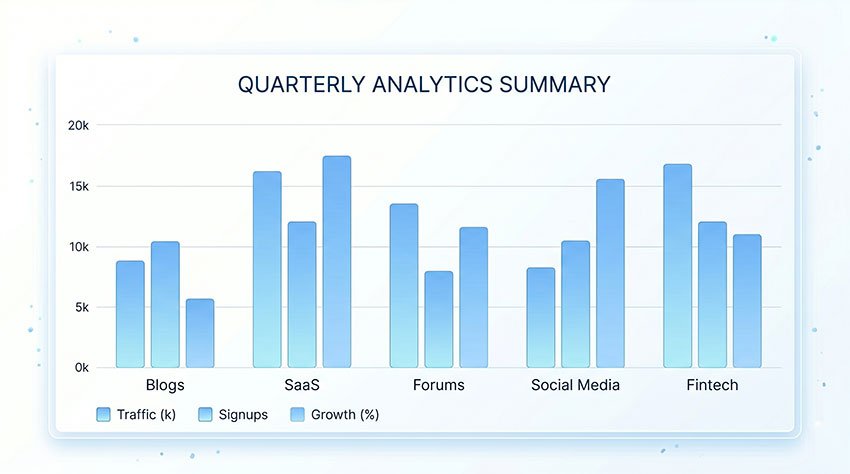
จากผลการทดสอบทั้งหมด พบรูปแบบที่ชัดเจนว่า อัตราความสำเร็จในการส่งอีเมลอยู่ในระดับสูงในสภาพแวดล้อมที่มีความปลอดภัยต่ำ ในขณะที่ลดลงอย่างมากในแพลตฟอร์มที่ใช้ระบบตรวจสอบอีเมลขั้นสูง
มีการสังเกตพบรูปแบบที่สอดคล้องกันเมื่อเปรียบเทียบผลลัพธ์ในหมวดหมู่ต่างๆ:
10 Minute Mail ทำงานได้อย่างน่าเชื่อถือในสภาพแวดล้อมที่มีความปลอดภัยต่ำ แต่มีประสิทธิภาพลดลงอย่างเห็นได้ชัดบนแพลตฟอร์มที่มีระบบตรวจสอบอีเมลและระบบป้องกันการฉ้อโกงขั้นสูง รวมถึงบริษัทเทคโนโลยีขนาดใหญ่และสถาบันการเงิน
อัตราความสำเร็จตามหมวดหมู่แพลตฟอร์ม
ผลลัพธ์ด้านล่างนี้สะท้อนถึงการสังเกตการณ์แบบรวมจากทุกแพลตฟอร์มที่ทดสอบ โดยแบ่งตามระดับความปลอดภัยและโครงสร้างพื้นฐานการตรวจสอบอีเมล
| ประเภทแพลตฟอร์ม | อัตราความสำเร็จที่สังเกตได้ | สถานะความเข้ากันได้ | ข้อสังเกตสำคัญ |
|---|---|---|---|
| Micro-SaaS & บล็อก | ~95% | ✅ ความน่าเชื่อถือสูง | ตรวจพบการกรองอีเมลชั่วคราวเพียงเล็กน้อย |
| ฟอรัม (เช่น Reddit) | ~70% | ⚠️ แปรผัน | ผลลัพธ์ขึ้นอยู่กับชื่อเสียงของโดเมนและความไวในการกรอง |
| โซเชียลมีเดีย (X, Instagram) | ~20% | ❌ ความสำเร็จต่ำ | มักมีการตรวจจับอีเมลชั่วคราวแบบเรียลไทม์ |
| ธนาคาร & ฟินเทค | <5% | 🚫 ถูกบล็อก | มีข้อกำหนดด้านการยืนยันตัวตนและการปฏิบัติตามกฎระเบียบที่เข้มงวด |
ทำไมจึงเกิดความแตกต่างเหล่านี้
ความแตกต่างของอัตราความสำเร็จเกิดจากความแตกต่างในโครงสร้างพื้นฐานการตรวจสอบอีเมล
แพลตฟอร์มระดับล่างมักพึ่งพาการกรองแบบบัญชีดำ (Blacklist) ในขณะที่แพลตฟอร์มขนาดใหญ่จะรวมเลเยอร์การตรวจจับหลายชั้นเข้าด้วยกัน รวมถึงการให้คะแนนชื่อเสียงของโดเมน การวิเคราะห์พฤติกรรม และการจดจำรูปแบบอีเมลชั่วคราว
ในทางกลับกัน แพลตฟอร์มขนาดใหญ่ เช่น Google, Meta และบริการทางการเงินหลักๆ ได้นำระบบตรวจสอบแบบหลายชั้นมาใช้ ซึ่งอาจรวมถึง:
- การให้คะแนนชื่อเสียงของโดเมน
- การวิเคราะห์พฤติกรรมการสมัครใช้งานแบบเรียลไทม์
- การตรวจจับรูปแบบอีเมลชั่วคราว
- การติดตามสัญญาณการละเมิดในอดีต
ด้วยเหตุนี้ บริการอีเมลชั่วคราวอย่าง 10 Minute Mail จึงถูกกรองออกมากขึ้นเรื่อยๆ ในระหว่างขั้นตอนการลงทะเบียนหรือการตรวจสอบอีเมลบนแพลตฟอร์มที่มีความปลอดภัยสูง
ข้อมูลเชิงลึกสำคัญจากการทดสอบ
ในทุกหมวดหมู่ที่ทดสอบ พบแนวโน้มที่สอดคล้องกันหนึ่งประการ:
ยิ่งระบบการยืนยันตัวตนและระบบป้องกันการละเมิดของแพลตฟอร์มมีความเข้มงวดมากเท่าใด ประสิทธิภาพของบริการอีเมลชั่วคราวอย่าง 10 Minute Mail ก็จะยิ่งต่ำลงเท่านั้น
นักพัฒนาอิสระและแพลตฟอร์มขนาดเล็กมักให้ความสำคัญกับการหาผู้ใช้ใหม่และการสมัครใช้งานที่ราบรื่น ในขณะที่แพลตฟอร์มขนาดใหญ่ให้ความสำคัญกับความสมบูรณ์ของการยืนยันตัวตน การป้องกันการฉ้อโกง และความปลอดภัยของบัญชีในระยะยาว
ทำไม 10 Minute Mail ถึงใช้งานไม่ได้? (การแก้ไขปัญหา)
อาจเป็นเรื่องน่าหงุดหงิดที่คุณทำตามขั้นตอนแล้ว แต่อีเมลยืนยันไม่เคยมาถึง ในปี 2026 การต่อสู้ระหว่างบริการอีเมลชั่วคราวและตัวกรองความปลอดภัยทวีความรุนแรงขึ้น หากคุณกำลังจ้องมองกล่องจดหมายที่ว่างเปล่า มักเกิดจากคอขวดสามประการต่อไปนี้
ความล้มเหลวของ 10 Minute Mail ส่วนใหญ่เกิดขึ้นเนื่องจากแพลตฟอร์มใช้บริการ API แบบเรียลไทม์เพื่อตรวจจับและบล็อก MX record แบบ "ชั่วคราว" หรือเนื่องจากส่วนต่อท้ายโดเมนเฉพาะนั้นถูกทำเครื่องหมายและขึ้นบัญชีดำโดยเซิร์ฟเวอร์อีเมลหลักแล้ว
เหตุผลทั่วไปที่ 1: โดเมนถูกขึ้นบัญชีดำ
เว็บไซต์สมัยใหม่หลายแห่งรวมบริการที่ดูแลฐานข้อมูลขนาดใหญ่ของโดเมนอีเมลชั่วคราวซึ่งอัปเดตทุกวัน หาก 10 Minute Email ใช้โดเมนยอดนิยมอย่าง @10minutemail.com เว็บไซต์อาจปฏิเสธทันทีหรือ "ทิ้ง" อีเมลที่เข้ามาโดยไม่แจ้งให้คุณทราบ
- หากเว็บไซต์แจ้งว่า "ไม่รองรับผู้ให้บริการอีเมลนี้" ให้ลองรีเฟรชหน้า 10 Minute Mail หรือคลิกปุ่ม "รับที่อยู่อีเมลใหม่" เพื่อรับส่วนต่อท้ายโดเมนอื่น (เช่น จาก
.comเป็น TLD ใหม่ๆ แบบสุ่ม เช่น.pwหรือ.xyz) โดเมนมักจะรอดพ้นจากการตรวจจับในช่วงสองสามสัปดาห์แรกก่อนที่จะถูกขึ้นบัญชีดำ
เหตุผลทั่วไปที่ 2: ความหน่วงสูงในเซิร์ฟเวอร์อีเมล
ในปี 2026 เซิร์ฟเวอร์อีเมลมักใช้ "Greylisting" ซึ่งเป็นเทคนิคที่จงใจหน่วงเวลาอีเมลจากผู้ส่งที่ไม่รู้จักเพื่อดูว่าเซิร์ฟเวอร์ผู้ส่งจะพยายามส่งอีกครั้งหรือไม่ (เป็นสัญญาณของเซิร์ฟเวอร์อีเมลที่ถูกต้องเทียบกับบอท) เนื่องจาก 10 Minute Mail เป็นผู้รับแบบพาสซีฟ อีเมลที่ล่าช้าเหล่านี้อาจมาถึง หลังจาก หน้าต่าง 10 นาทีของคุณหมดอายุลงแล้ว
- วิธีแก้ไข: ขยายเวลาของคุณเป็น 20 หรือ 30 นาทีทันทีที่คุณกด "สมัครใช้งาน" บนเว็บไซต์เป้าหมาย
เหตุผลทั่วไปที่ 3: ความขัดแย้งของคุกกี้เบราว์เซอร์
บางครั้งปัญหาไม่ได้อยู่ที่อีเมล แต่อยู่ที่เบราว์เซอร์ของคุณ หากคุณลองใช้อีเมลชั่วคราวหลายฉบับในเซสชันเดียวกัน ระบบตรวจจับการฉ้อโกงของเว็บไซต์อาจทำเครื่องหมายคุกกี้หรือที่อยู่ IP ของคุณแทนที่จะเป็นตัวอีเมลเอง
- วิธีแก้ไข: เปิด 10 Minute Mail ใน หน้าต่างไม่ระบุตัวตน (Incognito/Private) และใช้ VPN หรือฮอตสปอตมือถือเพื่อเปลี่ยนที่อยู่ IP ของคุณก่อนลองใหม่อีกครั้ง
การแก้ไขปัญหามักเป็นเกมของ "รูเล็ตโดเมน" บางครั้งการรีเฟรชง่ายๆ หรือการเปลี่ยนไปใช้หน้าต่างส่วนตัวก็เพียงพอที่จะแก้ปัญหาการบล็อกได้
ความเสี่ยงของการใช้ 10 Minute Mail สำหรับบัญชีที่สำคัญ
แม้ความสะดวกสบายของอีเมล "ใช้แล้วทิ้ง" จะปฏิเสธไม่ได้ แต่การใช้เพื่อวัตถุประสงค์ที่ไม่เหมาะสมอาจนำไปสู่ฝันร้ายทางดิจิทัล ในปี 2026 เมื่อโปรโตคอลความปลอดภัยเข้มงวดขึ้น ธรรมชาติที่อยู่ได้ไม่นานของ 10 Minute Mail จึงกลายเป็นความรับผิดชอบที่สำคัญสำหรับบัญชีบางประเภท
อย่าใช้อีเมล 10 นาทีสำหรับบัญชีที่คุณตั้งใจจะเก็บไว้ หากคุณออกจากระบบ ถูกทำเครื่องหมายเพื่อตรวจสอบความปลอดภัย หรือจำเป็นต้องรีเซ็ตรหัสผ่าน คุณจะถูกล็อกออกจากบัญชีอย่างถาวรเมื่อเซสชัน 10 นาทีเดิมหมดอายุลง
กับดัก "การกู้คืนรหัสผ่าน"
คนส่วนใหญ่ใช้ 10 Minute Mail เพื่อข้ามหน้าสมัครใช้งาน แต่พวกเขาลืมไปว่าที่อยู่อีเมลนั้นเปรียบเสมือน "กุญแจ" เข้าบ้าน หากเว็บไซต์ตรวจพบการเข้าสู่ระบบจาก IP ใหม่ในภายหลัง หรือต้องการการรีเซ็ตรหัสผ่านด้วยเหตุผลด้านความปลอดภัย เว็บไซต์จะส่งลิงก์ไปยังที่อยู่อีเมลที่ไม่มีอยู่จริงอีกต่อไป ไม่มีการกู้คืน "ลืมรหัสผ่าน" สำหรับกล่องจดหมายที่ถูกลบไปแล้ว
การขาดการรองรับการยืนยันตัวตนแบบสองชั้น (2FA)
ในปี 2026 บริการที่มีชื่อเสียงเกือบทุกแห่งกำหนดหรือสนับสนุนอย่างยิ่งให้ใช้การยืนยันตัวตนแบบสองชั้น (2FA) หากคุณเชื่อมโยงอีเมลชั่วคราวเข้ากับบัญชีที่ขอ "รหัสยืนยันเพื่อเข้าสู่ระบบ" เป็นระยะ คุณจะพบว่าตัวเองติดแหง็ก เนื่องจากคุณไม่สามารถเข้าถึงที่อยู่ 10 Minute Mail เดิมซ้ำได้ บัญชีของคุณจะกลายเป็น "บัญชีผี" ที่ยังใช้งานได้ แต่คุณไม่สามารถเข้าถึงได้
ข้อกังวลด้านความเป็นส่วนตัวบนโดเมนสาธารณะ
สิ่งสำคัญคือต้องจำไว้ว่าบริการอีเมล 10 นาทีส่วนใหญ่ใช้กลุ่มโดเมนสาธารณะที่นำกลับมาใช้ใหม่ แม้ว่ากล่องจดหมายของคุณจะเป็นส่วนตัวในช่วงอายุสั้นๆ แต่ตัวโดเมนเองก็ถูกตรวจสอบอย่างหนักโดยตัวติดตาม นอกจากนี้ เนื่องจากเครื่องมือเหล่านี้สร้างขึ้นเพื่อความเร็วมากกว่าการเข้ารหัส จึงไม่เหมาะสำหรับการรับเอกสารที่ละเอียดอ่อนหรือการสื่อสารส่วนตัว
นี่คือข้อแลกเปลี่ยนพื้นฐานของเครื่องมือระยะสั้นพิเศษ สำหรับผู้ใช้ที่ต้องการ ความเป็นส่วนตัวแบบ "กึ่งถาวร" เช่น กล่องจดหมายที่อยู่ได้นาน 24 ชั่วโมง หรือความสามารถในการนำโดเมนส่วนตัวกลับมาใช้ใหม่สำหรับการเข้าสู่ระบบในอนาคต [TempEmail.cc] มอบทางเลือกที่ปลอดภัยกว่ามาก โดยให้ความไม่เปิดเผยตัวตนของอีเมลชั่วคราวพร้อมความเสถียรของที่อยู่ที่กำหนดและกู้คืนได้
จำไว้เสมอว่า: 10 Minute Mail คือ เครื่องมือสำหรับความไม่เปิดเผยตัวตน ไม่ใช่เพื่อความปลอดภัย ใช้เพื่อซ่อนตัว แต่อย่าใช้เพื่อรักษาการเชื่อมต่อ
ทางเลือกที่ดีที่สุดแทน 10 Minute Mail (แบ่งตามกรณีการใช้งาน)
แม้ว่า 10 Minute Mail จะเหมาะสำหรับการสมัครใช้งานที่รวดเร็วและไม่ซับซ้อน แต่กรณีการใช้งานที่แตกต่างกันอาจต้องการโซลูชันอีเมลชั่วคราวที่ยืดหยุ่นหรือมีฟีเจอร์ครบครันกว่า ขึ้นอยู่กับระดับความปลอดภัยและความต้องการด้านระยะเวลา
ด้านล่างนี้คือการเปรียบเทียบประเภทเครื่องมืออีเมลชั่วคราวทั่วไปตามความแตกต่างด้านฟังก์ชันการทำงาน ไม่ใช่ตามแบรนด์เฉพาะ
การเปรียบเทียบโดยย่อ: อีเมลชั่วคราวมาตรฐาน vs ขั้นสูง
ผู้เชี่ยวชาญด้านการส่งอีเมลโดยทั่วไปแบ่งพฤติกรรมของแพลตฟอร์มออกเป็นสามระดับ:
- แพลตฟอร์มความปลอดภัยต่ำ (ตัวกรองการตรวจสอบน้อยที่สุด)
- แพลตฟอร์มความปลอดภัยปานกลาง (การกรองตามโดเมน + ฮิวริสติก)
- แพลตฟอร์มความปลอดภัยสูง (ระบบตรวจจับการฉ้อโกงหลายชั้น)
การจำแนกประเภทนี้สอดคล้องกับเอกสารจากผู้ให้บริการตรวจสอบอีเมล เช่น ZeroBounce และ Kickbox
| ฟีเจอร์ | 10 Minute Mail (พื้นฐาน Temp Mail) | บริการอีเมลชั่วคราวขั้นสูง |
|---|---|---|
| ประเภทโดเมน | โดเมนสาธารณะแบบใช้แล้วทิ้ง | โดเมนแบบหมุนเวียนหรือโดเมนที่ไม่ค่อยพบบ่อย |
| ระยะเวลาของกล่องจดหมาย | อายุการใช้งานสั้นคงที่ (≈10 นาที) | ระยะเวลาที่ปรับได้ |
| ขอบเขตการใช้งาน | การตรวจสอบครั้งเดียว | กรณีการใช้งานที่ขยายเวลาหรือทำซ้ำ |
| ความเข้ากันได้ของแพลตฟอร์ม | ต่ำบนแพลตฟอร์มที่เข้มงวด | สูงกว่าบนแพลตฟอร์มความปลอดภัยปานกลางบางแห่ง |
| ตัวเลือกการกู้คืน | ไม่มี | อาจรองรับการเข้าถึงชั่วคราวซ้ำ |
1. สำหรับการสมัครใช้งานครั้งเดียวแบบพื้นฐาน
เครื่องมืออีเมลชั่วคราวมาตรฐานอย่าง 10 Minute Mail มักใช้สำหรับการลงทะเบียนที่รวดเร็วซึ่งไม่จำเป็นต้องเข้าถึงในระยะยาว
มีประสิทธิภาพสูงสุดสำหรับสถานการณ์ที่มีแรงเสียดทานต่ำ เช่น:
- การดาวน์โหลดเนื้อหาที่ถูกล็อกไว้
- การทดสอบแบบฟอร์มการสมัคร
- การเข้าถึงโปรโมชันระยะสั้น
2. สำหรับหน้าต่างการตรวจสอบที่ยาวขึ้น
แพลตฟอร์มบางแห่งอาจหน่วงเวลาอีเมลยืนยันเนื่องจากการกรองป้องกันบอทหรือกระบวนการตรวจสอบภายใน
ในกรณีเหล่านี้ ผู้ใช้มักชอบบริการอีเมลชั่วคราวที่อนุญาตให้มีระยะเวลาใช้งานนานกว่าสองสามนาที
3. สำหรับสถานการณ์การพัฒนาและการทดสอบ
นักพัฒนาและทีม QA มักต้องการกล่องจดหมายทดสอบหลายกล่องเพื่อ...จำลองขั้นตอนการลงทะเบียนของผู้ใช้
เครื่องมือขั้นสูงอาจรองรับ:
- การสร้างกล่องจดหมายหลายรายการ
- รอบการทดสอบซ้ำ
- การจัดการเซสชันแบบขยายเวลา
ข้อมูลเชิงลึกที่สำคัญ (จากการเปรียบเทียบนี้)
ประสิทธิภาพของเครื่องมืออีเมลชั่วคราวถูกกำหนดโดยระบบตรวจสอบอีเมลในระดับแพลตฟอร์มเป็นหลัก ไม่ใช่ตัวเครื่องมือเอง
คำถามที่พบบ่อย: ทุกสิ่งที่คุณควรรู้เกี่ยวกับอีเมลชั่วคราว
10 Minute Mail สามารถถูกติดตามได้หรือไม่?
คำตอบสั้นๆ: โดยทั่วไปไม่ได้ในมุมมองของเว็บไซต์ แต่การติดตามในระดับ IP อาจยังคงมีอยู่
ในมุมมองของเว็บไซต์ที่รับอีเมล จะเห็นเพียงที่อยู่อีเมลชั่วคราวเท่านั้น อย่างไรก็ตาม ผู้ให้บริการอาจบันทึกที่อยู่ IP เพื่อป้องกันการละเมิดหรือเพื่อปฏิบัติตามข้อกำหนดทางกฎหมาย เพื่อความเป็นส่วนตัวที่สูงขึ้น มักมีการแนะนำให้ใช้ VPN ควบคู่ไปกับอีเมลชั่วคราว
การใช้อีเมลแบบใช้แล้วทิ้งถูกกฎหมายหรือไม่?
คำตอบสั้นๆ: ใช่ การใช้ อีเมลแบบใช้แล้วทิ้งนั้นถูกกฎหมาย ในประเทศส่วนใหญ่
บริการอีเมลชั่วคารถือเป็นเครื่องมือเพื่อความเป็นส่วนตัว อย่างไรก็ตาม การใช้งานอาจละเมิดข้อกำหนดในการให้บริการ (Terms of Service) ของบางแพลตฟอร์ม เช่น บริการสตรีมมิ่งหรือแอปทางการเงิน ซึ่งต้องการตัวตนที่ยืนยันได้ในระยะยาว
ทำไมบางเว็บไซต์ถึงบล็อก 10 Minute Mail?
คำตอบสั้นๆ: เพื่อป้องกันสแปม บอท และการสร้างบัญชีปลอม
แพลตฟอร์มส่วนใหญ่บล็อกบริการอีเมลแบบใช้แล้วทิ้งเนื่องจากข้อกำหนดในการป้องกันการละเมิด ตามที่ระบุไว้ในเอกสารของผู้ให้บริการตรวจสอบอีเมล (เช่น ZeroBounce, Kickbox) และกรอบการทำงานป้องกันสแปมที่ใช้กันอย่างแพร่หลายในระบบการเริ่มต้นใช้งาน SaaS สมัยใหม่
จะข้ามข้อผิดพลาด “ไม่อนุญาตให้ใช้ที่อยู่อีเมลแบบใช้แล้วทิ้ง” ได้อย่างไร?
คำตอบสั้นๆ: ใช้บริการอีเมลทางเลือกที่มีโดเมนซึ่งไม่ค่อยถูกขึ้นบัญชีดำ
บางแพลตฟอร์มตรวจพบและบล็อกโดเมนอีเมลแบบใช้แล้วทิ้งที่เป็นที่รู้จักระหว่างการลงทะเบียน ในกรณีดังกล่าว บริการที่มีโดเมนใหม่กว่าหรือโดเมนที่ยังไม่ถูกขึ้นบัญชีดำอย่างกว้างขวางอาจมีอัตราการยอมรับที่สูงกว่า อย่างไรก็ตาม การหลีกเลี่ยงข้อจำกัดอาจเป็นการละเมิดนโยบายของแพลตฟอร์ม ขึ้นอยู่กับการใช้งาน
ฉันสามารถกู้คืนกล่องจดหมาย 10 Minute Mail ที่หมดอายุแล้วได้หรือไม่?
คำตอบสั้นๆ: ไม่ได้ กล่องจดหมายที่หมดอายุแล้วไม่สามารถกู้คืนได้
เมื่อตัวจับเวลา 10 นาทีสิ้นสุดลง กล่องจดหมายและข้อความทั้งหมดที่จัดเก็บไว้จะถูกลบอย่างถาวร นี่เป็นคุณสมบัติหลักด้านความเป็นส่วนตัวที่ออกแบบมาเพื่อให้แน่ใจว่าจะไม่มีการเก็บรักษาข้อมูลในระยะยาว
บทสรุป: กรณีการใช้งานจริงในปี 2026
10 Minute Mail ไม่ใช่โซลูชันอีเมลแบบครอบจักรวาลอีกต่อไปในปี 2026 แต่เป็นเครื่องมือที่ขึ้นอยู่กับบริบท ซึ่งออกแบบมาเพื่อการยืนยันตัวตนระยะสั้นและการเข้าถึงที่ง่ายดาย
ประสิทธิภาพของมันเข้าใจได้ดีที่สุดผ่านบริบทของการตัดสินใจมากกว่าความน่าเชื่อถือทั่วไป
เมื่อใช้งานได้ดี
- แพลตฟอร์มที่มีความปลอดภัยต่ำ (บล็อก, การดาวน์โหลด, การทดลองใช้ SaaS พื้นฐาน)
- ขั้นตอนการยืนยันตัวตนแบบครั้งเดียวที่ไม่มีการพึ่งพาบัญชีในระยะยาว
เมื่อใช้งานไม่ได้ผล
- แพลตฟอร์มที่มีระบบตรวจจับอีเมลแบบใช้แล้วทิ้งขั้นสูง
- โซเชียลมีเดีย, ฟินเทค และระบบนิเวศ SaaS ขนาดใหญ่
- บัญชีใดก็ตามที่ต้องการการกู้คืนหรือการเข้าถึงในระยะยาว
กฎการตัดสินใจหลัก
หากบัญชีนั้น ไม่มีมูลค่าระยะยาวหรือไม่มีความจำเป็นต้องกู้คืน 10 Minute Mail ถือว่ามีประสิทธิภาพ
หากบัญชีนั้นต้องการ การยืนยันตัวตนที่ต่อเนื่องหรือการเข้าถึงในอนาคต บริการนี้ไม่เหมาะสม
ข้อมูลเชิงลึกส่งท้าย
การเปลี่ยนแปลงที่แท้จริงในปี 2026 ไม่ใช่ว่า 10 Minute Mail ใช้งานได้หรือไม่ แต่คือ แพลตฟอร์มกำลังพยายามบังคับใช้ตัวตนดิจิทัลประเภทใด