Um e-mail temporário para o Instagram é um endereço de e-mail descartável que permite que você se inscreva, receba códigos de verificação e gerencie sua conta sem expor sua caixa de entrada pessoal. Ele é amplamente utilizado para proteger a privacidade, evitar spam e criar várias contas no Instagram com segurança.
Em 2026, no entanto, usar um e-mail temporário para o Instagram não é mais tão simples quanto costumava ser. Muitos usuários encontram problemas como códigos de verificação que não chegam, e-mails sendo rejeitados ou serem forçados a realizar a verificação por telefone. Isso ocorre porque o Instagram aprimorou significativamente seus sistemas de detecção, tornando ineficazes os serviços de e-mail descartável de baixa qualidade.
Por trás desses problemas, existe uma mudança maior na forma como plataformas como o Instagram operam.
Procurando uma visão geral mais ampla?
Confira nosso guia completo sobre e-mail temporário para redes sociais para comparar como diferentes plataformas lidam com e-mails descartáveis.
A Nova Realidade: Rastreamento de Identidade Impulsionado por IA
De acordo com um relatório do TechCrunch de 2026, o Instagram evoluiu para um ecossistema focado em IA. Os sistemas de rastreamento modernos não tratam mais seu e-mail como uma simples credencial de login — eles o usam como um sinal central de identidade.
Ao se registrar com um e-mail pessoal, o Instagram pode correlacionar sua conta com outros pontos de dados, como comportamento de navegação, atividade de compras e perfis entre plataformas. Esse processo, frequentemente chamado de correspondência de identidade, torna a verdadeira anonimidade cada vez mais difícil.
Relatórios de organizações como a Cybersecurity Ventures 2026 e o Relatório do Q1 de 2026 do TechCrunch destacaram como sistemas integrados entre aplicativos podem aumentar o risco de exposição e tomada de conta quando e-mails principais são reutilizados.
Por que o E-mail Temporário Ainda é Importante
É aqui que usar um e-mail temporário para o Instagram se torna mais do que apenas uma conveniência — torna-se uma estratégia prática de privacidade.
Um e-mail descartável de alta qualidade atua como um amortecedor entre sua identidade real e sua atividade social. Em vez de vincular sua caixa de entrada pessoal a cada ação, ele cria uma camada controlada que reduz o rastreamento, limita a correlação de dados e minimiza riscos.
Escolhendo o Serviço de E-mail Temporário Certo
Nem todos os serviços de e-mail descartável funcionam com o Instagram em 2026.
Devido a filtros mais rigorosos (como verificações de reputação de domínio e validação de servidor de e-mail), muitos provedores de e-mail temporário gratuitos não entregam e-mails de verificação. Para usar com sucesso um e-mail temporário para o Instagram, você precisa de um serviço que ofereça:
- Domínios limpos e de alta reputação
- Entrega de e-mail confiável
- Infraestrutura que imita provedores de e-mail reais
Plataformas como o tempemail.cc são projetadas para atender a esses requisitos, ajudando a garantir que seu código de verificação chegue rapidamente e que a configuração da sua conta prossiga sem problemas.

O que é um E-mail Temporário para o Instagram?
Um e-mail temporário para o Instagram é um endereço de e-mail descartável usado para se inscrever, receber códigos de verificação e criar uma conta sem usar seu e-mail pessoal.
Em 2026, ele é comumente usado para:
- Proteger a privacidade
- Evitar spam
- Criar várias contas no Instagram com segurança
No entanto, nem todos os serviços de e-mail temporário funcionam devido aos sistemas de detecção mais rigorosos do Instagram.
Por que usar seu e-mail principal para o Instagram é arriscado
Em 2026, seu e-mail principal é mais do que apenas uma forma de receber mensagens — é o link central para toda a sua identidade online. Usá-lo para se inscrever no Instagram pode parecer conveniente, mas também cria um ponto único de falha.
Se esse e-mail for exposto, várias partes da sua vida digital podem ser afetadas de uma só vez.
1. Seu e-mail pode ser correspondido em diferentes plataformas
Um dos maiores riscos hoje é a correlação de dados.
Quando você usa seu e-mail principal para o Instagram, ele pode ser vinculado a outros serviços que você usou anteriormente — como sites de compras, fóruns ou aplicativos. Se seu e-mail aparecer em um vazamento de dados, invasores podem conectar essas informações à sua conta do Instagram.
Isso significa que até mesmo um pequeno vazamento de outro site pode expor:
- Seu perfil do Instagram
- Detalhes pessoais vinculados ao seu e-mail
- Outras contas que usam o mesmo endereço
Usar um e-mail temporário para o Instagram ajuda a evitar isso, separando sua conta social da sua identidade real.
2. Você se torna um alvo para e-mails de phishing
Outra ameaça crescente é o phishing direcionado.
Em 2026, os golpistas não enviam mais spam aleatório. Eles analisam o comportamento do usuário e enviam e-mails que parecem notificações reais do Instagram — como:
- "Sua conta tem um problema de segurança"
- "Seu conteúdo violou a política"
- "Confirme sua conta para evitar a suspensão"
Essas mensagens são projetadas para enganar você e fazer com que insira seus detalhes de login.
Se sua conta do Instagram estiver vinculada ao seu e-mail principal, esses e-mails de phishing chegam diretamente à sua caixa de entrada principal — onde é mais provável que você confie neles.
Ao usar um e-mail temporário para o Instagram, você reduz a chance de essas mensagens chegarem ao seu e-mail pessoal.
3. Várias contas podem afetar umas às outras
Se você gerencia mais de uma conta no Instagram, usar o mesmo e-mail pode criar riscos adicionais.
O sistema do Instagram pode vincular contas que compartilham o mesmo e-mail ou detalhes de recuperação. Se uma conta for sinalizada, limitada ou banida, isso pode afetar outras conectadas a ela.
Por exemplo:
- Uma conta é restrita
- Outras contas usando o mesmo e-mail podem perder visibilidade
- Sinais de confiança entre as contas podem diminuir
Usar endereços separados — como um e-mail temporário para o Instagram — ajuda a manter cada conta independente e reduz esse risco.
Seu e-mail principal conecta tudo em sua vida digital. Usá-lo para todas as plataformas, incluindo o Instagram, aumenta sua exposição a riscos de segurança.
Um e-mail temporário para o Instagram funciona como uma camada de proteção simples — ele mantém sua atividade social separada, reduz o rastreamento e limita o impacto de possíveis vazamentos de dados.
Por que alguns e-mails temporários para o Instagram não funcionam (2026)
Se o seu e-mail temporário para o Instagram não está funcionando, você pode ver erros como:
- "Por favor, insira um endereço de e-mail válido"
- Código de verificação não recebido
- E-mail rejeitado durante a inscrição
Você não está sozinho.
Em 2026, o Instagram atualizou seu sistema de filtragem, e muitos serviços de e-mail temporário de baixa qualidade não funcionam mais. Veja o porquê.
1. A reputação do domínio importa
O Instagram verifica a reputação do domínio de e-mail que você usa.
Muitos serviços de e-mail temporário gratuitos reutilizam os mesmos domínios para milhares de usuários. Assim que esses domínios são sinalizados por spam ou atividade de bots, eles param de funcionar completamente.
É por isso que:
- Alguns e-mails temporários funcionam um dia e falham no outro
- Domínios novos ou de baixa qualidade são frequentemente bloqueados instantaneamente
Para usar com sucesso um e-mail temporário para o Instagram, você precisa de um domínio com uma reputação limpa e um histórico estável.
2. O comportamento do servidor de e-mail é monitorado
O Instagram não olha apenas para o endereço de e-mail — ele também verifica como o servidor de e-mail se comporta ao enviar códigos de verificação.
Se o sistema detectar padrões incomuns, ele pode bloquear o e-mail ou nunca entregar o código.
Problemas comuns incluem:
- E-mails chegando muito lentamente ou não chegando
- Respostas do servidor que não correspondem a provedores reais
- Suporte a criptografia ruim
Essa é uma das principais razões pelas quais os e-mails de verificação do Instagram às vezes não chegam ao usar e-mail temporário.
3. E-mails "Catch-All" são mais fáceis de detectar
Alguns serviços de e-mail temporário aceitam todas as mensagens recebidas, mesmo para endereços que não existem.
O Instagram pode testar isso enviando solicitações para endereços de e-mail aleatórios no mesmo domínio. Se tudo for aceito, o sistema pode sinalizá-lo como um serviço de e-mail descartável.
Como resultado, muitos provedores de e-mail temporário genéricos são bloqueados automaticamente.
Por que alguns serviços de e-mail temporário ainda funcionam
Nem todos os serviços de e-mail temporário são afetados.
Provedores de alta qualidade usam:
- Domínios limpos e confiáveis
- Infraestrutura de servidor de e-mail estável
- Comportamento de entrega semelhante ao de serviços de e-mail reais
É por isso que plataformas como o tempemail.cc ainda conseguem entregar códigos de verificação do Instagram de forma confiável, enquanto muitas alternativas gratuitas falham.
Se o seu e-mail temporário para o Instagram não está funcionando, o problema geralmente não é o conceito — é a qualidade do serviço de e-mail.
Escolher um provedor confiável faz a diferença entre a verificação instantânea e erros constantes de inscrição.
Como usar um e-mail temporário para o Instagram (Guia passo a passo)
Usar um e-mail temporário para o Instagram em 2026 requer uma configuração limpa. Siga estas etapas para se inscrever com sucesso e evitar erros comuns, como falha na verificação ou solicitações de telefone.
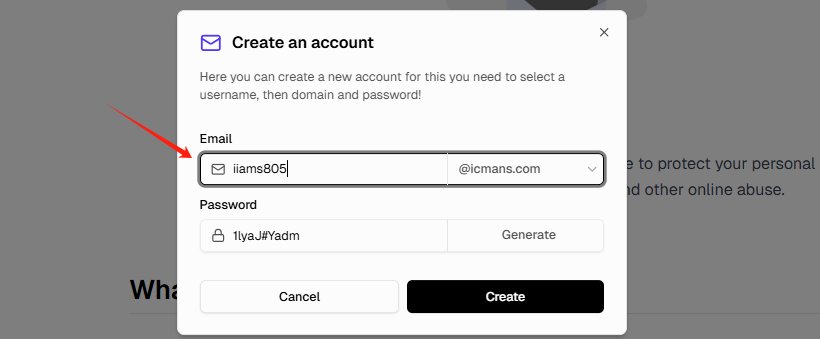
Passo 1: Gere um e-mail temporário de alta qualidade
Vá para tempemail.cc e gere um novo endereço de e-mail.
Para melhorar a taxa de sucesso:
- Escolha domínios com .com, .net ou .org
- Evite nomes de usuário com aparência aleatória (por exemplo,
[email protected]) - Use um formato natural como
[email protected]
Um e-mail temporário de alta qualidade para o Instagram aumenta suas chances de receber o código de verificação instantaneamente.
Passo 2: Use um ambiente de navegador limpo
Antes de abrir o Instagram, certifique-se de que seu ambiente esteja limpo:
- Abra uma janela anônima/privada
- Ou use um novo perfil de navegador
- Evite usar sessões antigas com cookies salvos
Isso evita que o Instagram vincule sua nova inscrição a atividades anteriores.
Dica profissional: Usar dados móveis (4G/5G) em vez de Wi-Fi pode melhorar as taxas de sucesso, já que IPs móveis são geralmente mais confiáveis.
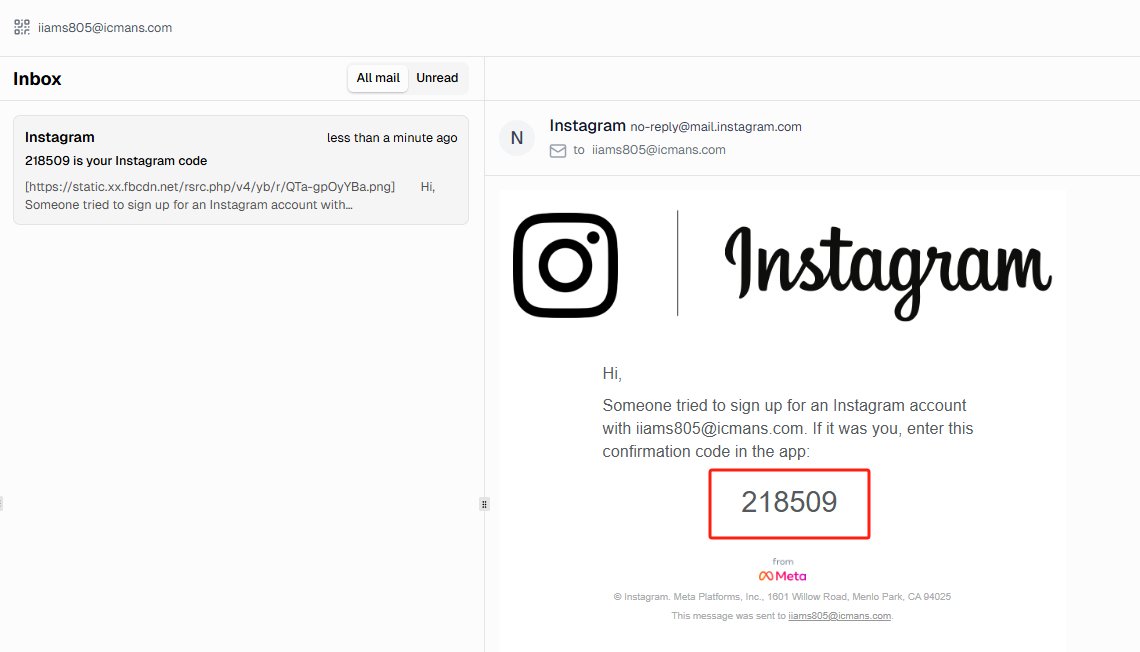
Passo 3: Inscreva-se no Instagram com o e-mail temporário
Vá para o Instagram e inicie o processo de inscrição.
- Insira seu e-mail temporário para o Instagram
- Crie um nome de usuário e senha
- Aguarde o código de verificaçãoA maioria dos e-mails de verificação chega dentro de 5 a 15 segundos.
Se você não receber o código:
- Aguarde pelo menos 60 segundos
- Evite clicar em “Reenviar” repetidamente
- Tente um domínio diferente, se necessário
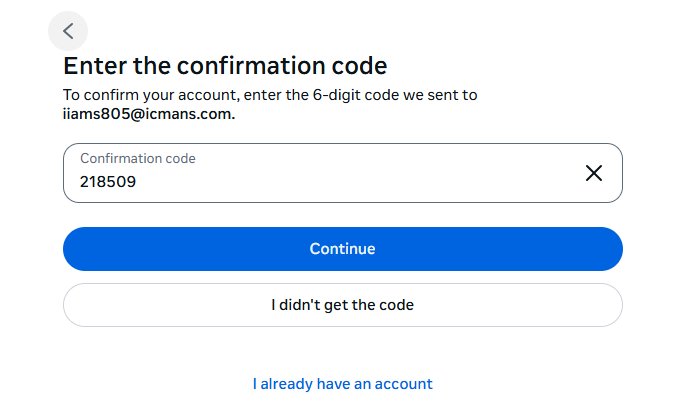
Passo 4: Conclua a verificação e proteja sua conta
Insira o código de verificação e finalize seu cadastro no Instagram.
Depois disso:
- Salve suas credenciais de login imediatamente
- Adicione um método de recuperação (telefone ou e-mail secundário, se necessário)
Isso garante que você não perca o acesso caso o e-mail temporário expire.
Passo 5: Evite atividades suspeitas após o cadastro
Novas contas são monitoradas de perto em 2026.
Para evitar ser sinalizado:
- Não siga muitas contas imediatamente
- Primeiro, adicione uma foto de perfil e uma biografia
- Passe alguns minutos navegando normalmente
Isso ajuda sua conta a parecer a de um usuário real.
Usar um e-mail temporário para o Instagram funciona melhor quando combinado com um ambiente limpo e um comportamento realista. A maioria dos problemas não ocorre por causa do e-mail em si, mas pela forma como a conta é criada.
Como gerenciar várias contas do Instagram sem ser banido
Se você está usando um e-mail temporário para o Instagram para criar várias contas, o verdadeiro desafio não é o cadastro — é manter essas contas seguras.
O sistema do Instagram pode vincular contas se elas compartilharem sinais semelhantes. Para evitar isso, você precisa manter cada conta o mais independente possível.
1. Use um endereço IP limpo e consistente
Um erro comum é usar um e-mail temporário para o Instagram, mas fazer login a partir de um endereço IP arriscado ou inconsistente.
O Instagram avalia a qualidade e a localização do IP. Se sua conta for criada em um local, mas acessada de outra rede suspeita, ela poderá ser sinalizada.
Para reduzir esse risco:
- Evite VPNs gratuitas ou públicas
- Use redes estáveis (Wi-Fi residencial ou dados móveis)
- Mantenha os locais de login consistentes
Um IP limpo é tão importante quanto um e-mail temporário confiável.
2. Evite vincular contas através do mesmo dispositivo
O Instagram pode detectar padrões em dispositivos e navegadores.
Se você criar várias contas no mesmo navegador sem separação, elas poderão ser vinculadas.
Para se manter seguro:
- Use perfis de navegador diferentes ou sessões anônimas
- Evite fazer login em várias contas ao mesmo tempo
- Limpe os cookies e o cache entre as sessões
O objetivo é fazer com que cada conta do Instagram pareça pertencer a um usuário diferente.
3. Aqueça novas contas lentamente
Novas contas do Instagram são monitoradas de perto, especialmente as criadas com e-mail temporário.
Se você agir rápido demais, o sistema pode sinalizar sua conta como suspeita.
Melhores práticas:
- Adicione uma foto de perfil e uma biografia primeiro
- Navegue pelo conteúdo normalmente por alguns minutos
- Siga apenas algumas contas por dia
A atividade gradual ajuda a construir confiança e reduz o risco de restrições.
Usar um e-mail temporário para o Instagram é apenas parte da estratégia.
Para gerenciar várias contas com sucesso, você também precisa controlar seu IP, ambiente de navegador e comportamento. Manter tudo separado e natural é a maneira mais segura de evitar banimentos.
E-mail temporário para Instagram não funciona? Problemas comuns e soluções
Mesmo usando um e-mail temporário de alta qualidade para o Instagram, você ainda pode encontrar problemas durante o cadastro. Aqui estão os problemas mais comuns em 2026 — e como resolvê-los.
1. O Instagram está pedindo um número de telefone
Isso geralmente acontece quando o Instagram detecta um ambiente de cadastro arriscado.
Causas comuns:
- Uso de VPN gratuita
- Endereço IP suspeito ou compartilhado
- Cadastro rápido demais
Como resolver:
- Mude para dados móveis (4G/5G) ou uma rede doméstica limpa
- Evite serviços de VPN gratuitos
- Tente o cadastro novamente usando um novo e-mail temporário para o Instagram
Na maioria dos casos, mudar seu IP e tentar novamente resolve o problema.
2. Código de verificação do Instagram não recebido
Este é um dos problemas mais comuns ao usar e-mail temporário.
Razões possíveis:
- O domínio do e-mail está bloqueado
- O servidor de e-mail não é confiável
- Muitas tentativas de reenvio
Como resolver:
- Aguarde pelo menos 60 a 120 segundos antes de tentar novamente
- Não clique em “Reenviar” repetidamente
- Tente um domínio diferente (.net ou .org costumam funcionar melhor)
- Use um provedor de e-mail temporário confiável
Um e-mail temporário funcional para o Instagram deve entregar códigos de verificação em segundos, assim como um e-mail descartável comum para o Instagram.
3. Erro de “Endereço de e-mail inválido”
Se o Instagram disser que seu e-mail não é válido, geralmente significa que o domínio foi sinalizado.
Como resolver:
- Gere um novo endereço de e-mail temporário
- Evite extensões de domínio incomuns como .xyz ou .top
- Use um formato de nome de usuário mais realista
Domínios de alta qualidade são essenciais para um cadastro bem-sucedido no Instagram.
4. Loop de “Checkpoint” do Instagram
Às vezes, após o cadastro, o Instagram continua pedindo para você verificar sua conta repetidamente.
Isso é frequentemente causado por:
- Incompatibilidade de impressão digital do navegador (browser fingerprint)
- Conflitos de sessão
- Sinais de atividade suspeita
Como resolver:
- Use um navegador diferente ou o modo anônimo
- Limpe os cookies e o cache
- Comece do zero com um novo e-mail temporário para o Instagram
5. Preocupado em perder o acesso após o e-mail expirar?
Endereços de e-mail temporário podem expirar, mas sua conta do Instagram não será excluída.
O que você deve fazer:
- Salve suas credenciais de login imediatamente
- Adicione um e-mail de recuperação ou número de telefone posteriormente
- Ative a autenticação de dois fatores
Isso garante acesso a longo prazo, mesmo que seu e-mail temporário não esteja mais disponível.
Se o seu e-mail temporário para o Instagram não estiver funcionando, o problema geralmente está relacionado à qualidade do e-mail, ao ambiente de IP ou ao comportamento de cadastro — não ao conceito em si.
Corrigir esses fatores pode melhorar drasticamente sua taxa de sucesso.
É seguro usar e-mail temporário para o Instagram?
Muitos usuários se perguntam se usar um e-mail temporário para o Instagram é permitido — e se isso pode levar a problemas na conta.
É seguro usar e-mail temporário para o Instagram? A resposta curta: Sim, você pode usar — mas existem algumas limitações.
Usar e-mail temporário viola as regras do Instagram?
Os Termos de Serviço do Instagram exigem que os usuários forneçam informações precisas ao criar uma conta. Em teoria, usar um e-mail descartável pode não atender totalmente a esse requisito.
No entanto, na prática:
- O Instagram não bane contas simplesmente por usar e-mail temporário
- Milhões de usuários se cadastram com e-mails alternativos ou secundários
- A fiscalização foca mais no comportamento (spam, automação, abuso)
Isso significa que usar um e-mail temporário para o Instagram é geralmente seguro, desde que você siga as regras de uso normal.
E-mail temporário é legal?
Sim. Usar um e-mail temporário é legal na maioria dos países.
É simplesmente uma ferramenta de privacidade — semelhante a:
- Usar uma VPN
- Criar uma conta de e-mail secundária
- Limitar a exposição de dados pessoais online
Não existem leis que proíbam o uso de e-mail temporário para o cadastro no Instagram.
Quando você NÃO deve usar e-mail temporário
Embora o e-mail temporário seja útil, ele não é adequado para todas as situações.
Evite usar um e-mail temporário para o Instagram se:
- Você estiver gerenciando uma conta comercial
- Sua conta estiver vinculada a pagamentos ou anúncios
- Você precisar de acesso a longo prazo a conteúdos importantes
Nesses casos, perder o acesso ao e-mail pode criar problemas sérios.
Melhor prática: Use e-mail temporário, depois adicione uma recuperação
Uma abordagem inteligente é:
- Use um e-mail temporário para o Instagram durante o cadastro
- Conclua a verificação e a configuração inicial
- Posteriormente, adicione um e-mail permanente ou número de telefone
Isso oferece tanto privacidade quanto segurança de conta a longo prazo.
Usar um e-mail temporário para o Instagram é geralmente seguro e legal. O risco real vem de como a conta é usada — não do e-mail em si.
Desde que você siga o comportamento normal e configure opções de recuperação, você pode usar e-mail temporário sem grandes problemas.
E-mail temporário vs. E-mail pessoal para o Instagram
| Recurso | E-mail temporário para Instagram | E-mail pessoal |
|---|---|---|
| Privacidade | Alta | Baixa |
| Risco de Spam | Baixo | Alto |
| Vinculação de conta | Mínima | Alta |
| Recuperação | Limitada | Total |
Usar um e-mail temporário para o Instagram ajuda a proteger sua identidade, enquanto e-mails pessoais oferecem melhores opções de recuperação a longo prazo.
Conclusão: Você deve usar e-mail temporário para o Instagram?
Usar um e-mail temporário para o Instagram em 2026 é uma das maneiras mais simples de proteger sua privacidade, evitar spam e reduzir o risco de problemas com a conta.
À medida que os sistemas de detecção do Instagram se tornam mais avançados, o sucesso depende não apenas de usar um e-mail temporário, mas de escolher um serviço confiável e seguir o processo de configuração correto.
Se você deseja se cadastrar rapidamente e evitar problemas comuns como erros de verificação ou solicitações de telefone, usar um e-mail temporário de alta qualidade para o Instagram pode tornar o processo muito mais tranquilo.
Você pode gerar um e-mail temporário funcional para o Instagram instantaneamente e concluir seu cadastro em segundos.
Comece agora e gere um e-mail temporário para o Instagram para criar sua conta com segurança e privacidade.
Perguntas frequentes sobre e-mail temporário para o Instagram
1. Como faço para me cadastrar no Instagram com um e-mail temporário?
Você pode usar um e-mail temporário para o Instagram para se registrar sem revelar seu e-mail pessoal. Basta gerar um endereço descartável em plataformas como tempemail.cc, inseri-lo no formulário de cadastro e confirmar o código de verificação. Esse processo mantém sua caixa de entrada principal privada e ajuda você a criar várias contas com segurança. Sempre escolha um domínio respeitável (.com/.net) para evitar os filtros de detecção de IA do Instagram, garantindo um registro tranquilo em 2026.
2. Minha conta do Instagram funcionará se o e-mail temporário expirar?
Sim, sua conta permanece ativa. No entanto, assim que o e-mail temporário expirar, você não receberá redefinições de senha ou notificações de segurança nesse endereço. Para evitar perder o acesso, adicione um número de telefone ou um e-mail permanente secundário imediatamente após o cadastro. Isso mantém sua conta recuperável.ainda beneficiando da privacidade inicial de um e-mail temporário para o Instagram.
3. O Instagram consegue detectar ou bloquear e-mails descartáveis?
A IA do Instagram de 2026 consegue identificar e-mails descartáveis de baixa qualidade, mas serviços de e-mail temporário de alta reputação, como o tempemail.cc, contornam esses filtros. A plataforma não banirá contas apenas por usar um e-mail descartável. Problemas surgem apenas se você violar outras regras, como spam, automação agressiva ou violações de políticas. Usar um e-mail temporário confiável reduz o risco e garante uma experiência de cadastro tranquila.
4. Quais serviços de e-mail temporário são mais seguros para o Instagram?
Procure serviços com registros MX verificados, domínios rotativos de alta confiança e infraestrutura de servidor de nível empresarial. O Tempemail.cc é otimizado para o Instagram 2026, oferecendo verificação rápida, atrasos mínimos e alta capacidade de entrega. Evite provedores gratuitos ou desconhecidos com IPs compartilhados, pois a IA do Instagram pode sinalizá-los. Escolher um serviço respeitável aumenta a taxa de sucesso na criação e verificação da conta.
5. Posso verificar minha conta do Instagram mais tarde se eu usei um e-mail temporário?
Sim, mas apenas se você tiver definido opções de recuperação, como um número de telefone ou e-mail secundário. Sem isso, você corre o risco de perder o acesso caso a caixa de entrada descartável expire. Após o cadastro, adicione imediatamente os detalhes de recuperação. Isso garante que sua conta do Instagram com e-mail temporário permaneça segura e lhe dá controle total para futuras verificações ou redefinições de senha.
6. É possível substituir um e-mail temporário por um e-mail real no Instagram?
Com certeza. Após se registrar com um e-mail descartável, vá para as configurações do seu perfil e atualize o campo de e-mail. O Instagram enviará um código de confirmação para o novo endereço. Uma vez verificado, sua conta estará permanentemente vinculada ao e-mail real, enquanto seu e-mail temporário ajudou você a manter a privacidade durante a fase inicial de cadastro.