È possibile utilizzare una temp mail per Facebook senza essere bannati?
La risposta breve è sì, ma dipende da come la si utilizza.
Facebook non blocca direttamente gli indirizzi email temporanei. Valuta invece fattori come l'indirizzo IP, il comportamento durante la registrazione e i modelli di attività. Ciò significa che una temp mail può funzionare perfettamente per casi d'uso a basso rischio, ma potrebbe fallire se il tuo comportamento appare sospetto.
Per molti utenti, la vera domanda non è solo "può funzionare", ma se ne valga la pena considerando il compromesso sulla privacy.
Secondo un sondaggio del Pew Research del 2023, l'81% degli adulti americani è preoccupato per come le aziende utilizzano i propri dati. Poiché piattaforme come Facebook usano spesso gli indirizzi email come identificatori a lungo termine, registrarsi con la propria casella di posta personale può portare a spam, tracciamento ed esposizione indesiderata nel tempo.
Ecco perché sempre più utenti si rivolgono alle temp mail per Facebook.
Un'email temporanea ti consente di ricevere istantaneamente i codici di verifica, completare la registrazione senza attriti ed evitare di collegare la tua casella di posta reale a un'ulteriore piattaforma. Agisce come uno scudo per la privacy, particolarmente utile per test, account secondari o accessi a breve termine.
In questa guida imparerai quando le temp mail funzionano per Facebook, quando non funzionano e come usarle in sicurezza senza essere segnalati.
Cerchi una panoramica più ampia?
Dai un'occhiata alla nostra guida completa sulle temp mail per i social media per confrontare come le diverse piattaforme gestiscono le email usa e getta.
È possibile utilizzare una temp mail per Facebook senza essere bannati? (Risposta completa)
Nel 2026, la risposta breve è Sì, ma con una precisazione. Sebbene i sistemi di sicurezza di Facebook, guidati da un'analisi comportamentale avanzata e dall'IA, siano diventati più rigorosi, la posta temporanea rimane uno scudo valido per la tua identità digitale se usata correttamente.
La realtà è semplice: Facebook non prende di mira la temp mail in sé, ma lo spam automatizzato. Se utilizzi un'email usa e getta di alta qualità e imiti un comportamento umano naturale, puoi registrarti con successo senza collegare la tua casella di posta personale.
Riassunto rapido per il 2026:
- Tasso di successo: ~75% (fortemente dipendente dalla reputazione del tuo IP).
- Ideale per: Test, account secondari "di sola lettura" ed evitare il tracciamento dei dati.
- Rischio principale: Il recupero dell'account è quasi impossibile una volta che la casella di posta temporanea scade.
- Strategia vincente: Usa un IP pulito + Browser privato + Provider affidabile come TempEmail.cc.
Come funziona realmente il rilevamento di Facebook
Facebook non banna esplicitamente gli indirizzi email temporanei o usa e getta. Nella maggior parte dei casi, qualsiasi email in grado di ricevere un codice di verifica a 6 cifre funzionerà durante il processo di registrazione.
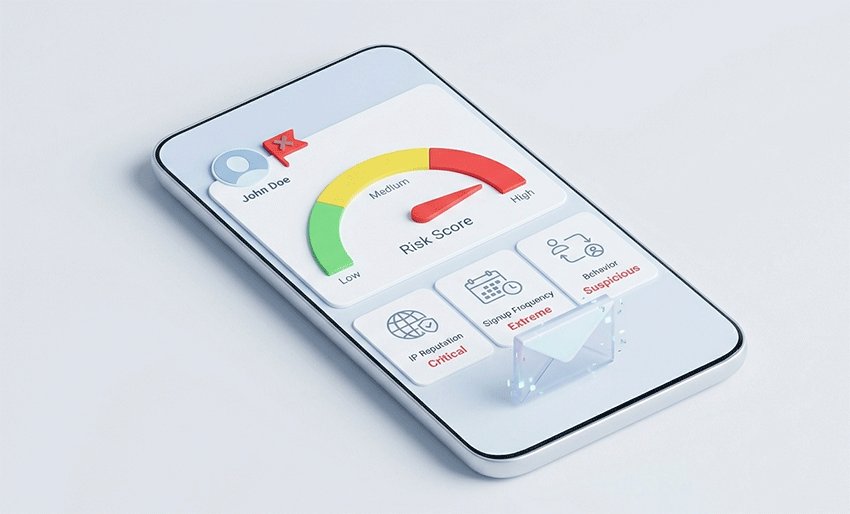
Tuttavia, il livello di sicurezza di Facebook valuta molto più del semplice dominio. Utilizza un punteggio di rischio (Risk Scoring) basato su:
- Reputazione dell'IP: Stai usando una VPN segnalata o un proxy condiviso?
- Fingerprinting del browser: Il tuo dispositivo sembra quello di un utente reale o di un bot?
- Velocità di registrazione: Stai creando più account in un breve lasso di tempo?
Il verdetto: Strumento per la privacy vs. Strumento di bypass
Ciò significa che il vero rischio non è l'email temporanea in sé, ma i tuoi segnali comportamentali.
Se crei account in modo "umano" e a basso volume (ad esempio, per test a breve termine o un progetto una tantum), la temp mail funziona perfettamente. Se la usi in modo aggressivo per registrazioni di massa, attiverai un fallimento della verifica o una restrizione immediata dell'account.
In breve: la temp mail è un potente strumento per la privacy, non uno strumento per aggirare i Termini di servizio di Facebook. Usata in modo responsabile, protegge efficacemente la tua casella di posta principale dal data harvesting a lungo termine di Facebook.
La temp mail funziona davvero per Facebook? (Spiegazione del tasso di successo)
Sì, la temp mail funziona per Facebook, ma il tasso di successo non è del 100%.
Nell'uso reale, l'efficacia dell'email temporanea dipende meno dall'email stessa e più da come l'account viene creato e utilizzato. Sulla base dei modelli di utilizzo comuni e del feedback degli utenti, il tasso di successo è solitamente moderato (circa 60-80%) se utilizzato correttamente.
Quando la temp mail funziona bene
L'email temporanea ha maggiori probabilità di funzionare in condizioni normali e a basso rischio:
- Creazione di un singolo account, non di più account in blocco
- Utilizzo di un indirizzo IP stabile (nessun cambio frequente di posizione)
- Seguire un flusso di registrazione naturale (nessuna automazione o comportamento insolito)
- Utilizzo di un dominio di posta temporanea affidabile che non sia stato segnalato
In questi scenari, Facebook tratta l'email temporanea come una casella di posta standard, consentendoti di ricevere i codici di verifica e completare la registrazione senza problemi.
Quando la temp mail fallisce
I problemi si verificano solitamente quando il comportamento attiva il sistema di rilevamento del rischio di Facebook:
- Creazione di più account in un breve periodo di tempo
- Cambio frequente di posizioni VPN o indirizzi IP
- Utilizzo di domini di posta temporanea già segnalati o abusati
- Agire troppo rapidamente o in un modo che ricorda gli script automatizzati
In questi casi, potresti riscontrare problemi come la mancata ricezione delle email di verifica, fallimenti nella registrazione o restrizioni temporanee dell'account.
Cosa influenza realmente il tasso di successo?
Un malinteso comune è che "la temp mail non funzioni". In realtà, la maggior parte dei fallimenti è causata da segnali comportamentali, non dal tipo di email.
Il sistema di Facebook valuta:
- Reputazione dell'IP
- Frequenza di creazione dell'account
- Modelli di interazione durante la registrazione
Ciò significa che anche un'email reale può fallire in condizioni sospette, mentre una temp mail può avere successo se usata normalmente.
Approfondimento chiave:
La temp mail per Facebook funziona in modo affidabile in scenari a basso rischio, ma il successo dipende dalla coerenza del comportamento, non solo dall'indirizzo email.
Quando dovresti usare una temp mail per Facebook? (Casi d'uso migliori)
L'email temporanea non è una soluzione valida per tutto. Funziona meglio in scenari specifici in cui la privacy e l'accesso a breve termine contano più della stabilità dell'account a lungo termine.
Capire quando usare una temp mail per Facebook può aiutarti a evitare rischi inutili e a trarne il massimo vantaggio.
✅ Casi d'uso consigliati
La temp mail è una scelta intelligente in situazioni in cui non hai bisogno di un accesso permanente o di una comunicazione a lungo termine:
- Account di test
Ideale per sviluppatori, marketer o flussi di lavoro di QA che devono testare funzionalità, integrazioni o sistemi di accesso senza collegare dati personali. - Progetti temporanei
Utile per campagne a breve termine, esperimenti o configurazioni una tantum in cui l'account non verrà mantenuto a lungo. - Profili secondari
Aiuta a creare account aggiuntivi senza esporre la tua email principale, specialmente quando vuoi separare le attività o ridurre il disordine nella posta in arrivo.
In questi casi, l'utilizzo di un'email temporanea per la registrazione a Facebook riduce al minimo lo spam, protegge la tua casella di posta principale e mantiene limitata la tua impronta digitale.
❌ Non consigliato
Ci sono anche situazioni in cui la temp mail può creare più problemi che benefici:
- Account personale principale
Se usi Facebook per la comunicazione quotidiana, perdere l'accesso a una casella di posta temporanea può rendere il recupero dell'account difficile o impossibile. - Account aziendali o pubblicitari
Gli strumenti aziendali richiedono spesso una verifica continua e una comunicazione stabile. Un'email usa e getta può portare a interruzioni o problemi con l'account. - Uso a lungo termine
Gli indirizzi email temporanei sono progettati per scadere. Affidarsi a essi per account a lungo termine aumenta il rischio di perdere l'accesso nel tempo.
Guida rapida alle decisioni
Se il tuo obiettivo è la privacy, i test o l'uso a breve termine, la temp mail è una soluzione pratica ed efficiente.
Se il tuo obiettivo è la stabilità, il recupero o l'accesso a lungo termine, un'email reale è la scelta più sicura.
In sintesi:
Usa la temp mail per la flessibilità, non per gli account che non puoi permetterti di perdere.
Perché Facebook a volte blocca la temp mail (Motivi reali)
Molti utenti presumono che Facebook blocchi direttamente gli indirizzi email temporanei. In realtà, non è così che funziona il sistema.
Facebook non prende di mira la temp mail in sé; si affida invece al tracciamento del comportamento e a sistemi di punteggio del rischio per rilevare attività sospette durante la creazione dell'account.
Ciò significa che un'email temporanea non è il problema di default. Il problema sorge quando alcuni segnali suggeriscono un comportamento anomalo o ad alto rischio.
Approfondimento chiave:
Non è l'email, è come ti comporti.
Il cambiamento nella privacy del 2026: perché la temp mail non è più opzionale
Secondo le recenti Previsioni sulla privacy dei dati del 2026, stiamo entrando nell'era del "tracciamento incentrato sull'identità". Poiché le principali piattaforme si muovono verso la crittografia resistente ai quanti e la profilazione comportamentale guidata dall'IA, il tuo indirizzo email personale è diventato una "impronta digitale permanente".
- Approfondimento sulle tendenze: Nel 2026, oltre 20 stati degli Stati Uniti hanno promulgato leggi complete sulla privacy (come il CCPA/Delete Act aggiornato), dando agli utenti maggiori diritti di eliminazione dei dati. Tuttavia, il modo più semplice per "eliminare" i dati è non fornirli mai.
- Gatekeeper dell'IA: I provider di posta nel 2026 (Google, Apple) utilizzano ora "Poste in arrivo intelligenti" per riassumere e filtrare i contenuti. L'utilizzo di un'email temporanea per Facebook impedisce al rumore dei social media di "inquinare" la tua casella di posta personale principale gestita dall'IA.
Verdetto dell'esperto: Utilizzare un servizio come TempEmail.cc non serve più solo a evitare lo spam; si tratta di "Data Decoupling" (disaccoppiamento dei dati), assicurando che la tua attività sui social media non possa essere incrociata con la tua identità finanziaria o professionale.
Come Facebook rileva il rischio
Facebook valuta molteplici fattori durante la registrazione e la verifica, tra cui:
- Reputazione dell'IP: se il tuo indirizzo IP è stato associato a spam o registrazioni ripetute
- Modelli di registrazione: con quale frequenza vengono creati gli account in un breve lasso di tempo
- Comportamento dell'utente: se le azioni sembrano umane (digitazione normale, tempismo) o automatizzate
Questi segnali vengono combinati in un punteggio di rischio. Se il punteggio è troppo alto, Facebook potrebbe ritardare la verifican, bloccare la ricezione di codici da parte dell'email o limitare completamente l'account.
Motivi comuni per cui le email temporanee falliscono
Ecco i fattori scatenanti più comuni che portano a problemi con le email temporanee su Facebook:
- I domini usa e getta sono segnalati
Alcuni domini di posta temporanea sono oggetto di abusi diffusi e potrebbero essere già presenti in liste di blocco interne, impedendo la ricezione delle email di verifica. - Bassa reputazione dell'IP
L'utilizzo di VPN pubbliche, proxy o il cambio frequente di posizione può rendere la tua connessione sospetta. - Comportamento di registrazione anomalo
Creare più account rapidamente, aggiornare ripetutamente la pagina o riprovare troppe volte può attivare le difese automatizzate.
Cosa significa questo in pratica
Anche se utilizzi un'email reale, le stesse restrizioni possono essere applicate in condizioni sospette. Allo stesso modo, un'email temporanea può funzionare senza problemi se il tuo comportamento appare normale e a basso rischio.
Comprendere questo aspetto aiuta a spiegare perché alcuni utenti segnalano che "l'email temporanea per Facebook non funziona", mentre altri non riscontrano alcun problema.
In sintesi:
L'email temporanea non è bloccata di per sé, ma opera all'interno del più ampio sistema di rilevamento dei rischi di Facebook.
Il modo più semplice per proteggere la tua privacy su Facebook
Se desideri un risultato rapido, utilizzare un'email temporanea è uno dei modi più semplici per ridurre l'esposizione.
Non è richiesta alcuna configurazione o competenza tecnica e può ridurre immediatamente lo spam e i rischi di tracciamento. Rispetto ad altri strumenti per la privacy, l'email temporanea offre uno dei migliori rapporti tra risultati ottenuti e sforzo richiesto.
In molti casi, può eliminare fino all'80% dell'esposizione indesiderata alle email durante la registrazione.
Come utilizzare un'email temporanea per Facebook (senza essere segnalati)
Utilizzare un'email temporanea per Facebook è semplice, ma farlo correttamente è ciò che fa la differenza tra successo e fallimento.
Segui i passaggi seguenti per completare la registrazione a Facebook in sicurezza, riducendo al minimo il rischio di problemi di verifica o restrizioni dell'account.
Passaggio 1 – Genera un indirizzo email temporaneo
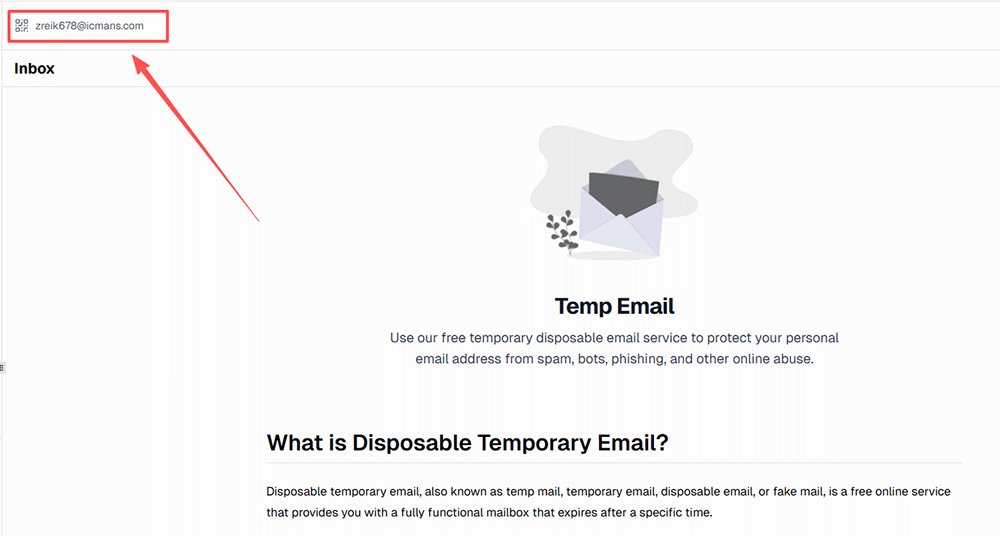
Inizia aprendo un servizio di posta temporanea affidabile e generando istantaneamente un nuovo indirizzo email.
Best practice:
- Utilizza un provider di posta temporanea affidabile con domini stabili e consegna rapida
- Tieni la casella di posta aperta in una scheda separata per un accesso rapido
Da evitare:
- Riutilizzare caselle di posta pubbliche o condivise che potrebbero essere già state segnalate
- Scegliere servizi di bassa qualità con domini lenti o bloccati
Un indirizzo email pulito e nuovo migliora le tue possibilità di ricevere il codice di verifica di Facebook senza ritardi.
Azione rapida: Ottieni la tua email pronta per FB
Prima di passare al Passaggio 2, hai bisogno di un dominio pulito e non segnalato. La maggior parte delle blacklist pubbliche si aggiorna ogni ora: i nostri domini vengono aggiornati quotidianamente per mantenere un tasso di accettazione di Facebook superiore al 75%.
👉 [Genera subito un'email temporanea privata su TempEmail.cc]
Passaggio 2 – Registrati su Facebook
Vai alla pagina di registrazione di Facebook e inserisci il tuo indirizzo email temporaneo come faresti con un'email normale.
Best practice:
- Inserisci informazioni realistiche e coerenti (nome, data di nascita, ecc.)
- Completa il modulo a un ritmo umano normale
Da evitare:
- Creare più account in breve tempo
- Utilizzare eccessivamente bot, script o strumenti di riempimento automatico
Facebook monitora i modelli di comportamento, quindi l'input naturale conta più del tipo di email.
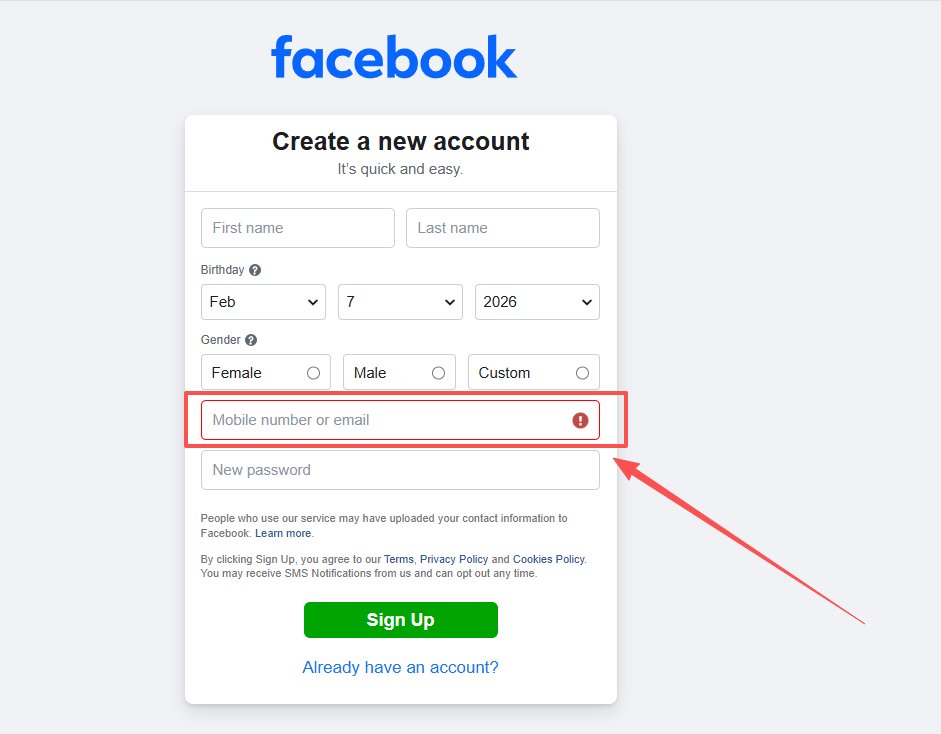
Passaggio 3 – Ricevi il codice di verifica
Dopo aver inviato i tuoi dati, Facebook invierà un codice di verifica o un link di conferma alla tua casella di posta temporanea.
Best practice:
- Mantieni la casella di posta temporanea aperta e attiva
- Aggiorna una volta se l'email non appare immediatamente
Da evitare:
- Cliccare ripetutamente su "rinvia codice"
- Cambiare indirizzo email a metà processo
Troppi tentativi possono attivare il rilevamento dello spam e ritardare la consegna.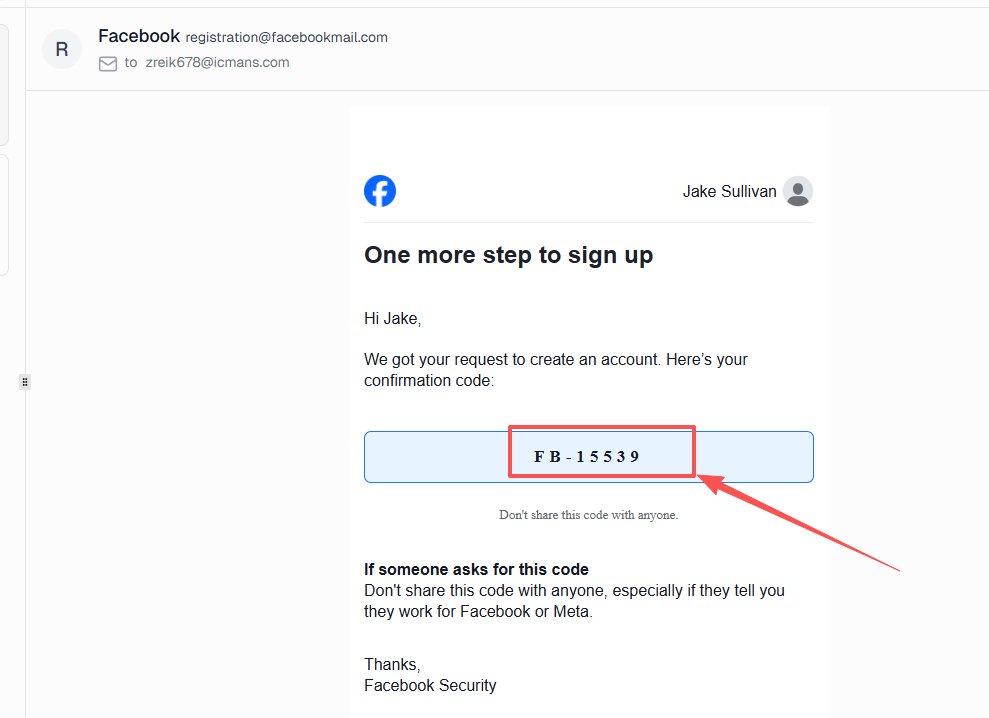
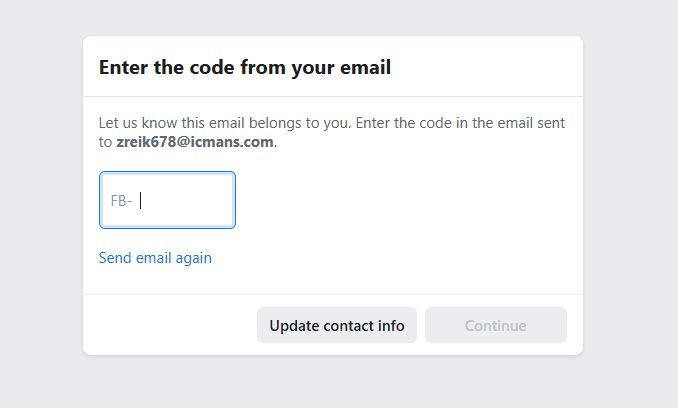
Passaggio 4 – Completa immediatamente la verifica
Inserisci il codice di verifica o clicca sul link di conferma per attivare il tuo account.
Best practice:
- Completa la verifica non appena arriva l'email
- Controlla due volte il codice prima di inviarlo
Da evitare:
- Ritardare il processo (i codici potrebbero scadere)
- Lasciare la registrazione incompleta troppo a lungo
Il completamento rapido riduce la possibilità di timeout della sessione o di ulteriori controlli di verifica.
Suggerimento finale: mantieni tutto coerente
Per ottenere i migliori risultati, mantieni coerenti l'indirizzo IP, il dispositivo e il comportamento durante l'intero processo. Cambiamenti improvvisi possono aumentare il tuo punteggio di rischio, anche se tutto il resto sembra normale.
Consiglio dell'esperto:
Tratta la registrazione come farebbe un utente reale: costante, semplice e a bassa frequenza.
Temp Mail vs Alias Gmail vs Email reale (Qual è la migliore per Facebook?)
Scegliere il tipo di email giusto per la registrazione a Facebook può influire direttamente sul tasso di successo, sul livello di privacy e sul rischio di essere segnalati.
Sebbene molti utenti presumano che tutti i metodi di posta elettronica funzionino allo stesso modo, ci sono differenze importanti nel modo in cui Facebook li valuta, specialmente quando si tratta di verifica e stabilità dell'account a lungo termine.
Tabella comparativa
Questo rapido confronto ti aiuta a scegliere il miglior metodo di posta elettronica in base al tuo obiettivo: privacy, tasso di successo o stabilità a lungo termine.
| Metodo | Livello di privacy | Livello di rischio | Tasso di successo | Caso d'uso migliore |
|---|---|---|---|---|
| Temp Mail | Alto | Medio | Medio | Test, account temporanei |
| Alias Gmail | Medio | Basso | Alto | Account secondari |
| Email reale | Basso | Minimo | Massimo | Account principali |
Cosa significa ogni opzione
Temp Mail (Email usa e getta)
L'email temporanea offre il massimo livello di privacy perché è completamente anonima e si elimina automaticamente dopo l'uso. Tuttavia, il tasso di successo è moderato poiché alcuni domini potrebbero essere segnalati. Funziona meglio per test, accessi a breve termine o account "usa e getta", ma non per account che intendi mantenere a lungo termine.
Alias Gmail (es. [email protected])
Gli alias Gmail sono varianti del tuo indirizzo email principale. Sono facili da usare e ampiamente accettati da Facebook, con un alto tasso di successo. Tuttavia, si collegano comunque alla tua casella di posta principale, il che significa che la privacy è solo parziale. Questo metodo è ideale per profili secondari o per l'organizzazione degli account.
Indirizzo email reale
L'utilizzo di un'email reale offre la massima affidabilità e il minor rischio di problemi di verifica. Facebook si fida pienamente dei provider di posta elettronica standard, rendendo questa l'opzione migliore per account personali, aziendali o a lungo termine. Il compromesso è una privacy inferiore, poiché la tua identità reale e la tua casella di posta potrebbero essere esposte a spam o tracciamento.
Concetto chiave
Non esiste un'unica opzione "migliore": dipende dal tuo obiettivo.
- Vuoi la massima privacy → usa l'email temporanea
- Vuoi un equilibrio → usa l'alias Gmail
- Vuoi la massima stabilità → usa l'email reale
In sintesi:
Usa l'email temporanea in modo strategico, non alla cieca.
Problemi comuni nell'uso dell'email temporanea per Facebook (e come risolverli)
Anche quando segui le best practice, potresti comunque riscontrare problemi durante l'utilizzo dell'email temporanea per la registrazione a Facebook. La maggior parte di questi problemi non è casuale: sono solitamente causati dalla reputazione del dominio, dai segnali comportamentali o da ritardi temporanei del sistema.
Di seguito sono riportati i problemi più comuni che gli utenti devono affrontare, insieme alle soluzioni pratiche che puoi applicare immediatamente.
Codice di verifica non ricevuto
Questo è il problema più comune segnalato dagli utenti quando utilizzano l'email temporanea.
Perché succede:
- Il dominio dell'email temporanea potrebbe essere segnalato o limitato nella frequenza
- Facebook ritarda l'invio dei codici a causa del rilevamento dei rischi
- La casella di posta non si aggiorna correttamente
Come risolvere:
- Passa a un dominio o provider di posta temporanea diverso
- Aggiorna la casella di posta e attendi almeno 30–60 secondi
- Clicca su "rinvia codice" solo una volta per evitare segnali di spam
Questo risolve direttamente le ricerche come "facebook non invia codice email temporanea" e migliora rapidamente il tuo tasso di successo.
Account Facebook bloccato o verifica fallita
A volte, anche dopo aver inserito il codice, l'account potrebbe essere temporaneamente bloccato o richiedere una verifica aggiuntiva.
Perché succede:
- Troppi tentativi di registrazione in breve tempo
- Indirizzo IP sospetto (VPN/proxy)
- Comportamento anomalo durante la registrazione
Come risolvere:
- Attendi qualche ora prima di riprovare
- Evita di cambiare ripetutamente indirizzo IP
- Usa una sessione del browser pulita e riprova
Nella maggior parte dei casi, si tratta di una restrizione temporanea, non di un ban permanente.
Dominio email temporanea bloccato
In alcuni casi, Facebook potrebbe non accettare affatto determinati domini di posta temporanea.
Perché succede:
- Il dominio è stato oggetto di abusi diffusi ed è stato aggiunto ai filtri interni
- Elevato volume di registrazioni dallo stesso dominio
Come risolvere:
- Genera una nuova email temporanea con un dominio diverso
- Utilizza un provider di qualità superiore con domini a rotazione
- Evita di riutilizzare la stessa email più volte
Questa è una soluzione chiave per le query sul "problema di verifica Facebook con email temporanea".
Consiglio dell'esperto: riduci i problemi prima che si verifichino
La maggior parte dei problemi può essere evitata mantenendo il tuo comportamento a basso rischio e coerente:
- Usa un account per sessione
- Evita tentativi aggressivi
- Mantieni stabili il tuo IP e il tuo dispositivo
Se l'email temporanea fallisce, di solito è un problema di segnale, non dello strumento in sé.
I migliori servizi di posta temporanea per Facebook (Scelte rapide)
Scegliere un provider di posta temporanea affidabile può fare una differenza notevole nel ricevere senza problemi i codici di verifica di Facebook. Invece di elencare decine di opzioni, ecco alcune scelte rapide.che sono comunemente usati e generalmente offrono buone prestazioni.
- TempEmail.cc — Offre un aggiornamento rapido della posta in arrivo, domini puliti e nessuna registrazione richiesta, rendendolo una scelta pratica per una rapida verifica su Facebook.
- temp-mail.org — Un servizio di posta elettronica temporanea ampiamente utilizzato con una consegna stabile, sebbene alcuni domini possano occasionalmente essere soggetti a limitazioni di frequenza.
- temp-mail.io — Fornisce un semplice accesso alla posta in arrivo temporanea con una discreta affidabilità per le esigenze di registrazione di base.
Se un servizio non funziona, passare a un altro provider o dominio spesso risolve il problema immediatamente.
Verdetto finale: vale la pena usare una temp mail per Facebook?
Quindi, vale davvero la pena usare una temp mail per Facebook?
✔ Sì — per casi d'uso a breve termine e a basso rischio.
Se stai creando un account di prova, un profilo secondario o ti stai registrando per un accesso temporaneo, la temp mail è un modo rapido ed efficace per proteggere la tua casella di posta principale da spam e tracciamento.
❌ No — per account a lungo termine o importanti.
Se l'account è legato all'identità personale, ad attività commerciali o pubblicitarie, utilizzare un'email reale è la scelta più sicura e stabile.
Cosa dovresti fare dopo
Se il tuo obiettivo è la privacy, la velocità e la semplicità, la temp mail rimane uno dei modi più semplici per iniziare: nessuna registrazione, nessun impegno e nessun rischio per la tua casella di posta reale.
Crea un'email temporanea e registrati su Facebook senza esporre la tua casella di posta reale.
FAQ: Temp Mail per Facebook
1. La temp mail è consentita su Facebook?
Sì, Facebook non vieta esplicitamente gli indirizzi email temporanei. Tuttavia, valuta il comportamento dell'utente, la reputazione dell'IP e i modelli di registrazione piuttosto che il tipo di email in sé. La temp mail può funzionare per casi d'uso a basso rischio come test o account secondari, ma un uso improprio, come registrazioni di massa o attività sospette, può portare a problemi di verifica o restrizioni dell'account.
2. Perché Facebook non invia il codice di verifica?
Se Facebook non invia un codice di verifica alla tua temp mail, solitamente è dovuto al filtraggio del dominio o al rilevamento dei rischi. Alcuni domini di posta elettronica usa e getta potrebbero essere segnalati, oppure richieste ripetute possono causare ritardi. Prova a passare a un altro provider di temp mail, attendi 30–60 secondi ed evita di cliccare più volte su "rinvia codice".
3. Posso recuperare un account Facebook con una temp mail?
Recuperare un account Facebook con una temp mail è difficile e spesso inaffidabile. Poiché le email temporanee scadono o non sono accessibili in modo permanente, potresti perdere l'accesso ai codici di recupero o ai link di ripristino. Per gli account a lungo termine, si consiglia vivamente di utilizzare un indirizzo email reale per assicurarsi di poter recuperare l'account, se necessario.
4. La temp mail è sicura per i social media?
La temp mail è generalmente sicura per l'uso sui social media a breve termine o a basso rischio, come test o creazione di account secondari. Aiuta a proteggere la tua casella di posta principale da spam e tracciamento. Tuttavia, non dovrebbe essere utilizzata per account importanti o a lungo termine, poiché potresti perdere l'accesso se la casella di posta temporanea scade o diventa non disponibile.
5. Facebook può rilevare le email temporanee?
Facebook può identificare alcuni domini di posta elettronica temporanea, specialmente quelli che vengono ampiamente abusati. Tuttavia, il rilevamento non si basa esclusivamente sull'email stessa. Il sistema di Facebook si concentra maggiormente sui segnali comportamentali, come la reputazione dell'IP e l'attività di registrazione. Una temp mail potrebbe comunque funzionare se il comportamento generale appare normale e a basso rischio.