Risposta rapida:
Sì, puoi usare una temp mail per Canva, ma è inaffidabile per account a lungo termine, collaborazione in team e l'utilizzo di Canva Pro.
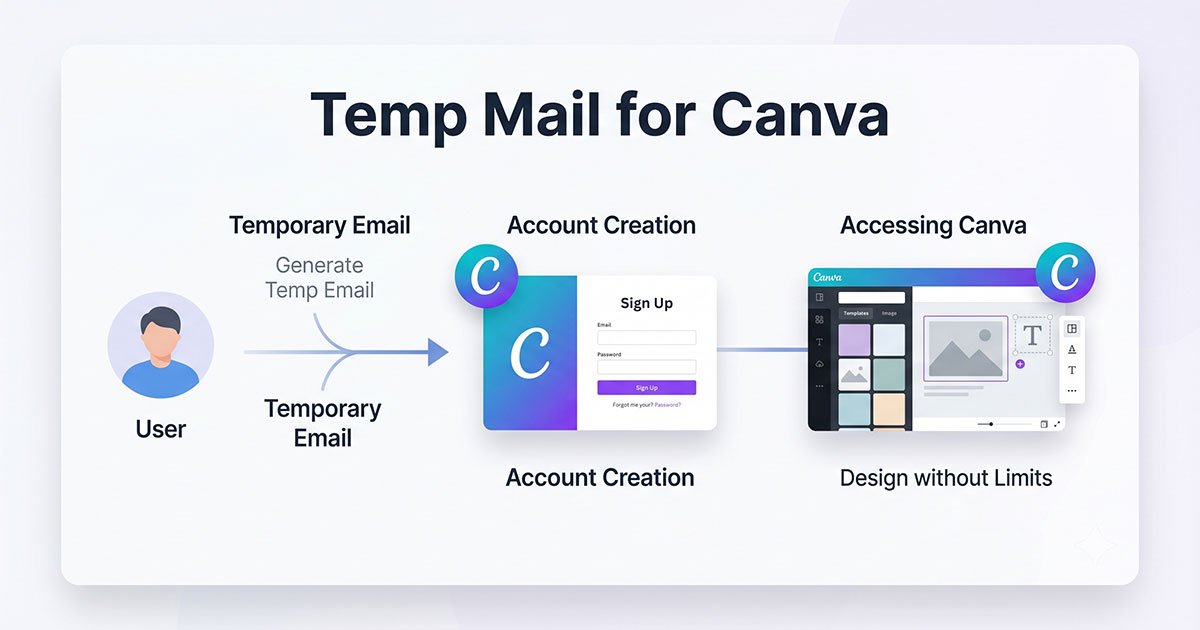
Molti utenti cercano una temp mail per Canva perché desiderano registrarsi rapidamente senza utilizzare un indirizzo email personale. In molti casi, Canva consente la registrazione tramite email temporanea e alcune caselle di posta usa e getta riescono a ricevere le email di verifica. Tuttavia, non tutti i domini di posta temporanea funzionano in modo affidabile e alcuni potrebbero fallire durante la registrazione o smettere di ricevere email in seguito.
La Temp mail è solitamente ideale per un uso a breve termine di Canva, come testare modelli o creare un account rapido. È molto meno affidabile per progetti a lungo termine, abbonamenti a Canva Pro, collaborazione in team o per archiviare importanti risorse del brand. Se la casella di posta temporanea scade, il recupero dell'account può diventare difficile.
Questo è particolarmente rilevante per gli utenti che cercano temp mail per Canva, poiché l'affidabilità dei servizi di email usa e getta influisce direttamente sul successo della registrazione, sulla ricezione della verifica e sull'accesso all'account a lungo termine.
Un altro problema importante è l'affidabilità della verifica. Alcuni domini di email usa e getta sono pesantemente abusati e potrebbero essere già stati segnalati dai sistemi di prevenzione dello spam. Di conseguenza, le email di verifica di Canva potrebbero non arrivare affatto o potrebbero apparire ulteriori controlli di sicurezza durante la registrazione.
In questa guida, imparerai se Canva è in grado di rilevare i servizi di email temporanea, perché le email di verifica a volte falliscono, i maggiori rischi dell'utilizzo di una temp mail per Canva, quando è relativamente sicuro usarla e quali alternative incentrate sulla privacy offrono una migliore stabilità a lungo termine.
È possibile utilizzare una Temp Mail per Canva?
Puoi utilizzare un'email temporanea per registrarti a Canva e, in molti casi, il processo di verifica funzionerà senza problemi. Tuttavia, il successo non è garantito, poiché Canva potrebbe rifiutare o non recapitare le email a seconda della reputazione del dominio di posta usa e getta.
Alcuni provider di email temporanea sono perfettamente funzionanti durante la registrazione, mentre altri potrebbero essere filtrati o bloccati dai sistemi di prevenzione dello spam. Ciò significa che il risultato può variare: un'email temporanea potrebbe funzionare istantaneamente, mentre un'altra potrebbe fallire prima che il passaggio di verifica sia completato.
Cosa succede solitamente durante la registrazione
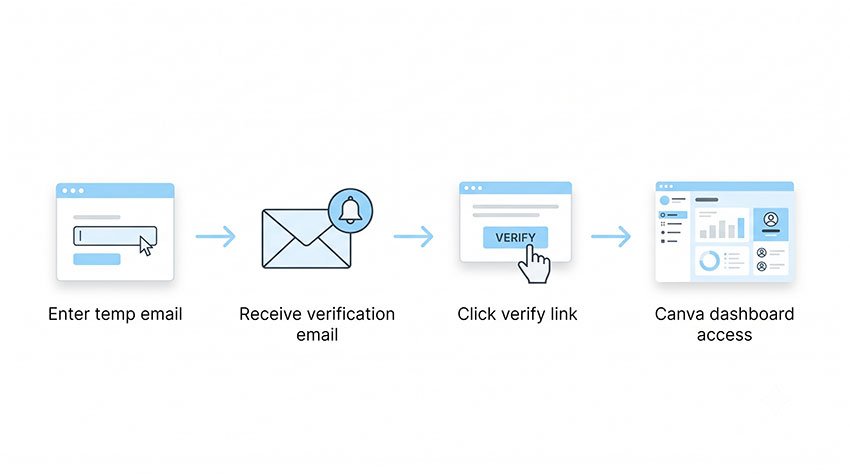
Nella maggior parte dei casi, il processo di registrazione è semplice:
- Inserisci un indirizzo email temporaneo
- Ricevi l'email di verifica di Canva
- Confermi il codice o il link di verifica
- Termini la creazione dell'account
Tuttavia, alcune caselle di posta usa e getta non ricevono mai il messaggio di verifica. In altri casi, l'email potrebbe arrivare molto in ritardo o scomparire dopo la scadenza della casella di posta.
Perché alcune email temporanee falliscono
Ci sono diverse ragioni per cui le email di verifica di Canva potrebbero non raggiungere una casella di posta temporanea.
Un problema comune è la reputazione del dominio. I domini di posta usa e getta pubblici sono spesso pesantemente abusati per spam, account falsi e ripetute registrazioni di prove gratuite. Nel tempo, alcuni domini sviluppano una scarsa reputazione SMTP e diventano più soggetti a essere filtrati.
I ritardi nella consegna possono verificarsi anche quando i provider di posta temporanea hanno un'infrastruttura instabile o server di posta sovraccarichi. In alcuni casi, i sistemi di filtraggio dello spam potrebbero bloccare il messaggio prima ancora che raggiunga la casella di posta.
Di conseguenza, l'utilizzo di una temp mail per Canva a volte può funzionare perfettamente, e altre volte fallire senza preavviso.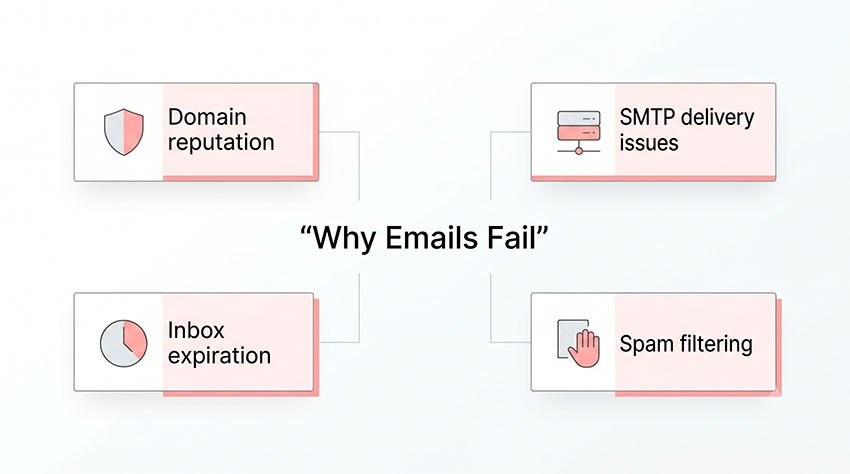
Perché le persone usano la Temp Mail per Canva
La maggior parte degli utenti non sta cercando di "hackerare" Canva. In realtà, le persone solitamente utilizzano i servizi di posta temporanea per comodità, privacy o accesso a breve termine. Comprendere queste motivazioni aiuta a spiegare perché l'email usa e getta rimane popolare per le registrazioni a Canva.
Evitare le email di marketing
Alcuni utenti semplicemente non vogliono che la propria casella di posta principale venga riempita di email promozionali, aggiornamenti di prodotto o campagne di onboarding dopo aver creato un account Canva. Un'email temporanea fornisce un modo rapido per accedere alla piattaforma senza aggiungere un altro abbonamento a lungo termine alla propria casella di posta personale.
Testare Canva prima di usare un'email reale
Molti utenti desiderano esplorare Canva prima di collegare un indirizzo email permanente. Questo è particolarmente comune quando si testano modelli, si controllano le funzionalità disponibili o si valutano gli strumenti di Canva Pro prima di impegnarsi in un account a lungo termine.
Download rapidi di modelli
In alcune situazioni, gli utenti hanno bisogno solo di un accesso a breve termine per scaricare un modello, esportare un design o testare una singola funzionalità. Una casella di posta usa e getta può sembrare più veloce e conveniente rispetto alla creazione di un account email permanente separato.
Gestione di più progetti a breve termine
Freelance, marketer e creatori a volte separano i progetti temporanei utilizzando caselle di posta diverse. Questo può aiutare a organizzare i flussi di lavoro di test, gli esperimenti con i clienti o le campagne di design a breve termine senza mescolare tutto in un unico account principale.
Preoccupazioni per la privacy e separazione dell'identità
Alcuni utenti preferiscono non collegare la propria identità reale a ogni piattaforma online che testano. I servizi di posta temporanea possono aiutare a creare un livello di separazione tra account personali e flussi di lavoro sperimentali, specialmente per creatori, freelance o utenti che gestiscono identità "usa e getta" a scopo di test.
I maggiori rischi dell'utilizzo di una Temp Mail con Canva
Utilizzare un'email temporanea per Canva può sembrare conveniente all'inizio, ma i rischi a lungo termine vengono spesso trascurati. In molti casi, il problema non è la creazione dell'account, ma il mantenimento dell'accesso in seguito.
Perdere l'accesso al proprio account Canva
La maggior parte delle caselle di posta temp mail è progettata per scadere dopo un breve periodo di tempo. Una volta che la casella di posta scompare, potresti perdere l'accesso a importanti funzioni dell'account.
Questo diventa un problema se mai avessi bisogno di:
- reimpostare la password
- confermare la tua identità
- ricevere codici di verifica per l'accesso
- recuperare un account bloccato
Senza accesso alla casella di posta originale, recuperare l'account Canva può diventare difficile o addirittura impossibile.
Le email di verifica di Canva potrebbero smettere di funzionare in seguito
Molti utenti pensano solo al processo di registrazione iniziale. Tuttavia, Canva potrebbe inviare ulteriori email di verifica in seguito per motivi di sicurezza.
Ciò può accadere quando:
- accedi da un nuovo dispositivo
- modifichi le impostazioni dell'account
- attivi controlli per attività insolite
- accedi all'account da una posizione diversa
Se la casella di posta temporanea non esiste più, potresti non ricevere affatto queste conferme di sicurezza.
Problemi con i Team di Canva e la collaborazione
L'email temporanea può anche creare problemi all'interno dei Team di Canva e nei progetti collaborativi. Questo è particolarmente importante per freelance, agenzie o aziende che gestiscono risorse di design condivise.
I potenziali problemi includono:
- perdita dell'accesso ai link di invito
- difficoltà nel recuperare le autorizzazioni
- problemi nel trasferire la proprietà
- perdita dell'accesso alle risorse condivise del brand
Per una collaborazione a lungo termine, un indirizzo email recuperabile è solitamente molto più sicuro.
I domini usa e getta possono essere segnalati
Alcuni domini di posta temporanea sono pesantemente abusati per spam, creazione di account falsi e registrazioni automatizzate. Nel tempo, le piattaforme potrebbero iniziare a filtrare o limitare tali domini.
Ciò non significa sempre che Canva blocchi completamente i servizi di temp mail. Tuttavia, i domini usa e getta con una scarsa reputazione hanno maggiori probabilità di riscontrare:
- email di verifica fallite
- ritardi nella consegna
- controlli di sicurezza aggiuntivi
- restrizioni alla registrazione
Il rischio può aumentare quando lo stesso dominio viene utilizzato ampiamente su un gran numero di account.
Limitazioni della prova di Canva Pro
Alcuni utenti provano i servizi di posta temporanea mentre testano le funzionalità di Canva Pro o gli abbonamenti a breve termine. Tuttavia, le caselle di posta usa e getta non sono sempre affidabili per l'accesso continuo agli abbonamenti.
Ripetuti tentativi di registrazione su più email temporanee possono attivare ulteriori revisioni dell'account o controlli di attività sospette. Inoltre, il recupero dei pagamenti, le notifiche di fatturazione e la gestione dell'abbonamento possono diventare difficili se la casella di posta originale scade in seguito.
Per gli utenti che pianificano di archiviare progetti importanti o gestire funzionalità a pagamento di Canva, un indirizzo email permanente e recuperabile è solitamente l'opzione più sicura.
Quando l'utilizzo di una Temp Mail per Canva è sicuro — e quando non lo è
Utilizzare una temp mail per Canva non è sempre una cattiva idea. In alcune situazioni a breve termine, può essere conveniente e a rischio relativamente basso. Tuttavia, una volta coinvolti progetti importanti, abbonamenti o risorse condivise, un indirizzo email recuperabile diventa molto più importante.
La tabella seguente mostra quando l'email temporanea è solitamente sicura — e quando può creare problemi a lungo termine.
| Caso d'uso | Temp Mail sicura? | Perché |
|---|---|---|
| Test rapido di modelli | ✅ | Basso rischio per l'account a lungo termine |
| Download di un design una tantum | ✅ | Dipendenza minima dal recupero dell'account |
| Provare brevemente le funzionalità di Canva | ✅ | Adatto per l'accesso a breve termine |
| Uso in classe con Canva | ❌ | Potrebbe essere richiesto l'accesso continuo e la verifica |
| Collaborazione in team | ❌ | Le risorse condivise e le autorizzazioni sono importanti |
| Progetti di design per clienti | ❌ | Perdere l'accesso all'account può influire sui risultati |
| Progetti di branding aziendale | ❌ | Le risorse del brand e la proprietà sono importanti |
| Abbonamento a Canva Pro | ⚠️ | Problemi di recupero e fatturazione possono apparire in seguito |
| Creazione di contenuti a lungo termine | ⚠️ | Le future email di verifica potrebbero diventare necessarie |
In generale, la temp mail funziona meglio per attività su Canva temporanee o a basso rischio. Se l'account dovrà archiviare design importanti, risorse a pagamento, progetti di team o materiali di branding aziendale, utilizzare un indirizzo email permanente è solitamente la scelta più sicura.
Riepilogo rapido:
La temp mail funziona per i test, ma diventa inaffidabile quando sono coinvolti il recupero dell'account o la collaborazione.
Canva è in grado di rilevare gli indirizzi email temporanei?
In alcuni casi, sì. Come molte piattaforme online, Canva può utilizzare sistemi automatizzati per identificare domini di posta elettronica temporanea con una storia di abuso o attività sospette. Tuttavia, ciò non significa necessariamente che ogni servizio di email temporanea sia bloccato.
Come funziona solitamente il rilevamento delle email temporanee
La maggior parte delle piattaforme non esamina manualmente ogni indirizzo email. Al contrario, i sistemi automatizzati analizzano i pattern collegati al dominio dell'email stessa.
Questi sistemi possono esaminare:
- la reputazione del dominio
- database di spam noti
- pattern di abuso su larga scala
- attività di registrazione insolite
- analisi dei record MX e comportamento del server di posta
Se un dominio di posta temporanea è stato pesantemente abusato su più piattaforme, è più probabile che attivi problemi di filtraggio o di verifica.
Perché le piattaforme limitano le email temporanee
Le restrizioni sulle email temporanee sono solitamente legate alla sicurezza della piattaforma e alla prevenzione degli abusi. Le grandi piattaforme cercano spesso di ridurre:
- la creazione di account falsi
- le registrazioni di spam automatizzate
- l'abuso ripetuto di prove gratuite
- l'attività dei bot
- gli account a bassa affidabilità all'interno dei sistemi di collaborazione
Per servizi come Canva, anche la fiducia e il recupero dell'account sono importanti, poiché gli utenti possono archiviare progetti condivisi, risorse del brand, dati di abbonamento e spazi di lavoro collaborativi all'interno della piattaforma.
Canva vieta ufficialmente le email temporanee?
Canva non dichiara pubblicamente di vietare tutti i servizi di email temporanea. Infatti, la documentazione ufficiale di assistenza di Canva sui requisiti dell'account e dell'email non elenca i domini di posta temporanea o usa e getta come esplicitamente proibiti.
In pratica, molti indirizzi email temporanei possono ancora essere utilizzati durante la registrazione. Tuttavia, alcuni domini potrebbero non superare la verifica, subire ritardi nella ricezione delle email o attivare ulteriori controlli di sicurezza. Questo è solitamente legato alla reputazione del dominio dell'email piuttosto che a una restrizione diretta sul concetto stesso di email temporanea.
Poiché i sistemi di filtraggio delle email si evolvono nel tempo, un dominio che funziona oggi potrebbe non rimanere sempre affidabile in futuro.
Come Canva valuta i segnali di fiducia delle email
Quando un utente si registra su Canva, la piattaforma non si limita a verificare se un indirizzo email "esiste" o può ricevere messaggi. Invece, come la maggior parte delle piattaforme SaaS, Canva si affida a una combinazione di segnali di fiducia dell'email per decidere quanto un account appaia "affidabile" durante la registrazione e l'utilizzo iniziale.
Ecco perché due diversi indirizzi email temporanei possono produrre risultati completamente diversi: uno potrebbe funzionare istantaneamente, mentre l'altro fallisce prima ancora che la verifica sia completata.
Nella maggior parte dei casi, questa valutazione non è esplicitamente visibile agli utenti. Tuttavia, il sistema sottostante è progettato per ridurre gli abusi, proteggere le prove gratuite e mantenere l'integrità della piattaforma su milioni di account.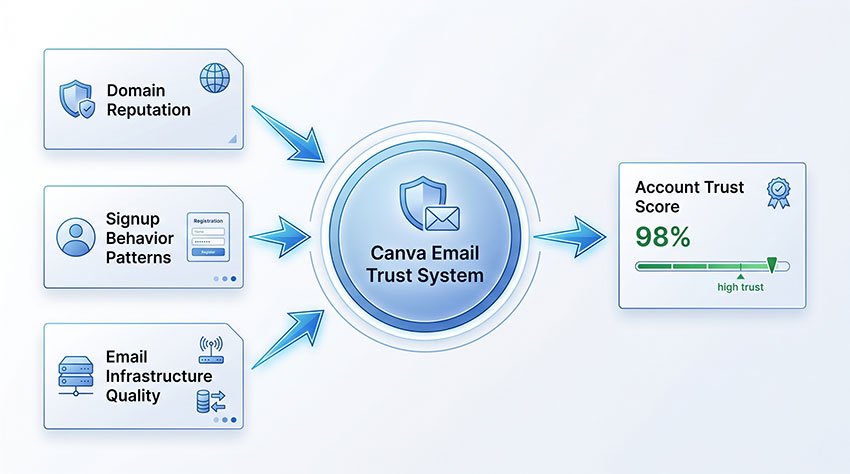
La reputazione del dominio come filtro principale
Uno dei segnali più forti nel processo di registrazione è la reputazione del dominio dell'email stessa.
In termini semplici, Canva tende a trattare i domini che hanno una storia di abuso — come registrazioni di massa, attività di bot o sfruttamento ripetuto di prove gratuite — come meno affidabili per impostazione predefinita.
Questo solitamente non è un comportamento casuale o incoerente. Riflette pattern a lungo termine associati all'infrastruttura di posta elettronica temporanea, dove gli stessi domini vengono frequentemente riutilizzati in registrazioni automatizzate ad alto volume.
Di conseguenza, alcuni domini di posta temporanea potrebbero ancora superare la verifica, mentre altri vengono silenziosamente depriorizzati o filtrati prima che il messaggio raggiunga la posta in arrivo.
Pattern comportamentali durante la registrazione
Oltre al dominio dell'email stessa, Canva può anche valutare come viene eseguita la registrazione.
Ciò include pattern come:
- tentativi di registrazione ripetuti in un breve lasso di tempo
- account multipli creati dalla stessa rete o intervallo IP
- invii di moduli insolitamente rapidi o automatizzati
- uso ripetuto di strutture di email simili o temporanee
Questi segnali non vengono necessariamente valutati isolatamente. Piuttosto, contribuiscono a un profilo comportamentale più ampio che aiuta a identificare attività a bassa affidabilità o potenzialmente automatizzate.
Dal punto di vista della progettazione del sistema, si tratta meno di bloccare i singoli utenti e più di ridurre i pattern di abuso su larga scala che potrebbero influire sulle risorse della piattaforma.
Punteggio di fiducia dell'email a livello di infrastruttura
Un altro livello importante è la qualità tecnica dell'infrastruttura dell'email stessa.
I fornitori di email temporanee operano spesso su sistemi di posta leggeri o condivisi, che potrebbero non mantenere segnali di reputazione forti a lungo termine con le principali reti di posta elettronica.
Ciò può influire su:
- tasso di successo della consegna
- latenza dell'email (ritardi)
- probabilità di filtraggio
- coerenza della visibilità nella posta in arrivo
Al contrario, fornitori affermati come Gmail, Outlook o iCloud beneficiano di una fiducia nell'infrastruttura a lungo termine, che migliora significativamente l'affidabilità della consegna attraverso le piattaforme SaaS.
Questo è anche il motivo per cui le email di verifica di Canva sono generalmente più stabili quando inviate a fornitori di posta elettronica tradizionali.
Perché alcune email temporanee funzionano ancora
Nonostante questi meccanismi di filtraggio, gli indirizzi email temporanei non sono universalmente bloccati.
In pratica, se un'email temporanea funziona dipende spesso da una combinazione di tempismo, reputazione del dominio e carico del sistema, piuttosto che da una rigida regola di consenso/diniego.
Alcuni domini temporanei potrebbero ancora funzionare normalmente perché:
- non hanno ancora accumulato segnali di reputazione negativi
- sono utilizzati meno frequentemente ed evitano le soglie di rilevamento
- rientrano temporaneamente al di fuori delle regole di filtraggio più rigorose
- sono più recenti o meno ampiamente condivisi attraverso le reti di abuso
Ciò spiega perché gli utenti riscontrano spesso risultati incoerenti: un'email temporanea potrebbe funzionare un giorno e fallire il successivo, anche in condizioni simili.
Perché potresti non ricevere le email di verifica di Canva
Uno dei problemi più comuni quando si utilizza un'email temporanea per Canva è la mancata ricezione dell'email di verifica. In molti casi, l'email non è bloccata in modo permanente, ma ritardata, filtrata o persa a causa dei limiti dell'infrastruttura di posta elettronica temporanea. L'esito è solitamente determinato da una combinazione di reputazione del dominio, segnali di fiducia del server di posta e sistemi anti-abuso a livello di piattaforma.
In pratica, i problemi di verifica sono significativamente più frequenti con i servizi di posta elettronica temporanea rispetto ai fornitori tradizionali come Gmail o Outlook. Questo non è casuale: la maggior parte delle piattaforme SaaS, inclusa Canva, si affida a sistemi di punteggio di fiducia impliciti che trattano i domini di posta elettronica temporanea come a rischio più elevato per impostazione predefinita.
Il dominio è stato bloccato o depriorizzato
Alcuni domini di posta elettronica temporanea potrebbero non ricevere le email di verifica perché non sono più pienamente attendibili dai principali sistemi di filtraggio delle email.
Questo solitamente non è casuale: riflette pattern di abuso a lungo termine associati all'infrastruttura di posta elettronica temporanea, come registrazioni di massa, attività di bot e sfruttamento ripetuto di prove gratuite.
Di conseguenza, Canva potrebbe comunque inviare l'email di verifica, ma l'infrastruttura di posta ricevente potrebbe rifiutare silenziosamente, depriorizzare o non mostrare mai il messaggio nella posta in arrivo.
Ritardi SMTP o fallimento della consegna
In alcuni casi, il problema non è il blocco totale, ma una ridotta affidabilità della consegna causata da un'infrastruttura di posta debole.
I fornitori di email temporanee operano spesso su sistemi SMTP leggeri o pesantemente condivisi che mancano di forti segnali di reputazione. In tali ambienti, la consegna dell'email non è garantita: i messaggi possono essere limitati, ritardati o eliminati prima della consegna finale.
Nella maggior parte dei casi, ciò riflette punteggi di fiducia del mittente e del destinatario più deboli piuttosto che qualsiasi comportamento specifico di Canva.
Al contrario, fornitori affermati come Gmail o Outlook beneficiano di una reputazione dell'infrastruttura a lungo termine, che migliora significativamente la coerenza della consegna.
L'email di verifica è finita nello spam o in filtri nascosti
Anche quando la consegna ha tecnicamente successo, l'email di verifica potrebbe non apparire nella visualizzazione principale della posta in arrivo.
Molti servizi di posta elettronica temporanea applicano regole di filtraggio interno aggressive, classificando automaticamente i messaggi automatizzati o di massa come a bassa priorità. Ciò può comportare l'inserimento delle email di verifica in cartelle spam, schede secondarie o code di messaggi nascoste.
Dal punto di vista dell'utente, questo appare spesso come un'"email mancante", anche se il messaggio è stato tecnicamente consegnato.
La posta in arrivo dell'email temporanea è scaduta prima della consegna
La maggior parte dei servizi di posta elettronica temporanea è progettata intenzionalmente con caselle di posta a breve ciclo di vita.
Se la casella di posta scade prima che Canva invii l'email di verifica, o prima che l'utente completi il processo di registrazione, il messaggio viene perso definitivamente e non può essere recuperato.
Questo è uno dei punti di fallimento più prevedibili nell'uso dell'email temporanea, specialmente quando i flussi di registrazione vengono interrotti o ritardati.
Quando tentativi di registrazione multipli attivano i controlli di consegna
Tentativi di registrazione ripetuti in un breve lasso di tempo possono attivare sistemi anti-abuso automatizzati.
Questi sistemi non sono specifici solo per Canva: fanno parte di framework di sicurezza della piattaforma più ampi progettati per prevenire spam, attività di bot e creazione di account falsi.
In tali casi, le email di verifica possono essere limitate, ritardate o temporaneamente soppresse. Ciò può includere:
- limitazione della frequenza a livello di dominio o IP
- rilevamento di attività sospette
- registrazioni ripetute dalla stessa rete
- account multipli legati a domini temporanei
Quando ciò accade, anche le richieste di verifica valide potrebbero non essere consegnate in modo coerente o entro i tempi previsti.
Nella maggior parte dei casi, il problema è legato all'infrastruttura dell'email piuttosto che a Canva stessa.
Best practice per l'utilizzo di email temporanee con Canva
Se scegli di utilizzare un'email temporanea per Canva, è importante trattarla come uno strumento di accesso a breve termine piuttosto che come un'identità di account a lungo termine. Il rischio principale non è la registrazione in sé, ma ciò che accade quando in seguito devi recuperare o ververifica l'account.
In pratica, la maggior parte dei problemi emerge solo quando gli utenti iniziano a fare affidamento sull'account per lavoro continuativo, pagamenti o collaborazione.
Evita di usare email temporanee per lavoro importante con i clienti o attività professionali
Gli account email temporanei non sono progettati per garantire affidabilità o recupero a lungo termine. Se si perde l'accesso alla casella di posta, anche qualsiasi account Canva collegato ad essa potrebbe diventare difficile da recuperare.
Ciò diventa un rischio reale quando l'account contiene:
- file di design per clienti
- risorse di identità del brand
- modelli o risorse a pagamento
- materiali di marketing o commerciali
Una volta perso l'accesso, l'assistenza di Canva richiede solitamente la verifica dell'email per ripristinare l'account, il che non è possibile se la casella di posta è scaduta.
Fai attenzione al branding a lungo termine o ai progetti in evoluzione
Per i progetti che si evolvono nel tempo, la continuità dell'account conta più della comodità iniziale.
I servizi di email temporanea spesso scadono o diventano inaccessibili, il che significa che qualsiasi futuro aggiornamento, richiesta di collaborazione o lavoro di riprogettazione potrebbe essere interrotto.
Per questo motivo, le email temporanee funzionano meglio per la sperimentazione, non per progetti che richiedono coerenza o proprietà a lungo termine.
Esporta ed esegui sempre il backup del tuo lavoro importante su Canva
Anche se stai usando Canva solo temporaneamente, è buona norma scaricare e archiviare i design importanti localmente.
Ciò riduce il rischio in situazioni come:
- scadenza della casella di posta temporanea
- impossibilità di accedere nuovamente all'account
- mancata ricezione di future email di verifica
- restrizioni di accesso impreviste
Avere copie offline garantisce che il tuo lavoro non dipenda interamente dall'accesso all'account.
Passa a un'email permanente prima di effettuare pagamenti
Se decidi di passare a Canva Pro o a qualsiasi piano a pagamento, è vivamente consigliato spostare prima l'account su un'email permanente e recuperabile.
Questo è importante perché le email relative ai pagamenti sono spesso necessarie per:
- gestione dell'abbonamento
- notifiche di fatturazione
- recupero dell'account
- verifica di sicurezza
L'utilizzo di un'email temporanea negli account a pagamento aumenta il rischio di perdere l'accesso sia alla fatturazione che ai controlli dell'account.
Usa password forti anche per gli account a breve termine
Anche gli account temporanei dovrebbero seguire le pratiche di sicurezza di base, specialmente se utilizzati su più dispositivi o ambienti di test.
Una password forte dovrebbe:
- essere unica e non riutilizzata altrove
- includere un mix di caratteri
- evitare schemi prevedibili
- non essere condivisa su più piattaforme
Sebbene l'accesso all'email sia temporaneo, la sicurezza della password determina comunque quanto facilmente l'account possa essere compromesso durante il suo periodo di attività.
Migliori alternative alle email temporanee per Canva
Sebbene i servizi di email temporanea possano funzionare per rapide registrazioni su Canva, introducono un limite fondamentale: la mancanza di recuperabilità a lungo termine, che è critica per qualsiasi account legato a design, abbonamenti o collaborazione.
Per questo motivo, le alternative più sicure si concentrano su un equilibrio tra privacy e continuità dell'account, piuttosto che sull'anonimato a breve termine.
Alias email
Gli alias email sono una delle alternative più pratiche perché mantengono tutto all'interno di una casella di posta recuperabile, aggiungendo livelli di separazione per le email relative a Canva.
Ad esempio:
A differenza delle email temporanee, questo approccio non crea una casella di posta separata; crea invece livelli di identità filtrabili all'interno di un account stabile.
Dal punto di vista dell'affidabilità, questo è significativamente più stabile rispetto all'email usa e getta perché mantiene il pieno supporto per il recupero e la verifica dell'account Gmail.
"Nascondi la mia email" di Apple
La funzione "Nascondi la mia email" di Apple genera indirizzi email casuali che inoltrano i messaggi alla tua casella di posta reale, preservando l'anonimato.
Questa opzione fornisce un livello di privacy più forte rispetto agli alias perché:
- L'indirizzo email è completamente casuale
- L'inoltro è automatico e persistente
- Il recupero dell'account rimane legato all'ID Apple
Rispetto alle email temporanee, questo è un sistema di privacy ad alta affidabilità piuttosto che una casella di posta usa e getta, il che lo rende molto più adatto agli account Canva che potrebbero richiedere verifiche future.
Casella di posta permanente secondaria
Creare un account email secondario dedicato rimane una delle soluzioni più utilizzate tra freelance e creator.
Questo metodo è particolarmente efficace perché separa i flussi di lavoro senza sacrificare:
- il recupero dell'email
- l'accesso al ripristino della password
- la gestione dell'abbonamento
In pratica, questo è l'equivalente più vicino alla "comodità dell'email temporanea" senza i rischi a lungo termine di perdere l'accesso all'account.
Inoltro email con dominio personalizzato
L'inoltro email con dominio personalizzato consente agli utenti di creare identità email brandizzate come:
[email protected]
che inoltrano i messaggi a una casella di posta principale.
Questo approccio è particolarmente prezioso per:
- freelance che gestiscono progetti Canva per clienti
- agenzie che gestiscono più account di brand
- creator che costruiscono sistemi di identità a lungo termine
Rispetto all'email usa e getta, questo è un modello di piena proprietà, il che significa che mantieni il controllo anche se le piattaforme cambiano le politiche o richiedono una nuova verifica.
Provider email incentrati sulla privacy
Provider incentrati sulla privacy come Proton Mail o SimpleLogin offrono una via di mezzo tra anonimato e persistenza.
A differenza dei servizi di email temporanea, questi strumenti sono progettati per:
- conservazione dell'account a lungo termine
- recupero sicuro dell'accesso
- infrastruttura di posta stabile
Ciò li rende significativamente più compatibili con piattaforme SaaS come Canva, dove la verifica e il recupero dell'account possono essere richiesti nel tempo.
Approfondimento in sintesi:
Tra tutte le alternative, la differenza chiave non è solo la privacy, ma la recuperabilità dell'account nel tempo.
Qualsiasi soluzione che preservi l'accesso a lungo termine è fondamentalmente più sicura dell'email temporanea per Canva.
Domande frequenti sulle email temporanee per Canva
Perché Canva rifiuta alcune registrazioni via email?
Canva può rifiutare alcune registrazioni quando il dominio dell'email ha un basso punteggio di affidabilità o è associato a schemi comunemente legati a spam o registrazioni automatizzate. Ciò non si limita ai servizi di email temporanea: anche alcuni domini legittimi possono occasionalmente essere interessati.
Nella maggior parte dei casi, ciò riflette il filtraggio della reputazione del dominio piuttosto che un blocco diretto sull'utente.
Cosa succede se perdo l'accesso alla mia email Canva?
Se perdi l'accesso all'email utilizzata durante la registrazione, potresti anche perdere l'accesso a funzioni chiave dell'account come il ripristino della password, la verifica di sicurezza e il recupero dell'accesso.
Ciò diventa particolarmente critico per gli account contenenti design salvati, progetti condivisi o funzionalità basate su abbonamento.
È meglio usare Gmail o un'email temporanea per Canva?
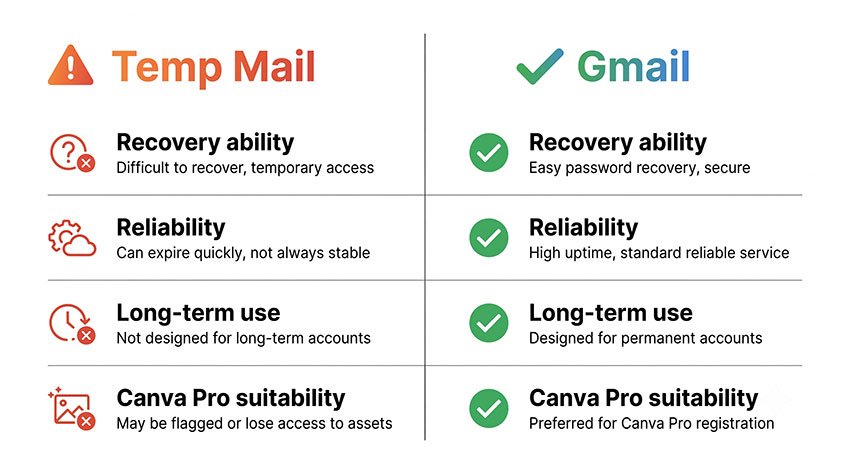
Per la maggior parte degli utenti, Gmail o altri provider di posta permanente sono significativamente più affidabili per Canva.
Offrono opzioni di recupero stabili, una consegna coerente delle verifiche e l'accesso all'account a lungo termine, mentre i servizi di email temporanea sono progettati per un uso a breve termine e potrebbero scadere senza preavviso.
Posso passare da un'email temporanea a Gmail su Canva in un secondo momento?
Sì, in molti casi Canva consente agli utenti di aggiornare l'indirizzo email dell'account dopo la registrazione.
Tuttavia, questo processo richiede solitamente l'accesso alla casella di posta originale per la verifica. Se l'email temporanea è già scaduta, il cambio potrebbe non essere sempre possibile.
Canva richiederà di nuovo la verifica dell'email dopo la registrazione?
Sì, Canva potrebbe richiedere un'ulteriore verifica dell'email in determinate situazioni, come:
- accesso da un nuovo dispositivo
- rilevamento di attività sospette o insolite
- modifiche all'account sensibili alla sicurezza
- ripristino della password o tentativi di recupero
Ecco perché l'accesso all'email a lungo termine rimane importante anche dopo la registrazione iniziale.
Qual è il tipo di email più sicuro per gli account Canva?
L'opzione più sicura è un indirizzo email permanente e recuperabile.
Ciò include:
- account Gmail o Outlook
- "Nascondi la mia email" di Apple (per gli utenti attenti alla privacy)
- alias email legati a una casella di posta stabile
- email con dominio personalizzato con supporto all'inoltro
Queste opzioni bilanciano la privacy con la sicurezza dell'account a lungo termine.
Cosa succede se la mia casella di posta temporanea scade?
Se la tua casella di posta temporanea scade, perderai la capacità di ricevere qualsiasi futura email da Canva.
Ciò include:
- codici di verifica dell'accesso
- email di ripristino della password
- avvisi di sicurezza
- messaggi di recupero dell'account
In pratica, questo può rendere l'account Canva parzialmente o totalmente inaccessibile nel tempo.
Canva può bloccare i domini di email temporanee?
Alcuni domini di email usa e getta possono essere filtrati o declassati in base alla loro reputazione e ai modelli di utilizzo storici.
Ciò non significa che tutti i servizi di email temporanea siano bloccati. Significa invece che domini specifici associati ad abusi ripetuti o registrazioni automatizzate hanno maggiori probabilità di fallire la verifica.
L'email temporanea è sicura per Canva Pro o account a pagamento?
No. L'email temporanea non è raccomandata per Canva Pro o qualsiasi abbonamento a pagamento.
Gli account a pagamento richiedono un accesso stabile alle notifiche di fatturazione, alla verifica di sicurezza e alle email di recupero. Se la casella di posta temporanea scade, ciò può portare alla perdita del controllo dell'abbonamento o a problemi di accesso all'account.
Posso usare un'email temporanea per i Team di Canva?
Non è consigliabile utilizzare un'email temporanea per i Team di Canva.
Gli ambienti di team si basano su:
- permessi di accesso condivisi
- collaborazione basata su inviti
- gestione della proprietà delle risorse
- continuità dell'account a lungo termine
Se un'email diventa inaccessibile, può interrompere la collaborazione e rendere difficile il recupero delle risorse relative al team.
Verdetto finale: dovresti usare un'email temporanea per Canva?
L'email temporanea può essere utile per Canva, ma solo in situazioni molto limitate e a breve termine. La vera decisione non è se funzioni, ma se sei disposto a correre il rischio di perdere l'accesso in seguito.
InIn pratica, l'email temporanea è da considerarsi uno strumento di comodità per un utilizzo leggero, non una base affidabile per qualsiasi account che richieda una gestione a lungo termine.
Puoi utilizzare un'email temporanea per:
- test rapidi delle funzionalità di Canva
- accesso a breve termine a modelli o strumenti
- download di design una tantum
- esplorare la piattaforma prima di impegnarsi
In questi casi, il rischio è relativamente basso perché l'account non contiene risorse importanti o durature.
NON dovresti utilizzare un'email temporanea per:
- lavoro aziendale o per clienti
- progetti di design a lungo termine
- Canva Teams o flussi di lavoro collaborativi
- abbonamenti a pagamento Canva Pro
- identità del brand o risorse di marketing
Questi casi d'uso dipendono fortemente dalla stabilità dell'account, dall'accesso al ripristino e dal controllo dell'email a lungo termine. Se la casella di posta temporanea scade o diventa inaccessibile, potresti perdere permanentemente l'accesso ai design, alla fatturazione o ai permessi del team.
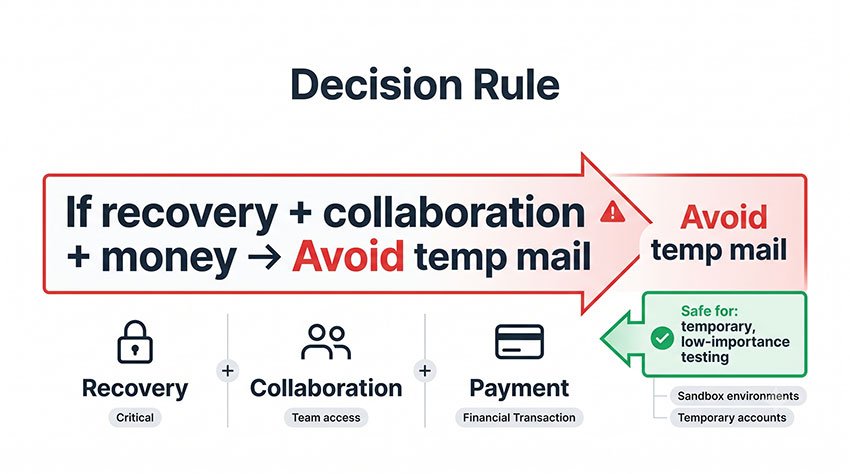
Regola generale
Una semplice regola pratica è: se l'account implica ripristino, collaborazione o denaro, evita del tutto l'email temporanea.
Questa non è solo una raccomandazione di comodità: riflette il modo in cui le piattaforme SaaS come Canva strutturano la dipendenza dell'account. Una volta che un account diventa parte di un flusso di lavoro che coinvolge risorse, team o abbonamenti, l'accesso all'email diventa parte dell'infrastruttura, non solo un dettaglio di accesso.
In sintesi
L'email temporanea funziona come metodo di "accesso rapido" per Canva, ma non è progettata per la proprietà, il ripristino o l'uso professionale.
Se il tuo lavoro va oltre il test a breve termine, un'email permanente e recuperabile è sempre la scelta più sicura. Nella maggior parte degli scenari reali, la stabilità conta più della velocità di registrazione.