AdGuard Temp Mail semble assez simple à première vue : obtenez une adresse jetable, attendez l'e-mail de vérification, utilisez le code, et oubliez cette adresse. La confusion s'installe lorsque vous la comparez aux alias e-mail d'AdGuard. Tous deux masquent votre véritable adresse e-mail, mais ils sont conçus pour des situations très différentes.
Considérez AdGuard Temp Mail comme une adresse que vous utilisez puis jetez. Un alias e-mail AdGuard est une adresse que vous conservez. Temp Mail vous offre une boîte de réception temporaire pour des besoins ponctuels comme des inscriptions uniques ou des codes de vérification. Un alias transfère les messages vers votre boîte de réception habituelle et est destiné à durer.
C'est aussi pour cette raison que nous ne voulions pas rédiger un énième article se contentant de lister les fonctionnalités d'AdGuard. Nous avons utilisé AdGuard Temp Mail nous-mêmes et nous nous sommes concentrés sur ce qui compte vraiment lorsque vous essayez de l'utiliser : obtenir une adresse, recevoir un e-mail de vérification, conserver la boîte de réception, gérer ses limites et comprendre ce qui se passe lorsqu'un site n'accepte pas l'adresse. Nous avons ensuite confronté ces observations à la documentation actuelle d'AdGuard.
Si vous recherchez AdGuard Temp Mail parce que vous souhaitez l'utiliser, ce guide est fait pour vous. Nous examinerons son fonctionnement en pratique, ses points forts, ses limites, et comment il se compare à un alias e-mail AdGuard lorsque l'option temporaire n'est pas la solution adaptée.
AdGuard Temp Mail vs Alias e-mail
AdGuard Temp Mail et un alias e-mail résolvent le même problème fondamental — garder votre véritable adresse e-mail à l'abri des regards indiscrets — mais ils fonctionnent très différemment. Temp Mail vous fournit une boîte de réception temporaire pour des tâches à court terme. Un alias e-mail transfère les messages vers votre boîte de réception réelle et est conçu pour rester actif.
Le moyen le plus simple de choisir est de vous demander combien de temps vous avez besoin de cette adresse. Si vous n'avez besoin d'un e-mail que pour recevoir un code de vérification ou finaliser une inscription, Temp Mail est généralement l'option la plus simple. Si vous prévoyez de continuer à recevoir des messages du service, un alias est plus judicieux.
| AdGuard Temp Mail | Alias e-mail AdGuard | |
|---|---|---|
| Masquer votre vrai e-mail | Oui | Oui |
| Boîte de réception temporaire | Oui | Non |
| Vérification unique | Idéal | Fonctionne |
| Transfert vers votre boîte réelle | Non | Oui |
| Conserver la même adresse à long terme | Non | Oui |
| Recevoir des pièces jointes | Non | Oui |
| Envoyer ou répondre | Non | Oui, offre payante |
| Compte requis | Non | Oui |
| Newsletters et courriers récurrents | Peu adapté | Plus adapté |
| Comptes à long terme | Non recommandé | Plus adapté |
La plus grande différence ne réside pas vraiment dans les fonctionnalités. Elle concerne ce qui se passe après avoir reçu l'e-mail. Avec Temp Mail, la boîte de réception est temporaire et finit par disparaître. Avec un alias, l'adresse reste connectée à votre boîte de réception réelle, vous permettant de continuer à recevoir du courrier du même service.
En résumé : Temp Mail est destiné à une adresse e-mail que vous ne prévoyez pas de garder ; un alias est destiné à celle que vous souhaitez conserver.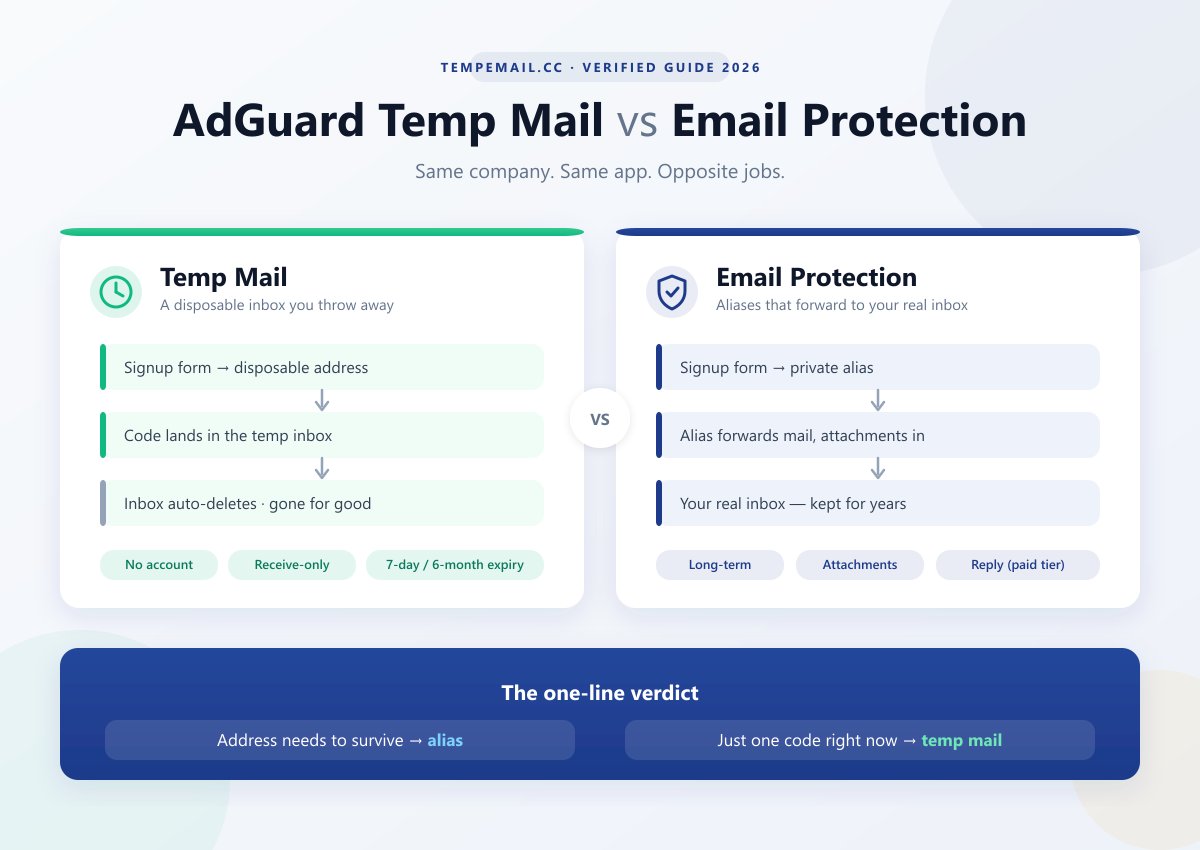
Comment nous avons testé AdGuard Temp Mail
Nous ne voulions pas que cet article soit une simple compilation de la FAQ d'AdGuard. Nous avons utilisé le service nous-mêmes, suivi le flux de travail normal de Temp Mail, puis vérifié nos observations par rapport à la documentation actuelle d'AdGuard.
L'objectif était simple : tester ce qui importe réellement à un utilisateur — obtenir une adresse, recevoir du courrier, conserver la boîte de réception et découvrir ce qui se passe lorsque le service atteint ses limites.
Ce que nous avons vérifié
- Obtention d'une adresse : La rapidité de génération d'une adresse, si un compte est requis et comment l'adresse est mémorisée entre les visites.
- Réception de courrier : Si les e-mails de vérification arrivent, comment la boîte de réception se comporte et ce qui se passe lorsqu'un message n'apparaît pas.
- Limites de la boîte de réception : Changements d'adresse, durée de conservation, taille des messages, pièces jointes et possibilité de récupérer des e-mails supprimés.
- Acceptation des domaines : Nous avons comparé les domaines jetables d'AdGuard avec la liste de blocage publique
disposable-email-domainspour voir s'ils étaient déjà signalés. - Fonctionnement du service : Nous avons également inspecté l'application web en direct et ses requêtes réseau pour comprendre comment la boîte de réception temporaire est réellement connectée au backend d'AdGuard.
Nous avons traité nos observations et les déclarations publiées par AdGuard séparément. Si nous avons pu vérifier quelque chose nous-mêmes, nous le mentionnons. Si une affirmation dépend d'une condition à long terme ou d'un site tiers, nous ne la présentons pas comme un résultat de test.
Note de test : Nos vérifications ont été effectuées en août 2026. La livraison et l'acceptation des domaines peuvent varier selon le site web, le réseau et le moment, donc un test réussi ne signifie pas que chaque inscription fonctionnera.
Ce que nous avons découvert
Après avoir réellement utilisé AdGuard Temp Mail, la différence avec un alias e-mail est évidente. Temp Mail est délibérément simple — et la plupart de ses limites découlent de cette simplicité. Vous obtenez une adresse temporaire, recevez ce dont vous avez besoin, et la boîte de réception finit par disparaître. Un alias est construit sur l'idée inverse : conserver l'adresse et transférer ses messages vers votre boîte de réception normale.
Quelques points ont retenu notre attention lors de nos vérifications :
- Temp Mail fait exactement ce qu'il est censé faire — mais uniquement dans un cadre assez restreint. Il est uniquement destiné à la réception, n'accepte pas les pièces jointes, et la boîte de réception ne doit pas être considérée comme un stockage permanent. L'adresse peut également disparaître lorsque vous la modifiez, donc tout élément important doit être sauvegardé avant de passer à autre chose.
- La question la plus importante est de savoir si le site web sur lequel vous vous inscrivez acceptera l'adresse. AdGuard avertit lui-même que les domaines jetables peuvent être bloqués. Nous n'avons pas pu transformer nos propres vérifications en un score de livraison universel car l'acceptation dépend du site web que vous utilisez, mais nous avons vérifié la liste publique
disposable-email-domainset n'avons trouvé aucun domaine lié à AdGuard dans son instantané d'août 2026. - L'absence de compte est un réel avantage. Il n'y a pratiquement rien à configurer avant de pouvoir commencer à recevoir du courrier. Pour une vérification ponctuelle, c'est beaucoup moins contraignant que de créer et de maintenir un alias e-mail.
Le choix ne porte donc pas vraiment sur le service offrant le plus de fonctionnalités. Il s'agit de savoir si vous voulez que l'adresse e-mail disparaisse ou qu'elle soit conservée.
Lequel devriez-vous utiliser ?
| Si vous avez besoin de... | Meilleur choix |
|---|---|
| Obtenir un code de vérification | AdGuard Temp Mail |
| Finaliser une inscription que vous n'utiliserez probablement plus | AdGuard Temp Mail |
| Tester un processus d'inscription | AdGuard Temp Mail |
| Recevoir des newsletters ou des e-mails récurrents | Alias e-mail |
| Garder la même adresse pendant des mois | Alias e-mail |
| Répondre sans exposer votre adresse réelle | Alias e-mail |
| Continuer à recevoir des e-mails de compte ou de récupération | Alias e-mail |
La règle simple : si vous avez besoin de l'adresse pour la tâche, utilisez AdGuard Temp Mail. Si vous avez besoin de l'adresse après la tâche, utilisez un alias e-mail.
Comment fonctionne AdGuard Temp Mail
Utiliser AdGuard Temp Mail est aussi simple que vous pouvez l'imaginer : obtenez une adresse, attendez l'e-mail, utilisez-le et passez à autre chose.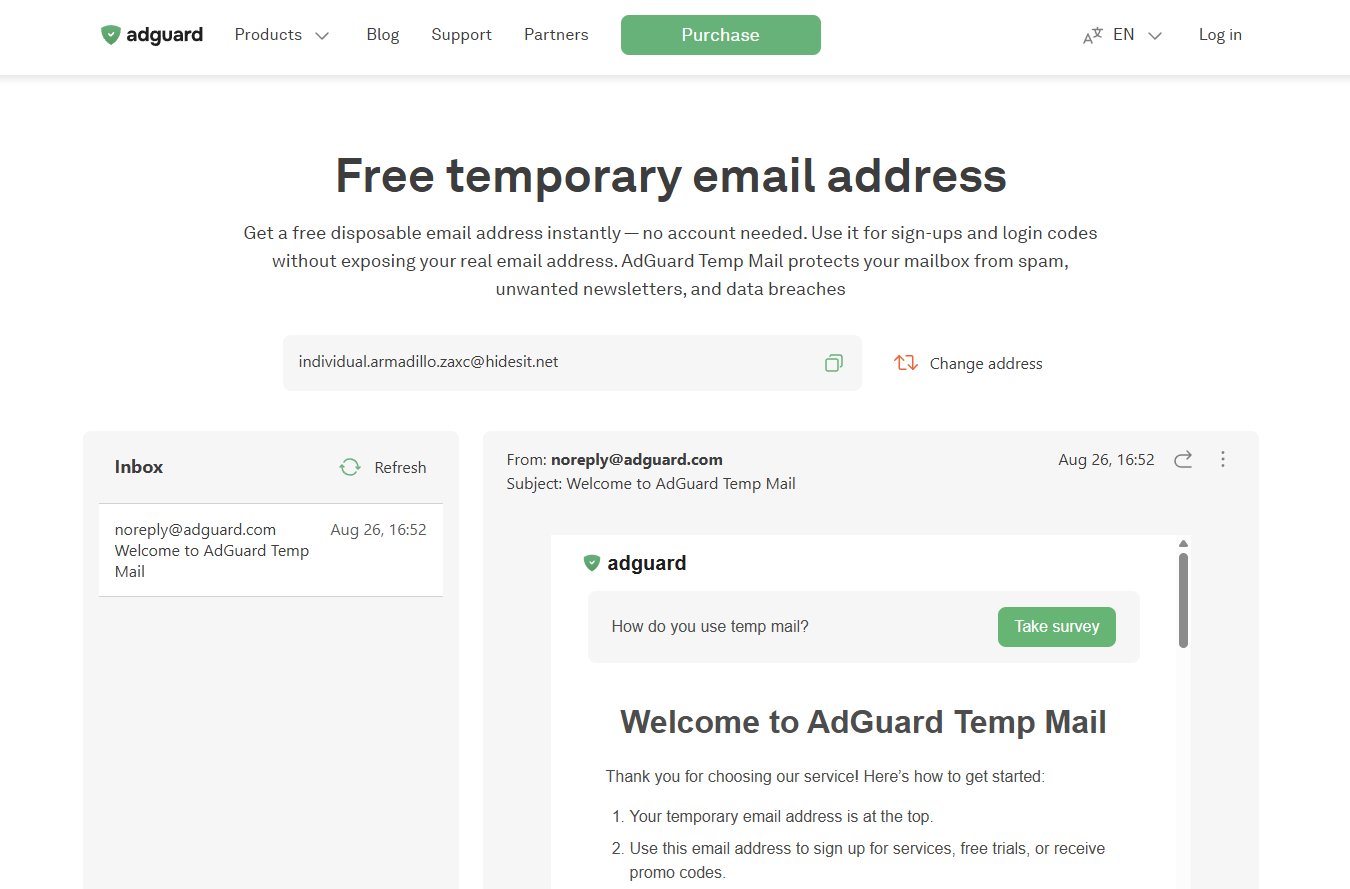
Le flux de base est :
Site web → Adresse jetable → Boîte de réception temporaire → Terminé
Il n'y a aucun compte à créer et aucune boîte de réception réelle à connecter. AdGuard génère une adresse jetable, et les messages envoyés à celle-ci apparaissent dans la boîte de réception temporaire. Pour une inscription unique ou un code de vérification, c'est tout ce dont vous avez besoin.
Ce qui compte davantage, c'est ce qui se passe après l'utilisation :
- Rien n'est transféré. Les e-mails restent dans la boîte de réception temporaire au lieu d'atteindre votre boîte aux lettres réelle.
- La boîte de réception ne reste pas indéfiniment. AdGuard indique qu'elle est supprimée après 7 jours sans ouverture ni rafraîchissement, avec une durée de vie maximale de 6 mois, même avec une utilisation régulière.
- Changer l'adresse efface l'ancienne boîte de réception. Si vous cliquez sur Changer d'adresse, l'adresse précédente et ses messages sont immédiatement supprimés et ne peuvent pas être récupérés.
- C'est uniquement pour la réception. Vous ne pouvez pas envoyer ou répondre depuis une adresse AdGuard Temp Mail, et AdGuard précise que le service n'accepte pas les pièces jointes.
C'est le compromis. Vous n'avez presque aucune configuration, mais vous n'obtenez pas non plus de boîte aux lettres permanente. Temp Mail est utile précisément parce que vous pouvez l'abandonner une fois la tâche terminée.
Et c'est là qu'il diffère d'un alias e-mail AdGuard : Temp Mail est conçu pour disparaître ; l'alias est conçu pour durer.
Sources : Présentation d'AdGuard Temp Mail, FAQ et base de connaissances AdGuard Mail, vérifiées en août 2026.
Comment fonctionne la protection e-mail d'AdGuard
Si AdGuard Temp Mail est l'option « utiliser et oublier », un alias e-mail adopte l'approche opposée. Il vous donne une adresse distincte, mais le courrier envoyé à cette adresse finit dans votre boîte de réception habituelle.
Le flux de base est :
Site web → Alias e-mail → Votre boîte de réception réelle
Vous créez un alias et l'utilisez à la place de votre véritable adresse e-mail. Lorsque le site web vous envoie un message, AdGuard le transfère vers la boîte de réception que vous avez connectée à l'alias. Vous pouvez continuer à utiliser cette même adresse pour le service, une newsletter ou tout autre besoin de contact futur.
C'est la principale différence que vous remarquerez en pratique. Rien ne reste dans une boîte de réception temporaire en attendant de disparaître. L'alias est simplement une autre adresse devant la boîte de réception que vous utilisez déjà. S'il commence à attirer du spam, vous pouvez le désactiver ou le supprimer sans affecter vos autres alias.
AdGuard prend également en charge les réponses via un alias sur son offre payante, ce qui rend les alias plus utiles pour les conversations suivies. Temp Mail ne dispose pas de cette option —il est en réception seule.
Donc, si Temp Mail est l'adresse que vous utilisez pour quelque chose que vous voulez oublier, un alias est l'adresse que vous utilisez lorsque vous vous attendez à recevoir des nouvelles de ce service à l'avenir.

Pouvez-vous utiliser Temp Mail avec AdGuard ?
Oui — AdGuard Temp Mail est conçu pour fonctionner en tant que service AdGuard, mais vos propres paramètres de filtrage peuvent toujours interférer.
Cela est principalement pertinent si vous utilisez AdGuard DNS, l'extension de navigateur ou des filtres de blocage de contenu agressifs. Nous avons inspecté la page Temp Mail en direct et avons constaté que la boîte de réception n'est pas seulement une page web statique : elle charge une application web distincte, utilise une iframe et communique avec une API backend. AdGuard utilise également des CAPTCHA dans certaines situations.
Cela donne aux outils de filtrage quelques points où les choses peuvent mal tourner.
Qu'est-ce qui peut bloquer ?
- Filtrage DNS : Un nom d'hôte AdGuard requis pourrait être bloqué par une règle de filtrage ou une configuration DNS personnalisée.
- Blocage de script ou d'iframe : La boîte de réception peut se charger partiellement si une ressource requise est filtrée.
- CAPTCHA : Si l'étape de vérification n'apparaît pas ou continue d'échouer, le filtrage de contenu peut en être une cause possible.
Nous n'avons trouvé aucun document AdGuard indiquant que ses produits DNS ou de navigateur sont incompatibles avec Temp Mail. Donc, si Temp Mail ne se charge pas correctement, ne supposez pas qu'AdGuard bloque son propre service — testez-le d'abord.
Un moyen rapide de vérifier
Si la boîte de réception fonctionne avec le filtrage désactivé mais échoue lorsque vous le réactivez, vous avez un indice solide :
- Désactivez temporairement le filtrage AdGuard et rechargez Temp Mail.
- Si la boîte de réception fonctionne, réactivez le filtrage et rechargez.
- Vérifiez si AdGuard signale des requêtes bloquées.
- Si nécessaire, ajoutez le domaine Temp Mail concerné à votre liste blanche.
- Si la boîte de réception fonctionne mais que les e-mails de vérification n'arrivent toujours pas, c'est un problème différent — vérifiez plutôt la politique de messagerie jetable du site destinataire.
La distinction importante : une page qui ne se charge pas et un site web qui rejette votre adresse Temp Mail sont deux problèmes complètement différents. Le premier peut être causé par le filtrage ; le second se produit généralement sur le site web sur lequel vous essayez de vous inscrire.
AdGuard Temp Mail ne fonctionne pas ? Que vérifier
Lorsque AdGuard Temp Mail ne fonctionne pas, la première chose à déterminer est ce qui ne fonctionne pas. Une boîte de réception vide, un e-mail de vérification manquant et un site web qui rejette l'adresse sont trois problèmes différents — et ils n'ont pas la même solution.
La boîte de réception ne se charge pas
Si la page Temp Mail s'ouvre mais que la boîte de réception ne le fait pas, commencez par les choses simples.
Actualisez la page, essayez une fenêtre privée et désactivez temporairement le filtrage AdGuard ou d'autres bloqueurs de contenu agressifs. Si la boîte de réception fonctionne soudainement, vous avez probablement trouvé le coupable. Vider vos cookies peut également faire disparaître une adresse existante de votre côté, alors ne confondez pas une adresse oubliée avec une boîte aux lettres cassée.
L'e-mail de vérification n'arrive jamais
C'est probablement le problème qui vous préoccupe le plus.
Donnez-lui quelques minutes d'abord. Si rien n'apparaît, ne supposez pas immédiatement que la boîte aux lettres est cassée. Le site web sur lequel vous vous inscrivez peut simplement rejeter le domaine jetable. AdGuard reconnaît lui-même que certains sites bloquent Temp Mail.
La chose la plus simple à essayer est de générer une nouvelle adresse et de la soumettre à nouveau. Si la nouvelle adresse utilise un domaine différent, elle pourrait passer là où la première ne l'a pas fait.
Il existe également quelques limites moins évidentes : AdGuard indique que les messages de plus de 2 Mo sont rejetés, et une boîte aux lettres cesse d'accepter le courrier une fois qu'elle atteint 100 Mo.
Le CAPTCHA ou les éléments de page sont cassés
Si l'adresse est générée mais que les boutons, la boîte de réception ou un CAPTCHA ne se comportent pas normalement, vérifiez vos paramètres de blocage de contenu.
AdGuard Temp Mail repose sur des scripts et des ressources web intégrées, donc un filtre agressif peut occasionnellement supprimer quelque chose dont la page a besoin. Mettez temporairement le filtrage en pause et rechargez la page. Si tout apparaît soudainement, ajoutez le domaine concerné à votre liste blanche plutôt que de modifier autre chose.
L'adresse ne peut pas être générée
Si vous ne parvenez pas à obtenir d'adresse du tout, essayez d'abord d'actualiser. Ensuite, éliminez les causes évidentes : problèmes réseau, extensions de navigateur ou problème temporaire de service/API.
Si cela échoue toujours dans un navigateur propre ou une fenêtre privée, il n'est pas très utile de cliquer sur le bouton à plusieurs reprises — réessayez plus tard.
Toujours pas de fonctionnement ?
Voici le raccourci que j'utiliserais :
Impossible d'ouvrir la boîte de réception → vérifiez votre navigateur et vos filtres.
La boîte de réception fonctionne mais aucun e-mail n'arrive → vérifiez si le site cible accepte les e-mails jetables.
L'e-mail arrive mais la page ne se comporte pas normalement → vérifiez les scripts, le CAPTCHA et le blocage de contenu.
Et si AdGuard affiche une option "Signaler un problème" pour un domaine bloqué, utilisez-la. La rotation des domaines fait partie de la façon dont Temp Mail gère le blocage des adresses jetables.
Pourquoi les sites bloquent les domaines AdGuard Temp Mail
Parfois, AdGuard Temp Mail fonctionne très bien — le site web n'accepte tout simplement pas l'adresse.
De nombreux formulaires d'inscription vérifient le domaine après le @ avant d'envoyer un e-mail de vérification. Si ce domaine est reconnu comme jetable, le site peut le rejeter immédiatement. C'est courant avec les services de messagerie temporaire en général, ce n'est pas propre à AdGuard.
AdGuard reconnaît lui-même ce problème. Parce qu'un domaine jetable connu peut être bloqué, Temp Mail utilise plusieurs domaines et les fait tourner au fil du temps plutôt que de s'appuyer sur un domaine permanent.
Ce que nous avons trouvé
Nous avons vérifié la liste de blocage publique disposable-email-domains en août 2026 :
Vérification de la liste de blocage — Août 2026
Domaines vérifiés : 8 354
Correspondances liées à AdGuard : 0
C'est un signe positif, mais cela ne signifie pas que chaque site acceptera une adresse AdGuard. Les sites web peuvent utiliser des listes de blocage privées ou commerciales, ou maintenir leurs propres règles. AdGuard ne publie pas non plus une liste complète de ses domaines Temp Mail actifs, donc notre vérification n'est qu'un instantané.
Si votre adresse est rejetée, générez-en une nouvelle d'abord. Si le site continue de rejeter chaque adresse, il bloque probablement les e-mails jetables dans leur ensemble — dans ce cas, changer d'adresse ne vous aidera pas.
Une adresse rejetée ne signifie pas nécessairement que Temp Mail est cassé. Parfois, le site web dit simplement non aux e-mails jetables.
AdGuard Temp Mail est-il sûr à utiliser ?
Pour des tâches à faible risque et à court terme, oui. Mais ne traitez pas AdGuard Temp Mail comme un compte e-mail normal.
AdGuard affirme que son service Temp Mail n'associe pas les boîtes aux lettres temporaires aux adresses IP ou aux informations personnelles des utilisateurs, et que les boîtes aux lettres sont automatiquement supprimées après une période d'inactivité. C'est utile du point de vue de la confidentialité, mais la confidentialité ne signifie pas que la boîte de réception est adaptée aux informations sensibles.
Bons usages :
- Codes de vérification à usage unique
- Inscriptions rapides et à faible risque
- Test de flux d'enregistrement
- Garder les e-mails marketing loin de votre vraie boîte de réception
Ne l'utilisez pas pour :
- Comptes bancaires ou de paiement
- Récupération de mot de passe pour des comptes importants
- Comptes gouvernementaux, médicaux ou liés au travail
- Documents ou informations sensibles
Il y a une raison simple : l'adresse est temporaire. Une fois que la boîte aux lettres expire — ou que vous passez à une nouvelle adresse — l'ancienne boîte de réception et ses messages disparaissent. Si vous avez besoin de cet e-mail à nouveau dans six mois, une adresse jetable n'est pas l'outil approprié.
Alors, AdGuard Temp Mail est-il sûr ? Suffisamment sûr pour ce pour quoi il est conçu, tant que vous le traitez comme jetable. Utilisez-le pour effectuer une inscription à faible enjeu, pas comme un remplacement privé de votre compte e-mail quotidien.
FAQ : AdGuard Temp Mail
Quelques questions pratiques faciles à oublier lorsque vous utilisez réellement AdGuard Temp Mail.
1. AdGuard Temp Mail nécessite-t-il un compte ?
Non. Vous pouvez générer une adresse temporaire sans créer de compte AdGuard ni lier une adresse e-mail réelle.
2. Puis-je choisir mon adresse AdGuard Temp Mail ?
Non. AdGuard génère l'adresse jetable pour vous. Vous ne pouvez pas choisir un nom d'utilisateur ou un domaine personnalisé.
3. Puis-je envoyer un e-mail depuis AdGuard Temp Mail ?
Non. Temp Mail est en réception seule. Vous pouvez recevoir des messages de vérification, mais vous ne pouvez pas envoyer ou répondre depuis l'adresse temporaire.
4. AdGuard Temp Mail prend-il en charge les pièces jointes ?
Non. AdGuard indique que Temp Mail n'accepte pas les pièces jointes, il est donc destiné aux messages entrants simples tels que les e-mails de vérification plutôt qu'à l'échange de documents.
5. Puis-je avoir plusieurs adresses AdGuard Temp Mail ?
Vous pouvez générer une nouvelle adresse, mais le changement d'adresse supprime la boîte aux lettres précédente et ses messages. Il n'est donc pas conçu pour fonctionner comme une collection de boîtes de réception permanentes.
6. AdGuard Temp Mail masque-t-il mon adresse e-mail réelle ?
Oui. Le site web auquel vous donnez l'adresse temporaire ne reçoit pas votre adresse e-mail normale. Cependant, masquer votre adresse e-mail ne rend pas l'inscription elle-même anonyme — le site web peut toujours collecter d'autres informations telles que votre adresse IP ou les détails de votre navigateur.
7. Pourquoi AdGuard Temp Mail demande-t-il parfois un CAPTCHA ?
AdGuard peut utiliser le CAPTCHA comme mesure anti-abus. S'il ne se charge pas correctement, vérifiez les paramètres de votre navigateur ou de blocage de contenu avant de supposer que le service Temp Mail est en panne.
8. Que se passe-t-il si un site web bloque mon adresse Temp Mail ?
Il n'y a pas de solution de contournement garantie. Vous pouvez essayer de générer une autre adresse au cas où la nouvelle utiliserait un domaine différent ; si le site bloque les e-mails jetables en tant que catégorie, vous aurez besoin d'un autre type d'adresse e-mail.
9. Puis-je utiliser AdGuard Temp Mail pour la récupération de compte ?
C'est une mauvaise idée. Les e-mails de récupération peuvent arriver après la disparition de la boîte aux lettres temporaire, vous laissant sans aucun moyen d'accéder au compte via cette adresse.
Vous cherchez une alternative à AdGuard Temp Mail ?
AdGuard Temp Mail fonctionne bien lorsque vous avez juste besoin d'une boîte de réception jetable et que vous ne voulez pas créer de compte. Mais vous pourriez vVous voulez quelque chose de différent si vous avez besoin de plus de contrôle sur l'adresse, de plusieurs domaines ou d'une boîte de réception à plus longue durée de vie.
C'est là que les alternatives commencent à devenir pertinentes. Si votre problème principal est qu'un site particulier rejette un domaine AdGuard, par exemple, disposer d'un autre domaine à essayer peut être plus utile que de simplement générer à nouveau le même type d'adresse.
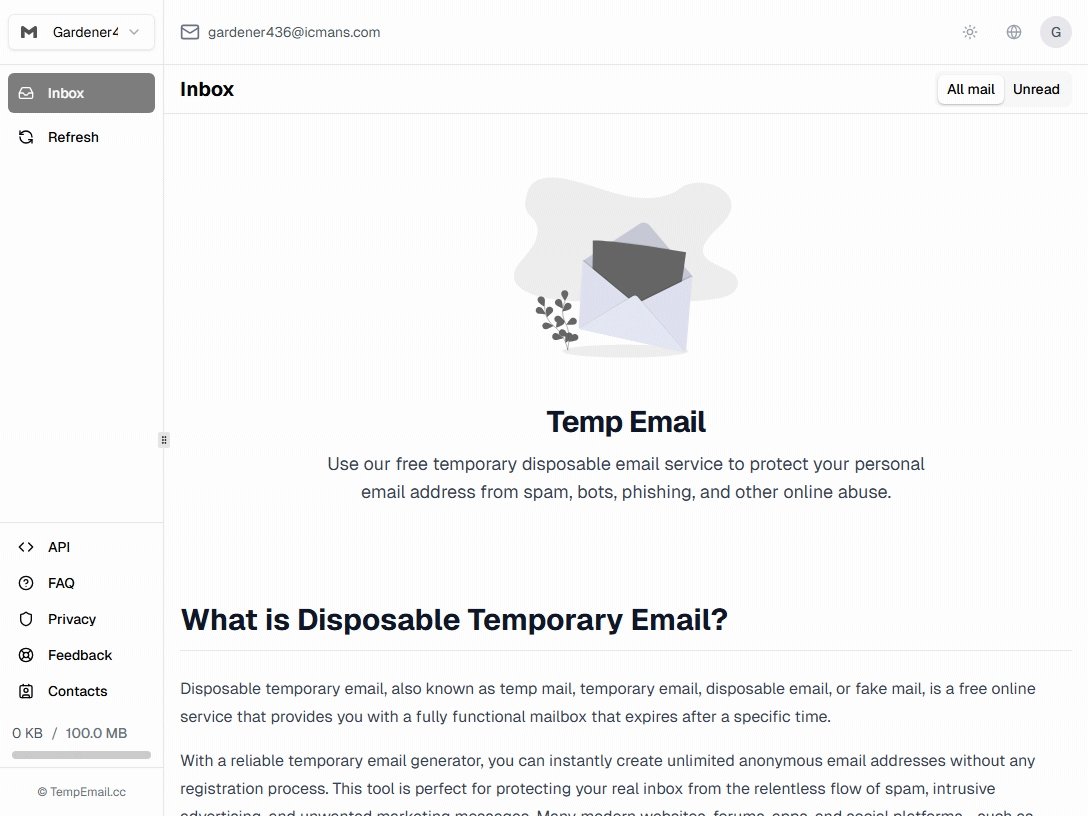
Pour une alternative simple, Tempemail.cc vous offre une boîte de réception jetable sans inscription, avec des adresses personnalisées et plusieurs domaines. Si vous comparez plusieurs services plutôt que de chercher un remplacement direct, notre guide sur les alternatives à 10 Minute Mail compare la conservation, les domaines, l'envoi et d'autres différences pratiques entre les principales options.
Verdict final
Si vous n'avez besoin d'une adresse e-mail que pour quelques minutes, utilisez AdGuard Temp Mail. Si vous avez besoin que l'adresse soit conservée, utilisez un alias AdGuard. C'est vraiment toute la distinction.
AdGuard Temp Mail est plus adapté aux codes de vérification ponctuels, aux inscriptions rapides et aux situations où vous ne voulez pas que l'adresse soit liée à votre boîte de réception habituelle. Un alias est plus adapté aux comptes, aux newsletters et à tout ce sur quoi vous devrez revenir plus tard.
L'important est de ne pas les considérer comme interchangeables. Temp Mail est fait pour être oublié ; un alias est fait pour être conservé.
Si tout ce dont vous avez besoin en ce moment est une boîte de réception jetable, vous pouvez en générer une et poursuivre votre tâche — aucune inscription requise.