Quick Answer: Is Public WiFi Safe in 2026?
- ⚠️ Free public WiFi is never 100% safe, but some types are riskier than others
- ✅ Always verify the network name with staff before connecting
- ✅ Use a VPN when accessing sensitive information on public WiFi
- ✅ Use a temporary email when registering for free public WiFi
- ✅ When in doubt, use your mobile data instead of unknown public WiFi
Public WiFi is convenient — we use it every day at coffee shops, airports, hotels, and shopping malls. I can't tell you how many times I've written blog posts from my local coffee shop while connected to their WiFi. But the question remains: is public WiFi safe to use for browsing, shopping, or checking your bank account?
After writing about online privacy for a few years and testing different public WiFi setups, I can tell you this: free public WiFi is never 100% safe, but some types are much riskier than others, and you can easily protect yourself with a few simple habits.
The truth is that public WiFi networks are often open and unencrypted, which creates privacy and security risks. According to security research summarized on Wikipedia's article on Wi-Fi security, public Wi-Fi networks have significant security risks including eavesdroding, evil twin attacks, and unpatched vulnerabilities. One study found that over 60% of public WiFi hotspots have at least one security vulnerability that can expose your data.
In this guide, I'll break down the real risks of public WiFi, rank different locations by risk level, give you my practical VPN recommendations, and show you how to protect your mobile privacy when connecting to public networks. I'll also explain why using a disposable email when registering for free public WiFi helps protect your privacy.
What Are the Real Risks of Public WiFi?
Public WiFi networks are usually open to anyone, which means hackers can easily intercept your data if the network isn't properly secured. The most common risks include:
Eavesdropping and Data Interception
On unencrypted public networks, hackers can monitor the data you send and receive. This means they can potentially see your usernames, passwords, credit card numbers, and browsing history if you're not using a VPN.
Fake "Evil Twin" Hotspots
Hackers often set up fake WiFi hotspots with names that look legitimate — like "Starbucks Guest WiFi" or "Airport Free WiFi". When you connect to these fake networks, all your traffic goes through the hacker's computer, where they can steal your data.
Malware Distribution
On compromised public networks, hackers can inject malware into unencrypted web pages you visit, which can infect your device without you even noticing.
Unsecured Network Infrastructure
Many public WiFi networks don't have recent security updates or proper encryption, making them easy targets for automated attacks scanning for vulnerable networks.
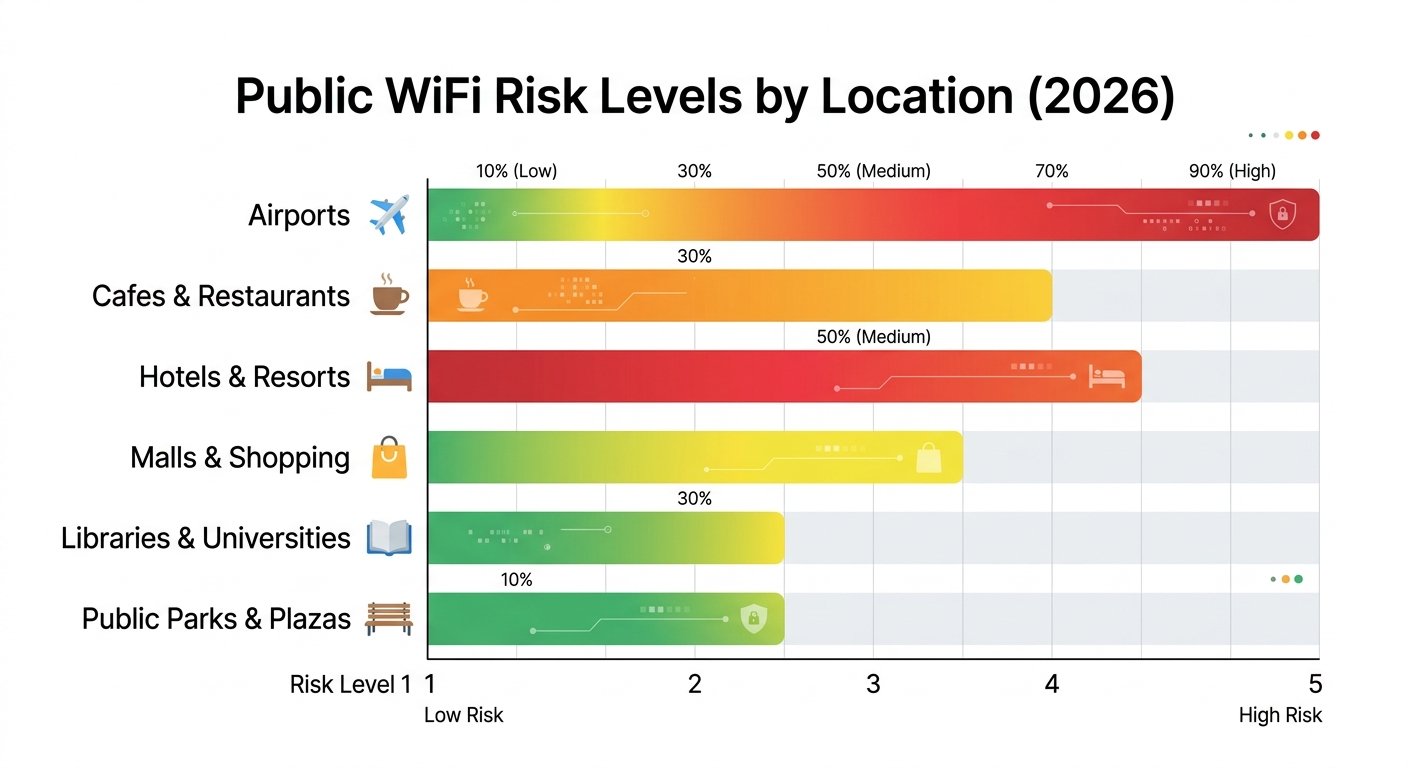
Public WiFi Risk Level Chart by Location
Not all public WiFi is equally risky. Here's how common public WiFi locations rank by risk:
| Public Wi-Fi Location | Risk Level | Notes |
|---|---|---|
| Local Coffee Shop / Cafe | ⭐⭐ (Low-Medium) | Usually password-protected, fewer attackers hanging around |
| Hotel Wi-Fi | ⭐⭐⭐ (Medium) | Large open network shared by many users, harder to monitor |
| Airport Wi-Fi | ⭐⭐⭐⭐ (Medium-High) | High traffic, lots of strangers, common place for evil twin attacks |
| Train Station / Shopping Mall | ⭐⭐⭐⭐ (Medium-High) | Open access, easy for attackers to set up nearby fake hotspots |
| Unknown/Unnamed Free Wi-Fi | ⭐⭐⭐⭐⭐ (Highest) | Never connect to these. Almost certainly a trap. |
Key Takeaway: The more public and anonymous the location, the higher the risk. Always verify the exact network name with staff before connecting to free public WiFi at busy places like airports.
Do You Really Need a VPN on Public WiFi?
This is one of the most common questions: should you always use a VPN on public WiFi? The answer depends on what you're doing and which network you're connecting to.
When you DO need a VPN:
- You're entering passwords or logging into financial accounts
- You're entering credit card information for online shopping
- You're connected to an unknown or high-risk public network
- You're handling any sensitive personal information
When you might not need a VPN:
- You're just browsing public news or blog content (all HTTPS)
- The network is password-protected and you've verified it's legitimate
- You're using your phone's mobile data instead of WiFi
- All the sites you visit use HTTPS (this gives you basic protection)
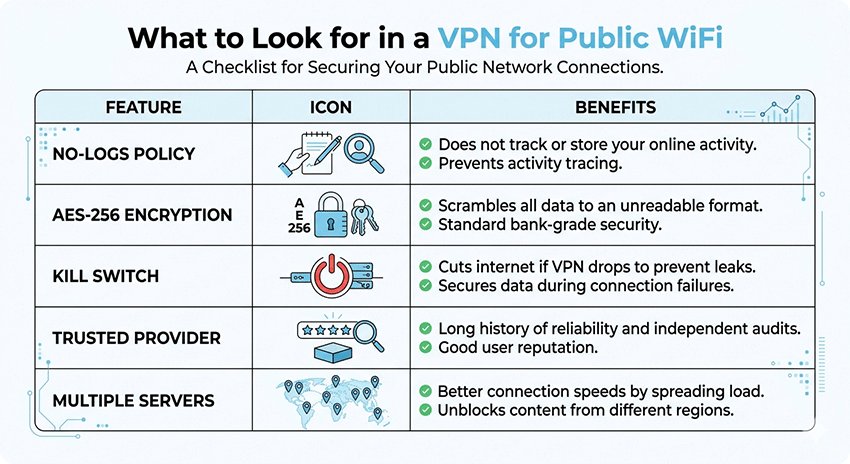
VPN Selection Guide for Public WiFi
If you decide to use a VPN (recommended for most public networks when accessing anything sensitive), here's what to look for:
| VPN Feature | What You Need |
|---|---|
| Logging Policy | No-logs policy (provider doesn't store your browsing activity) |
| Encryption | AES-256 encryption (current industry standard) |
| Kill Switch | Yes — disconnects your internet if the VPN connection drops |
| Price | Free VPNs are okay for casual use, but paid VPNs are more reliable |
| Server Locations | Multiple servers in the countries you need |
My quick recommendation: In my testing, If you're just looking for something simple and free, ProtonVPN has a good free tier that doesn't sell your data. They've been around for years and have a solid reputation. I avoid most "free VPN" apps from unknown providers — they often track your activity anyway, which defeats the purpose of using a VPN for privacy.
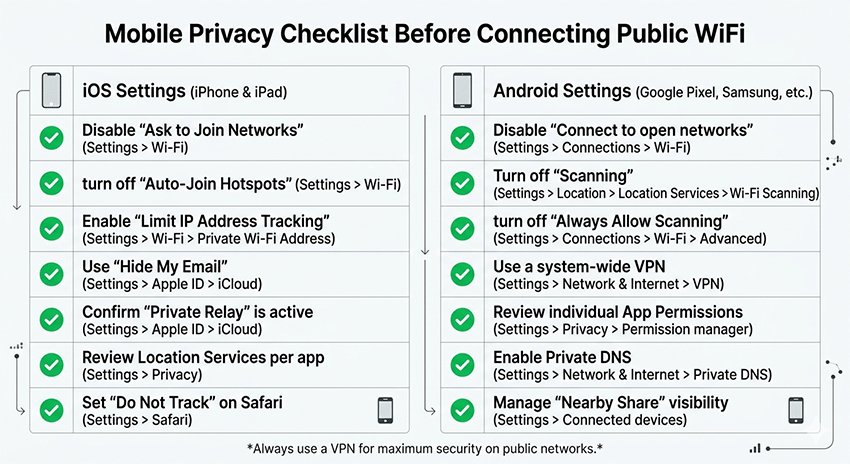
Mobile Privacy Checklist: iOS and Android
Whether you use a VPN or not, you should check these privacy settings on your phone before connecting to public WiFi. These simple steps take two minutes and drastically improve your privacy.
iOS Privacy Settings Check
- Limit Ad Tracking: Settings → Privacy & Security → Tracking → Turn off "Allow Apps to Request to Track"
- Wi-Fi Auto-Join: Settings → Wi-Fi → Turn off "Auto-Join" for unknown networks
- Private Address: Settings → Wi-Fi → (i) next to network → Enable "Private Address" (hides your real MAC address)
- Background App Refresh: Turn off for sensitive apps when on public WiFi
- iCloud Private Relay: If you have iCloud+, turn this on for extra privacy
Android Privacy Settings Check
- Ad Privacy: Settings → Privacy → Ads → Enable "Opt out of Ads Personalization"
- MAC Randomization: Settings → Network & Internet → Wi-Fi → Privacy → Select "Use randomized MAC"
- Auto-Connect: Turn off auto-connect to open hotspots
- App Permissions: Review which apps have location permission — restrict it when not in use
Quick Pro Tip:
Always forget the public network after you're done using it. Your phone won't automatically connect to it again next time, which prevents you from accidentally connecting to an evil twin hotspot with the same name.
How Temporary Emails Protect Your Privacy on Public WiFi
Many public WiFi networks require you to register with an email address before you can connect. This is how hotels, airports, and shopping malls collect your contact information for marketing.
Should you use your main personal email address? No.
Here's why you should use a temporary (disposable) email when signing up for public WiFi:
- Avoid marketing spam: The venue will almost certainly send you promotional emails after you register. Using a temp mail keeps all this junk out of your main inbox.
- Protect your real email address: If the WiFi provider suffers a data breach, your real email isn't exposed to attackers.
- No cross-site tracking: If you don't give them your real email, they can't track your activity across different online services.
- It's free and takes 10 seconds: Just generate a temporary email, use it to complete registration, and you're done. You don't need to check it again unless you need to re-verify.
Best Practice for Public WiFi Registration:
- Connecting to public WiFi: Generator a temporary email to register
- Logging into your important accounts: Always use a VPN, and double-check you're on the legitimate network
- Sensitive activities: If you don't have a VPN, wait until you're on a trusted network or use mobile data
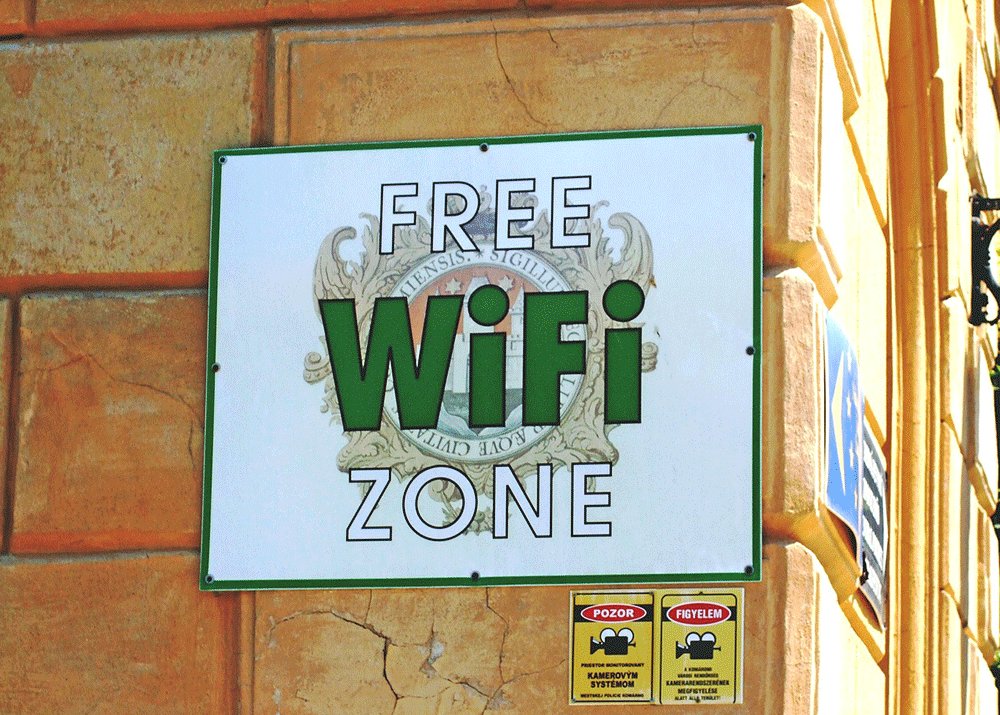
7 Practical Tips to Stay Safe on Public WiFi in 2026
Follow these simple rules and you'll drastically reduce your risk when using public WiFi:
1. Always verify the network name with staff
Hackers create fake hotspots with names very similar to the legitimate venue's network. Ask an employee what the correct network name is before connecting. This one step eliminates most evil twin attacks.
2. Avoid accessing sensitive accounts unless you have a VPN
Don't check your online banking, don't log into your email, don't enter credit card information if you're not using a VPN. Wait until you're on a trusted network that you control.
3. Always use HTTPS
Modern browsers warn you when a site isn't secure. Never enter any information on a site that doesn't have "https://" in the URL. Nearly all modern sites use HTTPS anyway, but it's always worth double-checking.
4. Turn off file sharing
Keep file sharing turned off when you're on public networks. This prevents strangers on the same network from accessing files stored on your computer.
5. Use two-factor authentication everywhere
Even if your password gets intercepted on a public network, 2FA will keep attackers out of your account. This is your last line of defense if something goes wrong.
6. Keep your device software updated
Security updates patch known vulnerabilities that hackers exploit. Turn on automatic updates if you haven't already.
7. When in doubt, use your mobile data
If you're not sure if the network is safe, and you don't have a VPN, just use your cellular data. It's much safer than taking chances with an untrusted public WiFi network.
Frequently Asked Questions About Public WiFi Safety
Can public WiFi see my passwords?
A: If the network is unencrypted and you're not using a VPN, yes — anyone monitoring the network can potentially see your passwords if you enter them on unencrypted HTTP sites. Always use HTTPS and a VPN when entering passwords on public networks.
Is hotel WiFi safe in 2026?
A: Hotel WiFi is medium risk. It's usually more secure than completely open airport WiFi, but it's still shared with hundreds of strangers. Always use a VPN if you're accessing any sensitive information like email or online banking when connected to hotel WiFi.
Is it safe to use public WiFi for online banking?
A: We don't recommend doing online banking on public WiFi unless you're using a reputable VPN. If you absolutely need to check your bank account, use your bank's official mobile app — it's generally more secure than using a browser on an open network.
Can someone hack my phone through public WiFi?
A: It's possible, especially if you're not taking basic precautions. Fake hotspots and unpatched software vulnerabilities can let attackers access your device. Using a VPN and keeping your phone updated minimizes this risk significantly.
What is the safest way to use public WiFi?
A: The safest approach is to always use a VPN when connecting to public WiFi, verify the network name with staff, avoid accessing sensitive accounts, and use a temporary email for registration. When in doubt, just use your mobile data instead.
Conclusion: Is Public WiFi Safe in 2026?
From my experience, public WiFi is convenient, and it's not inherently dangerous if you take the right precautions. I use it regularly when I'm out working from coffee shops — I just follow these simple rules and don't take unnecessary risks.
To summarize the key points:
- Low risk locations like coffee shops with password-protected WiFi are generally safe for casual browsing
- High risk locations like airports and unknown networks need more caution
- Always use a VPN when accessing sensitive information on any public network
- Use a temporary email when registering for public WiFi to avoid spam and protect your privacy
- When in doubt, use mobile data — it's safer than taking chances with an untrusted network
By following these simple guidelines, you can enjoy the convenience of public WiFi without putting your personal information and privacy at risk. For more tips on staying safe online, check out our how to protect your privacy online and our article on best practices for password security