Вы нажимаете Отправить код подтверждения, следите за входящими, обновляете страницу раз, другой — и происходит одно из двух. Либо письмо так и не приходит, либо 10-минутный таймер обнуляется раньше, чем сообщение оказывается в ящике. Если вы с этим сталкивались, то уже знаете самую частую проблему бесплатных почтовых сервисов для верификации: дело не в том, что таких сервисов нет, а в том, что неподходящий из них подводит вас в самый неподходящий момент.
Честно говоря, понятие «бесплатная почта для верификации» объединяет множество совершенно разных инструментов — 5-минутные одноразовые ящики, публичные почтовые ящики с хранением до 8 дней, пересылающие алиасы на вашем собственном домене — и они далеко не взаимозаменяемы. Сервис, который идеально подходит для получения одного кода, станет плохим выбором, если процесс регистрации предполагает отправку подтверждения, приветственного письма и чека в течение трех дней. Большинство статей обходят это различие стороной. Мы — нет.
Это руководство идет по одному пути: что на самом деле заставляет письмо с подтверждением работать, какой из двенадцати протестированных нами сервисов справляется с этим лучше всего, почему некоторые бесплатные почтовые ящики молча блокируются сайтами, на которых вы регистрируетесь, и как выбрать подходящий вариант для вашей ситуации.
Краткое сравнение: 12 бесплатных почтовых сервисов для верификации
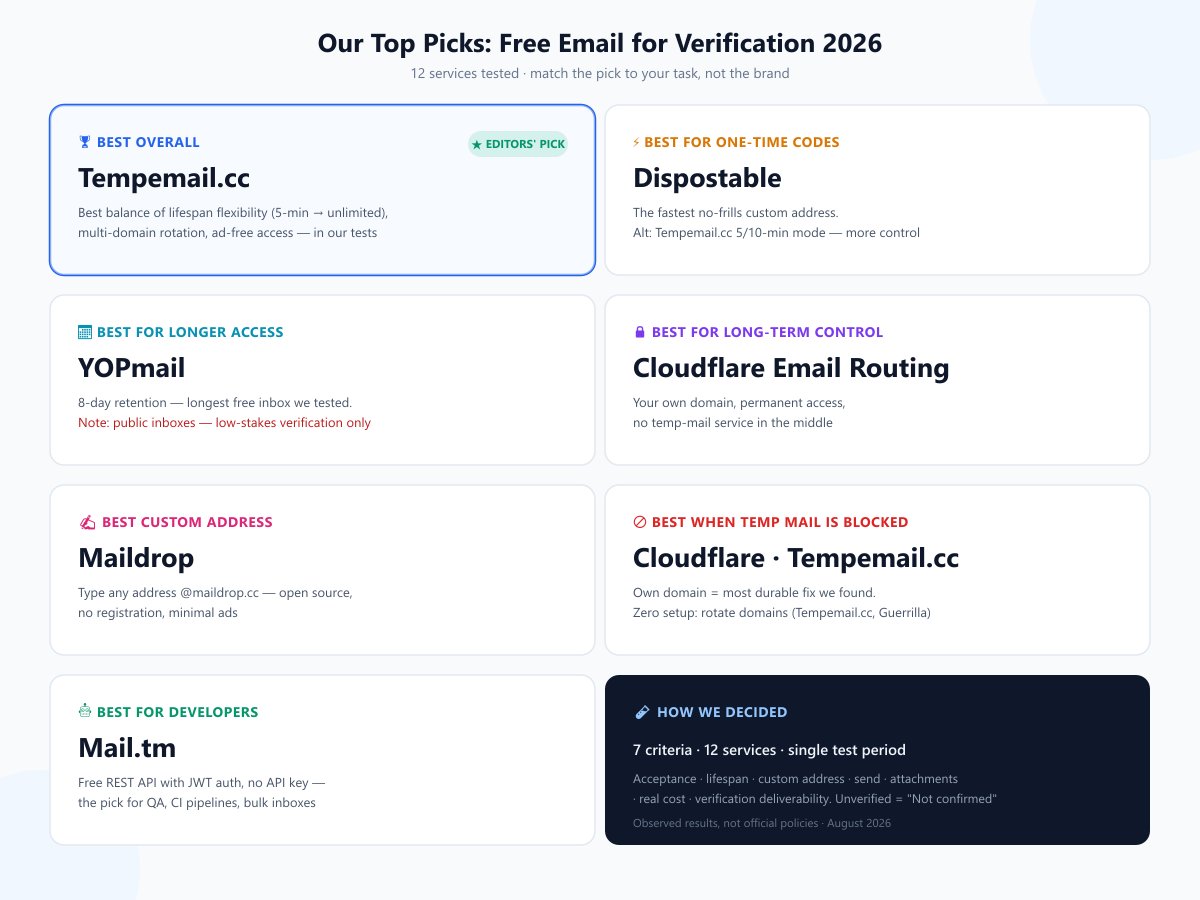
Прежде чем переходить к деталям, вот лидеры, выявленные в ходе нашего тестирования, чтобы вы могли быстро выбрать ящик и двигаться дальше:
- 🏆 Лучший в целом: Tempemail.cc — лучшее сочетание гибкости срока жизни, выбора доменов и отсутствия сложностей в доступе в наших тестах.
- ⚡ Лучший для одноразовых кодов: Dispostable — самый быстрый и простой вариант.
- 📅 Лучший для длительного доступа: YOPmail — хранение писем 8 дней, самый долгий срок среди протестированных нами бесплатных ящиков (примечание: его ящики публичны — подходят для верификации с низким уровнем риска, но не для чего-то конфиденциального).
- 🔒 Лучший для долгосрочного контроля: Cloudflare Email Routing — ваш собственный домен, постоянный доступ, никакой сторонней службы временной почты.
- ✍️ Лучший для создания адреса: Maildrop — используйте любой адрес
@maildrop.cc, проект с открытым исходным кодом. - 🚫 Лучший, если временная почта заблокирована: Cloudflare Email Routing — самое надежное решение из всех найденных.
- 🤖 Лучший для разработчиков: Mail.tm — бесплатный REST API с JWT-авторизацией.
Полное сравнение:
| Сервис | Для чего лучше всего | Приемлемость для верификации | Срок жизни ящика | Кастомный адрес | Публичный ящик | Ротация доменов |
|---|---|---|---|---|---|---|
| Temp Mail (temp-mail.org) | Повторно используемый адрес, мобильные | Часто блокируется | Долгосрочный (повторный) | Ограниченно | Нет | Нет |
| Tempemail.cc | Выбор срока жизни | Зависит от домена — ротация | 5 мин / 10 мин / безлимит | Да | Нет (случайный по умолчанию) | Да (мультидомен) |
| Guerrilla Mail | Отправка почты | Часто блокируется | 60 мин (можно продлить) | Да (11 доменов) | Нет | Да |
| YOPmail | Самое долгое хранение | Часто блокируется | 8 дней | Да | Да — без пароля | Ограниченно |
| Maildrop | Open-source, кастомный | Иногда блокируется | Сессионный | Да | Да — без пароля | Нет |
| 10 Minute Mail | Классическая одноразовая | Часто блокируется | 10 минут | Нет (случайный) | Нет | Нет |
| EmailOnDeck | «Дольше 10 минут» | Не подтверждено | Сессионный | Не подтверждено | Нет | Нет |
| Mohmal | Для арабоязычных пользователей | Не подтверждено | 45 мин (можно продлить) | Случайный | Нет | Нет |
| Dispostable | Минимализм, мгновенно | Не подтверждено | Не указано | Да | Да — без пароля | Нет |
| Throwawaymail | В один клик, без раздумий | Не подтверждено | Короткая сессия | Нет (случайный) | Нет | Нет |
| Smailpro | Домены Gmail/Outlook | Высокая (по заявлению) | Не подтверждено | Не подтверждено | Нет | Да (выглядят как реальные) |
| Cloudflare Email Routing | Долгосрочный контроль (свой домен) | Вне списков блокировки | Постоянно (ваш ящик) | Да (свой домен) | Нет | Н/Д |
Два примечания к таблице. «Приемлемость для верификации» обобщает наши наблюдения во время тестов в августе 2026 года — в полном разделе ниже объясняется, как работает блокировка. Функции в этой категории часто меняются; некоторые сервисы предоставляют удивительно мало информации о своих базовых возможностях. Там, где мы не смогли подтвердить что-либо напрямую, мы пометили это как «Не подтверждено», вместо того чтобы гадать.
Что делает бесплатную почту хорошей для верификации?
Во-первых, почему это важно: спам по-прежнему составляет 45,6% мирового почтового трафика, а утечки данных скомпрометировали миллиарды адресов — только Have I Been Pwned отслеживает более 17,7 миллиарда скомпрометированных аккаунтов, включая один набор данных из почти 2 миллиардов уникальных адресов. Одноразовый ящик убережет ваш основной адрес от попадания в следующий список.
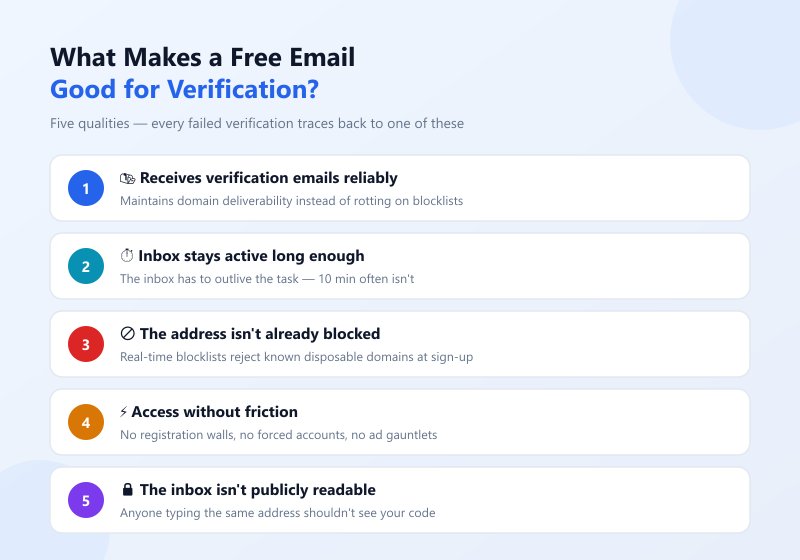
Но «бесплатность» сама по себе не делает почту полезной для верификации. Когда письмо с подтверждением не доходит, это почти всегда происходит по одной из пяти причин — и именно эти пять качеств отличают сервисы, которые работают, от тех, что провалились в наших тестах:
1. Надежный прием писем с подтверждением. Это самое главное. Домены временной почты имеют низкую репутацию, и некоторые почтовые инфраструктуры молча задерживают или удаляют письма, отправленные на них. Хороший сервис активно поддерживает доставляемость своих доменов, не позволяя им попасть в черные списки.
2. Достаточный срок жизни ящика. Ящик должен прожить дольше, чем сама задача. 10-минутный таймер истечет в середине процесса, если отправитель медленный или регистрация требует нескольких писем. Правильный срок жизни зависит от задачи — именно эту ловушку мы разберем в следующем разделе.
3. Адрес не находится в черном списке. Большинство крупных сайтов проверяют адреса при регистрации по спискам временных доменов в режиме реального времени. Если домен сервиса есть в этих списках, форма отклонит вас еще до отправки письма — никакой ошибки, никакого кода, просто «пожалуйста, введите действительный адрес электронной почты».
4. Доступ к ящику без лишних препятствий. Стены регистрации, принудительное создание аккаунтов и навязчивая реклама создают точки отказа между «мне нужен код» и «у меня есть код». Лучшие сервисы работают в один клик: зашел, получил ящик, принял письмо.
5. Ящик не является публично доступным. В некоторых сервисах любой, кто введет тот же адрес, может прочитать вашу почту, включая код подтверждения, предназначенный только для вас. Хорошая бесплатная почта предоставляет ящик, который нельзя легко угадать или который не является общим.
Эти пять качеств стали нашим стандартом тестирования. Вот как мы их применили.
Одноразовая верификация против долгосрочного доступа
Прежде чем выбирать сервис, ответьте на один вопрос — потому что это вопрос, который большинство людей пропускает, и именно он решает всё:
«Достаточно ли мне получить код сейчас — или этот ящик понадобится мне позже?»
Это скрытая тревога, стоящая за большинством поисков почты для верификации: Могу ли я просто получить код и уйти? Или я заблокирую себе доступ к этому аккаунту через три месяца? Ответ делит все регистрации на две группы.
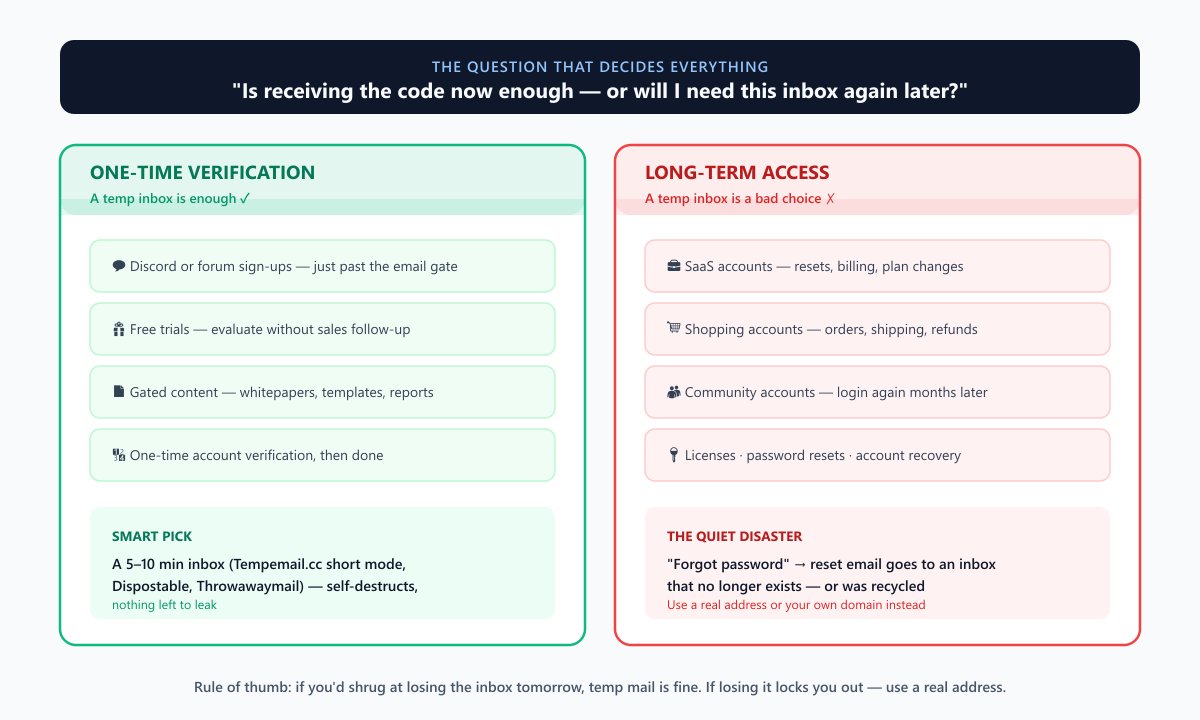
Одноразовая верификация: временного ящика достаточно
Если письмо нужно один раз и вы больше не вернетесь к этому ящику, временный адрес — правильный инструмент. Типичные случаи:
- Регистрация в Discord или на форумах, где нужно просто пройти проверку почты.
- Бесплатные пробные версии, которые вы хотите оценить без последующих звонков от менеджеров по продажам.
- Скачивание контента — whitepapers, шаблоны, отчеты, закрытые почтовым барьером.
- Разовая верификация аккаунта для сервиса, которым вы будете пользоваться анонимно или эпизодически.
Здесь короткий срок жизни ящика — не компромисс: адрес самоуничтожается, когда вы закончили, так что утекать больше нечему. (Хотя короткий срок жизни не автоматически означает приватность — если кто-то может прочитать ящик в эти минуты, это большая проблема. Для таких задач временные ящики работают хорошо).
Долгосрочный доступ: бесплатный временный ящик — плохой выбор
Если аккаунт важен и вам может понадобиться доступ к почте снова, временный адрес — это риск:
- SaaS-аккаунты, которыми вы будете пользоваться — сброс пароля, уведомления о биллинге и изменениях в тарифах приходят на почту.
- Аккаунты в интернет-магазинах — подтверждения заказов, уведомления о доставке, переписка по возвратам.
- Аккаунты в сообществах, которые вам дороги — потеря доступа к ящику означает потерю аккаунта, если вы когда-нибудь выйдете из системы.
- Лицензии на ПО — ключи активации и уведомления о продлении живут в почте.
- Восстановление аккаунта — в тот момент, когда вам понадобится ссылка на сброс пароля, временный ящик должен все еще существовать — или, что еще хуже, не быть переданным другому пользователю.
Проблема проявляется тихо: в первый день все работает, а катастрофа случается спустя месяцы, когда вы нажимаете «забыли пароль», а письмо для сброса уходит в ящик, который больше не существует.
Краткая таблица решений
| Ваша задача | Нужный срок жизни | Рекомендуемые сервисы |
|---|---|---|
| Один код, и всё | 5–10 минут | Tempemail.cc (короткий режим), Dispostable, Throwawaymail |
| Медленный отправитель, неясно, когда придет | Часы, без жесткого таймера | Tempemail.cc (безлимит), EmailOnDeck |
| Многоэтапный процесс в течение дней | Дни | YOPmail (8 дней), Tempemail.cc (безлимит) |
| Аккаунт, который вы сохраните | Постоянно, реальный ящик | Ваш реальный адрес или Cloudflare Email Routing на своем домене |
Правилоправило: если вы не расстроитесь, потеряв почтовый ящик завтра, временная почта подойдет. Если же потеря доступа к ящику приведет к блокировке важного для вас аккаунта, используйте реальный адрес.
Как мы тестировали эти бесплатные почтовые сервисы
Каждый сервис проверялся по одним и тем же критериям, одинаковым способом, в течение одного периода оценки (август 2026 года). Пять качеств, упомянутых выше, превратились в семь конкретных проверок:
- Время жизни входящих. Как долго адрес — и сообщения в нем — остаются доступными? Там, где сервис предлагал фиксированный таймер, мы фиксировали его; если ящик был многоразовым или привязанным к сессии, мы указывали это, а не выдумывали цифры.
- Поддержка пользовательских адресов. Можно ли ввести собственное имя пользователя или оно генерируется случайно? Пользовательские адреса легче запомнить, их можно использовать повторно в разных сессиях, и иногда они проходят через блокировщики, основанные на шаблонах.
- Возможность отправки. Можно ли отправлять письма или только получать? Это встречается реже, чем принято считать, поэтому мы отметили каждый сервис, который действительно это поддерживает.
- Поддержка вложений. Может ли ящик принимать файлы, а не только обычный текст? Полезно, когда письмо для подтверждения содержит PDF или изображение.
- Блокировка доменов. Примет ли типичная форма регистрации адрес или отклонит его как известный домен для временной почты? Мы сопоставили позиционирование каждого сервиса с публичными черными списками доменов временной почты и отчетами сообщества.
- Реальная стоимость. Действительно ли сервис бесплатен для основных функций или он навязывает рекламу, премиум-тарифы и обязательную регистрацию? «Бесплатно с обилием рекламы» и «бесплатно, без рекламы, без регистрации» — это совершенно разный опыт.
- Доставляемость писем подтверждения. Поскольку главная цель — получение писем для подтверждения, мы оценивали, известен ли сервис тем, что действительно получает почту от крупных отправителей, а не просто тем, что у него есть работающий ящик.
Мы намеренно не проводили бенчмаркинг скорости доставки: скорость появления письма во входящих зависит от репутации отправителя и фильтрации, а не от сервиса временной почты. Все проверки статуса «онлайн» проводились путем прямого посещения каждого сервиса в период оценки. Если функция не была задокументирована на официальном сайте — а многие сервисы расплывчато описывают такие базовые вещи, как время жизни ящика, — мы помечали ее как «Не подтверждено», а не гадали.
12 бесплатных почтовых сервисов для подтверждения, которые мы протестировали
Ниже представлены двенадцать сервисов, упорядоченных по тому, насколько хорошо они решают повседневные проблемы, с которыми сталкиваются люди при попытке получить письмо для подтверждения — заблокированные домены, слишком короткие таймеры, отсутствие возможности настройки, реклама. Каждый обзор следует одному формату: что это, плюсы, минусы и для кого лучше всего подходит.
1. Temp Mail (temp-mail.org)
Temp Mail — это сервис, который ближе всего к статусу «бытового имени» в этой категории, и для многих он является стандартной бесплатной почтой для подтверждения. Главное отличие от 10 Minute Mail — это входящие: вместо самоуничтожения через десять минут адрес остается действительным и многоразовым, пока вы его не удалите или сервис не обновит список доменов, поэтому вы можете продолжать использовать один и тот же ящик для нескольких регистраций.
Плюсы: Нативные приложения для iOS и Android, принимает вложения, поддерживает более 45 языков, без регистрации, многоразовый адрес, который не исчезнет в процессе работы.
Минусы: Семейство доменов temp-mail.org находится в черных списках — ожидайте отказов на большинстве крупных платформ. Бесплатная веб-версия перегружена рекламой, а премиум-тариф навязывается для удаления рекламы и увеличения срока хранения.
Для кого: Для мобильных пользователей, которым нужен быстрый временный ящик в приложении и важно, чтобы адрес сохранялся между сессиями.
2. Tempemail.cc
Tempemail.cc построен на простой идее: временный ящик, который не монетизирует ваше внимание и адаптируется к тому, сколько времени он вам на самом деле нужен. Здесь нет рекламы, регистрации и сбора персональных данных — вы заходите на сайт, выбираете адрес (или создаете свой) и начинаете получать письма. Примечательное дизайнерское решение — выбор срока жизни: вы можете использовать 5- или 10-минутный ящик для быстрого одноразового кода или переключиться в безлимитный режим, если не уверены, когда придет письмо, или если нужно получить несколько писем за раз. Эта гибкость важна, так как большинство других сервисов привязывают вас к одной модели.
Это сервис только для получения почты, что является стандартом для данной категории. В чем он выигрывает у более крупных имен, так это в наличии нескольких доменов: когда один домен помечается привередливой формой регистрации, вы можете переключиться на другой, не теряя свой ящик — это практичный способ обойти проблему черных списков, с которой сталкивается почти каждый временный сервис.
Плюсы: Действительно без рекламы, не требуется аккаунт, настраиваемый адрес, несколько доменов для обхода блокировок, ящики можно удалять или менять по желанию, выбор срока жизни ящика (короткий или безлимитный).
Минусы: Только получение (отправка невозможна), нет нативного мобильного приложения, а детали хранения в безлимитном режиме не очень подробно задокументированы — для типичного использования это нормально, но стоит знать, если вам нужно гарантированное долгосрочное хранение.
Для кого: Для тех, кто хочет чистый ящик без рекламы и гибкость в выборе срока жизни в зависимости от задачи — особенно если вы не уверены, сколько времени займет процесс регистрации.
3. Guerrilla Mail (guerrillamail.com)
Guerrilla Mail — это «белая ворона», в хорошем смысле: он действительно может отправлять почту, а не только получать ее. Одно это делает его достойным внимания, так как почти все остальные сервисы в этом списке работают только на прием. Вы получаете 60-минутный ящик (с возможностью продления), около одиннадцати доменов на выбор и полный контроль над именем пользователя.
Плюсы: Единственный сервис в нашем тесте, поддерживающий отправку, одиннадцать доменов на выбор, настраиваемый адрес, доступно приложение для Android.
Минусы: Интерфейс выглядит так, будто его перестали обновлять в 2012 году, а домены Guerrilla (sharklasers.com, grr.la и т.д.) хорошо известны блокировщикам. Вложения ограничены сильнее, чем обычный лимит в 25 МБ.
Для кого: Для всех, кому нужно именно отправить анонимное сообщение, а не только получить его.
4. YOPmail (yopmail.com)
Если ваша проблема с недолговечными ящиками в том, что они слишком быстро умирают, YOPmail — это противоположная крайность: сообщения хранятся восемь дней — это самый долгий срок бесплатного хранения в данном списке. Вы можете ввести любой адрес [email protected] и сразу начать получать письма, регистрация не нужна. Также поддерживаются альтернативные домены, которые перенаправляют почту в тот же ящик.
Плюсы: Восьмидневное хранение, полностью настраиваемый адрес, без регистрации, доступны альтернативные домены.
Минусы: Ящики публичные — любой, кто знает или угадает ваш адрес, может прочитать вашу почту, поэтому это небезопасно для чего-либо конфиденциального. Сайт перегружен рекламой, а yopmail.com широко заблокирован.
Для кого: Для некритичных, долгосрочных регистраций, где нужно получать несколько писем в течение нескольких дней и где не важна конфиденциальность.
5. Maildrop (maildrop.cc)
Maildrop — фаворит среди open-source решений для тех, кому нужен чистый, настраиваемый ящик. Введите любой адрес @maildrop.cc, и у вас есть почтовый ящик. Код доступен на GitHub, что дает преимущество в прозрачности перед конкурентами с закрытым исходным кодом.
Плюсы: Полностью настраиваемый адрес, открытый исходный код, минимум рекламы, без регистрации.
Минусы: Встроенная фильтрация спама агрессивна — легитимные письма для подтверждения иногда попадают в спам. Точное время жизни ящика не задокументировано, нет нативного мобильного приложения.
Для кого: Для технически подкованных пользователей, которые ценят открытый исходный код и хотят простой ящик с настраиваемым адресом.
6. 10 Minute Mail (10minutemail.com)
10 Minute Mail — одно из самых известных имен в этой категории. Сервис называет себя «первым сервисом временной и одноразовой почты», работающим с 2006 года, с ящиками, которые самоуничтожаются через 10 минут. Без регистрации, 45 языков. Это имя, которое приходит на ум первым, и это лучший пример проблемы «одноразовое против долгосрочного»: 10 минут — это слишком мало для большинства современных процессов регистрации. Если отправитель ставит письмо в очередь или задерживает его, или если процесс требует получения более одного сообщения, таймер истекает раньше, чем вы закончите.
Плюсы: Культовый, предельно простой, без излишеств, полностью в оперативной памяти (после истечения срока ничего не остается).
Минусы: 10-минутный таймер — главный недостаток, слишком мало для медленных отправителей и многоэтапных процессов. Случайный (не настраиваемый) адрес, домен сильно заблокирован, только получение, нет мобильного приложения, нет возможности продления.
Для кого: Для получения одного быстрого кода подтверждения от отправителя, которому вы доверяете — и не более того.
7. EmailOnDeck (emailondeck.com)
EmailOnDeck позиционирует себя почти как прямой ответ 10 Minute Mail — его суть буквально в том, что ящик «живет дольше 10 минут». Точное время жизни не определено, но оно привязано к сессии, а не к жесткому 10-минутному ограничению, что решает главную претензию к 10minutemail.
Плюсы: Явно более долгий, чем 10 минут, срок жизни, без регистрации, простой процесс.
Минусы: Интерфейс устарел, точное время хранения не задокументировано, и, как у большинства старых сервисов, домен, вероятно, частично заблокирован.
Для кого: Для всех, чья главная проблема — «10 минут недостаточно».
8. Mohmal (mohmal.com)
Mohmal — сервис временной почты, ориентированный на арабоязычных пользователей; он называет себя первой арабской временной почтой. Ящики по умолчанию живут 45 минут, но их можно продлить вручную, также есть приложение для Android с поддержкой арабского и английского языков.
Плюсы: Хорошая поддержка арабского языка, продлеваемый 45-минутный ящик, приложение для Android.
Минусы: 45 минут — это маловато, интерфейс преимущественно на арабском (что может подойти не всем), международная известность низкая.
Для кого: Для арабоязычных пользователей, которым нужен опыт на родном языке с поддержкой мобильных устройств.
9. Dispostable (dispostable.com)
Dispostable — это минимализм в чистом виде. Введите настраиваемое имя пользователя или нажмите кнопку случайного выбора, и у вас есть ящик. Никаких настроек, никакой панели управления, никакого беспорядка.
Плюсы: Предельно простой, поддержка настраиваемого адреса, без регистрации, почти нет интерфейса, который нужно изучать.
Минусы: Почтинет документации — время жизни входящих не указано, информация о вложениях отсутствует, приложения нет, а сайт предлагает очень мало функций помимо базовых.
Лучше всего подходит для: случаев, когда вам просто нужно какое-то входящее сообщение прямо сейчас, и вас не волнуют дополнительные функции.
10. Throwawaymail (throwawaymail.com)
Throwawaymail — еще один вариант «в один клик»: зашли на страницу, получили входящие. Он разделяет философию «максимальной простоты» Dispostable с коротким временем жизни сессии.
Плюсы: Входящие в один клик, никакой регистрации, ничего не нужно настраивать.
Минусы: Случайный (не настраиваемый) адрес, короткое время жизни сессии, нет документированной поддержки вложений и нет опубликованной политики конфиденциальности, которую мы смогли бы найти.
Лучше всего подходит для: максимально быстрой одноразовой регистрации, когда вам больше никогда не понадобится этот адрес.
11. Smailpro (smailpro.com)
Smailpro использует другой подход к проблеме черных списков: вместо ротации одноразовых доменов он предлагает временные входящие на доменах, выглядящих как настоящие, например, Gmail и Outlook, заявляя о 95% уровне принятия. Обратная сторона медали — почту обрабатывает третья сторона на домене, который выглядит как личный провайдер, что является вопросом доверия, а не только техническим аспектом.
Плюсы: Домены, выглядящие как настоящие (в стиле Gmail/Outlook), которые обходят черные списки одноразовых доменов; полезно для регистраций, которые отклоняют известные домены временной почты.
Минусы: Только получение почты, вопрос доверия к третьей стороне, обрабатывающей почту на домене личного провайдера, ограниченная публичная документация, а заявление об уровне принятия является самооценкой.
Лучше всего подходит для: случаев, когда вас заблокировали везде, и вам нужен адрес, который выглядит так, будто он от Gmail или Outlook.
12. Cloudflare Email Routing (альтернатива с самостоятельным хостингом)
Это другой случай: Cloudflare Email Routing — это вообще не сервис одноразовой почты, а бесплатный уровень пересылки для вашего собственного домена. Настройте что_угодно@вашдомен.com с правилом «catch-all», и все адреса будут пересылаться на ваш настоящий почтовый ящик. Выгода огромна — поскольку вы контролируете домен, вероятность того, что он попадет в черные списки одноразовой почты, с которыми борются все остальные сервисы из этого списка, гораздо ниже.
Плюсы: Собственный домен (в значительной степени вне черных списков одноразовых адресов), постоянное хранение, бесплатно, без рекламы, неограниченное количество псевдонимов, полная поддержка вложений, конфиденциальность корпоративного уровня.
Минусы: Требуется владение доменом и некоторая настройка — это не вариант «нажал и готово», и это только пересылка (отправка невозможна, если вы не добавите отдельного SMTP-провайдера).
Лучше всего подходит для: опытных пользователей и всех, кто устал от того, что домены временной почты отклоняются, и хочет долгосрочное, надежное решение.
Почему некоторые бесплатные почтовые сервисы не работают для верификации
Это раздел, который определяет, придет ли ваше письмо для верификации вообще — и тот, который пропускает большинство статей. Если вы когда-либо вставляли временный адрес в форму регистрации и получали сообщение «пожалуйста, введите действительный адрес электронной почты», ни один из двенадцати сервисов выше не имел шанса вас подвести. Отказ произошел еще до того, как было отправлено первое письмо. Вот что происходит на самом деле.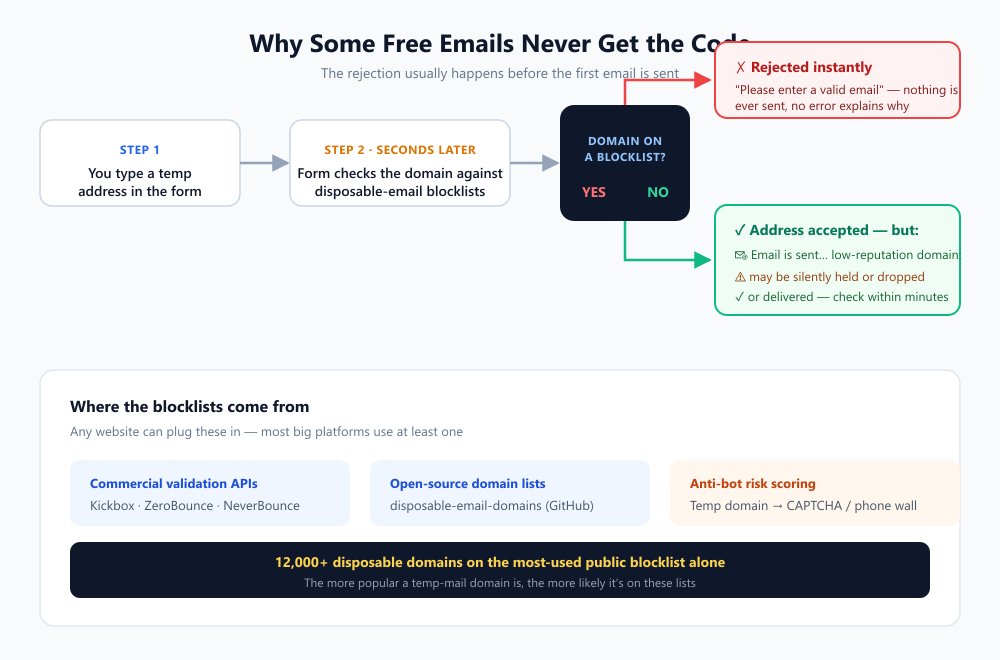
Черные списки одноразовой почты
Когда вы вводите адрес в форму регистрации, платформа обычно прогоняет его через API проверки электронной почты в реальном времени, прежде чем принять. Эти сервисы поддерживают огромные базы данных известных одноразовых, временных и «мусорных» доменов:
- Kickbox предлагает специальный чекер одноразовой почты, который помечает временные адреса, и даже предоставляет бесплатный публичный API для этого.
- ZeroBounce явно обнаруживает «временные электронные письма от широкого круга провайдеров одноразовой почты» как часть своего API проверки.
- NeverBounce классифицирует «Одноразовый» (Disposable) как одну из пяти категорий результатов проверки.
Помимо коммерческих API, любой разработчик может подключить список с открытым исходным кодом. Самым широко используемым является список disposable-email-domains на GitHub — поддерживаемый сообществом реестр, который вырос до более чем 12 000 записей. Если домен вашего сервиса временной почты есть в этом списке, сайт, использующий его, мгновенно отклонит ваш адрес.
Репутация домена
Даже после того, как форма регистрации приняла адрес, письмо должно еще дойти. Одноразовые домены — это направления с низкой репутацией; они активно используются для спама и злоупотреблений, поэтому платформы отправки относятся к ним с подозрением и иногда молча задерживают или удаляют письма, чтобы не рисковать собственными метриками доставляемости. В обычных условиях примерно одно из шести легитимных писем уже не доходит до входящих; для одноразовых доменов ситуация еще хуже. Вот почему код, который «никогда не приходит», часто просто не был отправлен.
CAPTCHA и антибот-системы
Современные формы регистрации не просто проверяют электронную почту — они оценивают весь запрос целиком. Одноразовый домен является одним из самых сильных сигналов риска в таких системах, и он часто вызывает эскалацию: появляется CAPTCHA, внезапно требуется номер телефона, или форма выдает общую ошибку. Со стороны кажется, что сайт «глючит». Это не так — он решил, что регистрация с временной почты, скорее всего, является злоупотреблением, и намеренно повысил уровень сложности.
Ограничения почтовых провайдеров
Некоторые отправители — особенно банки, государственные службы и крупные SaaS-платформы — вообще отказываются доставлять определенную почту (выписки, уведомления безопасности, ключи лицензий) на одноразовые домены в соответствии с политикой. Адрес принимается при регистрации, а затем первое важное письмо молча не отправляется. Это еще одна причина, по которой временная почта и долгосрочные аккаунты несовместимы.
Ограничения при регистрации
Наконец, многие платформы прямо запрещают использование одноразовых адресов в своих условиях обслуживания. Результат такой же, как при использовании черного списка — «домен электронной почты не разрешен» — но причина заключается в политике, а не в технологии, что означает, что это применимо даже к совершенно новым доменам, которые еще не попали в черные списки. Это также объясняет, почему использование временной почты для обхода бана — это не просто нарушение правил; это сценарий использования, для которого и были написаны эти политики.
Почему один домен временной почты работает, а другой — нет
Общая закономерность: чем популярнее одноразовый домен, тем вероятнее, что он находится в черном списке. 10minutemail.com, temp-mail.org, guerrillamail.com и yopmail.com есть практически в каждом списке. Менее известные домены, свежие домены и сервисы, которые используют ротацию по большому пулу, проскакивают гораздо чаще — именно поэтому мультидоменные сервисы (Guerrilla Mail) в наших тестах показали себя лучше, чем однодоменные, и именно поэтому ваш собственный домен (Cloudflare Email Routing) превосходит всё остальное.
Что делать, если письмо для верификации не приходит
Прежде чем сдаваться, пройдите по этому чек-листу: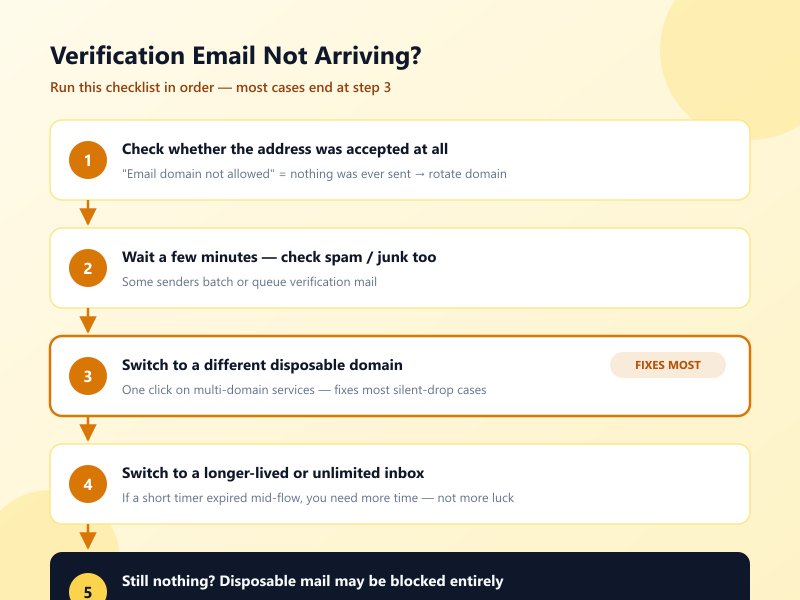
- Проверьте, был ли адрес принят вообще. Если форма показала «домен электронной почты не разрешен» или похожую ошибку, ничего не было отправлено — смените домен или сервис.
- Подождите несколько минут и проверьте снова (включая папку спама/нежелательной почты, если сервис ее предлагает). Некоторые отправители отправляют письма верификации пакетами или ставят их в очередь.
- Переключитесь на другой одноразовый домен. В мультидоменных сервисах это делается в один клик и исправляет большинство случаев «тихого удаления».
- Переключитесь на ящик с более долгим сроком жизни или безлимитный. Если короткий таймер истек в процессе, решение — больше времени, а не больше удачи.
- Если одноразовая почта, похоже, заблокирована полностью, используйте домен, выглядящий как настоящий (Smailpro), собственный домен (Cloudflare Email Routing) или — для аккаунтов, которые вы планируете сохранить — постоянный адрес электронной почты.
Что мы наблюдали на практике
Наблюдаемое принятие во время наших тестов в августе 2026 года. Это наши собственные результаты, а не официальные политики платформ — принятие может варьироваться в зависимости от домена, региона, репутации IP, истории аккаунта и процесса регистрации.
Условные обозначения: ✅ обычно принимается · ⚠️ работает иногда / зависит от активного домена · ❌ обычно отклоняется
| Платформа | Temp Mail | Tempemail.cc | Guerrilla Mail | YOPmail |
|---|---|---|---|---|
| Amazon | ❌ | ⚠️ | ❌ | ❌ |
| Netflix | ❌ | ⚠️ | ❌ | ❌ |
| Facebook / Instagram | ❌ | ⚠️ | ❌ | ❌ |
| X (Twitter) | ❌ | ⚠️ | ❌ | ❌ |
| OpenAI / ChatGPT | ⚠️ | ⚠️ | ❌ | ❌ |
| Discord | ⚠️ | ⚠️ | ⚠️ | ❌ |
| ⚠️ | ⚠️ | ⚠️ | ⚠️ | |
| Spotify | ❌ | ⚠️ | ❌ | ❌ |
| GitHub | ✅ | ✅ | ✅ | ✅ |
| Небольшие SaaS / форумы / рассылки | ✅ | ✅ | ✅ | ✅ |
Для мультидоменных сервисов ⚠️ означает «зависит от того, какой домен активен — если один отклонен, переключитесь на другой». Применение правил постоянно меняется: домен, который работает сегодня, завтра может быть заблокирован. Закономерность, которую стоит запомнить: чем крупнее платформа и чем больше она обеспокоена злоупотреблениями, тем строже черный список — а регистрация в банках, платежных системах и государственных службах с одноразовым адресом практически невозможна (и неразумна).
Какую бесплатную почту выбрать? Выбирайте по сценарию
Имея перед собой двенадцать сервисов, практический вопрос не в том, «какой из них лучший», а в том, «какой из них лучший для того, что я делаю прямо сейчас». Вот как результаты тестирования выше превращаются в выбор.
Лучшее для одноразовой верификации
Вам нужен один код из одной формы, и на этом всё.
→ Dispostable или Throwawaymail для максимально быстрого пути. Если вы предпочитаете иметь настраиваемый адрес или больше контроля над входящими, альтернативой является режим 5/10 минут в Tempemail.cc — без рекламы и равноценно.быстро.
Лучший выбор для долгого ожидания писем
Отправитель работает медленно или процесс предполагает отправку нескольких писем — подтверждение, приветствие, чек — в течение нескольких часов или дней.
→ YOPmail (8 дней, самый долгий бесплатный срок хранения — но помните, что их почтовые ящики публичны) или Tempemail.cc в неограниченном режиме (без таймера вообще). Любой сервис с жестким ограничением в 10 минут в этом сценарии — это лотерея.
Лучший выбор для минимального раскрытия данных
Ваш приоритет — передать как можно меньше информации о себе.
→ Для использования без настройки лучше всего подходят «одноразовые» ящики от сервисов без рекламы и регистрации. Для долгосрочного контроля Cloudflare Email Routing — более надежный вариант: почта приходит на ваш собственный домен и пересылается на ваш реальный адрес, при этом сторонний сервис временной почты не читает ваши письма. А чтобы оставить минимум следов, используйте «короткий» ящик и позвольте ему самоуничтожиться.
Лучший выбор для пользовательских адресов
Вы хотите ввести свое имя пользователя, а не соглашаться на случайный набор символов.
→ Maildrop — самый гибкий вариант (любой адрес @maildrop.cc, открытый исходный код). YOPmail и Guerrilla Mail также поддерживают полностью настраиваемые адреса, причем Guerrilla предлагает выбор из одиннадцати доменов.
Лучший выбор, если временные домены заблокированы
Вы столкнулись с ошибкой «email domain not allowed» и просто хотите пройти форму регистрации.
→ Лучшее долгосрочное решение: Cloudflare Email Routing на собственном домене — реальный домен блокируют гораздо реже. Альтернативы без настройки: Guerrilla Mail, которые позволяют менять домены, если один из них был отклонен. Для адреса, который выглядит как Gmail или Outlook: Smailpro (с учетом компромисса в виде доверия к стороннему сервису).
Лучший выбор для разработчиков и тестирования
Вам нужен программный доступ — массовые ящики для QA, интеграции с API, CI-конвейеров.
→ Mail.tm, который предлагает бесплатный REST API с JWT-авторизацией и не требует API-ключа. Ни один другой сервис из этого списка не ориентирован на API; если вы интегрируете временную почту в приложение, начните с него.
Безопасно ли использовать бесплатную почту для верификации?
Для получения кода подтверждения с низким уровнем риска — да, но с четырьмя важными оговорками, которые стоит понять, прежде чем на них полагаться.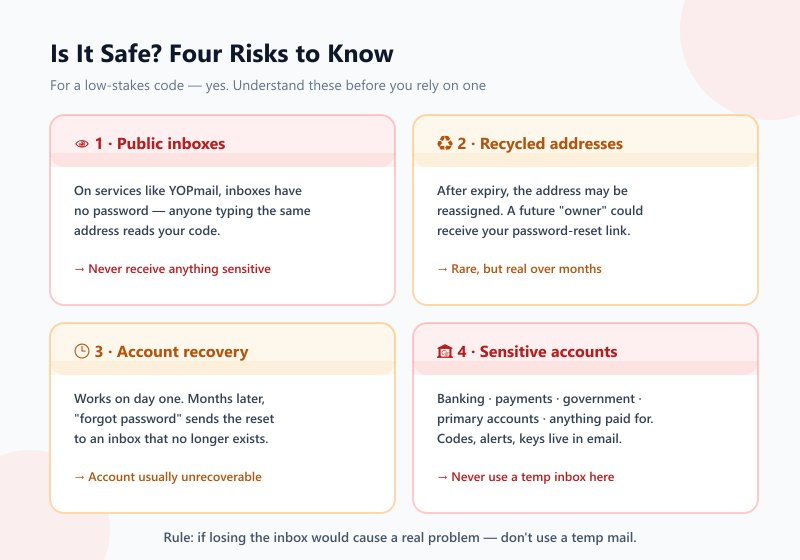
Публичные ящики
Самая большая ловушка в этой категории. В таких сервисах, как YOPmail, у ящиков нет пароля: любой, кто введет тот же адрес, может прочитать всё, что в нем находится, включая код подтверждения, предназначенный только для вас. Если код открывает доступ к чему-то важному (оплата, аккаунт с личными данными), публично доступный ящик означает, что кто-то другой может воспользоваться вашим кодом. Относитесь к любому временному ящику как к потенциально доступному для других и никогда не получайте на него конфиденциальную информацию.
Переиспользуемые адреса
Временные адреса не остаются вашими навсегда. После того как срок действия ящика истекает, сервис может передать этот адрес другому пользователю. Если письмо для сброса пароля придет на переиспользованный адрес, новый «владелец» ящика получит вашу ссылку для сброса. Это редко случается в краткосрочной перспективе, но является реальной проблемой в течение недель и месяцев — и это еще одна причина, почему долгосрочные аккаунты и временная почта несовместимы.
Восстановление аккаунта
Тихая катастрофа. В первый день всё работает, но проблема возникает спустя месяцы, когда вы нажимаете «забыли пароль», а письмо для сброса уходит в ящик, который больше не существует. В этот момент аккаунт обычно становится невозможно восстановить — вот почему вопрос «одноразовый или долгосрочный» важнее выбора конкретного сервиса.
Чувствительные аккаунты
Независимо от того, насколько хорош сервис, временный ящик — неподходящий инструмент для всего, что связано с вашей личностью или деньгами:
- Банки, платежи и финансы — банковские счета, карты, PayPal, Stripe, криптобиржи. Коды подтверждения, уведомления о мошенничестве и выписки приходят на почту; потеряете доступ к ящику — потеряете доступ к деньгам.
- Государственные и официальные службы — налоговые порталы, системы идентификации, здравоохранение. Юридически значимая и срочная корреспонденция.
- Ваши основные аккаунты — Google, Apple, Microsoft, рабочая почта. Если потеря доступа к ним создаст серьезные проблемы, они заслуживают постоянного почтового ящика, как и их резервные адреса для восстановления.
- Все, за что вы платите — подписки, лицензии, курсы. Чеки и уведомления о продлении приходят на почту.
Правило остается прежним: если потеря доступа к ящику создаст реальную проблему, не используйте временную почту. Если вы просто пожмете плечами и создадите новый адрес — всё в порядке.
Часто задаваемые вопросы
Какая бесплатная почта лучше всего подходит для верификации?
Единого «лучшего» варианта нет — всё зависит от задачи. Для быстрого получения одного кода достаточно короткоживущего ящика (Dispostable или режим 5/10 минут в Tempemail.cc). Для медленных отправителей или многошаговых процессов используйте YOPmail (8 дней). Для регистраций, блокирующих временные домены, используйте мультидоменный сервис или собственный домен через Cloudflare Email Routing. Раздел с рекомендациями по сценариям подробно это описывает.
Какая бесплатная почта лучше всего подходит для OTP-верификации?
Та же логика применима к одноразовым паролям: вам нужен ящик, на который (а) платформа отправителя действительно доставит письмо и (б) который будет активен до момента прихода OTP. Для мгновенных OTP подойдет любой короткоживущий ящик. Для OTP, которые приходят с задержкой или на втором этапе, используйте ящик без ограничения по времени.
Можно ли использовать бесплатную почту для верификации аккаунта?
Да, именно для этого и созданы такие сервисы. Настоящий вопрос в том, является ли аккаунт одноразовым или долгосрочным. Для разовых или неважных аккаунтов временный ящик подходит. Для аккаунтов, которые вы планируете сохранить (магазины, SaaS, сообщества, всё, где есть пароль, который можно забыть), используйте постоянный адрес — иначе будущий сброс пароля уйдет в никуда.
Можно ли использовать временную почту для получения кода подтверждения?
Да, именно для этого они и созданы. Нужно проверить две вещи: принимает ли сайт, на котором вы регистрируетесь, временные домены (крупные платформы часто их блокируют) и будет ли ящик жить достаточно долго, чтобы письмо успело прийти. Для большинства разовых регистраций оба условия легко выполнить.
Почему мое письмо с подтверждением не приходит?
Почти всегда по одной из четырех причин: (1) ящик истек до того, как пришло письмо (часто бывает с 10-минутными ящиками); (2) адрес был отклонен при регистрации как временный, поэтому письмо даже не отправлялось; (3) платформа отправителя молча отбросила или задержала письмо, отправленное на временный домен с низкой репутацией; (4) спам-фильтр самого временного сервиса заблокировал его (агрессивная фильтрация Maildrop делает именно это). Решения: переключитесь на ящик с более долгим сроком жизни, смените домен или попробуйте другой сервис.
Истекает ли срок действия бесплатной почты для верификации?
Это полностью зависит от сервиса: от 5–10 минут (10 Minute Mail), 45–60 минут с возможностью продления (Mohmal, Guerrilla Mail), на основе сессии (EmailOnDeck, Throwawaymail), 8 дней (YOPmail) или без ограничений, пока вы сами его не удалите (Temp Mail, Cloudflare Email Routing). Если не уверены, сколько времени вам понадобится, начните с ящика без жесткого таймера.
Могут ли сайты блокировать временные адреса электронной почты?
Да, и большинство крупных сайтов делают это автоматически, используя API проверки в реальном времени (Kickbox, ZeroBounce, NeverBounce) и открытые списки блокировки, такие как disposable-email-domains. Именно это вызывает ошибки «email domain not allowed». Обходные пути: смените домен, используйте домен, похожий на настоящий (Smailpro), или используйте свой собственный домен через Cloudflare Email Routing.
Безопасна ли бесплатная почта для верификации?
Для регистраций с низким уровнем риска — да, с оговорками из раздела безопасности: некоторые ящики публично доступны, адреса могут переиспользоваться, и их никогда нельзя использовать для банков, госуслуг или основных аккаунтов. Для одноразового кода на «мусорном» аккаунте риск практически равен нулю.
Можно ли использовать одну и ту же временную почту дважды?
В сервисах с многоразовыми ящиками (Temp Mail, YOPmail) — да, адрес остается активным и может получать почту до тех пор, пока вы его не удалите или не истечет срок. В сервисах с жестким таймером (10 Minute Mail) — нет, после истечения срока адрес пропадает. Учтите, что повторное использование публичного ящика (как в YOPmail) означает, что любой, кто угадает адрес, сможет его прочитать.
Что делать, если сайт отклоняет мою временную почту?
Попробуйте по порядку: смените домен в мультидоменном сервисе (Guerrilla Mail); попробуйте домен, похожий на настоящий (адреса Smailpro в стиле Gmail/Outlook); используйте свой собственный домен через Cloudflare Email Routing — это самый надежный подход для строгих платформ, таких как Netflix, X и Amazon. Если ничего не помогает, а аккаунт важен, значит, сайт требует реальный адрес — и для аккаунтов, которые вы планируете использовать долго, это правильный ответ.
Итог: какая бесплатная почта для верификации действительно работает?
После тестирования двенадцати сервисов честный ответ заключается в том, что вопрос не в том, «какой лучший», а в том, «какой проблемы я пытаюсь избежать». Подбирайте инструмент под задачу:
- Ящик умер до прихода кода → вам нужен более долгий срок жизни: Tempemail.cc (неограниченный режим) или YOPmail.
- Форма отклонила адрес как временный → вам нужна гибкость доменов: Guerrilla Mail для смены доменов или Cloudflare Email Routing для самого надежного решения.
- Нужен только один быстрый код → Dispostable, Throwawaymail или режим 5/10 минут в Tempemail.cc — зашли, получили код, исчезли.
- Нужно не только получать, но и отправлять почту → Guerrilla Mail, единственный сервис с функцией отправки в нашем тесте.
- Аккаунт действительно важен → ни один из них. Используйте свой реальный адрес или псевдоним (алиас) на собственном домене.
Для большинства повседневных регистраций идеальный вариант — сервис, который позволяет подобрать ящик под задачу: короткий, когда вы хотитечтобы не оставлять следов, и безлимитный доступ, когда нужно подождать. Tempemail.cc заслужил наш выбор как «Лучший в целом» именно по этой причине: оба варианта срока действия в одном месте, множество доменов для обхода черных списков, а также отсутствие рекламы и необходимости регистрации.