受信トレイ
ブログAPIFAQプライバシーフィードバックお問い合わせ
/
© TempEmail.cc
Temp Mail ブログHow to Use Temp Mail for Spotify: Complete Guide 2026

How to Use Temp Mail for Spotify: Complete Guide 2026

Temp Mail for Spotify: Stream Music Now, Not Spam Later

Harsel GiveshPost by Harsel Givesh |2026年2月25日
How to Use Temp Mail for Spotify: Complete Guide 2026

Nobody wants another spam email. You go to sign up for Spotify, and suddenly, you are handing over your real email address just to listen to a few songs. The result? A cluttered inbox full of newsletters and promotions you never asked for.

Using a temp mail for Spotify solves this instantly. It lets you create an account, verify it, and start streaming—all without exposing your personal email to marketing lists or potential data leaks. It is a simple tool that gives you complete control over your digital privacy.

In this guide, we’re going to break down exactly how to use temporary email addresses to enjoy Spotify on your terms.

Why Use Temp Mail for Spotify

Your email address is the key to your digital identity. When you use it to sign up for free tiers of services like Spotify, you are often the product, not the customer. Here is why a temp mail for Spotify is a smart move.

1. Stop the Spam Before It Starts

Spotify’s promotional emails can be relentless. While it's great to know when your favorite artist drops a new album, do you really need a "Your 2026 Wrapped is here!" email every single day for a week? Probably not.

By using a disposable address, you ensure that all the marketing noise stays out of your primary inbox. If the spam gets bad, you simply throw away the temporary address.

2. Protect Your Privacy

Data breaches are no longer a matter of "if," but "when." Spotify has millions of users, making it a high-profile target for hackers.

If Spotify’s database is ever compromised, or if a third-party data aggregator buys user information, your real email is now floating around the dark web. Using a temp mail for Spotify creates a buffer. Your real identity remains detached from your listening habits.

3. Test Features Without Commitment

Are you thinking about switching from Apple Music to Spotify but want to test out the algorithm first? Or maybe you need a second account to test a feature for a podcast you’re producing? A temporary email allows you to create "burner" accounts to test the waters without committing your real identity.

4. Avoid Targeted Advertising

Tech giants are constantly tracking you. Spotify listens to what you listen to, and that data often feeds into advertising profiles.

By using a temporary email, you make it much harder for advertisers to connect your music taste (which can be very personal) to your browsing history or social media profiles.

How to Choose the Best Disposable Email Service

Not all temporary email services are created equal. If you search for "temp mail" online, you will find hundreds of options, ranging from sleek and modern to shady and pop-up-ridden. If you want a smooth experience registering for Spotify, you need a service that is reliable.
Here is what you should look for in the best disposable email:

  • Speed: The inbox should load instantly. You don't want to be staring at a loading screen while your verification email expires.
  • Reliability: The service must actually receive emails from major providers. Some free temp mail domains get blacklisted by Spotify. You need one that works.
  • Simplicity: It should be one-click to copy the address and one click to refresh the inbox.

While there are many tools out there, one that consistently ticks these boxes is tempemail.cc. It is straightforward, doesn't ask for any personal info to generate an address, and is reliable for receiving those critical verification links from platforms like Spotify.

How to Use Temp Mail for Spotify Sign Up: Step-by-Step

Alright, let’s get to the practical part. You’re ready to sign up for Spotify, and you want to keep your main inbox clean. Here is exactly how to do it using a disposable address.

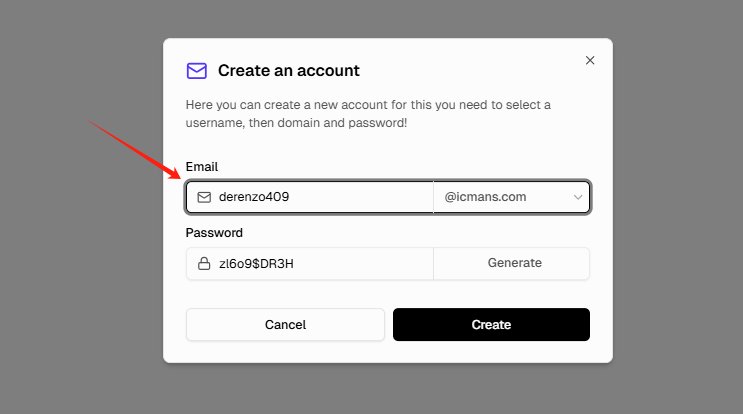
Step 1: Generate Your Disposable Address

First, open your browser and navigate to tempemail.cc. The moment the page loads, it will automatically generate a random temporary email address for you. Copy this address to your clipboard.
How to Use Temp Mail for Spotify: Generate Your Disposable Address

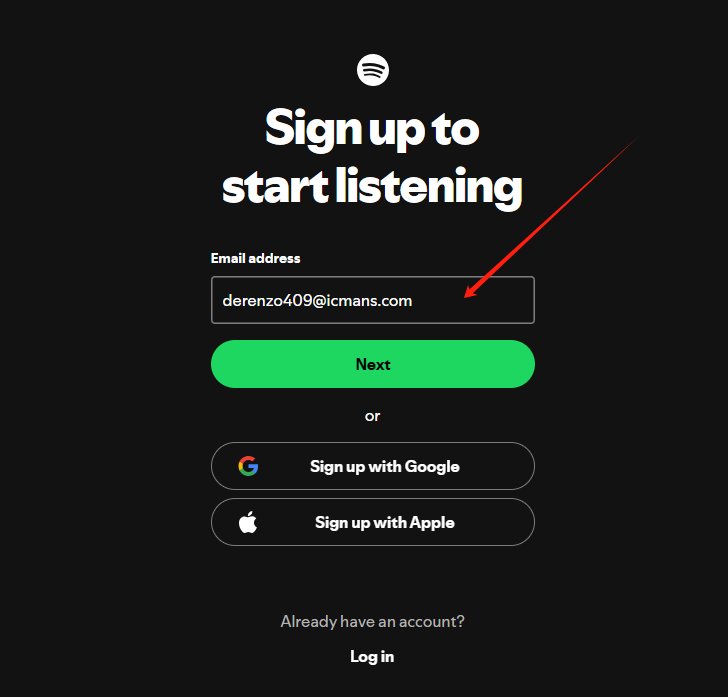
Step 2: Go to Spotify

In another tab, go to the official Spotify sign-up page. You will be prompted to enter an email address, confirm it, provide a display name and your date of birth, create a password, and complete the "I'm not a robot" verification if prompted.
How to Use Temp Mail for Spotify: Go to Spotify

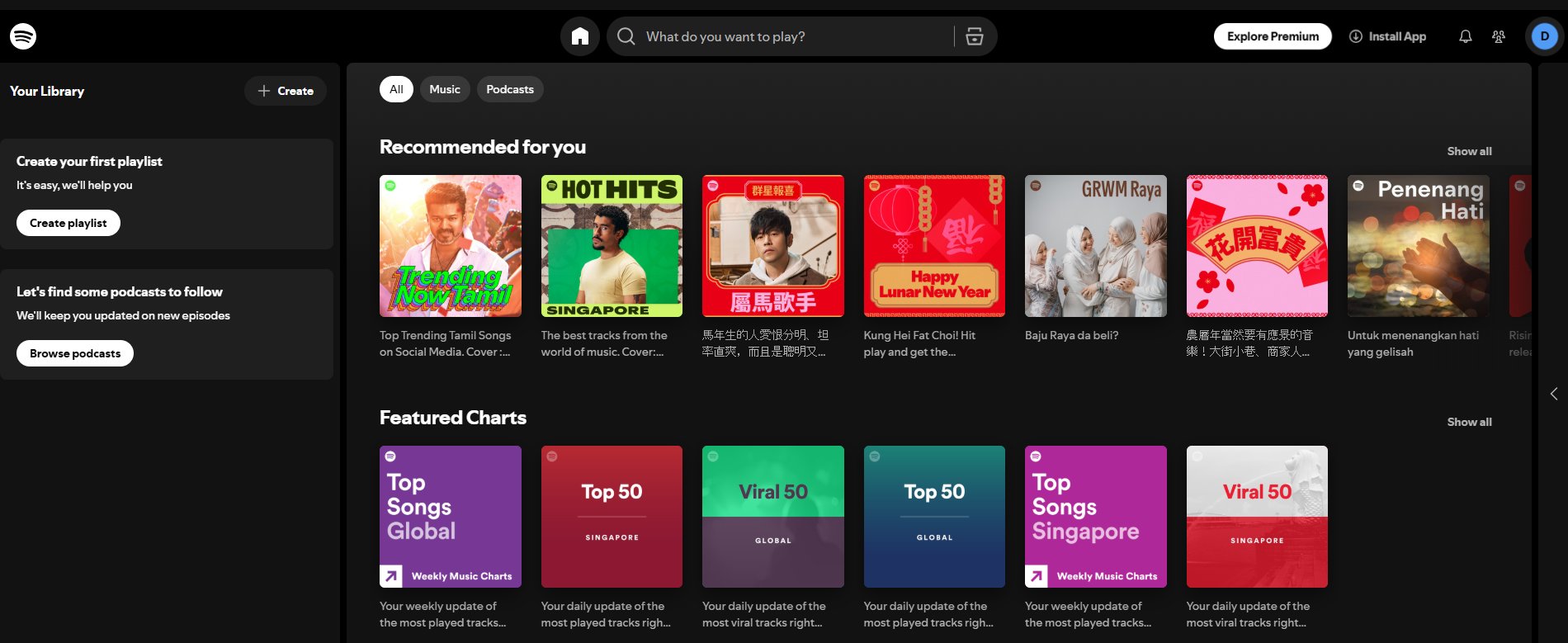
Step 3: Start Listening

Click "Sign Up." Spotify will likely log you in automatically and take you straight to the dashboard. Notice something? You didn't have to click a verification link in your email.

This is why a temp mail for Spotify is so effective. The service trusts you, and you get instant access without ever touching the inbox.

Step 4: Keep the Tab Open (Just in Case)

While verification is not required, sometimes Spotify might send a "New Login" warning or a password reset confirmation. Leave the tempemail.cc tab open for the next hour or so.

If any emails do come through, they will appear in that inbox instantly, and you can view them by clicking on the subject line.

Is It Safe to Use Temp Mail for Spotify?

This is a valid concern. Is it safe, or does it violate the terms of service?

From a security perspective, it is arguably safer than using your real email. It minimizes your digital footprint and reduces the risk of your primary email being caught in a data breach. The temporary email service itself (like tempemail.cc) usually doesn't store your data or require any personal information from you, making it a dead end for trackers.

From a legal/Terms of Service perspective, Spotify’s terms require you to provide accurate information. Technically, using a temporary email could be seen as providing inaccurate information. However, Spotify generally turns a blind eye to this practice for free accounts. They primarily use device fingerprints and payment data (if you upgrade) to track you. The risk of being banned solely for using a temp mail for a free account is extremely low, provided you aren't using the account to scrape data or spam others.

What are the Limitations of Using Temp Mail for Spotify

While using a temporary email is a great privacy tool, it isn't a magic bullet. There are a few limitations you should be aware of before you go deleting all your old accounts.
Spotify homepage

  • Account Recovery Issues: This is the big one. If you forget your password or if your account gets hacked, Spotify will send a recovery link to your email. If you have already let that temporary email expire, you are locked out permanently. There is usually no customer service rep that can help you get back in without access to that original inbox.
  • No Long-Term Communication: If you are the type of person who likes receiving those "Your Year in Music" recaps or playlist suggestions based on your history, you won't get them. The whole point of a temp mail is to block incoming mail, so those fun, personalized emails will bounce back or simply never arrive.
  • Spotify’s Terms of Service: Technically, Spotify expects you to provide a valid email address that you have access to. While using a temporary email isn't illegal, it does technically violate their terms if you are doing it to abuse free trial limits. For standard, everyday listening, it is rarely an issue, but it is worth knowing the fine print.

Tips for Using Temp Mail with Spotify

To make sure your experience is smooth and you don't accidentally lock yourself out of a playlist you love, you need a strategy. Using a disposable address isn't just about generating one and forgetting it. It is about managing your access smartly.

Keep the Tab Open Until You're In

The most common mistake people make is closing the temp mail tab immediately after hitting "Sign Up." Sometimes, Spotify's verification email takes two or three minutes to arrive. If you close the inbox, you might miss it. Keep the temporary email tab open and refreshing until you are fully logged into your Spotify account, and the music is actually playing.

Consider a "Burner" Password Manager

Since you might lose access to the email associated with your Spotify account, you need to make sure you don't lose access to the account itself. Use a password manager to save the Spotify login credentials. That way, even if you lose the inbox, you still have the password stored securely and can log in from your devices as long as you aren't logged out.

When to Avoid Temp Mail

There are specific scenarios where a temp mail for Spotify might cause more headaches than it solves. If you plan on subscribing to a family plan, the account manager might need to verify relationships via email.
Similarly, if you are an artist or podcaster using Spotify for Creators, you absolutely need a stable, permanent email address to receive important communications. Save the temp mail for your personal, casual listening accounts.

FAQs about Temp Mail for Spotify

Can I use a temporary email to get multiple Spotify free trials?

Yes, many users do this. By using a fresh temp mail for Spotify and a different payment method (or avoiding payment info altogether), you can theoretically start new trials. However, Spotify also tracks IP addresses and browser fingerprints, so you may need to combine this with a VPN or incognito mode to actually bypass their limits .

Will I lose my playlists if the temp email expires?

No. Your playlists and saved music are tied to your Spotify account, not your email inbox. As long as you stay logged into the Spotify app on your phone or computer, your music will still be there. The only risk is if you get logged out and need a verification code to get back in.

Can I upgrade to Spotify Premium using a temporary email?

Yes, you can technically upgrade. However, be aware that all receipts and billing issues will go to that temporary inbox. If you lose access to the inbox and have a billing problem, resolving it with customer support will be very difficult.

Why does Spotify say "This email is invalid" when I use a temp mail?

This usually happens when the specific email domain you chose has been blacklisted by Spotify. If you get this error, simply go back to your temp mail provider and generate a new address with a different domain. Try to pick one that looks like a standard Gmail or Outlook alias if possible.

Conclusion on Temp Mail for Spotify

In a digital world where our data is constantly being collected, bought, and sold, taking small steps to protect your privacy is essential. Using a temp mail for Spotify is a simple yet highly effective way to enjoy over 100 million songs without selling your identity in the process.

It shields you from relentless marketing spam, protects your primary email from potential data leaks, and allows you the freedom to explore the platform without a long-term commitment . While it comes with the caveat of making account recovery tricky, this risk is easily managed with a password manager and the understanding that this technique is best suited for free accounts or short-term use.

So, the next time you want to listen to that niche playlist without attaching it to your permanent digital footprint, head over to a disposable email service like tempemail.cc. Grab that temporary address, sign up for Spotify, and press play!

最新記事

How to Use Temp Mail for Spotify: Complete Guide 2026
2026年2月25日

How to Use Temp Mail for Spotify: Complete Guide 2026

Temp Mail API for Automated Testing: How Developers Use Disposable Inboxes in Modern Workflows
2026年2月12日

Temp Mail API for Automated Testing: How Developers Use Disposable Inboxes in Modern Workflows

Temp Mail for Social Media: Stay Private and Spam-Free When Signing Up Anywhere
2026年2月11日

Temp Mail for Social Media: Stay Private and Spam-Free When Signing Up Anywhere

Temp Mail for Netflix: How to Use a Temporary Email Safely for Account Sign-Up
2026年2月9日

Temp Mail for Netflix: How to Use a Temporary Email Safely for Account Sign-Up

目次

  • Why Use Temp Mail for Spotify
  • How to Choose the Best Disposable Email Service
  • How to Use Temp Mail for Spotify Sign Up: Step-by-Step
  • Is It Safe to Use Temp Mail for Spotify?
  • What are the Limitations of Using Temp Mail for Spotify
  • Tips for Using Temp Mail with Spotify
  • FAQs about Temp Mail for Spotify
  • Conclusion on Temp Mail for Spotify
Temp mailに戻る