Online shopping has never been more convenient, but learning how to shop online safely in 2026 has become a critical survival skill as the stakes change. As AI technology evolves, so do the tactics of cybercriminals. Today, a "professional-looking" website is no longer a benchmark for safety, and that little green padlock in your browser isn't the shield it used to be.
According to the 2025 FBI Internet Crime Report, losses from online shopping fraud have hit record highs, with AI-generated phishing sites now making up nearly 30% of new scam domains. In 2026, the rise of 'Generative Scams'—where AI creates perfectly written fake reviews and deepfake customer support—means the old ways of spotting a fraud are no longer enough.
The New Reality of Online Fraud
We’ve moved past the era of poorly spelled phishing emails. Modern AI-driven scams now create hyper-realistic fake storefronts, generate thousands of convincing human-like reviews, and even spoof customer service chatbots to gain your trust. If you feel like it’s becoming harder to tell a legitimate deal from a sophisticated trap, you aren’t alone.
Breaking the "HTTPS" Myth
For years, the gold standard of advice was: "Check for the HTTPS padlock." While encryption is still essential, it’s no longer enough. Most fraudulent sites now use SSL certificates to appear secure, masking the fact that they are designed to harvest your credit card data the moment you click "Pay."
Your 2026 Defense Strategy
To stay protected, you need more than just a strong password. You need a Defense Stack—a combination of proactive detection, shielded payment methods, and identity isolation.
Online shopping is safe if you combine active scam detection, secure payment methods (like credit cards or digital wallets), and identity protection tools (such as temporary emails and virtual cards) to isolate your personal data from potential breaches.
In this guide, we will walk you through the exact steps to verify a store in 60 seconds, the tools you need to hide your real identity, and the "emergency plan" to follow if you suspect your data has been compromised.
1. How to Identify Online Shopping Scams in 2026 (Red Flags Checklist)
Knowing how to identify online shopping scams in 2026 requires more than just a quick glance; it requires a deep understanding of how modern fraudsters build fake trust. To shop online safely, you must learn to look past the professional design and identify the subtle inconsistencies that reveal a trap.
If a deal feels urgent, overly perfect, or inconsistent across different pages, it is likely a scam designed to harvest your data.
1.1 Spot Fake AI-Generated Reviews (5 Signs You Shouldn’t Ignore)
The days of "broken English" reviews are gone. Today’s scammers use advanced AI to generate thousands of convincing testimonials. However, AI still leaves a "digital footprint" if you know where to look.
- Robotic Consistency: If 50 reviews use the exact same sentence structure or oddly specific adjectives (e.g., "This product is remarkably transcendental for my daily utility"), they were likely generated in a single batch.
- Lack of Specific Context: AI reviews often talk about "the item" or "the quality" without mentioning specific details, like how it fits a certain body type or how it performs in a specific climate.
- Unnatural Bursts: Check the dates. If a product has zero reviews for months and then suddenly receives 200 five-star ratings in 48 hours, it's a paid or AI-generated attack.
- The "All-Star" Trap: A 100% five-star rating with zero balanced feedback is a major red flag. Legitimate products always have a mix of 3 or 4-star reviews highlighting minor flaws.
- AI-Generated Images: Look closely at user-uploaded photos. Do the hands have six fingers? Does the background look oddly blurred or distorted? AI often fails at the fine details of "real-life" photos.
Fake reviews often sound repetitive, lack specific usage details, and appear in unnatural bursts of 5-star ratings within a short timeframe.
1.2 Detect Fake Websites (Shadow Domains & URL Tricks)
One of the most dangerous ways to get scammed online is through 'Shadow Domains' that mimic famous brands to trick your brain into feeling safe.
- The Typosquatting Trap: Look for subtle character swaps.
amozon.com,walmart-deals.net, oramaz0n.comare classic examples. In 2026, scammers also use international characters that look like English letters (e.g., using a Cyrillic 'а' instead of a Latin 'a'). - Excessive Subdomains: A legitimate URL should be simple. Be wary of links like
secure-login.pay.amazon.shopping-verify.xyz. The real domain is only what comes before the last.comor.org. - Recent Domain Registration: Use a "Whois" lookup tool. If a site claiming to be a "World-Leading Retailer" was registered only 14 days ago, close the tab immediately.
Scam websites often use slightly misspelled domains, excessive subdomains (e.g., amazon.payment-secure.xyz), or recently registered URLs to mimic legitimate brands.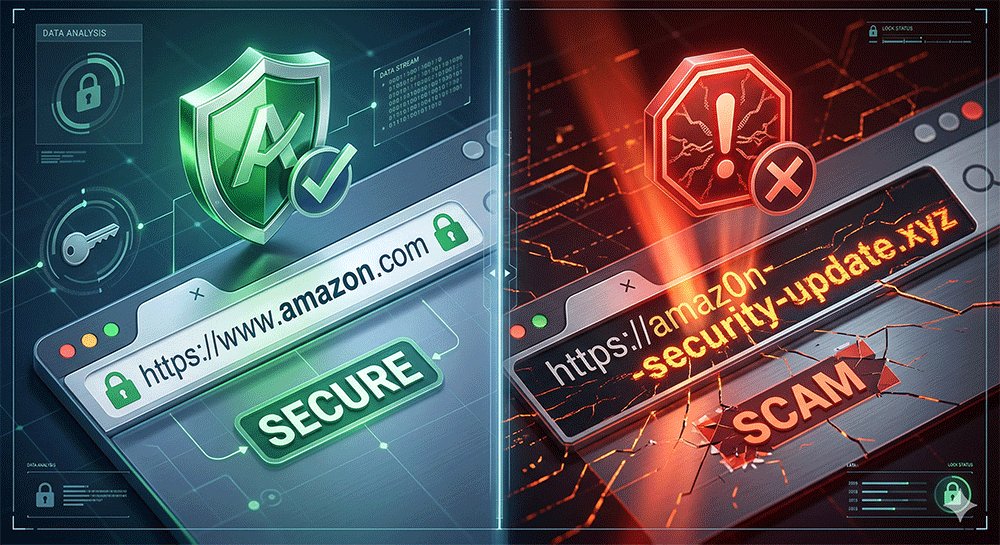
1.3 Avoid Social Media “Too-Good-To-Be-True” Deals
Your TikTok and Instagram feeds are the new frontier for high-speed scams. These ads are designed to bypass your logic by triggering an emotional response.
- The "Direct Link" Danger: Ads that take you directly to a checkout page without a proper homepage or "About Us" section are designed to capture your credit card and vanish.
- Artificial Urgency: Scammers love countdown timers and "Only 3 items left!" banners. This pressure is meant to stop you from performing the security checks mentioned above.
- The Ghost Brand: If you click an ad for a brand you’ve never heard of, check their social media presence. No comments, hidden follower lists, or a 2-day-old profile are clear signs of a "Burner Store."
Strategy Tip: > Never use your primary email address when exploring these "new" stores from social media. If the site is a scam, your main inbox will be flooded with phishing attacks for years. Always use a Temporary Email for the initial sign-up to keep your digital identity isolated.
2. How to Protect Your Payments and Personal Data (Defense Stack Guide)
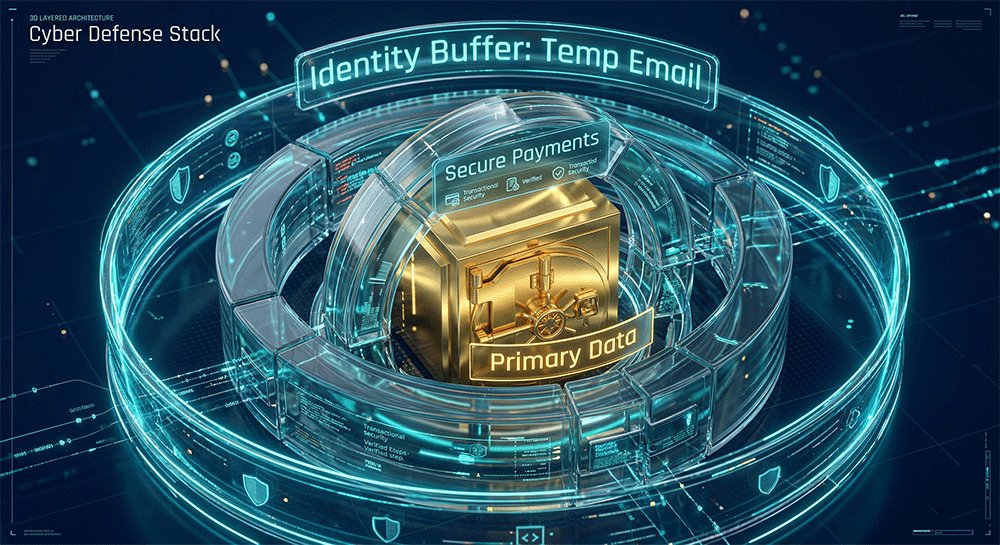
To shop online safely in 2026, being 'careful' is no longer enough; you need a structural payment and data protection strategy.Professional security experts use what we call a "Defense Stack"—separating your sensitive information into layers so that even if one layer is compromised, your life savings and primary identity remain untouched.
The safest online shoppers never use their primary credentials for every transaction; they separate payments, identity, and accounts into secure, isolated layers.
2.1 Choose the Safest Payment Method (Credit Card vs. Debit Card vs. Wallets)
Not all payment methods are created equal. In the battle against fraud, your choice of plastic (or digital) matters.
- Credit Cards (The Gold Standard): Credit cards offer the strongest legal protection. Thanks to Chargeback rights, you can dispute a transaction if the goods never arrive or the site turns out to be a scam. You are spending the bank's money first, not your own.
- Debit Cards (The High Risk): Avoid using debit cards for new or untrusted sites. A debit card is a direct straw into your bank account. Once the money is gone, it’s much harder to get back, and you might be left unable to pay your bills while the bank "investigates."
- Digital Wallets (Apple Pay / Google Pay): These are excellent for privacy because they use Tokenization. The merchant never sees your actual card number—only a one-time-use code.
Credit cards remain the gold standard for online shopping security due to the Fair Credit Billing Act (FCBA), which limits your liability for fraudulent charges to $50 and provides robust chargeback rights that debit cards lack.
2.2 Use Identity Isolation to Prevent Data Leaks (Advanced but Practical)
The biggest mistake people make is using the same "Master Identity" (primary email and phone number) for every site. If one small hobby store gets hacked, your entire digital life is at risk.
Use Temporary Emails for Non-Trusted Sites
If you want to shop safely on unknown websites, the first rule is: never give them your primary email address. Using a temporary email service is the single most effective way to:
- Stop Spam at the Source: If the site sells your data, the spam goes to a burner inbox, not your personal one.
- Prevent "Credential Stuffing" Attacks: Hackers often use leaked emails to try and log into your Amazon, PayPal, or Bank accounts. By using a unique, temporary email, you break that link.
- Complete Anonymity: You get your discount code or order confirmation without leaving a permanent digital footprint.
Pro Tip: For maximum security, we recommend using a tool like [TempEmail.cc]. It allows you to generate a secure, anonymous inbox in seconds—keeping your primary email "invisible" to advertisers and scammers alike.
Use Virtual Cards or One-Time Payment Methods
Similar to temporary emails, virtual cards act as a shield for your bank account.
- Set Spending Limits: You can create a virtual card with a $50 limit for a $45 purchase. If the merchant tries to overcharge you later, the transaction fails.
- One-Time Use: Some services offer "disposable" cards that expire the moment the first transaction is processed.
- Kill the "Auto-Renew" Trap: Tired of "free trials" that are impossible to cancel? Use a virtual card and freeze it after the first sign-up.
Cybersecurity experts at firms like Norton and CrowdStrike increasingly advocate for "Identity Isolation." By using a temporary email (like those from TempEmail.cc) as a buffer, you adhere to the Principle of Least Privilege (PoLP)—ensuring a merchant only has access to the data they need for a single transaction, rather than your permanent digital identity.
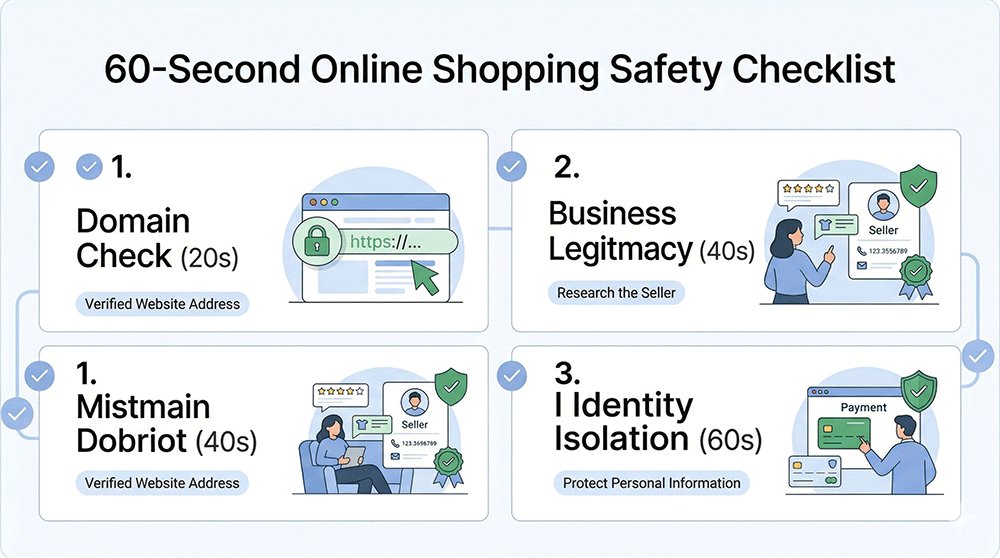
3. 60-Second Online Shopping Safety Checklist (Before You Click “Pay Now”)
In the heat of a "Limited Time Offer," it’s easy to let your guard down. But most online shopping scams can be avoided by taking just 60 seconds to run this pre-flight check. Before you enter your card details, pause and verify these three pillars.
A quick 60-second ritual is the difference between a successful purchase and a drained bank account.
3.1 Verify Business Legitimacy (Contact Info & Presence)
A real business wants to be found; a scammer wants to stay hidden.
- Physical Address: Check the "Contact Us" page. If there is no physical address, or if the address is a residential house or a random parking lot on Google Maps, walk away.
- Support Channels: Is there a working phone number or a professional email (e.g.,
[email protected]),If the only way to contact them is a generic "Contact Form" with no other details, it’s a red flag. - External Social Proof: Don't trust reviews on their own site. Search for "[Brand Name] + reviews" on Trustpilot, Reddit, or Better Business Bureau (BBB). If you see "Order never arrived" or "No response from support," take it seriously.
Legitimate online stores always provide verifiable contact information, including a physical business address and a professional customer service email or phone number.
3.2 Read the Return & Refund Policy Carefully
This is the part everyone skips—and it’s exactly where scammers hide their "legal" traps.
- The Copy-Paste Test: Scammers rarely write their own policies. Copy a sentence from their Refund Policy and paste it into Google. If it appears word-for-word on 50 other unrelated "discount" sites, it’s a template used by a scam network.
- The "No Refunds" Trap: Legitimate retailers have clear, fair windows for returns (usually 14–30 days). Be extremely wary of sites that state "All Sales Final" or have overly complex return processes involving shipping items back to an obscure international address at your own expense.
- Grammar & Formatting: Professional policies are well-formatted. If you see broken English, inconsistent fonts, or references to a different company name in the text, it’s a scam site.
Scam websites often feature vague, copied, or overly restrictive refund policies (such as "all sales final") to prevent victims from reclaiming their money after a fraudulent transaction.
3.3 Avoid Public Wi-Fi When Entering Payment Details
Convenience is the enemy of security. When you are shopping on the go, your data is "in the air."
According to cybersecurity standards from the National Institute of Standards and Technology (NIST), public Wi-Fi networks are highly susceptible to Man-in-the-Middle (MITM) attacks. In these scenarios, an attacker intercepts the data packets traveling between your device and the online store, potentially capturing your unencrypted login credentials and credit card info in real-time.
- The "Man-in-the-Middle" Risk: Hackers at airports or coffee shops can set up fake Wi-Fi hotspots to intercept your payment data as you type it.
- The Solution: Always switch to Mobile Data (LTE/5G) when making a purchase. If you must use public Wi-Fi, ensure you have a reputable VPN active to encrypt your connection.
Pro Tip: To achieve 100% anonymity during this 60-second check, pair your secure connection with a temporary email. By using [TempEmail.cc] to sign up for those "First Order 10% Off" coupons, you ensure that even if the site tracks your session, they don't get your real identity.
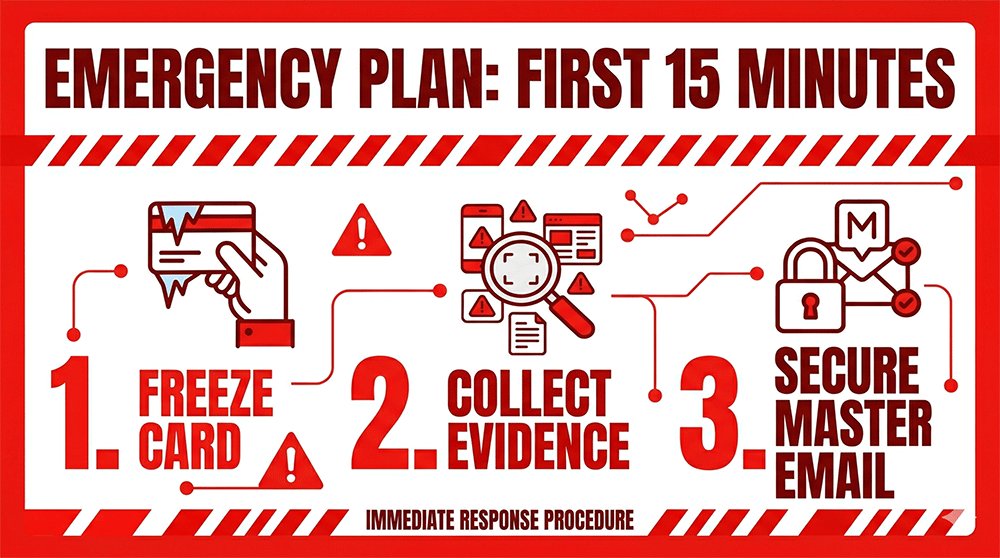
4. What to Do If You Get Scammed Online (15-Minute Emergency Plan)
Realizing you’ve been scammed is a heart-pounding moment, but panic is your enemy. The next 15 minutes are the "Golden Window" to minimize financial loss and prevent identity theft. Follow this exact sequence to shut down the threat.
Fast, methodical action within the first 15 minutes can stop a single fraudulent charge from turning into a total identity takeover.
4.1 Freeze Your Payment Immediately
Don't wait to call the bank—use your technology.
- The Bank App "Kill Switch": Open your mobile banking app immediately and look for the "Freeze Card" or "Lock Card" toggle. This prevents any further pending or future transactions from being processed while you investigate.
- Report the Fraud: Once the card is frozen, call your bank's fraud department. Explicitly state that you have been a victim of a "scam website" and wish to initiate a chargeback dispute.
Immediately freezing your credit or debit card via your mobile banking app is the fastest and most effective way to stop further financial loss after being scammed online.
4.2 Collect Evidence (Screenshots & Transactions)
Scammers often delete their websites or block victims once the money is taken. You need proof for your bank and local authorities.
- Capture the "Paper Trail": Take screenshots of the order confirmation page, the receipt sent to your email, and any "tracking numbers" provided.
- Save Communications: If you chatted with a fake support agent or received marketing emails, save those headers. These often contain IP addresses or server info that help fraud investigators.
- Transaction ID: Note the exact time and amount shown in your banking app.
To support fraud disputes and investigations, you must document everything—including screenshots of the website, order confirmations, and all email correspondence with the scammer.
4.3 Secure Your Accounts and Email Immediately
This is where most victims fail. If you used your primary email and a reused password on the scam site, the hackers now have the keys to your entire digital life.
- Change Your "Master" Password: Immediately change the password for your primary email account and enable 2FA (Two-Factor Authentication) if it wasn't already on.
- Check for Account Linking: Scammers often try to "recover" your other accounts (Amazon, PayPal, Social Media) using the email address they just captured.
- The "Clean Up" Cost: If your main inbox is now on a "Scammer's List," prepare for a wave of sophisticated phishing emails.
The Lesson for Next Time: This exhausting cleanup is exactly why experienced shoppers use Identity Isolation. By using a Temporary Email from a service like TempEmail.cc, you ensure that even if the store is a scam, the hackers only get a "dead end" inbox. Your primary email, your passwords, and your sensitive personal accounts remain completely invisible to them.
5. FAQ: Online Shopping Safety (2026 Long-Tail Questions Answered)
To help you understand how to shop online safely, our security experts have answered the most common questions regarding online shopping security and fraud prevention in 2026.
Is it safe to save credit card information in browsers?
While modern browsers like Chrome or Safari use encryption, saving your card details increases your "attack surface." If your laptop is stolen or a piece of malware infects your device, your financial data is more accessible.
- Better Alternative: Use a dedicated password manager or, better yet, use digital wallets (Apple/Google Pay) that don't store the actual card number on the local device.
Saving credit card details in browsers is convenient but increases your security risk; if your device is compromised, your stored financial information could be accessed by unauthorized parties.
What happens if I enter my details on a scam site but don’t pay?
Many users think they are safe if they don't click "Submit Order." Unfortunately, some scam sites use "Form Grabbing" scripts that capture what you type into a field in real-time—even if you never hit enter.
- The Result: Your name, address, and email are now in their database, likely to be sold on the dark web or used for targeted phishing.
Even if you don’t complete a payment, entering your personal details on a scam site can lead to data exploitation, as scammers often use "form-grabbing" technology to steal info as you type.
How can I tell if a tracking number is fake?
A fake tracking number is a common "delay tactic" used by scammers to prevent you from filing a chargeback too early.
- Red Flags: The tracking number only works on a strange, unofficial website provided by the seller, or it shows "Shipment Information Received" for weeks without any movement.
- Verification: Always try to track the number on a neutral third-party site like 17Track or the official USPS/FedEx/DHL websites.
Fake tracking numbers often fail to update on official carrier websites and are used by scammers as a delay tactic to prevent victims from disputing the transaction immediately.
How do I check if a website is legit before buying?
Before you trust a new store with your money, perform a 3-step audit:
- Domain Age: Use a Whois tool to see if the site was created recently.
- Social Presence: Look for real user comments (not just likes) on their social media.
- Contact Test: Send a quick question to their support email. If they don't reply within 24 hours, don't buy.
What is the safest way to shop online as a beginner?
The "Golden Rule" for beginners is Isolation.
- Always use a credit card for its protection policies.
- Stick to well-known marketplaces (Amazon, Walmart, etc.) for the first few purchases.
- Never share your primary email with random sites to avoid being tracked or hacked.
Do temporary emails really improve online shopping security?
Absolutely. Most people don't realize that your email address is the "ID card" for your entire digital life.
- By using a Temporary Email, you create a "firewall" between the store and your sensitive accounts.
- If the store gets hacked, your real identity remains safe. It’s the simplest yet most effective way to reduce your risk of identity theft and spam.
Pro Tip: For a fast and free way to generate these "digital shields," you can use a temp mail. It’s the go-to tool for savvy shoppers who want to claim discounts without sacrificing their privacy.
6. Conclusion: Build a Habit, Not Just a One-Time Defense
As we navigate through 2026, the digital marketplace will only become more complex. But security doesn't have to be complicated. The most successful online shoppers aren't those with the most advanced antivirus software—they are the ones who have built repeatable habits of caution and isolation.
By following the strategies in this guide, you aren’t just protecting a single transaction; you are building a permanent "Digital Shield" around your financial and personal life.
Key Takeaway: Online shopping safety isn’t a one-time setup; it’s a repeatable habit of verifying stores, isolating your data, and choosing protected payment methods.
Your Action Plan (Start Today)
Don't wait until your next big purchase to change your behavior. Start with these three non-negotiable steps:
- Stop using Debit Cards for online shopping. Switch to Credit Cards or secure Digital Wallets (Apple/Google Pay) to ensure you have chargeback protection.
- Run the 60-Second Checklist. Before you hit "Pay Now," always verify the domain age, contact info, and the reality of the refund policy.
- Separate Your Identity. Stop giving your primary "Master" email to every random store that offers a 10% discount. Treat your real inbox as a high-security vault.
Protect Your Primary Inbox Starting Today
Your email address is the key to your identity—it’s connected to your bank, your social media, and your private memories. Why hand that key to a stranger just to buy a pair of shoes?
Tired of giving away your real email every time you shop online?
Break the cycle of spam and security risks. Use a temporary email to stay anonymous, block trackers, and shield your identity. Only reveal your real inbox once a brand has earned your absolute trust.
[Protect Your Identity Now with TempEmail.cc] — Generate your first anonymous shopping email in 2 seconds. Free, secure, and zero spam.