Quick Answer: What to Do If Your Email Is Hacked
If your email is hacked, acting quickly is essential. Start by assessing whether you can access your account, then change your password and enable two-factor authentication. Next, identify any compromised accounts, recover them securely, and strengthen your email defenses to prevent future breaches. This step-by-step guide helps you regain control, protect sensitive information, and minimize financial or personal damage.
In this guide, you’ll learn:
- How to detect if your email has been hacked
- Immediate 4-step recovery plan for hacked email accounts
- How to secure linked accounts like social media, banking, and shopping
- Long-term strategies to prevent future hacks and maintain email privacy
Millions of people face the question: what to do if your email is hacked. Email accounts are more than just communication tools—they often serve as the hub for financial transactions, social media logins, and sensitive personal information. When your email is compromised, it can lead to identity theft, unauthorized purchases, and even social embarrassment if private messages are exposed.
According to the Verizon 2025 Data Breach Investigations Report, over 50% of breaches involve stolen credentials, and email accounts remain one of the primary targets for cybercriminals. Individuals are just as vulnerable as large organizations, especially if they reuse passwords across multiple platforms. Financial accounts, social media profiles, and online shopping sites are often linked to the same email, which makes rapid, systematic action critical.
This article provides a step-by-step guide on what to do if your email is hacked. You’ll learn how to detect a compromise early, recover your accounts, secure linked platforms, and implement long-term strategies to prevent future hacks, whether you use standard email services or additional privacy tools.
Signs Your Email Has Been Hacked
Once you understand what to do if your email is hacked, the next step is recognizing the warning signs. Detecting a compromised email account early can significantly reduce potential damage, from financial loss to identity theft.
One of the most common indicators is unusual login activity. Many email services notify you when your account is accessed from an unfamiliar location or device. If you receive multiple alerts or see login attempts you did not initiate, it’s a red flag that someone may have gained unauthorized access.
Another warning is missing emails or messages you didn’t send. Hackers often delete important communications or send spam to your contacts without your knowledge. Similarly, receiving account recovery emails that you didn’t request is a strong signal that someone is trying to take control of your accounts.
If your email account is sending spam or phishing messages, your contacts may start reporting you, and your email provider may temporarily lock your account. This is another clear sign that your email security has been breached.
Finally, pay attention to security alerts from linked accounts. Many people use the same email for banking, shopping, social media, and other online services. Notifications about password changes or suspicious activity from these linked accounts often indicate a broader compromise.
What to Do If Your Email Is Hacked: 4-Step Immediate Response Plan
When it comes to what to do if your email is hacked, acting quickly and systematically can make all the difference. Below is a structured 4-step response plan to help you contain the breach, recover your accounts, and prevent future hacks.
Step 1: Assess & Contain Your Hacked Email
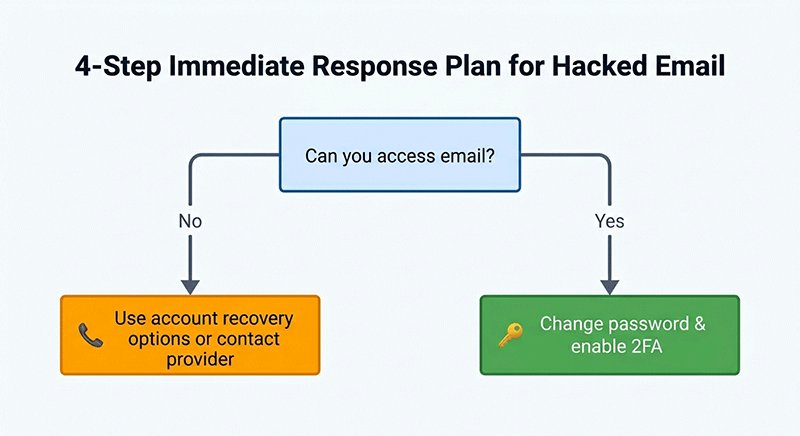
The first step is to determine whether you can still access your email. If you can log in, immediately change your password to a strong, unique one and enable Two-Factor Authentication (2FA) for added protection. This prevents the hacker from regaining control and secures your account against further attempts.
Next, check the devices you use to access email. Run a full malware and spyware scan to ensure no malicious software is tracking your keystrokes or storing your credentials. Remember, even after changing passwords, a compromised device can allow hackers to regain access.
Can you access email?
       │
     Yes ──> Change password & enable 2FA
       │
     No ──> Use account recovery options or contact provider
This visual helps readers quickly decide the correct next action depending on their access status.
Step 2: Identify All Compromised Accounts Linked to Your Email
Once your email is contained, make a list of all accounts linked to the hacked email, including social media, financial platforms, shopping sites, and subscriptions. Check each account for unauthorized changes such as password updates, new payment methods, or unfamiliar activity.
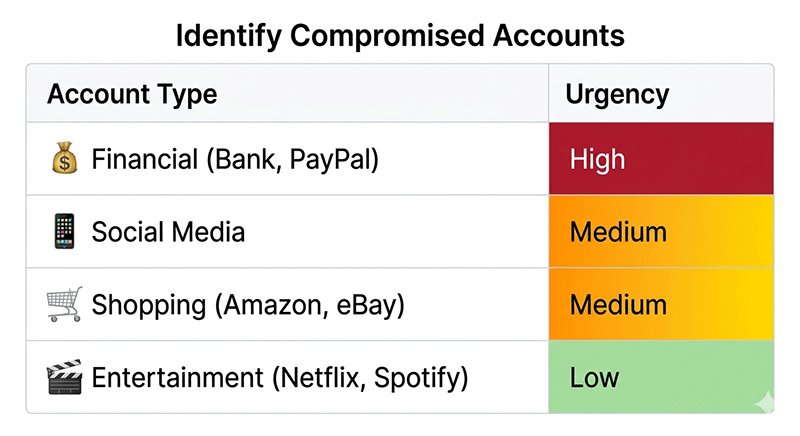
Prioritization Table (Account Type vs. Urgency):
| Account Type | Urgency | Notes |
|---|---|---|
| Financial (Bank, PayPal) | High | Immediate action required, monitor transactions |
| Social Media | Medium | Prevent misuse, alert contacts if necessary |
| Shopping (Amazon, eBay) | Medium | Update passwords, check payment info |
| Entertainment (Netflix, Spotify) | Low | Reset passwords, minimal immediate risk |
By prioritizing financial accounts first, you reduce the risk of monetary loss, then address social and shopping accounts, which may contain sensitive personal data. Entertainment accounts generally have minimal immediate risk but should still be secured.
Step 3: Recover Your Hacked Email & Linked Accounts
Use secure recovery methods provided by your service providers. If standard password reset methods fail, contact customer support for assistance. Keep detailed records of the recovery process, including dates and communications, in case further follow-up is needed.
Monitor each account for unusual activity over the following days or weeks. This may include unexpected login attempts, outgoing emails you didn’t send, or alerts from linked accounts. Early detection of residual threats can prevent additional breaches.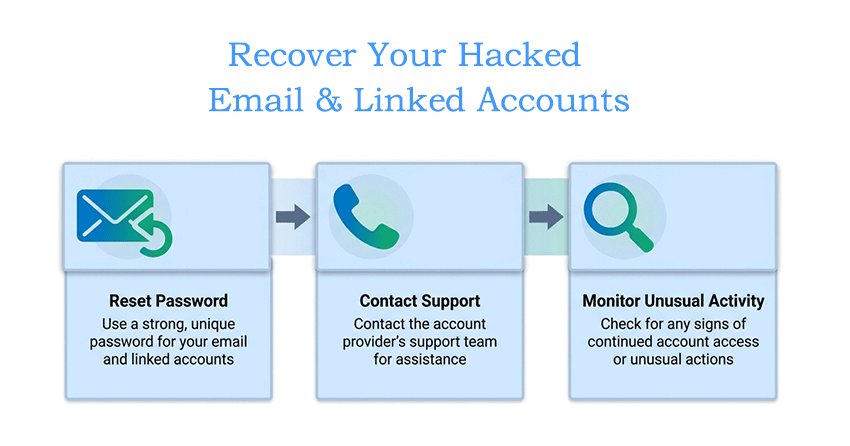
Step 4: Secure and Protect Your Email from Future Hacks
After recovery, strengthen your defenses to avoid future incidents. Learning how to protect your privacy online is essential for preventing future email hacks.
- Use strong, unique passwords or passphrases for all accounts.
- Enable 2FA / MFA on every critical account.
- Avoid reusing your primary email across multiple services.
- Periodically audit account activity with legitimate security tools to detect suspicious behavior.
Handling Different Scenarios When Your Email Is Hacked
Even after you follow the immediate 4-step response plan, the specific actions you take may vary depending on the type of accounts linked to your hacked email. Understanding these scenarios ensures you prioritize correctly and minimize potential damage.
1. Financial Accounts Linked
If your email is connected to banking or payment platforms such as PayPal, credit cards, or online banking, these accounts should be addressed first. Contact your bank or payment provider immediately to report unauthorized access and monitor recent transactions. According to the Identity Theft Resource Center, financial losses resulting from compromised emails can reach hundreds or thousands of dollars if not addressed promptly.
2. Social Media Accounts Linked
Social media accounts may be used for impersonation or spreading malicious content. Check for unfamiliar posts, messages, or login alerts. Notify your contacts if any suspicious activity occurred, and reset passwords on each linked platform. Enabling login alerts and two-factor authentication can prevent future misuse.
3. Work / Enterprise Email
For employees using email for business purposes, notify your IT or security team immediately. Compromised work emails can expose sensitive company data and internal communications. Follow corporate protocols for reporting breaches and securing enterprise accounts.
4. Sensitive Personal Data Exposed
If your email contains highly sensitive information, such as Social Security numbers, tax records, or health documents, consider enrolling in a credit monitoring or identity theft protection service. Monitor your accounts closely for any unauthorized financial or identity activity, and report suspicious actions promptly.
Scenario vs. Recommended Action & Urgency matrix:
| Scenario | Recommended Action | Urgency |
|---|---|---|
| Financial Accounts | Contact bank/payment provider, monitor transactions | High |
| Social Media | Reset passwords, notify contacts, enable 2FA | Medium |
| Work/Enterprise Email | Inform IT/security team, follow company protocol | High |
| Sensitive Personal Data | Activate credit monitoring, report suspicious activity | High |
How to Protect Your Email Long-Term
Recovering from a hacked email is only the first step. To prevent future email hacks and maintain long-term security, implementing proactive measures is essential.
1. Use Strong, Unique Passwords
The foundation of email security is password hygiene. Avoid using the same password across multiple accounts. Instead, create long, complex passwords or passphrases that combine letters, numbers, and symbols. Using a reputable password manager helps you generate and store unique credentials safely, reducing the risk of reuse and weak passwords.
2. Enable Two-Factor or Multi-Factor Authentication
Activating 2FA or MFA adds an extra layer of protection to your accounts. Even if a hacker obtains your password, they cannot access your account without the second verification factor, such as a text code, authentication app, or security key. Enabling 2FA across all critical accounts—financial, social, and work-related—is a highly effective preventive measure.
3. Regular Security Audits
Periodically review and audit all accounts linked to your email. Check for suspicious activity, unexpected password changes, or unauthorized devices. Many email providers offer security checkup tools to help identify vulnerabilities. Regular audits can catch threats early and prevent escalations.
4. Maintain Good Email Hygiene
Exercise caution when interacting with emails. Avoid clicking on suspicious links or downloading attachments from unknown senders. Do not access sensitive accounts over public Wi-Fi without a VPN. Additionally, understanding how to stop spam emails and avoid phishing attempts helps maintain a clean and secure inbox.
5. Follow Expert Recommendations
Referencing authority sources like the Google Safety Center provides additional guidance on account protection. Recommendations include using security alerts, reviewing connected apps, and maintaining updated recovery information. Following expert advice enhances your overall defense strategy.
By implementing these long-term strategies, you not only safeguard your email against future hacks but also establish a strong foundation for overall online security. Next, we’ll summarize key takeaways and actionable tips for maintaining email safety.
Common Mistakes to Avoid After an Email Hack
Even after taking immediate action, many users unintentionally make errors that can worsen the impact of a hacked email. Recognizing and avoiding these mistakes is critical for long-term email security.
1. Ignoring the Hack
One of the most dangerous mistakes is assuming the problem will resolve itself. Hackers can continue accessing linked accounts, steal personal information, or use your email to commit fraud. Prompt action is always necessary.
2. Reusing Passwords Across Multiple Accounts
Using the same password for social media, shopping, and financial accounts increases the risk of cascading breaches. If a hacker compromises one account, all other accounts with the same password become vulnerable. Always use unique, complex passwords, preferably stored in a password manager.
3. Failing to Notify Linked Accounts
After a hack, neglecting to alert affected platforms can allow unauthorized changes or fraudulent activity to go unnoticed. Notify your bank, social media, and subscription services to secure linked accounts immediately.
4. Falling for Follow-Up Phishing Scams
Hackers often attempt secondary attacks after an email breach. Be cautious of emails or messages claiming to “help recover your account” or asking for personal information. Verify all recovery communications directly with the official service provider.
Understanding these common mistakes is just the first step. The next section presents real-life case studies of email hacks to show how structured responses can minimize damage.
Case Study: Real-Life Examples of Email Hacks
Understanding the real-world impact of a hacked email can help illustrate why swift action is essential. Here are anonymized examples showing different scenarios and how structured responses minimized damage.
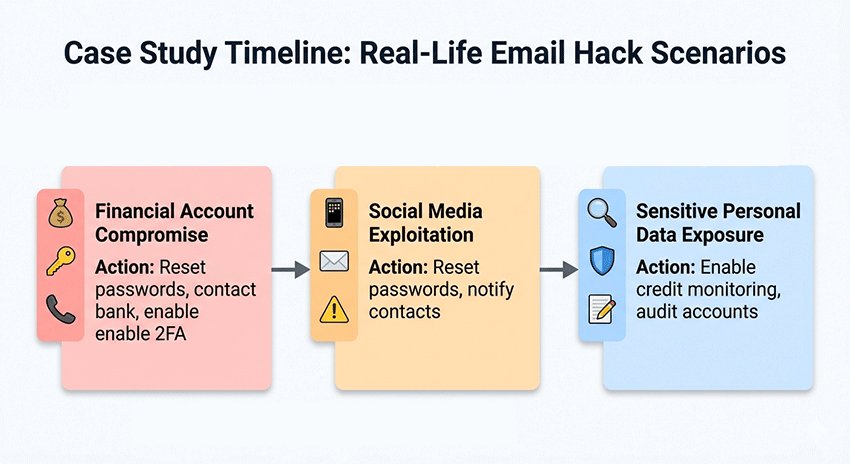
Case 1: Financial Account Compromise
A user received an unexpected login alert from their email linked to online banking. Within hours, small unauthorized transactions appeared. By immediately following the 4-step recovery plan—changing passwords, enabling 2FA, and contacting the bank—they were able to reverse most transactions and prevent further losses. This aligns with findings from the Identity Theft Resource Center, which reports that compromised emails can lead to significant financial loss if not addressed promptly.
Case 2: Social Media Exploitation
Another individual’s email was hacked, allowing hackers to post spam and impersonate them on social media. Early detection of unusual activity enabled the user to reset passwords across all linked accounts, alert contacts, and activate login notifications. As a result, further malicious activity was prevented. This scenario reflects the common trend noted in the Verizon 2025 Data Breach Investigations Report, which emphasizes that email remains a primary target for account takeover.
Case 3: Sensitive Personal Data Exposure
A third user had tax documents and personal records stored in their email. Following the breach, they enrolled in credit monitoring services and notified relevant institutions. Regular auditing of linked accounts and strong email hygiene prevented additional identity theft attempts.
Takeaway:
These cases highlight that a structured response—assessing access, securing accounts, notifying affected parties, and implementing long-term protections—can significantly reduce the impact of email hacks. Visual aids such as a timeline of response actions per case can enhance reader comprehension and on-page engagement.
Conclusion & Key Takeaways
Dealing with a hacked email can be stressful, but following a structured, step-by-step approach significantly reduces risk and potential damage. The immediate 4-step response plan—Assess & Contain, Identify Compromised Accounts, Recover Accounts, and Prevent Future Hacks—provides a clear roadmap to regain control and secure your information quickly.
Prioritizing linked accounts is essential. Address financial accounts first, followed by social media, shopping, and entertainment accounts. This strategy ensures the most critical threats are mitigated promptly, minimizing financial and personal impact.
Long-term protection is equally important. Maintaining strong, unique passwords, enabling 2FA or MFA, regularly auditing accounts, and practicing safe email habits can prevent future breaches. Awareness of common mistakes, such as ignoring alerts or falling for phishing scams, further strengthens your defense.
Understanding these steps can help protect your accounts, whether you use standard email services or temp mail for extra privacy. By taking proactive measures and following best practices, you not only recover from an email hack effectively but also significantly reduce the likelihood of future compromises.
FAQ About What to Do If Your Email Is Hacked
How can I tell if my email is hacked?
Check for unexpected password changes, login alerts from unknown devices or locations, missing emails, or messages sent without your knowledge. Regularly reviewing your account activity helps detect unauthorized access early.
What is the first step if my email is hacked?
Immediately assess whether you can access your email. If yes, change your password, enable 2FA, and secure linked accounts. If no, use recovery options provided by your email service or contact customer support.
Which accounts should I secure first after an email hack?
Prioritize accounts based on risk: Financial > Social > Shopping > Entertainment. Addressing financial accounts first can prevent potential monetary loss, followed by social and shopping accounts.
Can I recover a hacked email if I lost access?
Yes. Use secure recovery methods like backup emails, phone verification, or contacting your provider. Prompt action increases the chance of regaining control of a compromised email.
How can I prevent future email hacks?
Use strong, unique passwords, enable 2FA on all critical accounts, monitor account activity regularly, and avoid clicking suspicious links or reusing your email across multiple services.
Should I use temporary emails to protect my main inbox?
Temporary emails can reduce spam and limit exposure on less trusted sites. However, they do not replace strong security on your main email. Use them as an additional privacy layer, alongside proactive security practices.